Creating a Cluster
Unduh
Mode fokus
Ukuran font
Scenarios
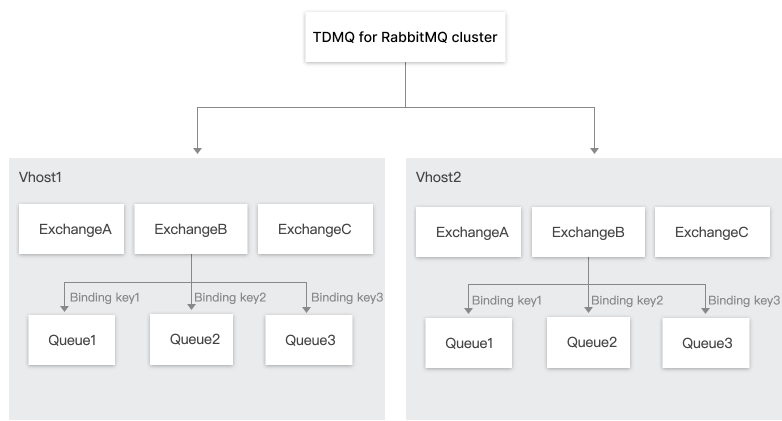
A cluster is a resource dimension in TDMQ for RabbitMQ. The vhosts, exchanges, and queues of different clusters are completely isolated. A common method to achieve this is to use a dedicated cluster for development and test environments and another dedicated cluster for the production environment.
After completing the cluster resource assessment, you can purchase clusters of corresponding specifications in the RabbitMQ console based on your business requirements.
Prerequisites
Before purchasing a cluster, ensure that you have completed the following preparations:
1. Ensure that your account has a sufficient balance to cover the payment for purchasing the cluster. For specific steps on account top-up, see Online Top-Up.
2. Ensure that your account has the operational permissions to create a cluster. For specific steps on sub-account authorization, see Account Permission Overview.
3. Ensure that an available Virtual Private Cloud (VPC) network and subnet exist, and that the VPC network and RabbitMQ cluster must be in the same region. Cloud products in different regions cannot communicate with each other via the private network. For specific steps to create a VPC network and subnet, see Creating a VPC Network and Subnet.
Operation Steps
1. Log in to the TDMQ for RabbitMQ console.
2. In the left sidebar, choose Cluster. Click Create Cluster to go to the purchase page.
3. On the purchase page, select the specifications of the instance to be purchased.
Parameter | Required | Description |
Cluster Type | Yes | Select Managed Edition Cluster. |
Billing Modes | Yes | TDMQ for RabbitMQ Managed Edition clusters offer two billing modes: yearly/monthly subscription and postpaid by hour. Yearly/monthly subscription: You need to prepay for resources before usage, and the cost is settled based on the order's purchase cycle. This mode is suitable for scenarios with steady and long-term usage requirements. Postpaid by hour: Pay after using resources, billed based on actual usage duration, and settled by hour. This mode is suitable for short-term scenarios such as testing or where traffic peaks are unpredictable. |
Region | Yes | Select a region close to the location where the client resources are deployed. Cloud products in different regions cannot communicate with each other via the private network. Select a region with caution, as it cannot be changed after purchase. For example, Cloud Virtual Machine (CVM) instances in the Guangzhou region cannot access clusters in the Shanghai region via the private network. For cross-region communication via the private network, see Cloud Connect Network. |
RabbitMQ Version | Yes | Three versions are supported: 3.8.30, 3.11.8, and 3.13.7 (recommended). |
Deployment Mode | Yes | Both multi-availability zone (AZ) and single-AZ deployment modes are supported. Single-AZ deployment does not support cross-AZ disaster recovery. It is recommended to select multi-AZ deployment to enhance disaster recovery capabilities. |
Availability Zone | Yes | An AZ refers to a physically isolated area in the same region with independent power and network infrastructure. AZs in the same region are interconnected via the private network, while AZs in different regions are physically isolated from each other. Select AZs based on actual needs. The system supports either randomly selecting AZs or specifying AZs. If the multi-AZ deployment mode is selected, 2 to 3 AZs need to be selected for deployment. |
Node Specification | Yes | Select an appropriate node specification based on your business needs. It is recommended to select our recommended node specification. For a detailed specification introduction, see Product Specifications. |
Node Count | Yes | Select an appropriate number of nodes based on your business needs. Single-node clusters do not provide production-level high availability and cannot guarantee SLA compliance. It is recommended to use them for test scenarios. For production business, select multi-node clusters to ensure high service availability. |
Single-Node Storage Specification | Yes | Message storage is billed separately. Messages can be retained without limitation within the purchased storage range. Actual storage consumption can be estimated by multiplying message production traffic by retention period. |
VPC | Yes | Bind the access point domain name of the newly purchased cluster to the pre-configured VPC in the same region. |
Public Network Access | No | TDMQ for RabbitMQ provides 3 Mbps of public network bandwidth for free by default. For higher bandwidth, you can purchase it at an additional cost. For details, see Managed Edition. |
Cluster Name | Yes | Enter a cluster name that complies with the naming rules: It must be 3 to 64 characters in length and can only contain digits, letters, hyphens (-), and underscores (_). |
Mirrored Queue | No | It is recommended to enable mirrored queues to ensure availability. After they are enabled, a default policy will be generated under Policy on the Basic Info page of the default vhost named / . This policy only applies to the default vhost. You can delete this policy or create a custom policy to override the default one. For details, see Configuring a Mirroring Policy. |
Tag | No | Tags are used to categorize and manage resources from different dimensions. For specific usage, see Configuring Resource Tags. |
Parameter | Required | Description |
Cluster Type | Yes | Select a Serverless Edition cluster. |
Billing Mode | Yes | TDMQ for RabbitMQ Serverless Edition clusters provide two billing modes: monthly subscription and postpaid by hour. Monthly subscription: You need to prepay for resources before usage, and the cost is settled based on the order's purchase cycle. This mode is suitable for scenarios with steady and long-term usage requirements. Postpaid by hour.: Pay after using resources, billed based on actual usage duration, and settled by hour. This mode is suitable for short-term scenarios such as testing or where traffic peaks are unpredictable. |
Region | Yes | Select a region close to the location where the client resources are deployed. Cloud products in different regions cannot communicate with each other via the private network. Select a region with caution, as it cannot be changed after purchase. For example, Cloud Virtual Machine (CVM) instances in the Guangzhou region cannot access clusters in the Shanghai region via the private network. For cross-region communication via the private network, see Cloud Connect Network. |
Cluster Specification | Yes | Currently, only the Pro Edition is supported. The Platinum Edition is coming soon. |
TPS Specification | Yes | Pro Edition supports a TPS range of 1000-100000. You can select an appropriate TPS specification based on your business traffic requirements. Subsequent configuration changes can be made quickly in the console. For specific operations, see Adjusting Cluster Specifications. |
Number of Queues | No | The minimum adjustable value is the number of free queues provided. Each TPS specification comes with a certain free queue quota. If this cannot meet your requirements, you can purchase additional queues for a fee. You can also increase or decrease the number of queues in the cluster via the console later. For specific operations, see Adjusting Cluster Specifications. |
VPC | Yes | Bind the access point domain name of the newly purchased cluster to the pre-configured VPC in the same region. |
Cluster Name | Yes | Enter a cluster name that complies with the naming rules: It must be 3 to 64 characters in length and can only contain digits, letters, hyphens (-), and underscores (_). |
Tag | No | Tags are used to categorize and manage resources from different dimensions. For specific usage, see Configuring Resource Tags. |
4. Check I have read and agree to the TDMQ for RabbitMQ Service Terms, and then click Buy Now.
5. On the order payment page, click Pay. After completing the payment, wait 5–10 minutes to see the created cluster on the cluster management list page.
Bantuan dan Dukungan
Apakah halaman ini membantu?
Anda juga dapat Menghubungi Penjualan atau Mengirimkan Tiket untuk meminta bantuan.
masukan