Step 6: Deleting Resources
Unduh
Mode fokus
Ukuran font
After completing the getting started process, you can use the purchased cluster for your official production environment. If the cluster specifications are not suitable, you can adjust the cluster specifications. For specific operation steps, see Adjusting Cluster Specifications. If you no longer need the cluster, you can delete the cluster resources. We will process the refund based on your billing method and usage duration, and clean up the relevant data.
Deleting a Cluster
1. Log in to the TDMQ for RabbitMQ console.
2. In the left sidebar, choose Cluster. On the cluster management list page, choose More > Terminate in the Operation column.
3. In the deletion dialog box, click Next. After the confirmation of the resource details, click Confirm Destruction, and then the cluster will enter the isolation period.
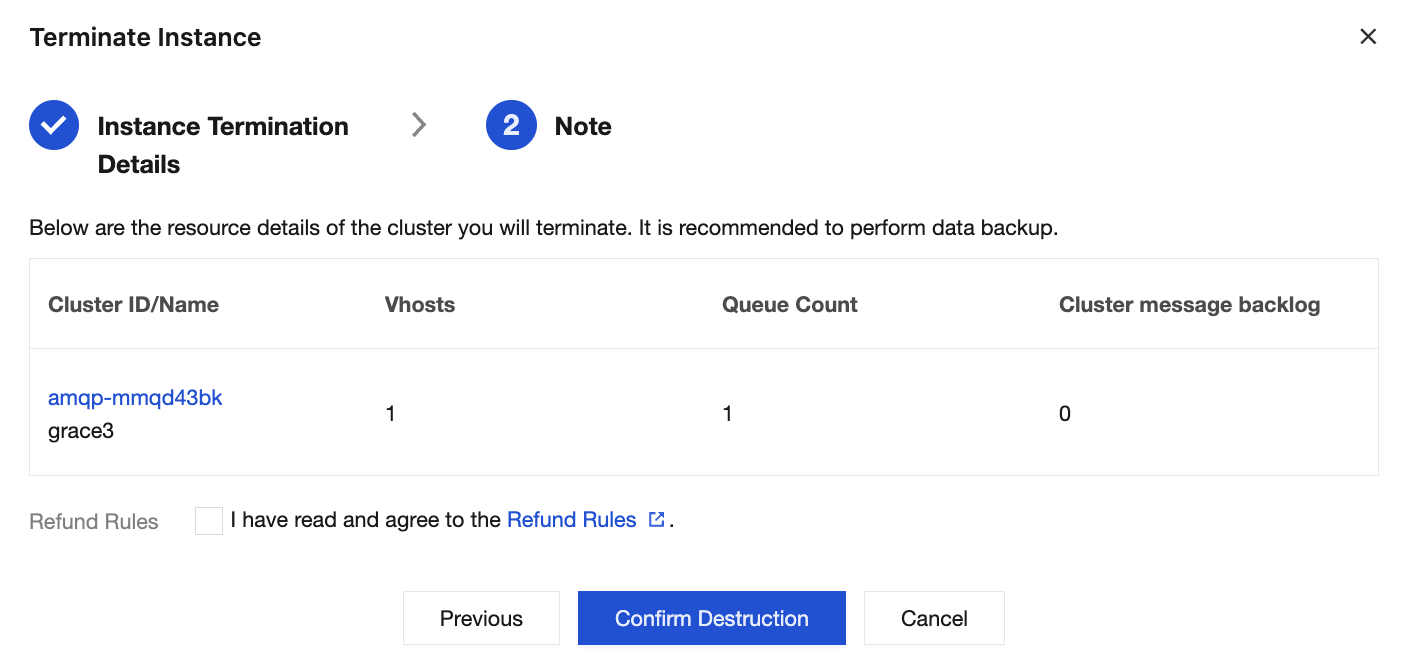
Note:
1. After a cluster is deleted, the cluster remains isolated for 7 days. During this period, you can manually delete the cluster permanently or restore it. After this period, the cluster is permanently deleted along with all resources and metadata, which cannot be recovered. It is recommended to back up your data in advance.
2. During the isolation period, message reading and writing in the cluster are prohibited, and both console operations and cloud API calls are restricted. Any saved and unconsumed messages in the cluster will be discarded. Make sure that you back up your data in advance.
3. If a discount or a promo voucher is used during your purchase, it will not be returned.
Deleting a Cluster
Clusters in the isolation period can be deleted manually and completely. After deletion, all resources and metadata associated with the cluster will be deleted and cannot be recovered. Ensure that data is backed up in advance.
1. Log in to the TDMQ for RabbitMQ console.
2. In the Operation column of the instance list page, choose More > Terminate.
3. In the pop-up window for confirmation of deletion, click Submit to delete a cluster completely.
Bantuan dan Dukungan
Apakah halaman ini membantu?
Anda juga dapat Menghubungi Penjualan atau Mengirimkan Tiket untuk meminta bantuan.
masukan