Billing Overview
Unduh
Mode fokus
Ukuran font
TDMQ for RabbitMQ provides two flexible billing modes: yearly/monthly subscription and postpaid by hour. The billing rules and applicable scenarios of different billing modes vary. You can choose the optimal billing solution based on your business scale, usage period, and cost budget to achieve the best balance between resource utilization and cost-effectiveness.
Product Series
TDMQ for RabbitMQ provides two cluster types, including Managed Edition and Serverless Edition, to meet your requirements for different business scenarios.
Product Series | Sales Form | Sales Specifications |
Managed Edition | Sold by node specifications | Recommended: 2 cores and 8 GB; 4 cores and 16 GB; 8 cores and 32 GB; 16 cores and 32 GB; 16 cores and 64 GB Soon to be discontinued: 2 cores and 4 GB; 4 cores and 8 GB Note: The specifications to be discontinued are planned to be sold out in the second half of 2025. After that, you will no longer be able to purchase or change to these node specifications. However, cluster management features, renewal, and upgrades for existing clusters will remain unaffected. |
Serverless Edition | Sold by TPS specifications | TPS specification range: 1,000 to 100,000 |
For specific differences, scenarios, and selection recommendations for products in different forms, see Description of Differences Between Managed Edition and Serverless Edition.
Billing Modes
TDMQ for RabbitMQ supports two billing modes: yearly/monthly subscription (prepaid) and postpaid by hour. The following table describes the differences between the billing modes.
Billing Mode | Yearly/Monthly Subscription (Prepaid) | Postpaid by Hour |
Billing instruction | Select specified specifications and prepay for a certain period before you can use the resources. | Select specified specifications to create a cluster and pay after using the resources. |
Billing cycle | Billed based on the purchased duration of the order. | Billed by the hour, with daily deductions. Usage less than one hour is rounded up to one hour. |
Applicable scenario | Suitable for scenarios with stable business scale and long-term usage, offering discounted pricing to help reduce long-term costs. | Suitable for short-term scenarios such as testing or uncertain traffic peaks, billed based on actual usage to avoid idle resource wastage. |
Billing mode change | Support switching to the postpaid by hour billing mode. | Support switching to the yearly/monthly subscription billing mode. After you complete tests with the postpaid by hour instance, if you need to continue using the instance, you can switch its billing mode to yearly/monthly subscription for long-term use. |
Cluster specification upgrade | Supported. | Supported. |
Cluster specification downgrade | Submit a ticket for consultation. | Submit a ticket for consultation. |
Supported cluster type | Managed Edition; Serverless Edition | Managed Edition; Serverless Edition |
Billable Items
The billable items for the yearly/monthly subscription and postpaid by hour modes of TDMQ for RabbitMQ clusters are basically the same. The detailed description of the specific billing items is as follows:
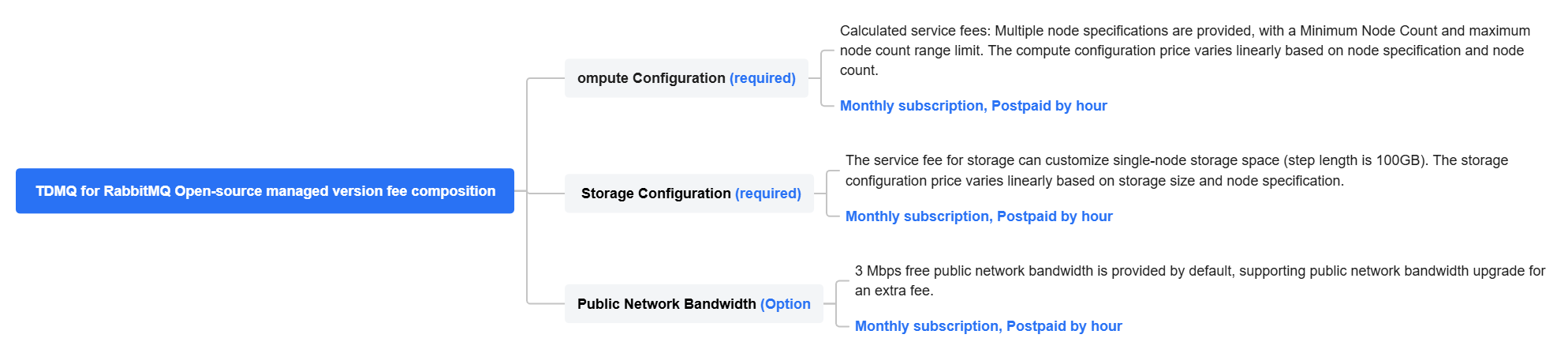
Managed Edition Fee Composition
The total fees for purchasing a TDMQ for RabbitMQ Managed Edition cluster are calculated as follows:
Total cluster price = Computing configuration fee + Storage configuration fee + Public network bandwidth fee = Unit price of a single node x Number of nodes + Storage unit price x Storage capacity x Number of nodes + Public network bandwidth unit price x Public network bandwidth size
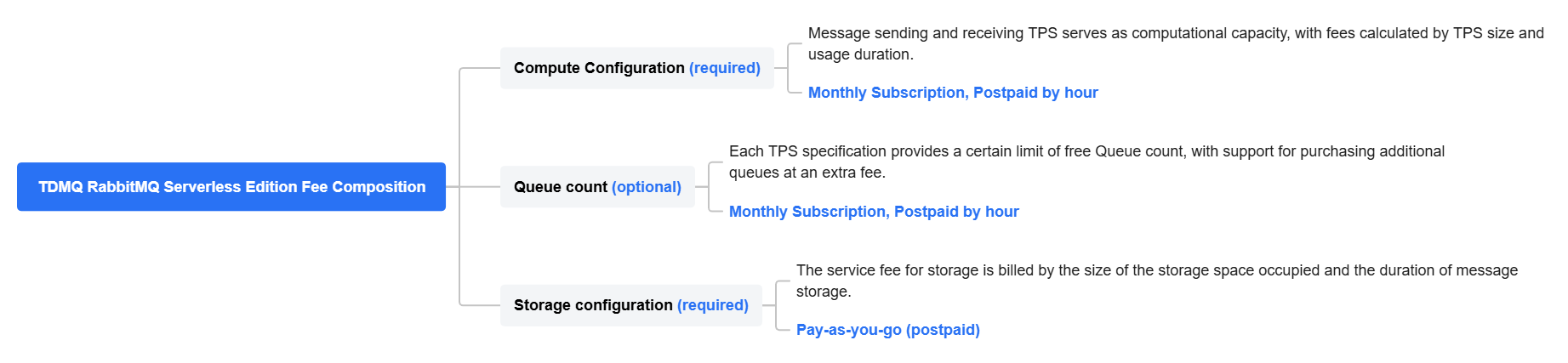
Serverless Edition Fee Composition
The total fees for purchasing a TDMQ for RabbitMQ Serverless Edition cluster are calculated as follows:
Total cluster price = Computing fee + Queue fee + Storage fee = TPS specification x TPS unit price + Number of queues x Queue unit price + Storage space x Storage unit price
Purchase Methods
You can log in to the TDMQ for RabbitMQ console for self-service purchase. For specific operation steps, see Creating a Cluster.
Bantuan dan Dukungan
Apakah halaman ini membantu?
Anda juga dapat Menghubungi Penjualan atau Mengirimkan Tiket untuk meminta bantuan.
masukan