GPU Private Deployment with CLB
Download
Focus Mode
Font Size
Overview
When enterprises deploy large models privately on self-managed GPU clusters, completing model deployment is only the first step. What determines production availability is the traffic governance layer in front of the model. A single GPU has a throughput ceiling, a single inference node carries a failure risk, and cluster scale changes as the business grows. If each business directly connects to fixed nodes, problems will arise, including uneven load distribution across nodes and overall service unavailability caused by a single node failure. The traditional approach is to build a self-managed load balancer with monitoring to address these issues. However, general-purpose load balancers cannot perceive the load characteristics of large model inference: they can only identify connection counts, and cannot identify the number of tokens consumed by a single request, Cache usage, or the compute differences caused by varying request lengths. The result typically manifests as even request distribution but uneven GPU utilization.
In this scenario, CMR functions as a load balancing gateway. It provides a unified OpenAI-compatible entry point for upstream services and distributes requests to multiple GPU nodes based on inference-oriented policies for downstream services, with built-in health probing and usage monitoring. Compared with self-managed load balancing and monitoring, CMR enables customers to obtain load balancing, fault localization, and performance monitoring capabilities with near-zero Ops, allowing them to focus on models and business itself.
Solution Value
The goal of load balancing is not even request distribution, but maximizing compute utilization, minimizing tail latency, and minimizing failure impact. CMR's scheduling policies for inference scenarios are designed around these goals. The differences introduced by scheduling policy selection are often underestimated. Take least-busy routing as an example: it assigns new requests to the currently most idle node, avoiding queueing caused by concentrated long requests. Lowest-latency routing is more suitable for scenarios with uneven node performance, directly optimizing for end-to-end latency. For the same GPU cluster, simply adjusting the scheduling policy can yield significant improvements in throughput or tail latency. This is where an inference-optimized gateway delivers value over a general-purpose load balancer. Users can also specify model priorities and weights, and the gateway distributes requests according to these priorities and weights.
Dimension | Customer Benefits | Implementation Mechanism |
CLB | Inference workload-aware scheduling that fully utilizes each GPU to improve overall cluster throughput. | Priority weight / least busy / lowest latency / usage balancing policies |
High availability | Health probes automatically remove faulty nodes and reinstate them after recovery, requiring no manual intervention. | Health probing |
Performance monitoring | Collect latency and Token usage in a unified manner and present them for direct performance observation. | Observability |
Reduced cost and improved efficiency | Eliminate the costs of self-built CLB, monitoring, scaling, and Ops, and use the service out of the box. | Managed gateway capability |
Architecture Description
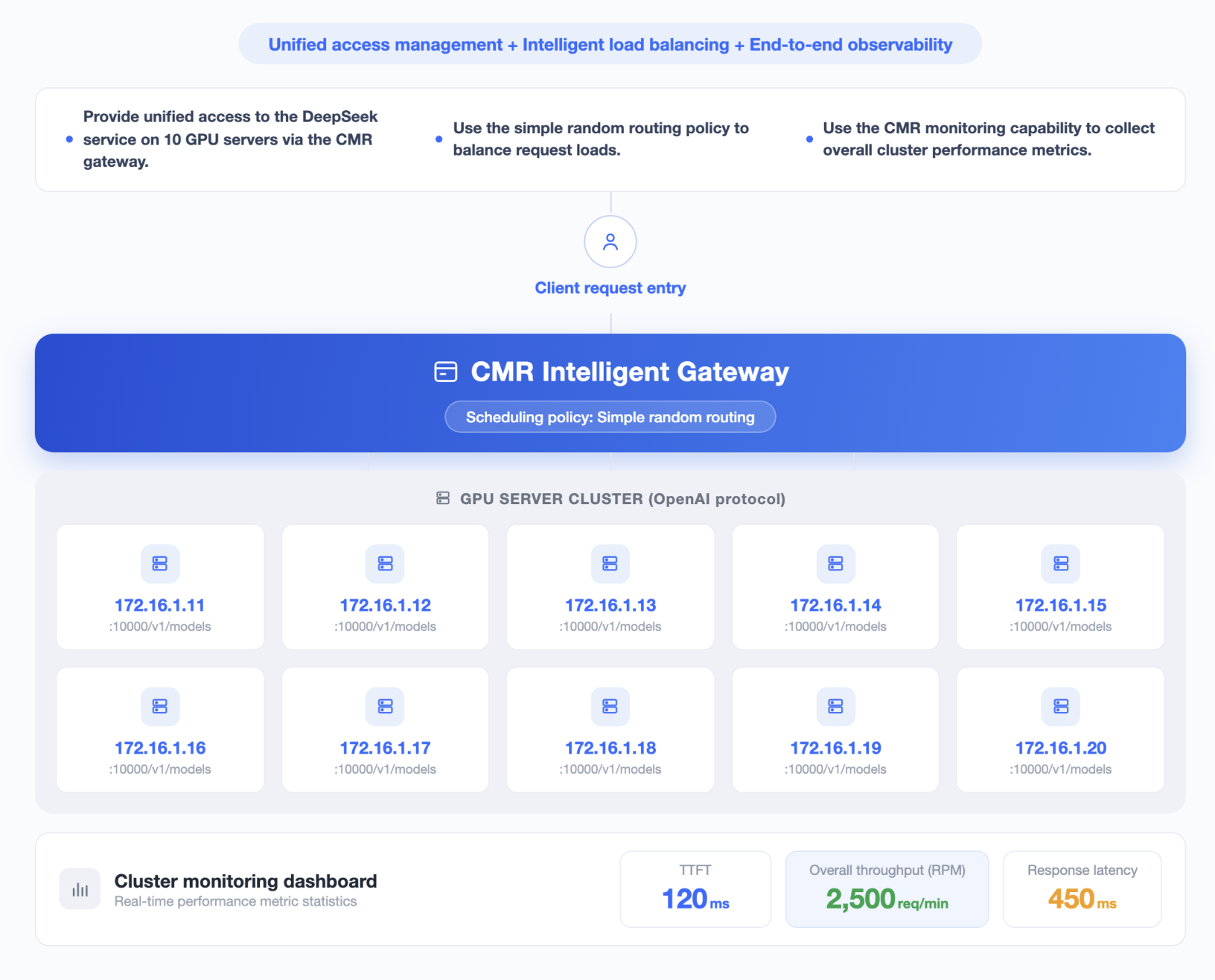
The core of the architecture is to decouple a single logical model from multiple physical backends. High-concurrency requests from business applications uniformly go to the CMR gateway. The gateway distributes them to a backend pool composed of GPU inference nodes 1 through N, continuously determines the availability of each node through health probing, and automatically removes abnormal nodes. From the business perspective, it always faces a stable model name, while the number of nodes, health status, and scheduling details behind it are all shielded by the gateway.
Beyond scheduling, metrics such as latency and Token consumption can be presented in the usage dashboard, forming a closed loop between scheduling and monitoring: scheduling determines traffic distribution, monitoring reveals distribution effectiveness, and together they support capacity planning and bottleneck identification.
Prerequisites
1. Deploy multiple inference nodes that provide OpenAI-compatible APIs on the self-managed GPU cluster, such as those based on vLLM or TGI. Run the same model and version on each node to ensure result consistency, and record the private network address and credentials of each node.
2. An enterprise private network CMR instance has been created. For detailed operations, see Creating a CMR Instance. The gateway and GPU cluster communicate over the private network within the same VPC or through CCN to achieve low latency and private network bandwidth.
3. The TPM, RPM, or credit budgets for the CMR instance and API Key have been planned based on the actual processing capacity of the GPU cluster.
Operation Steps
This practice assumes that the deployment of GPU inference nodes and model services has been completed. The following steps start with integrating a self-managed model.
Step 1: Deploying a GPU Inference Node
1. Deploy multiple inference nodes on the self-managed GPU cluster to ensure result consistency.
2. Confirm that all GPU inference nodes can be accessed normally through their API addresses.
3. Confirm the request protocol and response format of the model on each node.
4. Send test requests to each node separately to confirm that the model can return responses normally.
Step 2: Creating a BYOK
Create separate self-managed BYOK configurations for GPU inference nodes with different API addresses.
1. Log in to the CMR console. In the left sidebar, select BYOK and click Create.
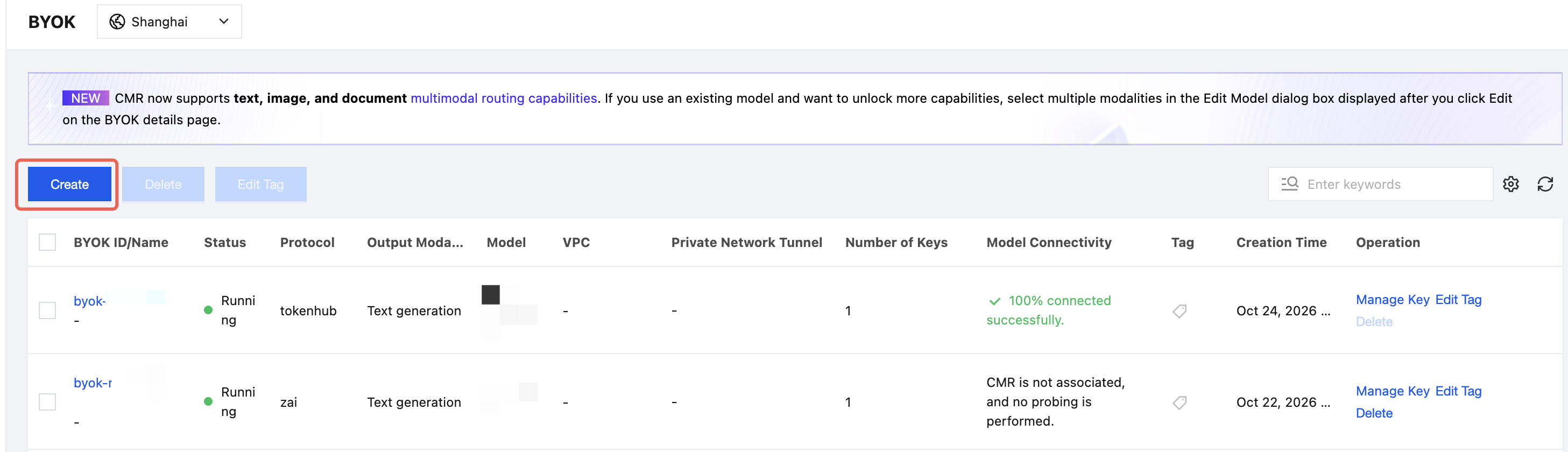
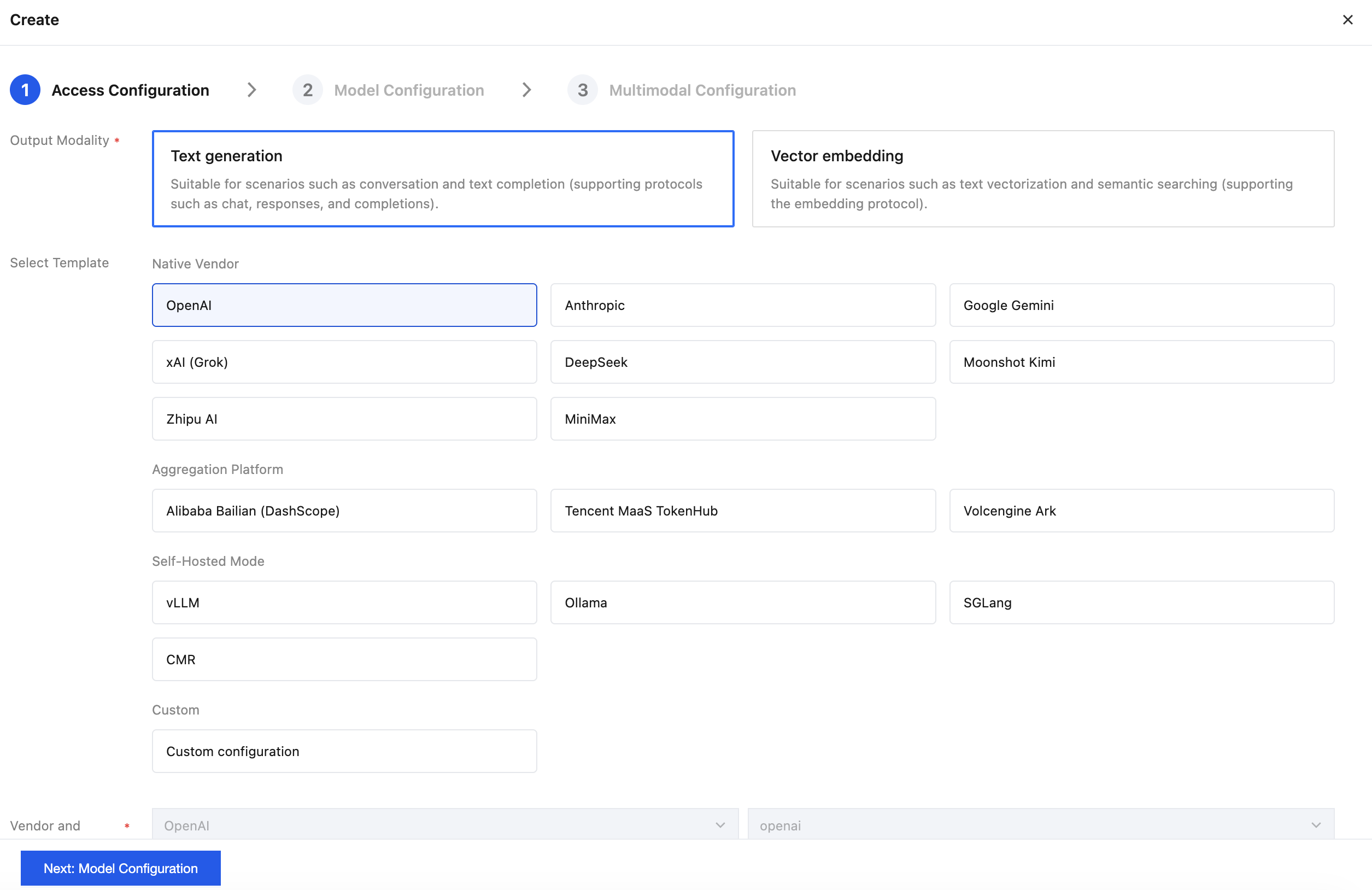
2. Select Custom and complete the integration configuration.
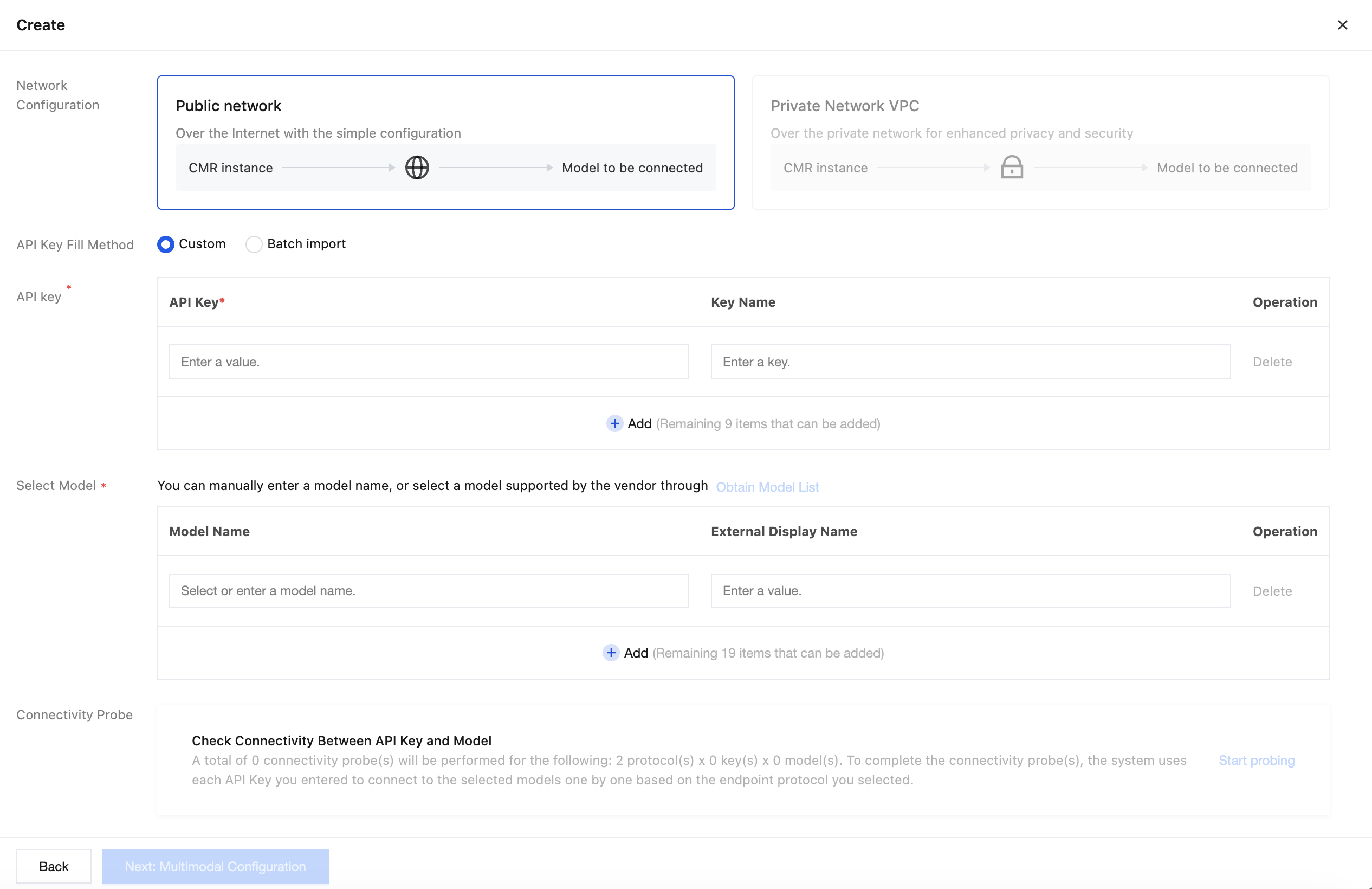
3. Select a private network VPC to configure the corresponding CMR private network tunnel. Then, enter the model information and complete the multimodal configuration.
4. Complete the self-managed BYOK model configuration for the other GPU inference nodes in the same way.
Step 3: Associating a Model
1. On the Instance Management page, click the target instance ID to go to the basic information page of the target instance. Select the Model Scheduling Management tab.
2. In the Associated Models area, associate the models from the self-managed BYOK configuration with the current CMR instance and set priority weights. For detailed operations, see Configure Model Scheduling Management.

Step 4: Configuring In-Model Routing
1. In the routing policy diagram, click Switch on the in-model routing node to configure the in-model routing policy.
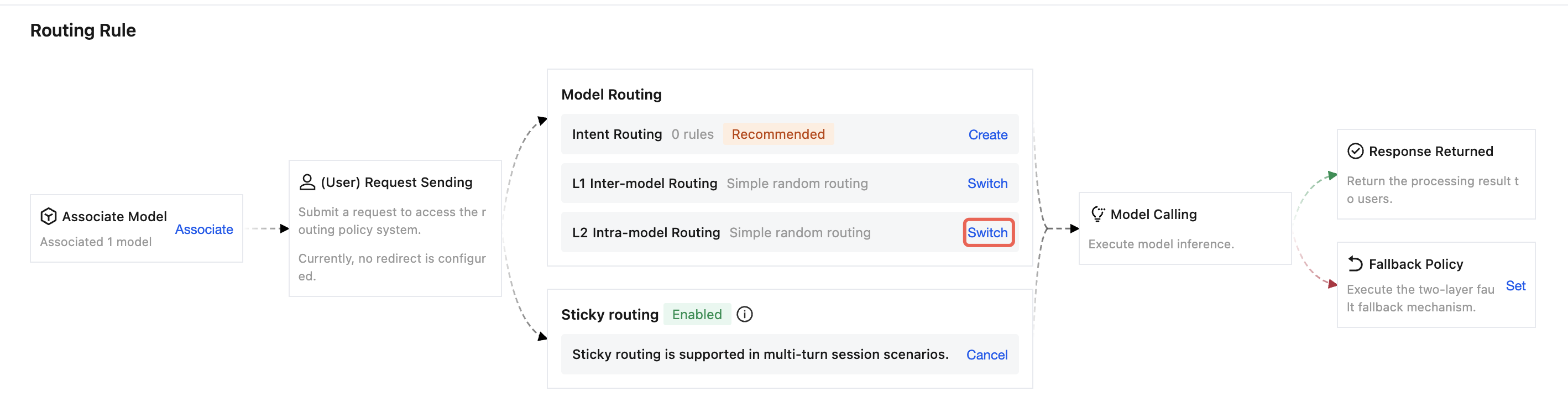
2. Select a routing policy based on your business objectives:
Policy | Description |
simple random routing | Randomly select from available models. |
least-busy routing | Assign requests to the currently least busy model. |
lowest-latency routing | Automatically select the model with the lowest current latency. |
usage-balanced routing | Distribute requests to each model evenly based on usage. |
Minimum coefficient routing | Prioritize distribution to models with lower score coefficients. |
3. Save the configuration.
We recommend that you first select a policy to complete baseline testing, and then adjust the policy based on the request success rate, time to first Token, overall request latency, and usage of each node. For detailed operations, see Configure Model Scheduling Management.
Step 5: Creating an API Key
1. Go to the details page of the created CMR instance and select the User Group tab.
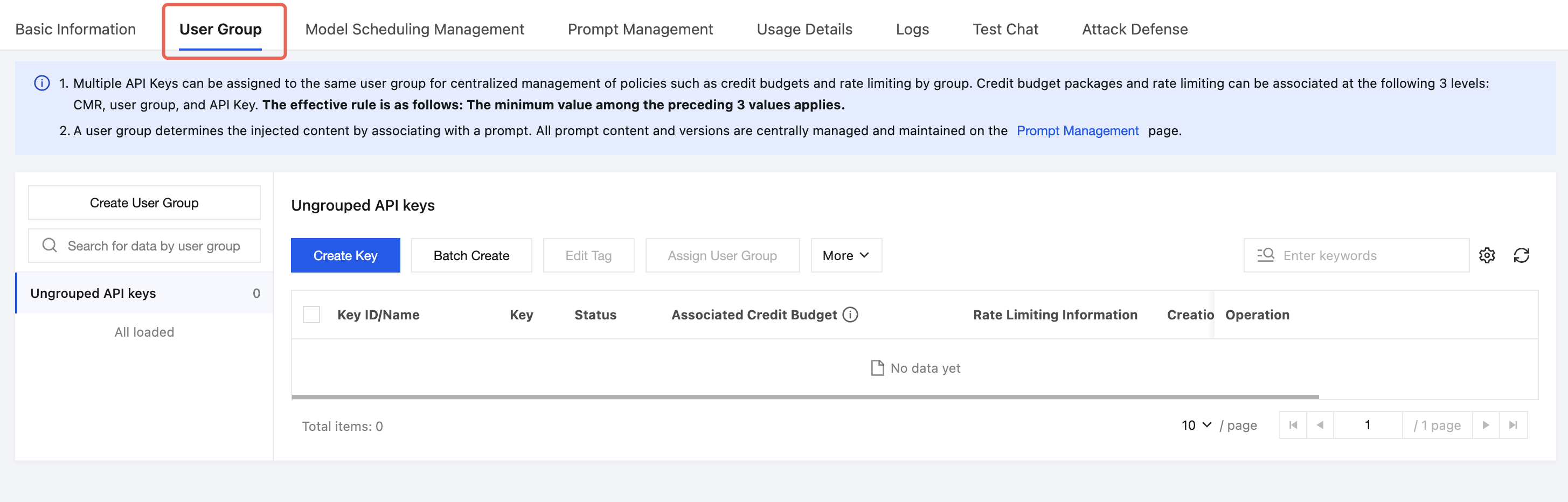
2. Select the target user group. If you do not need to group by business or personnel, you can select Ungrouped.
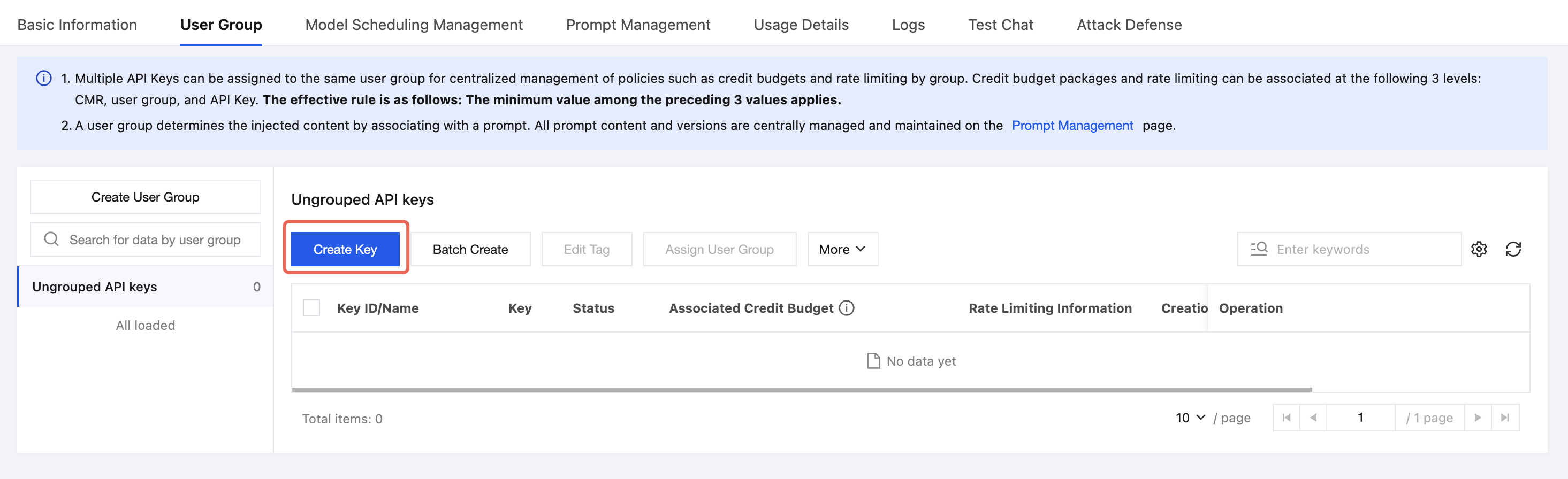
3. Click Create Key.
4. Configure the Key name, tag, and limit type.
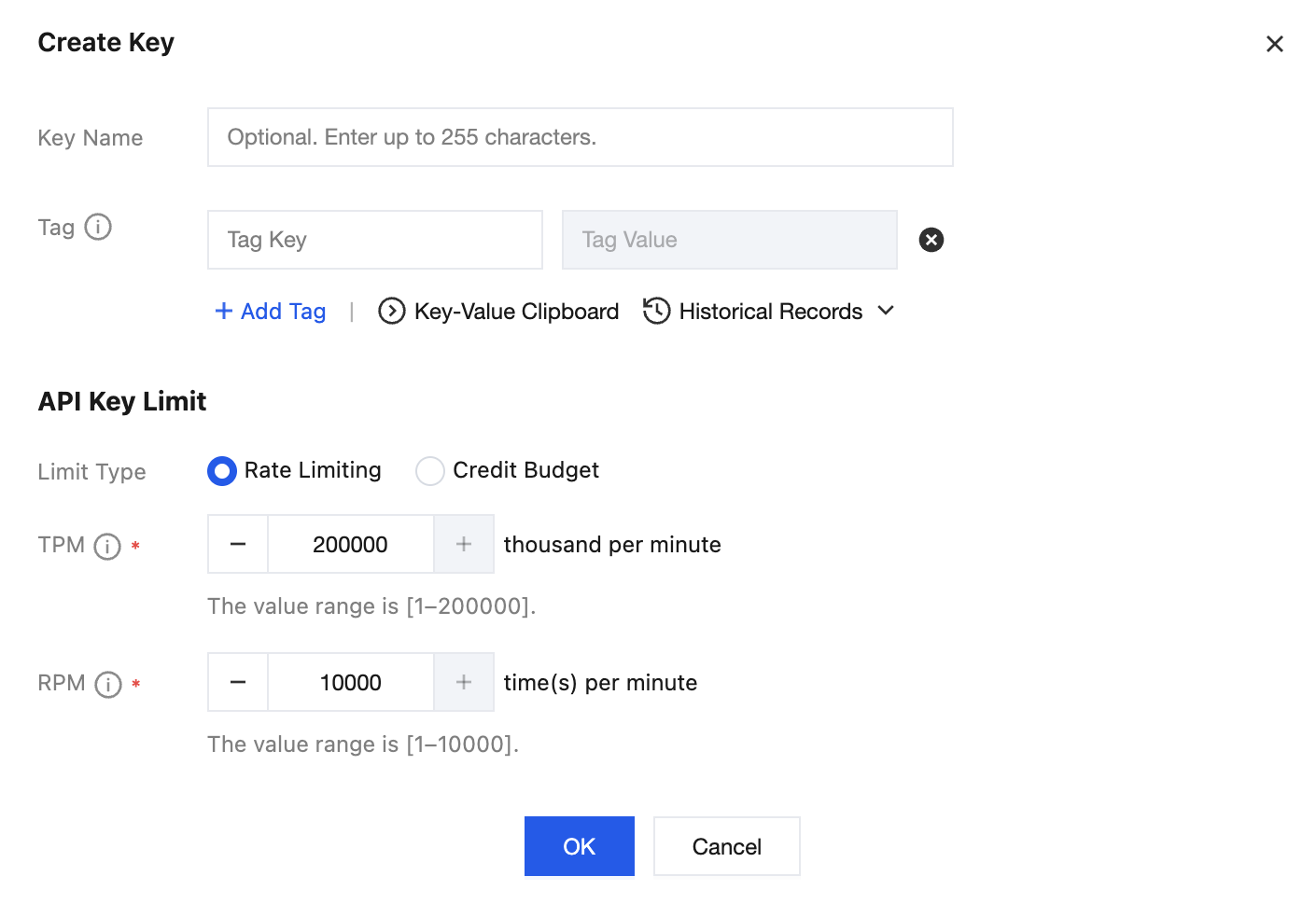
5. After creation, copy and securely store the complete API Key.
Step 6: Verifying Results
After completing the configuration, verify the load distribution and observability of CMR by following these steps.
1. Use the created CMR API Key to send multiple model requests consecutively through a business application or testing tool, and confirm that CMR can return responses normally.
2. In the usage details of the CMR console, view the request count, Token usage, and upstream model call latency to check whether the distribution results comply with the routing policy.
3. In the test environment, stop a GPU inference node or make it temporarily inaccessible, and confirm that normal business is not affected. Send requests again to confirm that other available nodes can continue to process subsequent calls.
References
Help and Support
Was this page helpful?
You can also Contact sales or Submit a Ticket for help.
Help us improve! Rate your documentation experience in 5 mins.
Feedback