Configuring the Mirroring Policy
Unduh
Mode fokus
Ukuran font
Overview
To enhance the reliability and fault tolerance of RabbitMQ clusters, TDMQ for RabbitMQ provides the option to enable mirrored queues when users create RabbitMQ clusters or vhosts (with at least 3 nodes in the cluster). Mirrored queues can replicate messages across multiple nodes in a RabbitMQ cluster, ensuring that messages in the queue will not be lost if a node fails and maintaining service availability.
Use Limits
TDMQ for RabbitMQ Managed Edition only allows clusters with 3 or more nodes to enable "mirrored queues", primarily to ensure the high availability and fault tolerance of the cluster.
In a cluster with 3 or more nodes, mirrored queues can replicate messages across multiple nodes, distributing the load on each node to improve performance while ensuring normal service operation if a node fails. At the same time, this provides greater flexibility, allowing us to configure mirrored queue parameters flexibly based on actual needs. Therefore, this limitation aims to deliver more stable and reliable services.
TDMQ for RabbitMQ Serverless Edition does not currently support enabling mirrored queues.
Enabling Mirrored Queues
Default Mirroring Policy Description
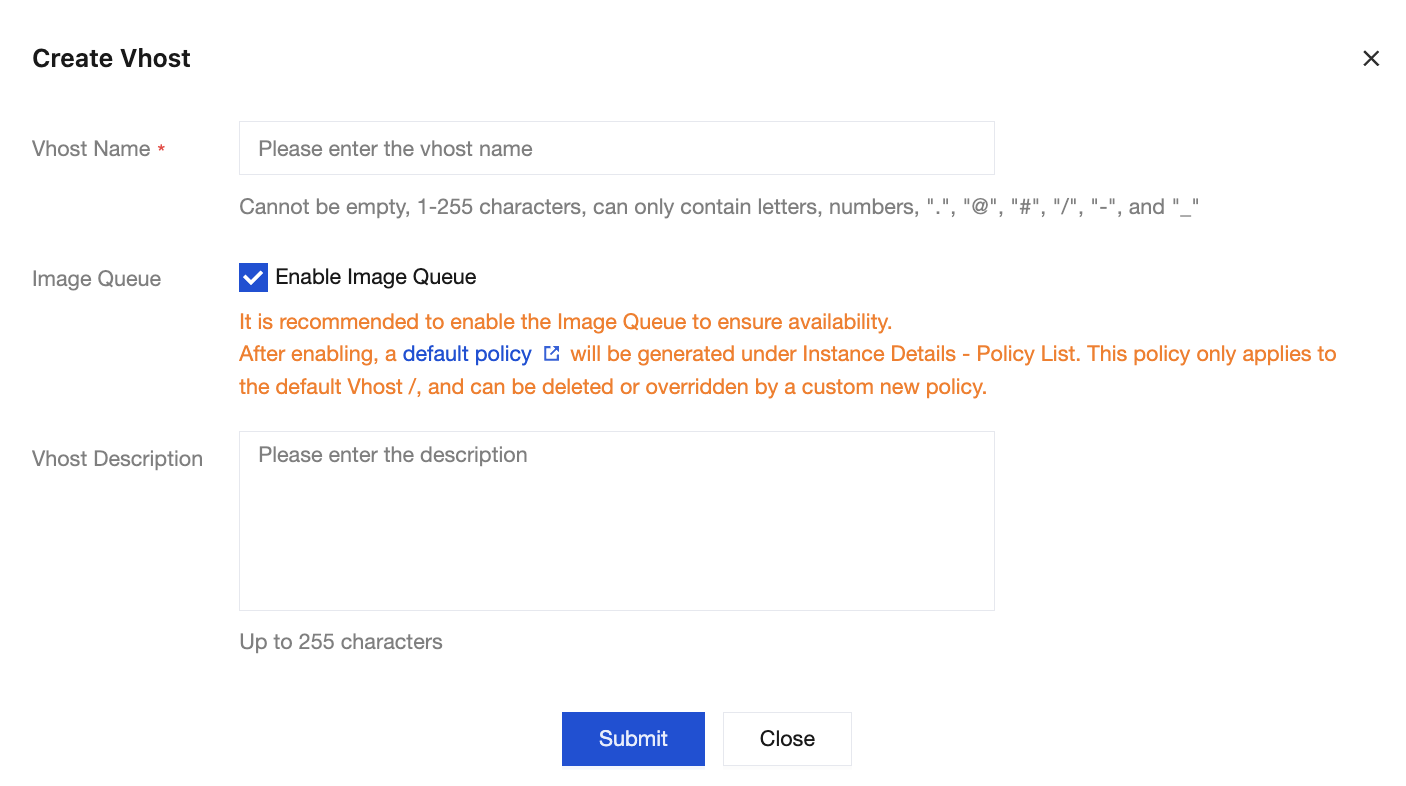
After mirrored queues are enabled, a default mirroring policy is generated under the Policy tab. You can adjust these parameters based on actual business scenarios and requirements, or modify/customize a new mirroring policy to override this default policy.
Below is a detailed description of the "default mirrored queue" policy parameters provided by TDMQ for RabbitMQ for users:
Parameter Name | Configuration Parameter | Parameter Description |
Name | pay-mirror-policy | Policy name, which is used to identify and reference the policy. |
Pattern | .* | Match mode of the policy, using regular expression syntax. The period ( .) indicates matching any character, while the asterisk (*) indicates matching the preceding character zero or more times. Therefore, the mark (.*) indicates matching any queue name. |
Apply to | Queues | Application object of the policy. If it is set to queues, it indicates that the policy applies to queues. |
Priority | 0 | Policy priority. If a queue matches multiple policies, the policy with the highest priority will take precedence. 0 indicates the lowest priority. |
ha-mode | exactly | Replication mode of mirrored queues. exactly: indicates that the messages in the queue will be replicated to a specified number of nodes. all: indicates that the messages in the queue will be replicated to all nodes. nodes: indicate that mirroring occurs on specified nodes, with the node names specified by a mirror parameter. Selecting exactly can reduce network and storage overheads while ensuring availability, thus improving performance. |
ha-params | 3 | Replication parameter for mirrored queues. When ha-mode is set to exactly, the number of nodes to be replicated needs to be set here. The default value is 3, and even if the cluster scales out to 5 nodes in the future, the performance can still be maintained at a good level. |
ha-promote-on-failure | always | Promotion policy for mirrored queues during node failure. always: indicates that the mirrored queue will be promoted to the main queue regardless of the reason for node failure. when-synced: indicates that the mirrored queue will only be promoted to the main queue when it is resynchronized due to node failure. The default value is always to ensure service availability under any failure conditions. |
ha-promote-on-shutdown | when-synced | Promotion policy for mirrored queues when a node is shut down normally. always: indicates that the mirrored queue will be promoted to the main queue regardless of the reason for the node shutdown. when-synced: indicates that the mirrored queue will only be promoted to the main queue when it is resynchronized after the node shutdown. The default value is when-synced to avoid unnecessary promotion operations. |
ha-sync-mode | manual | Synchronization mode of mirrored queues. automatic: indicates that the mirrored queue is automatically synchronized with the main queue when a node is started or reconnected to the cluster. manual: indicates that the synchronization operation needs to be manually triggered to synchronize the mirrored queue with the main queue. The default value is manual to avoid automatic synchronization affecting cluster performance in case of backlogged messages. |
Operation Steps
Method 1: Enable mirrored queues when creating a cluster: Cluster Purchase Page > Other Configurations > Enable Mirrored Queue. After mirrored queues are enabled, a default policy will be generated under
Policy on the Basic Info page of the default vhost named /, and this policy only applies to the default vhost.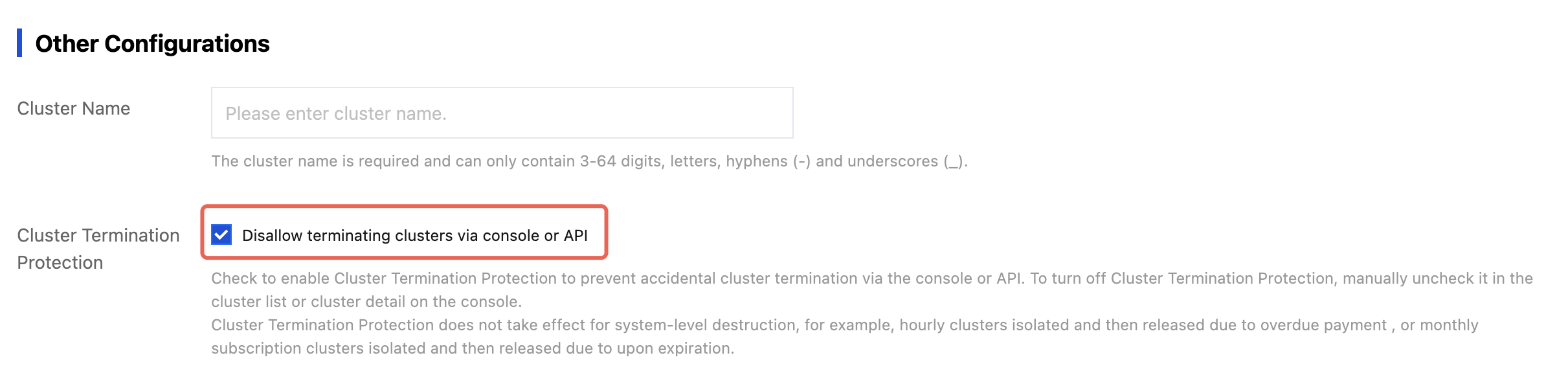
Method 2: Enable mirrored queues when creating a vhost: TDMQ for RabbitMQ Console > Cluster > Vhost > Create > Enable image queue. After mirrored queues are enabled, a default policy will be generated under Policy on the Basic Infor page of the corresponding vhost, and this policy only applies to the corresponding vhost.
Creating the Mirroring Policy
During the creation of a cluster, if mirrored queues are enabled, a default policy will appear under the Policy tab in the console. You can delete it or create a mirroring policy to override this default policy.
Operation Steps
1. Log in to the TDMQ for RabbitMQ console.
2. In the left sidebar, choose Cluster > Vhost. Select the target region and click the ID of the target vhost to go to the Basic Information page.
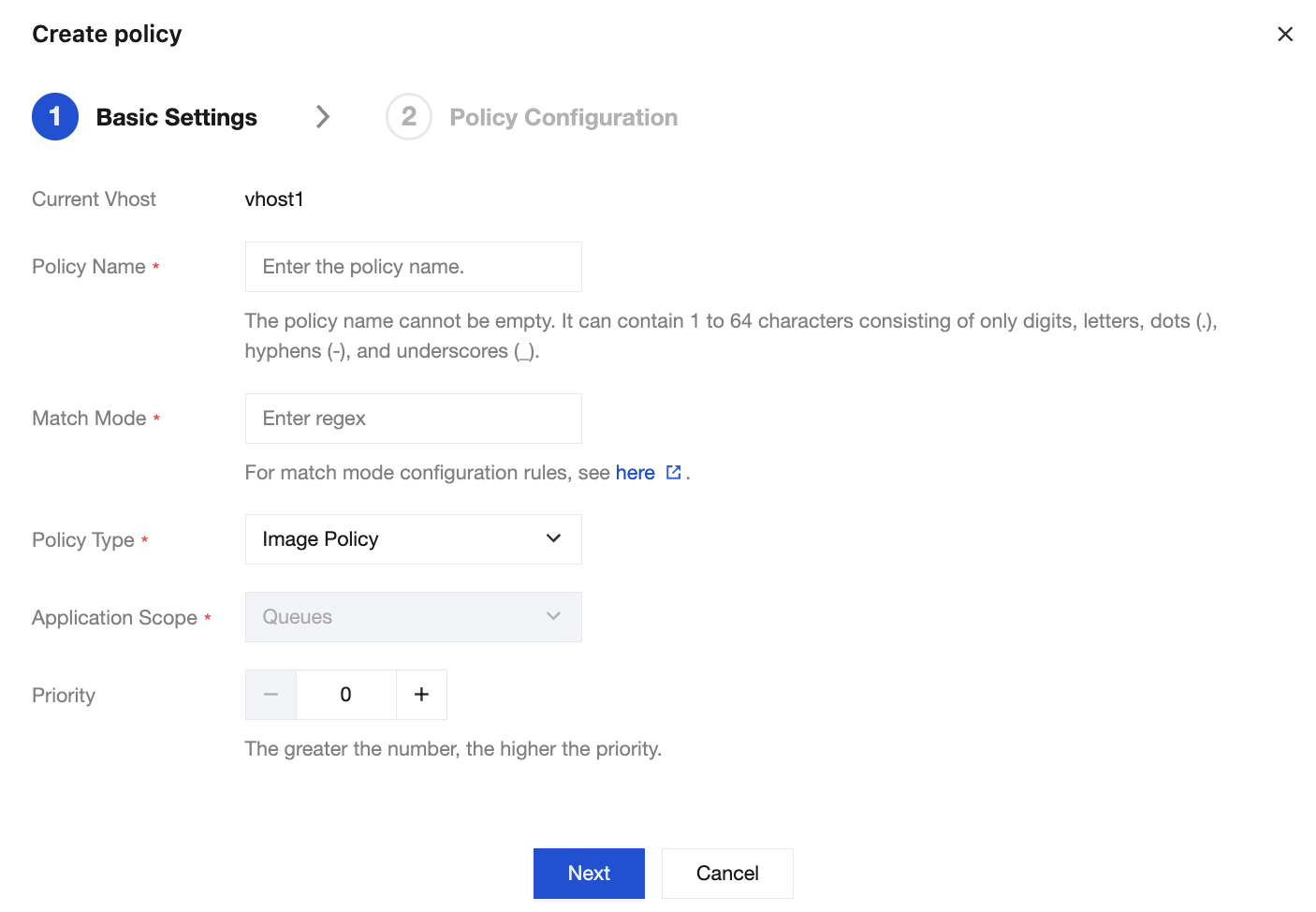
3. Choose Policy > Create Policy and enter the basic policy information.
Basic settings:
Parameter | Description |
Current Vhost | Indicates which vhost the mirroring policy is being created for. |
Policy Name | Enter a policy name. It must be 1 to 64 characters in length and can only contain digits, letters, periods (.), hyphens (-), and underscores (_). |
Match Mode | A regular expression used to match relevant queues or exchanges. For common regular expressions of match modes, see: .*: Match all queues or exchanges under this vhost. ^test.*: Match all queues or exchanges under this vhost whose names start with "test". .*test.*: Match all queues or exchanges under this vhost whose names contain "test". .*test$: Match all queues or exchanges under this vhost whose names end with "test". |
Policy Type | Select Image Policy. |
Application Scope | Used to specify the effective scope of the current policy. The mirroring policy only takes effect in Classic Queues. |
Priority | Defines the policy priority. Optional range: [0, 255]. If multiple policies apply to the same queue, only the policy with the largest priority number takes effect. |
Policy definition:
Parameter | Description |
Mirror Mode | Mode of mirrored queues, with valid values being all/exactly/nodes. all: indicates that mirroring occurs on all nodes in the cluster. exactly: indicates that mirroring occurs on a specified number of nodes, with the number of nodes specified by a mirror parameter. nodes: indicate that mirroring occurs on specified nodes, with the node names specified by a mirror parameter. |
Mirror Parameter | Mirror parameter: indicates the nodes to which the message will be synchronized. When the mirror mode is set to all, this parameter is not required. Mirroring queues to all nodes in the cluster may result in unnecessary network and disk I/O traffic for the cluster. When the mirror mode is set to exactly, the mirror parameter is recommended to be set to 3, which can be up to the current number of cluster nodes but must be at least 1. This ensures availability while reducing network and storage overheads to improve performance. When the mirror mode is set to nodes, the mirror parameter can be specified by node names, and it is recommended to select 3 nodes. |
Message Sync Mode | Synchronization mode for messages in the mirrored queue. It can be set to automatic or manual. automatic: indicates that the mirrored queue is automatically synchronized with the main queue when a node is started or reconnected to the cluster. manual: indicates that the synchronization operation needs to be manually triggered to synchronize the mirrored queue with the main queue. The default value is manual to avoid automatic synchronization affecting cluster performance in case of backlogged messages. |
Primary Node Exit Handling | Whether to allow electing an unsynchronized mirror as the master when the primary node exits gracefully. |
Primary Node Failure Handling | Whether to allow electing an unsynchronized mirror as the master when the primary node fault/failure occurs. To ensure availability, it is recommended to keep it as Allow Selecting All Mirrors. |
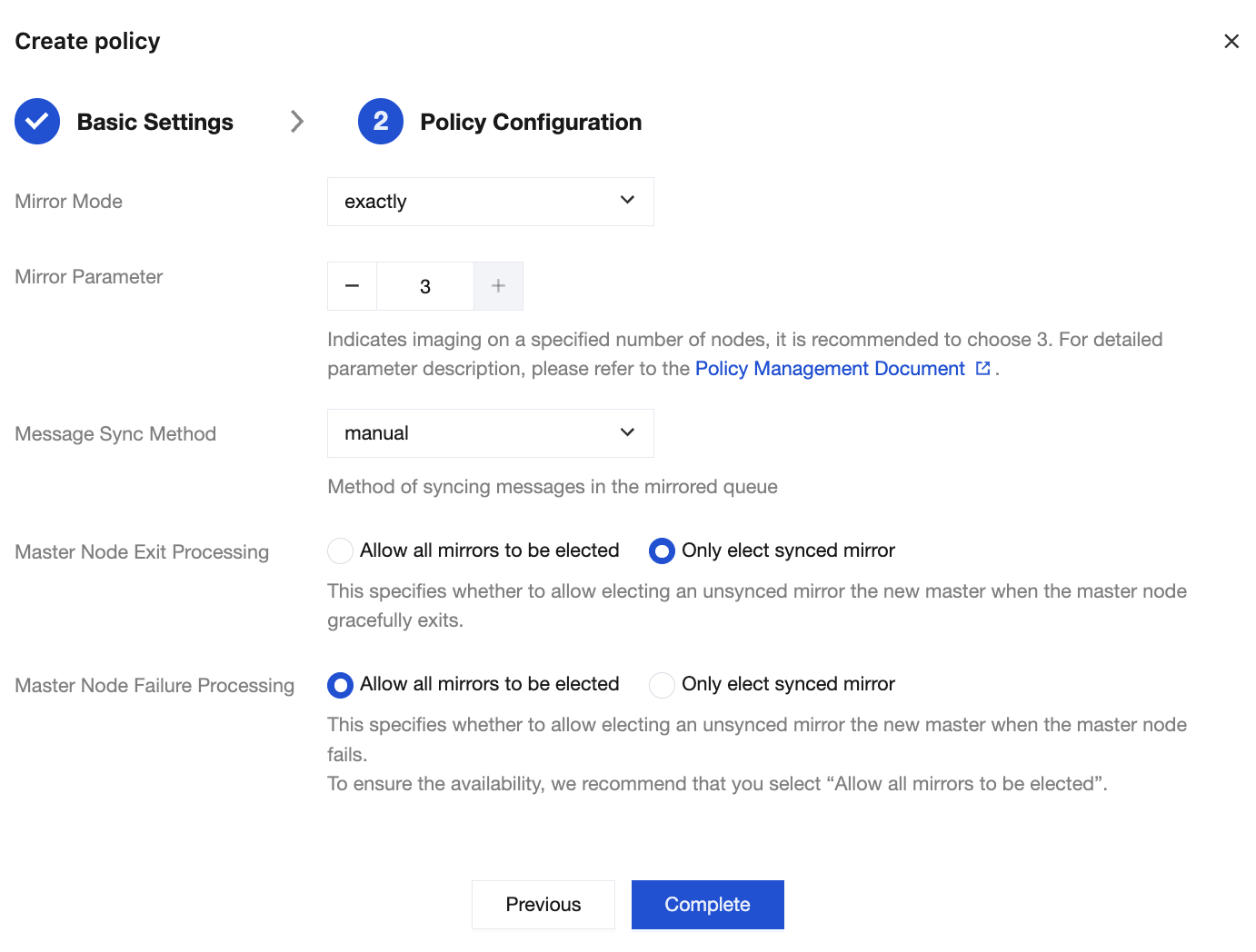
4. Click Complete to complete the policy creation. You can see the created policy in the policy list.
Bantuan dan Dukungan
Apakah halaman ini membantu?
Anda juga dapat Menghubungi Penjualan atau Mengirimkan Tiket untuk meminta bantuan.
masukan