Configuring Deletion Protection
Unduh
Mode fokus
Ukuran font
After deletion protection is enabled for a cluster, the cluster cannot be deleted through the console or an API. To delete the cluster, you need to manually disable the deletion protection feature first. It is recommended to keep this feature enabled for key businesses.
Constraints and Limitations
Cluster deletion protection does not apply to system-level deletion. For example, postpaid by hour clusters are isolated and subsequently released due to overdue payment, and yearly/monthly subscription clusters are isolated and released after expiration.
Enabling Cluster Deletion Protection
There are three entries to enable cluster deletion protection.
Entry 1: Log in to the TDMQ for RabbitMQ console, click Create Cluster on the Cluster List page, and enable cluster deletion protection on the purchase page.

Entry 2: Log in to the TDMQ for RabbitMQ console, choose More > Set Cluster Termination Protection in the Operation column of the target cluster on the Cluster List page, and enable cluster deletion protection.
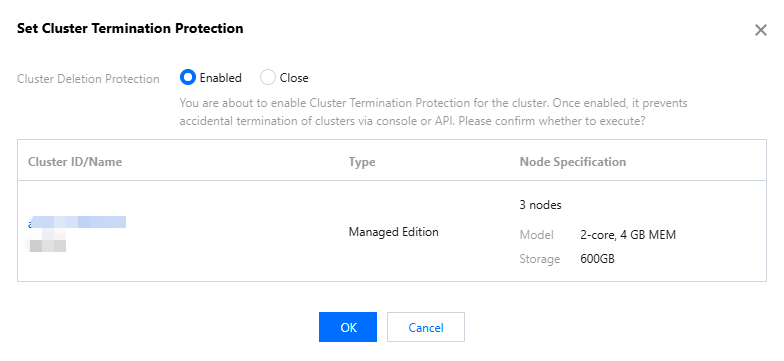
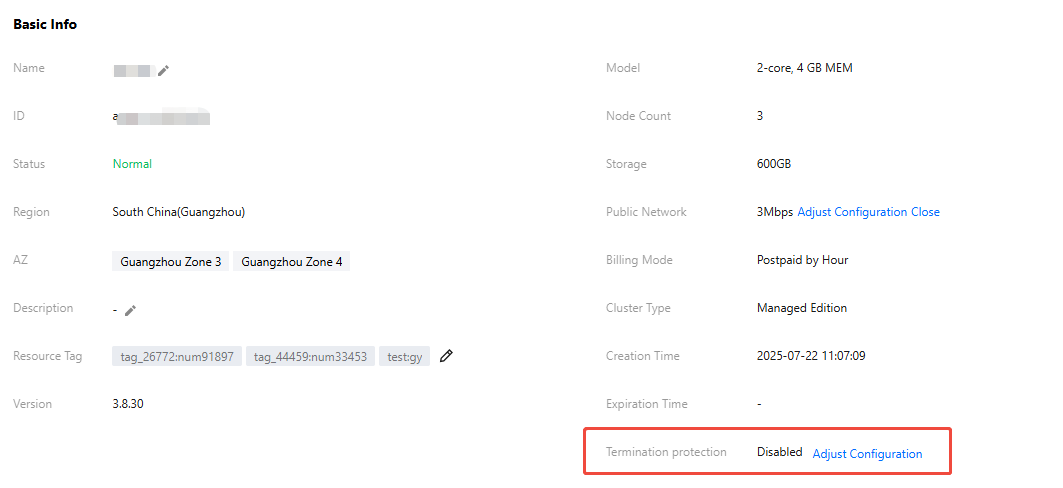
Entry 3: Log in to the TDMQ for RabbitMQ console, on the Cluster List page, click the ID of the target cluster to go to the basic cluster information page, and enable deletion protection in the Termination Protection section of the Basic Information module.
Disabling Cluster Deletion Protection
There are two entries to disable cluster deletion protection.
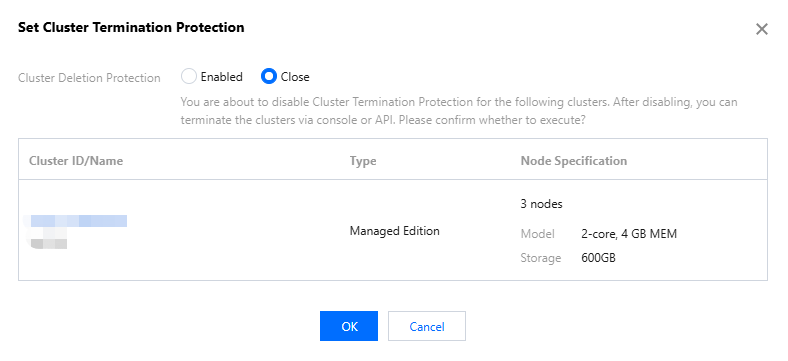
Entry 1: Log in to the TDMQ for RabbitMQ console, choose More > Set Cluster Termination Protection in the Operation column of the target cluster on the Cluster List page, and disable cluster deletion protection.
Entry 2: Log in to the TDMQ for RabbitMQ console, on the Cluster List page, click the ID of the target cluster to go to the basic cluster information page, and disable deletion protection in the Termination Protection section of the Basic Information page.
Bantuan dan Dukungan
Apakah halaman ini membantu?
Anda juga dapat Menghubungi Penjualan atau Mengirimkan Tiket untuk meminta bantuan.
masukan