View the Change Record
Unduh
Mode fokus
Ukuran font
The change records feature centrally manages, stores, analyzes, and visualizes change event data generated by TDMQ for RabbitMQ, enabling future querying, auditing, and tracing. You can view details of change records in the change records section.
This document introduces how to view details of change records in the TDMQ for RabbitMQ console.
Constraints and Limitations
Only Managed Edition clusters support viewing change records.
Viewing Change Records
1. Log in to the TDMQ for RabbitMQ console.
2. In the left sidebar, choose Cluster, select a region, and click the ID of the target cluster to go to the cluster details page.
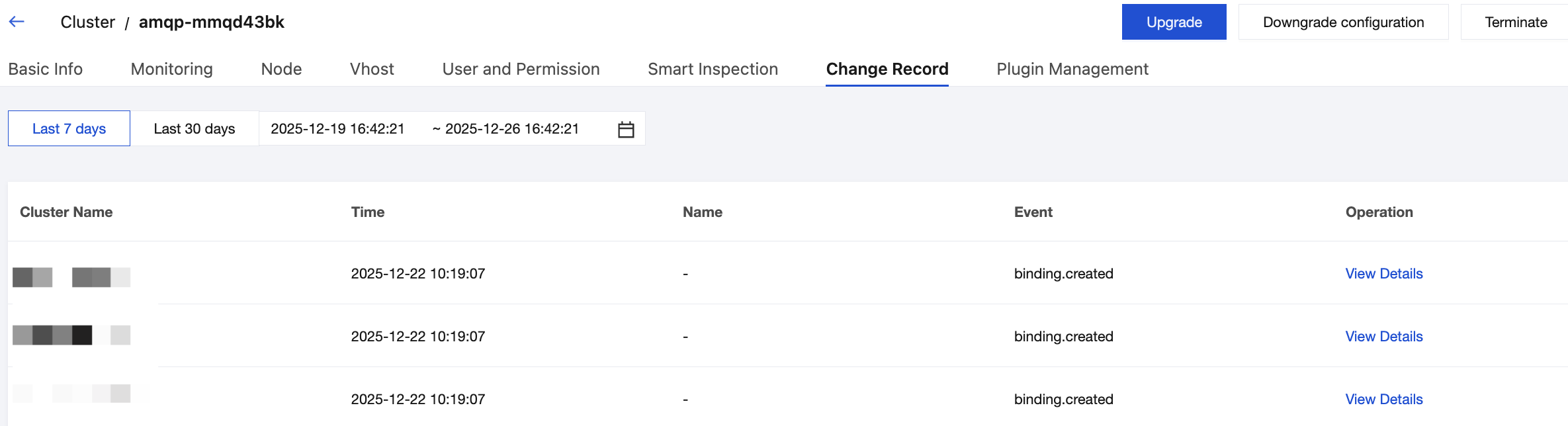
3. At the top of the cluster details page, click the Change Record tab to go to the change records page.
4. Set the time range (last 7 days, last 30 days, or custom time range) to view change events within the corresponding period.
5. Click View Details in the Operation column to view event details in the right sidebar.
Bantuan dan Dukungan
Apakah halaman ini membantu?
Anda juga dapat Menghubungi Penjualan atau Mengirimkan Tiket untuk meminta bantuan.
masukan