Switching from Yearly/Monthly Subscription to Pay-as-You-Go
Download
Focus Mode
Font Size
The billing mode of TDSQL-C for MySQL supports conversion from yearly/monthly subscription to pay-as-you-go. You can independently convert the compute nodes and storage nodes on the cluster details page. After the conversion, the bills and details will change, and the database can continue to provide normal access during the conversion process.
Note:
Conversion from yearly/monthly subscription to pay-as-you-go applies only to clusters with provisioned resources, not to Serverless clusters.
After the billing mode conversion is successful, only Tencent Cloud online cash is refunded to the account balance. Vouchers, discount coupons, and other offers are not refunded and cannot be combined with billing discounts. The actual refund amount is subject to the final settlement.
Switching Compute Nodes from Yearly/Monthly Subscription to Pay-as-You-Go
TDSQL-C for MySQL supports converting compute nodes from yearly/monthly subscription to pay-as-you-go. Before the conversion, the system estimates the refund amount and supports a second confirmation.
Scenarios
Compute Node Billing Mode (Before Conversion) | Storage Node Billing Mode (Before Conversion) | Whether Conversion of Compute Node to Pay-as-You-Go Is Supported | Description |
Yearly/Monthly subscription | Pay-as-you-go | Yes | The compute node is converted to pay-as-you-go, and the storage node remains pay-as-you-go. |
Yearly/Monthly subscription | Yearly/Monthly subscription | Yes | The compute node and storage node will both be converted to pay-as-you-go. |
Note
Before the conversion, check whether the cluster has any unfinished Ops tasks (such as rollback or conversion to Serverless). If so, the conversion to pay-as-you-go is temporarily not supported. Wait until the Ops tasks are completed before retrying.
During the conversion task, the cluster status changes to "Billing mode switching". All configuration adjustment features (scaling, conversion to Serverless, storage billing settings, and conversion from pay-as-you-go to yearly/monthly subscription) cannot be operated, and cluster termination is not supported.
Do not close the console pop-up during the conversion task. Closing the window will interrupt the operation.
If the conversion task fails, the cluster status will be rolled back to "Yearly/Monthly Subscription". You can view the failure cause in the task list.
Do not trigger billing mode conversion through both the API and the console at the same time, otherwise an error may occur.
Use Limits
The feature entry is visible only for clusters whose compute node billing mode is yearly/monthly subscription.
For clusters with parallel query or columnar storage indexes enabled, disable the corresponding features before performing the conversion.
Clusters with overdue payments, insufficient account balance, or in a frozen state do not support conversion. Resolve the abnormal account status before performing the conversion.
If a resource pack is already bound to the cluster, the issued portion of the resource pack can still be used after the conversion. For details, see Resource Pack Description.
Operation Steps
1. Log in to the TDSQL-C for MySQL console.
2. Select a region at the top of the page based on your actual console view mode and perform corresponding operations.
In the cluster list on the left, click the target cluster to go to the cluster management page, and then click Monthly Subscription to Pay-As-You-Go on the right.
In the instance list, select the target instance, and in its Operation column, choose More > Monthly Subscription to Pay-As-You-Go.
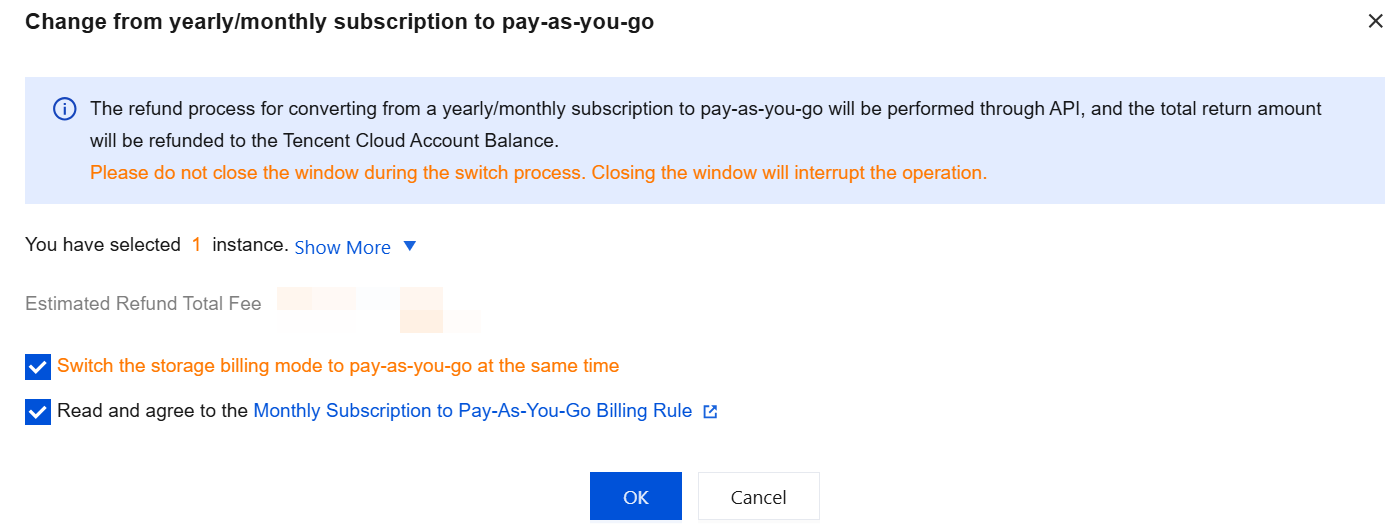
3. In the pop-up window, select "Switch the storage billing mode to pay-as-you-go at the same time" (this option is displayed only when the cluster storage billing mode is yearly/monthly subscription), select "Read and agree to the Monthly Subscription to Pay-As-You-Go Billing Rule", and click OK.
Note:
Do not close the window during the conversion process. Closing the window will interrupt the operation.
4. The conversion is successful when the cluster status returns to "Running" and the compute billing mode displays as "Pay-as-You-Go".
Switching Storage Nodes from Yearly/Monthly Subscription to Pay-as-You-Go
TDSQL-C for MySQL supports converting storage nodes from yearly/monthly subscription to pay-as-you-go. After the conversion, storage is billed based on actual hourly usage.
Scenarios
Compute Node Billing Mode (Before Conversion) | Storage Node Billing Mode (Before Conversion) | Whether Storage Node Supports Conversion to Pay-as-You-Go | Description |
Yearly/Monthly subscription | Yearly/Monthly subscription | Yes | The storage billing mode is converted from yearly/monthly subscription to pay-as-you-go, while the compute billing mode remains yearly/monthly subscription. |
Note
Before the conversion, check whether the cluster has any unfinished Ops tasks (such as rollback or conversion to Serverless). If so, the conversion to pay-as-you-go is temporarily not supported. Wait until the Ops tasks are completed before retrying.
Do not close the console pop-up during the conversion. Closing the window will interrupt the operation.
If the conversion task fails, the cluster status will be rolled back to "Yearly/Monthly Subscription". You can view the failure cause in the task list.
Do not trigger billing mode conversion through both the API and the console at the same time, otherwise an error may occur.
If the cluster's storage billing mode is yearly/monthly subscription and storage overuse is enabled, storage overuse will be disabled after the cluster is converted from yearly/monthly subscription to pay-as-you-go. Storage overuse cannot be set when the storage billing mode is pay-as-you-go, so proceed with caution.
Use Limits
Only clusters whose storage billing mode is yearly/monthly subscription can have their storage billing mode converted by clicking the edit icon.
Clusters with overdue payments, insufficient account balance, or in a frozen state do not support conversion. Resolve the abnormal account status before performing the conversion.
Operation Steps
1. Log in to the TDSQL-C for MySQL console.
2. Select a region at the top of the page based on your actual console view mode and perform corresponding operations.
In the cluster list on the left, click the target cluster to go to the cluster management page, and then click the edit icon after Billing Mode.

In the instance list, locate the target cluster. Click its cluster ID to go to the cluster details page, and then click the edit icon after Billing Info > Storage Billing.

3. In the pop-up window, select Pay-As-You-Go as the storage billing mode, and click OK.
4. The conversion is successful when the cluster status returns to "Running" and the storage billing mode displays as "Pay-As-You-Go".
Refund Rules
The refund policy for converting TDSQL-C for MySQL from yearly/monthly subscription to pay-as-you-go is as follows:
During the refund, the portion of the original order paid with Tencent Cloud online cash will be refunded to your Tencent Cloud account balance based on resource usage. Vouchers, discount coupons, and other offers are not refundable.
The used portion is calculated based on the pay-as-you-go price of the first used tier.
The actual refund amount is subject to the final settlement, and the amount displayed in the billing conversion pop-up is for reference only.
Task record
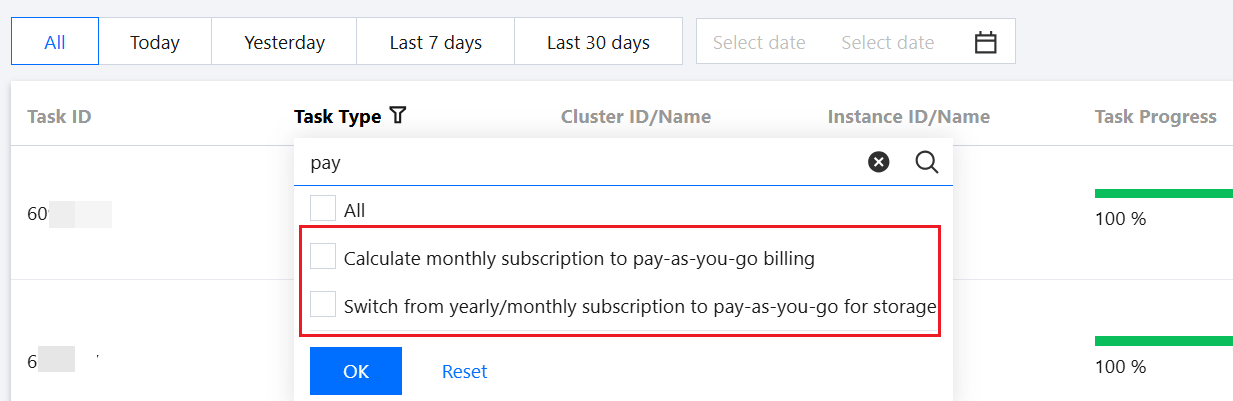
After the conversion task is submitted, you can view its details in the Task List. The system records a task named "Calculate monthly subscription to pay-as-you-go billing" or "Switch from yearly/monthly subscription to pay-as-you-go for storage" in the task list.
Related Documentation
Help and Support
Was this page helpful?
You can also Contact sales or Submit a Ticket for help.
Help us improve! Rate your documentation experience in 5 mins.
Feedback