一括リダイレクト
ダウンロード
フォーカスモード
フォントサイズ
この例では、受信した HTTP リクエストをキャプチャし、事前定義されたリダイレクトマッピングテーブルを通じて、指定されたパスから対応する URL への自動ジャンプを実現します。これは、サイト移行やエラーページのカスタム処理に使用できます。
サンプルコード
fetchイベントリスナーを追加し、リクエストが入るとトリガーされ、handleRequest関数を使用してリクエストを処理し、レスポンスを返します。async function handleRequest(request) {// ターゲット外部ホスト名を定義します。const yourExternalHostname = "www.example.com";// パスからリダイレクトURLへのマッピングを作成します。const redirectMap = new Map([["/foo", "https://" + yourExternalHostname + "/redirect1"],["/bar", "https://" + yourExternalHostname + "/redirect2"],["/baz", "https://" + yourExternalHostname + "/redirect3"],]);リクエストのURLを解析します。const url = new URL(request.url);URLのパス部分を取得します。const path = url.pathname;// パスがリダイレクトマッピングに存在するかどうかを確認し、存在する場合はリダイレクトを実行します。if (redirectMap.has(path)) {return Response.redirect(redirectMap.get(path), 301);} else {// パスがマッピングに存在しない場合は、404ステータスを返します。return new Response('Not Found', { status: 404 });}}// リクエストイベントが発生した場合、handleRequest関数を使用して処理します。addEventListener('fetch', event => {event.respondWith(handleRequest(event.request));});
サンプルプレビュー
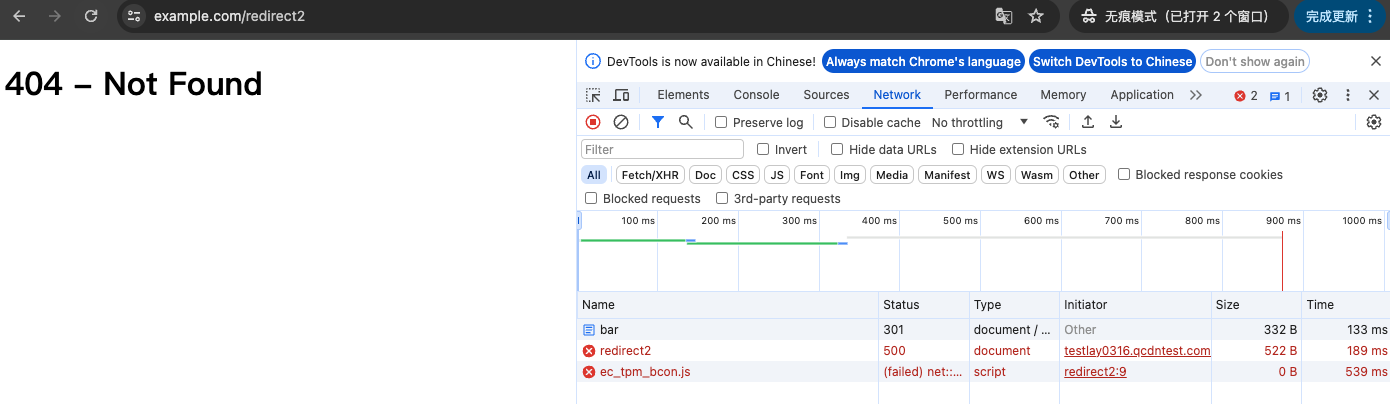
ブラウザのアドレスバーにエッジ関数のトリガールールに一致するURLを入力し、パスに/barを含めると、
https://www.example.com/redirect2への自動301リダイレクトが実行されます。プレビューは以下の通りです。現在404が表示されています。これは、ターゲットホスト名www.example.comのパス/redirect2配下にリソースが存在しないためです。実際の状況に応じてターゲットホスト名とパスを置き換えてください。
関連参考
フィードバック