Getting Started
Unduh
Mode fokus
Ukuran font
Elastic IP (EIP) is a public IP address resource that can be purchased and held independently. After an EIP is bound to a cloud resource, the cloud resource can communicate with the public network via the EIP. This document uses EIP binding to the Cloud Virtual Machine (CVM) as an example to describe the EIP usage lifecycle.
Background
Currently, Tencent Cloud's accounts are divided into the Standard Account Type and the Traditional Account Type. Both EIP fees and use vary based on the account type. Perform the corresponding operations based on your account type.
Note:
All accounts registered after 00:00 AM on June 17, 2020, are standard accounts. If your account was registered before this time point, check your account type in the console. For the specific operations, see Determining Account Type.
The lifecycle of an EIP includes applying for an EIP, binding an EIP to a CVM, unbinding an EIP to a CVM, and releasing an EIP.

1. Applying for an EIP: Apply for an EIP based on your account type and actual usage requirements.
2. Binding an EIP to a CVM instance: Bind the EIP to a CVM instance for communication with the public network via the EIP.
3. Unbinding the EIP from the CVM instance: After unbinding the EIP from the CVM instance, you can bind the EIP to other cloud resources. Unbinding the EIP from the CVM instance may cause network connectivity issues for the corresponding CVM instance. Additionally, an EIP that is not bound to any cloud resource will incur IP address resource fees.
4. Releasing the EIP: If you no longer need to use the EIP, you can release it. After being released, the EIP will no longer incur fees. However, it may not be recoverable after the release. Please be aware of this.
Prerequisites
Ensure that the EIP and the bound CVM instance are in the same region. You can view the region of the corresponding EIP and CVM instance in the EIP Console and CVM Console.
Directions
Applying for EIP
1. Log in to the Public IP Address Console.
2. At the top of the Public IP page, select Region and click Apply.
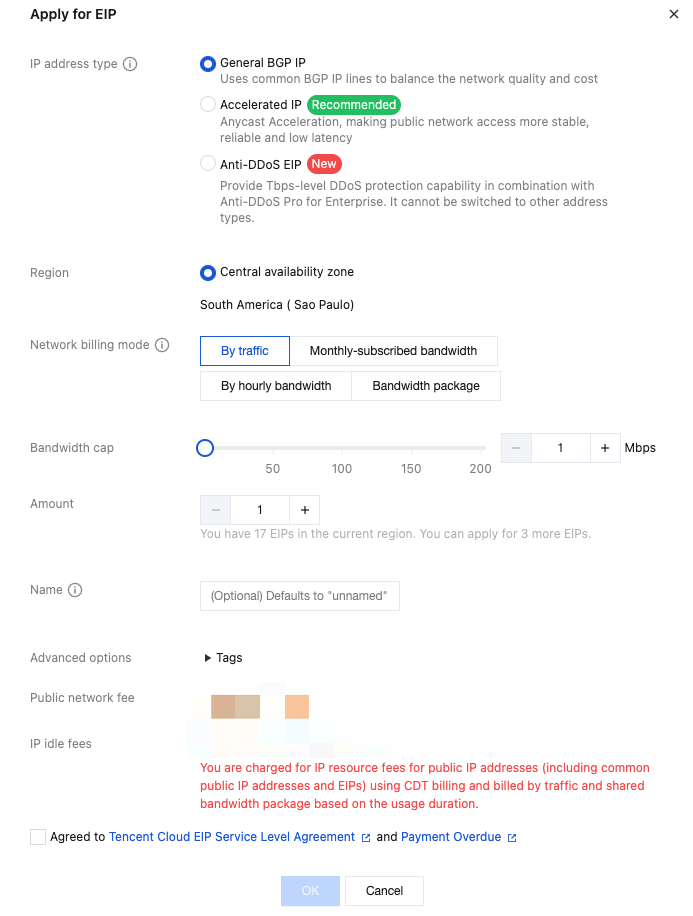
3. In the pop-up Apply for EIP window, perform the following operations according to your account type:
[Standard account type]
Parameter | Description |
IP Address Type | Tencent Cloud supports various types of EIPs, such as general BGP IP addresses, dedicated BGP IP addresses, accelerated IP addresses, Anti-DDoS EIPs, and static single-line IP addresses. For more information, see EIP IP Address Types. - General BGP IP addresses: They are used for balancing network quality and cost. - Dedicated BGP IP address: A dedicated line that avoids detours through the egress networks of international ISPs and has lower latency. Currently, it is only supported by the standard account type. You need to upgrade the traditional account type to the standard account type to use it. For more information on the upgrade, see Account Type Description. The dedicated BGP IP address is only supported in the Hong Kong (China) and Singapore regions. For more information on the prices, see Billing Overview. - Accelerated IP addresses: They use Anycast Internet Acceleration (AIA) to make public network access more stable, reliable, and low-latency. To apply for an accelerated IP address, you must enable AIA. Contact your business manager to apply. - Static single-line IP addresses: They access the public network through a single network operator, featuring low cost and easy self-scheduling. To try this feature, contact your business manager to apply. For the regional availability of this feature, see Use Limits. - Anti-DDoS EIP: A cloud-native Anti-DDoS BGP IP address that must be used with the Enterprise Anti-DDoS Package to provide Tbps-level full Anti-DDoS protection. After an Anti-DDoS EIP is bound to your business resources and Anti-DDoS resources respectively, it will have Anti-DDoS protection capabilities. Currently, it is only supported by the standard account type. You need to upgrade the traditional account type to the standard account type to use it. For more information on the upgrade, see Account Type Description. |
IP Address Resource Pool | - If you need to reserve continuous IP addresses or allocate IP addresses in a specific IP address range for your businesses, you can submit a ticket for consultation. We will allocate an exclusive IP address resource pool for you. - Currently, exclusive IP address resource pools are supported by the following line types: general BGP, static single-line, and dedicated BGP. - For specific fees, contact your business manager. |
ISP | This parameter is required only when the IP address type is static single-line, including China Mobile (CMCC), China Telecom (CTCC), and China Unicom (CUCC). |
Billing Mode | Select the public network billing mode for the EIP, including the traffic, monthly bandwidth subscription, hourly bandwidth, and BWP billing modes. Different billing modes are supported by different IP address types. - General BGP IP addresses support billing modes such as billed by traffic, monthly bandwidth subscription, hourly bandwidth subscription, and BWP. For more information, see Public Network Fees. - Accelerated IP addresses, static single-line IP addresses, and Anti-DDoS EIPs only support billing by BWP and do not support other billing modes for now. |
Bandwidth Package | This option only applies to EIPs in the BWP billing mode. Select the BWP ID. Note: An accelerated IP address will automatically generate a BWP, so you do not need to set this parameter. |
Bandwidth Cap | Set the bandwidth limit as needed and allocate bandwidth resources reasonably. |
Quantity | Select the number of EIPs you apply for as needed and ensure that the total number of EIPs does not exceed the total quota for the product. For more information, see Quota Limits. |
Subscription Duration | This option only applies to EIPs in the monthly bandwidth subscription billing mode. Select the purchase duration for the monthly bandwidth subscription as needed. |
Automatic Renewal | This option only applies to EIPs in the monthly bandwidth subscription billing mode. If it is selected and the account balance is sufficient, the EIPs will be automatically renewed monthly upon expiration. |
Name | EIP instance name, not required. It can be up to 128 characters. Uppercase and lowercase letters, Chinese characters, digits, hyphens (-), and underscores (_) can be used, and spaces cannot be contained. |
Tag | If you need to add tags, you can add them here. Then, you can perform permission management by tags. |
[Traditional account type]
Parameter | Description |
IP Address Type | Tencent Cloud supports various types of EIPs, such as general IP addresses, accelerated IP addresses, and static single-line IP addresses. - General BGP IP addresses: They are used for balancing network quality and cost. - Accelerated IP addresses: They use AIA to make public network access more stable, reliable, and low-latency. To apply for an accelerated IP address, you must enable AIA. Contact your business manager to apply. - Static single-line IP addresses: They access the public network through a single network operator, featuring low cost and easy self-scheduling. To try this feature, contact your business manager to apply. For the regional availability of this feature, see Use Limits. |
Quantity | Select the number of EIPs you apply for as needed and ensure that the total number of EIPs does not exceed the total quota for the product. For more information, see Quota Limits. |
Name | EIP instance name, not required. |
Tag | If you need to add tags, you can add them here. Then, you can perform permission management by tags. |
4. Select to agree to the agreement and click Confirm to complete the EIP application.
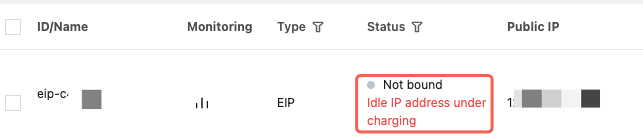
5. In the list, you can view the applied EIP, which is currently unbound.
Note:
It is recommended that you bind cloud resources to unbound EIPs promptly to save IP resource fees. Such fees are billed hourly and are precise down to the second. If the duration is less than an hour, the fee will be charged based on the proportion of idle time. Therefore, you should bind cloud resources promptly.
Binding an EIP to a CVM
1. Log in to the Public IP Address Console and select the region of the EIP.
2. In the operation column on the right of the target EIP, select More > Bind.
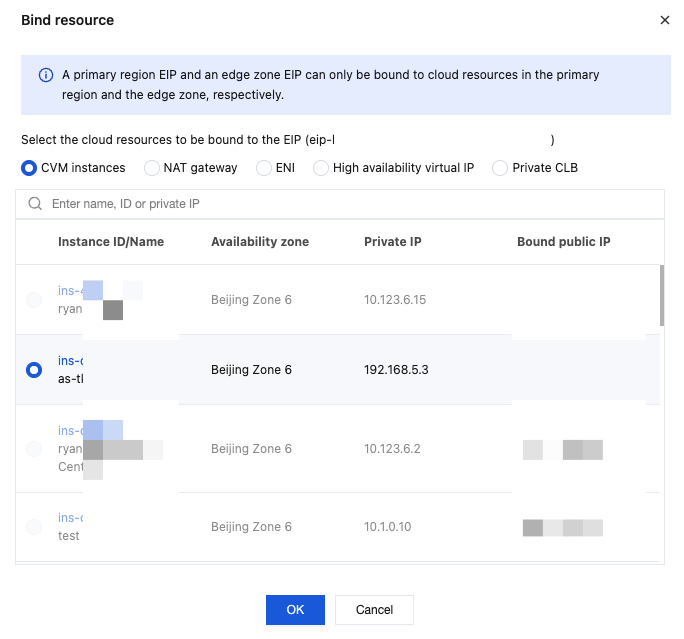
3. In the pop-up Bind Resource window, click CVM instance, select the CVM instance to be bound, and then click Confirm.
Note:
For the standard account type, if the CVM instance already has a common public IP address, you need to release the common public IP address before binding an EIP.
For the traditional account type, if the CVM instance already has a common public IP address, binding an EIP will release the common public IP address of the current CVM instance.
The limit on the number of CVM instances that can be bound to an EIP varies based on the CPU configuration of the CVM instance. See Use Limits.
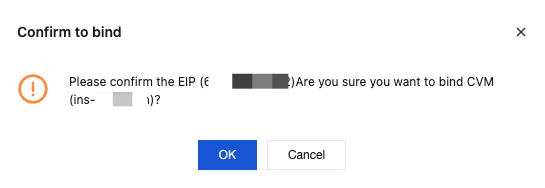
4. In the pop-up "Confirm to Bind" dialog box, click OK to complete the binding to the cloud resource.
Unbinding an EIP from a CVM
1. Log in to the Public IP Address Console and select the region of the EIP.
2. In the operation column on the right of the target EIP, select More > Unbind.
3. In the pop-up Unbind EIP window, confirm the service impact and billing impact of unbinding the EIP and click Confirm.
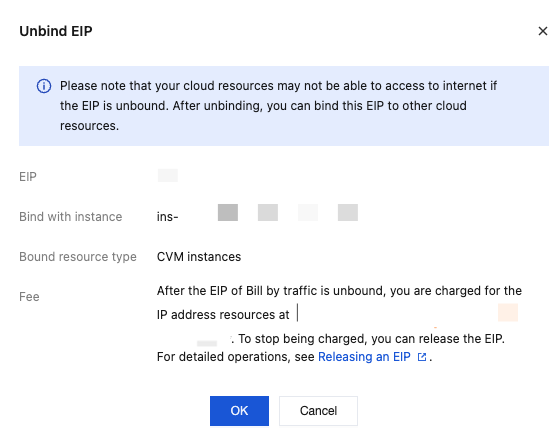
4. In the pop-up confirmation dialog box, reconfirm the EIP unbinding information. After confirming that everything is correct, click OK to complete the unbinding.

Note:
For the traditional account type, you can select Free Allocation of Common Public IP Address after Unbinding during unbinding. After unbinding, a new common public IP address will be allocated. Each account can be reallocated with a common public IP address for free 10 times every day.
Releasing an EIP
1. Log in to the Public IP Address Console and select the region of the EIP.
2. In the operation address on the right of the target EIP, select More > Release.
3. In the pop-up Confirm to Release the Selected EIPs? window, select Confirm to Release the above IP Addresses and click Release.
Related Information
If you need to convert the ordinary public IP of the CVM to EIP, see Switching a Common Public IP Address to an EIP.
If you need to retrieve a used public IP address, see Retrieving Public Network IP Addresses.
If you need to bind other cloud resources, such as NAT Gateways, ENIs, and HAVIPs, see Binding an EIP to Cloud Resources.
If you need the EIP bound to the CVM to be visible on the local machine, see EIP Direct Connection.
If you need to adjust the peak bandwidth of the EIP, see Adjusting Bandwidth.
If you need to monitor traffic fluctuations of the EIP, see View Monitoring Data.
Bantuan dan Dukungan
Apakah halaman ini membantu?
Anda juga dapat Menghubungi Penjualan atau Mengirimkan Tiket untuk meminta bantuan.
masukan