Cloud Workload Protection Platform (CWPP) leverages the massive amount of threat data accumulated by Tencent Security and uses machine learning algorithms to provide security services for servers. It can detect and block brute-force attacks, abnormal logins, Trojan files, high-risk vulnerabilities, and more.
Qualifications
CWPP has obtained a number of international authoritative certifications such as and CSA CSTR (CSA, Cloud Sec Tech Review).
VB100: Certified 42 times in a row with 100% pass rate
AV-C: 29 A+ ratings, Top Rated product for three consecutive years
Gartner: Listed in the Market Guide for Cloud Workload Protection Platforms
AMTSO: Member of Anti-Malware Testing Standards Organization (AMTSO)
AVAR: Member of Association of Anti-Virus Asia Researchers (AVAR)
EICAR: Member of European Institute for Computer Anti-Virus Research (EICAR)
How it Works
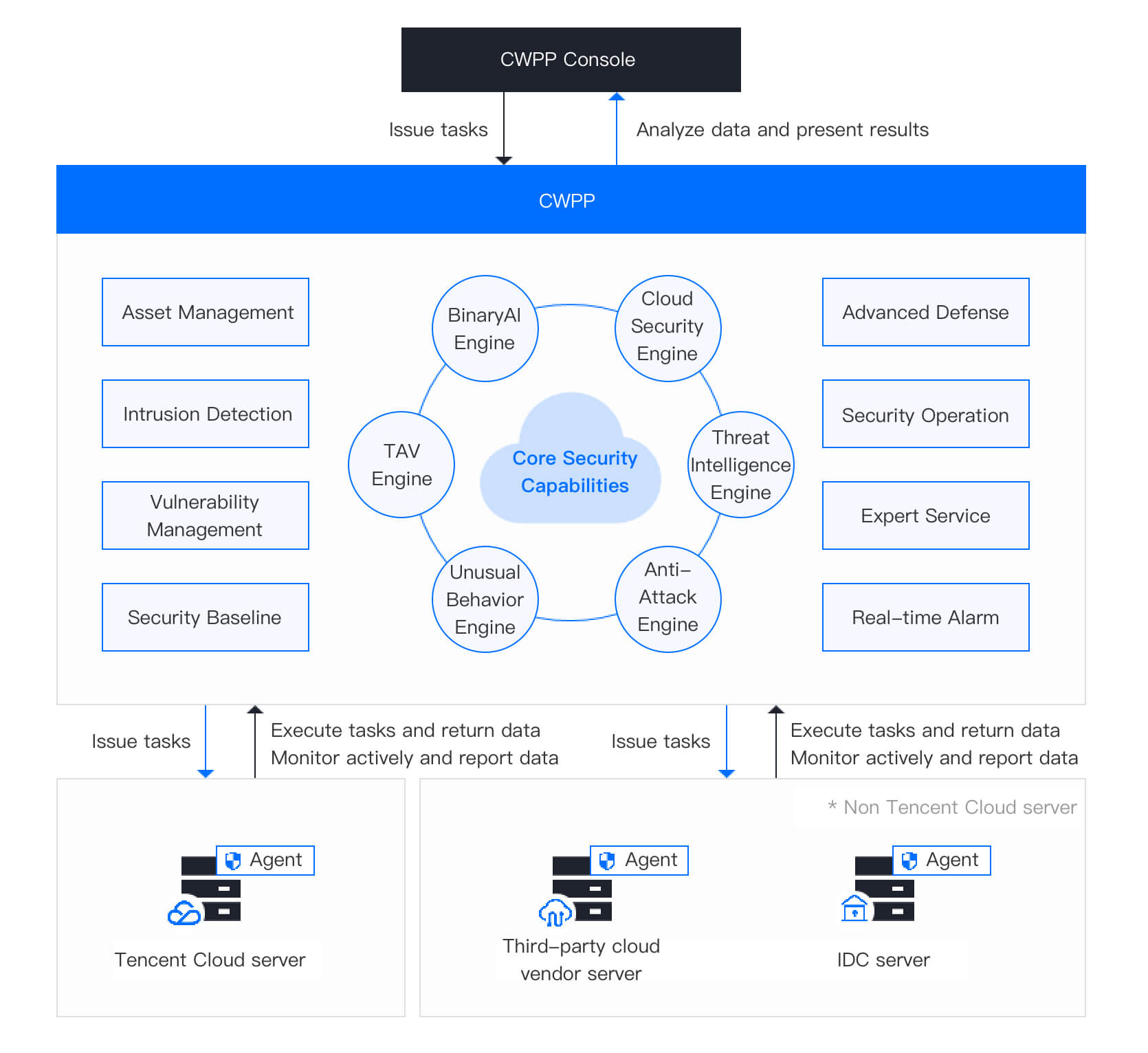
Install the CWPP agent on the server to .
When you start a detection task on the CWPP console, the agent will execute the task and return data. You can check and process the security events on the CWPP console.
Term
Description
CWPP console
A cloud-native security system independently developed by Tencent Cloud,
which provides a one-stop cloud workload protection solution (prevention-defense-detection-response).
Agent
Official security plugin for CWPP, which can be used for servers running in a hybrid cloud.
It syncs risk information to CWPP in real time and performs detection or process tasks issued by the CWPP Console.
Tencent Cloud servers
CVM, Lighthouse, and ECM.
Non-Tencent Cloud servers
Third-party servers and IDC servers.
CWPP
Cloud Workload Protection Platform (CWPP) is a security information processing center that continuously checks and analyzes the information returned by different servers. It boasts six core security capabilities to check servers from various dimensions.
1. TAV Engine: Efficiently detects and removes binary Trojan viruses.
2. BinaryAI Engine: The binary search engine built on the deep learning algorithm for efficient detection and removal of malicious samples.
3. Cloud Security Engine: Efficiently detects and removes the popular Trojans and virus files both at home and aboard based on the deep self-learning algorithm and multi-engine cloud virus detection mechanism.
4. Threat Intelligence Engine: Built on a large threat intelligence library that keeps updated to help identify malicious files, IPs, and domain names.
5. Anti-Attack Engine: Detects cyber attacks in real time, including Webshell detection, Struts vulnerability exploitation, code repository pulling, code injection attacks, and brute force cracking. Provides auto defense capabilities.
6. Unusual Behavior Engine: Matches unusual behavior characteristics and detects multi-behavior threats in real time to facilitate real-time detection and alarm of malicious intrusion events.
Editions
CWPP is available in Basic, Pro and Ultimate editions. For more information on the features in different editions, see Features in Different Editions.
How to Use
After registering a Tencent Cloud account, you can configure security protection settings on the CWPP Console. For more information about console operations, see Operation Guide.