This document will introduce how to view and manage the alarm list and policy configuration of malicious requests.
Overview
The malicious request feature provides the capability to monitor and handle external request behaviors in real-time, effectively identifying malicious request behaviors. If a host initiates requests to malicious domains, the behavior will be identified and recorded. Upon detecting such malicious request behaviors, the system will provide you real-time alarms.
Restrictions
Malicious request monitoring supports Pro Edition or Ultimate Edition hosts.
Malicious request interception is supported only for hosts of Ultimate Edition running Linux systems. It is limited to intercepting DNS queries made by the server. It does not support the interception of forwarded traffic.
Alert List
1. Log in to the CWPP console. In the left sidebar, choose Intrusion Detection > Malicious Requests.
2. On the malicious requests page, you can view the alarm list of malicious requests and perform related operations.
Filters: You can filter by policy type hit, status, last requested, entering the host name in the search box, instance ID, IP address, or malicious request domain name.
Custom display columns: Click
to set the fields displayed in the alarm list.
Export: Click
to export detailed information from the alarm list.
Field Description:
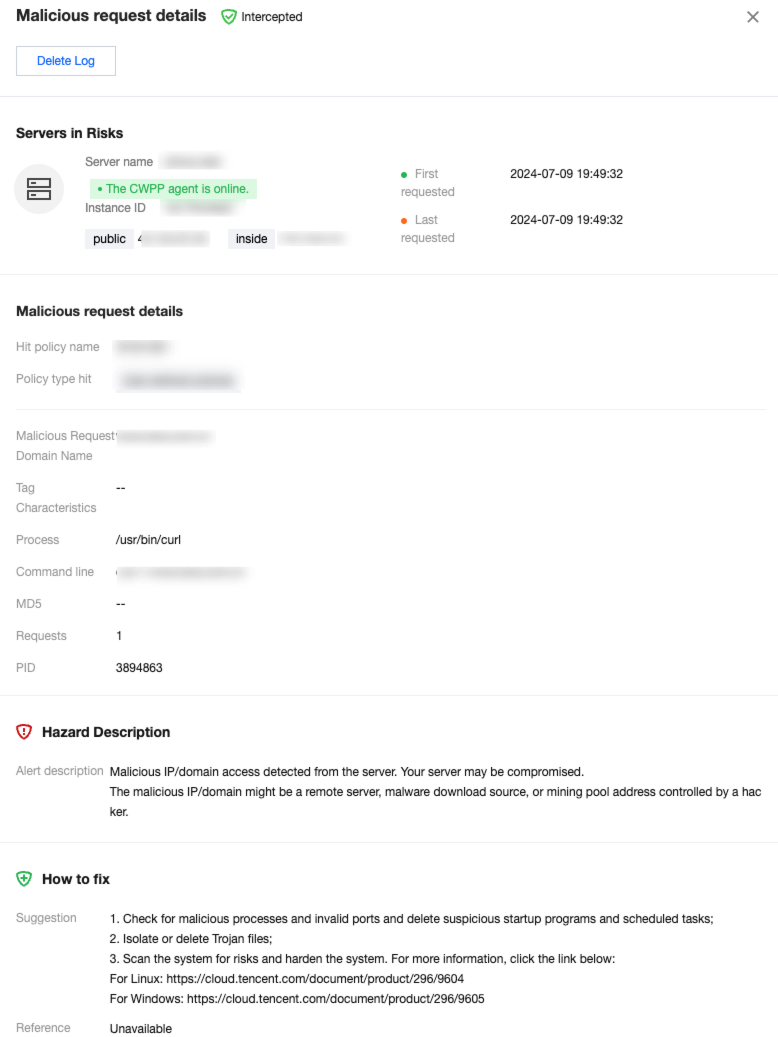
Server Name/Instance ID: The host name and instance ID initiating the request to the malicious domain.
IP Addresses: The host IP initiating the request to the malicious domain.
Policy Type Hit:
Preset Policy: The preset policy is a rule configuration that has been developed by Tencent's CWPP operation experts and algorithm experts through the accumulation of multiple models, and it is applicable for detecting most malicious requests.
User-defined Policies: Users set alarm/intercept/allow actions for relevant domains based on their business needs.
Hit Policy: The name of the policy hit when the host requests a malicious domain.
Malicious Request Domain Name: Domains or IP addresses.
Requests: Number of times the host has made requests.
Hazard Description: Potential hazard that may result from requesting the malicious domain.
Last Requested: The last time the malicious domain was requested.
Status: Pending, allowlisted, processed, ignored, and intercepted.
Details: View detailed information on the malicious request event, including risk host information, malicious request details, hazard description, and fix suggestions.
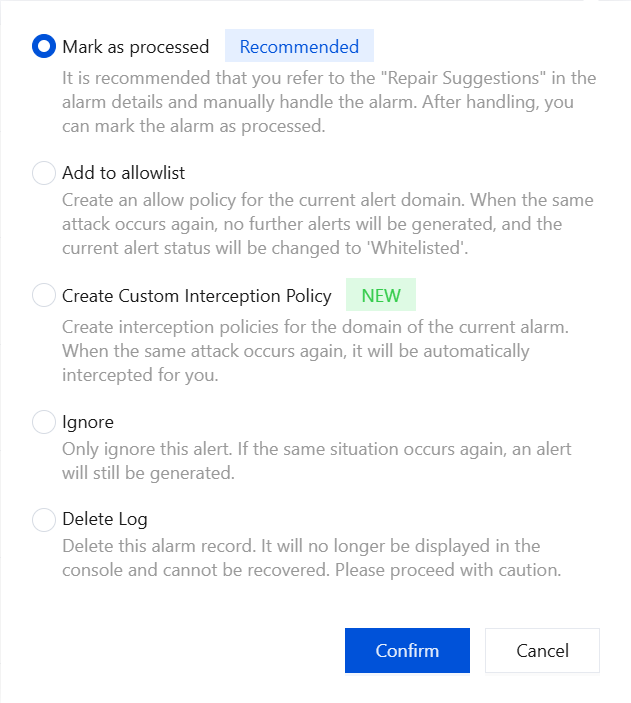
Processing: Mark as processed, add to allowlist, create custom interception policy, ignore, and delete log.
Policy Configuration
Managing a Policy
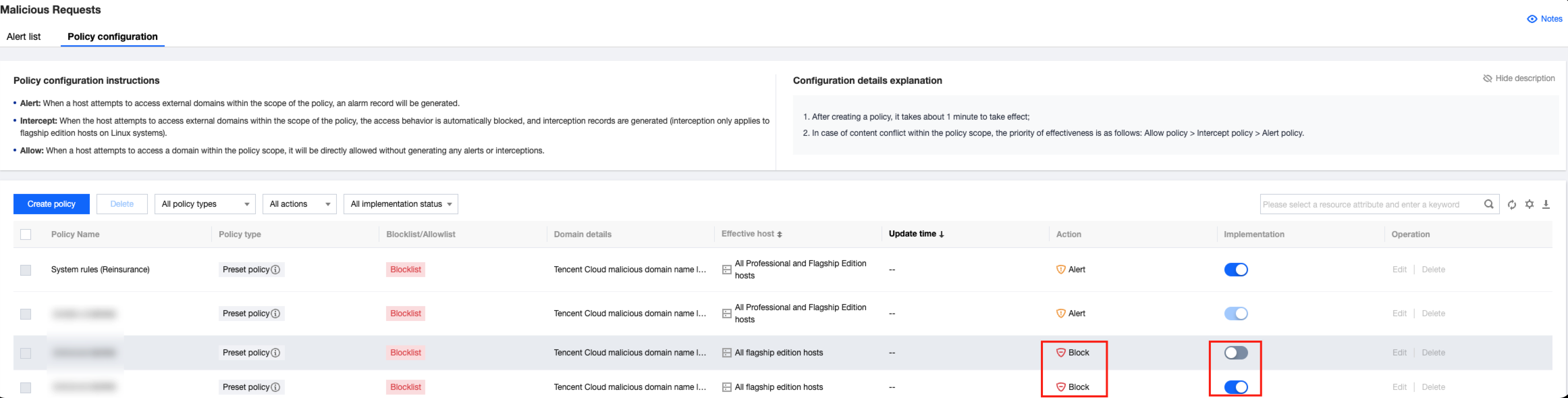
On the top of the malicious request page, select Policy configuration to enter the policy configuration page.
Filtering: You can filter by policy type, recommended action, effective status, and keywords.
Custom display columns: Click
to set the fields displayed in the policy list.
Export: Click
to export detailed information from the policy list.
Field Description:
Policy Name: Fixed preset policy names, including system rules (critical protection) and system rules (standard). For user-defined policies, the name will be as specified by the user.
Policy Type: Preset policy, and user-defined policy.
Blocklist/Allowlist: This policy belongs to the allowlist/blocklist.
Domain Details: IP/domain name or wildcard domain.
Effective Hosts: The range of hosts where the policy is effective.
Update Time: The time when the policy was last updated.
Action: Actions automatically performed when the policy is hit by the domain request (allow/alarm/intercept).
Implementation: Whether the policy is effective.
Edit: Edit the policy.
Delete: Delete the policy.
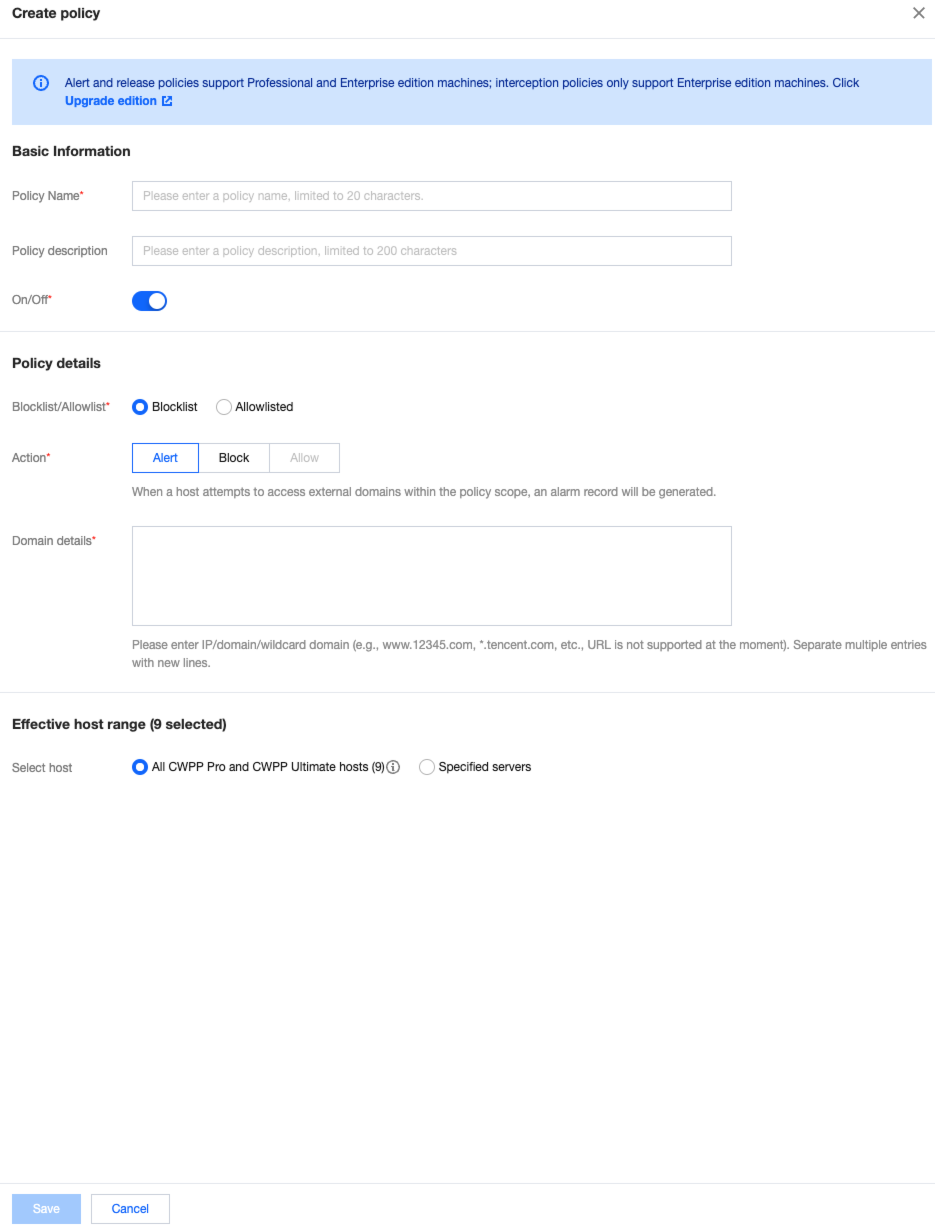
Create a Policy:
Blocklist: When the host requests a domain in the blocklist, an alarm/intercept action will be performed.
Allowlist: When the host requests a domain in the allowlist, an allow action will be performed.
Note:
Preset policies are built-in policies that do not support adding, editing, or deleting, and that only support Enable/Disable switching.
It is recommended to keep the preset policies (standard) enabled, and to make the preset policies (critical protection) enabled as needed during critical protection periods.
In user-defined policies, the interception policy is only effective for Ultimate Edition hosts.
System Auto-Interception Rules
The malicious request feature now includes system auto-interception rules. Once enabled, the system automatically intercepts detected malicious domains and IPs. However, some configurations still require your manual policy settings.
System blocklist domains and IPs: A list of domains and IPs refined by CWPP operation experts and algorithm experts. Domains and IPs on this list can be automatically intercepted.
Principles of Interception: Malicious requests refer to the termination of access requests to legitimate domains/IPs. It does not terminate the process but stops the access request.
Note:
If you find any false interceptions, you can create a user-defined policy for allowlist processing or contact us.
System auto-interception rules are available only to Ultimate Users.
1. Log in to the CWPP console. In the left sidebar, choose Intrusion Detection > Malicious Requests.
2. On the malicious request page, the following two methods are supported to enable system automatic interception rules.
On the policy configuration page, click the Implementation Switch next to the system automatic interception rules policy.
On the alarm list page, click to enable the Automatic Interception of Malicious Requests.