An Abnormal Log-in Notification
Unduh
Mode fokus
Ukuran font
Phenomenon Description
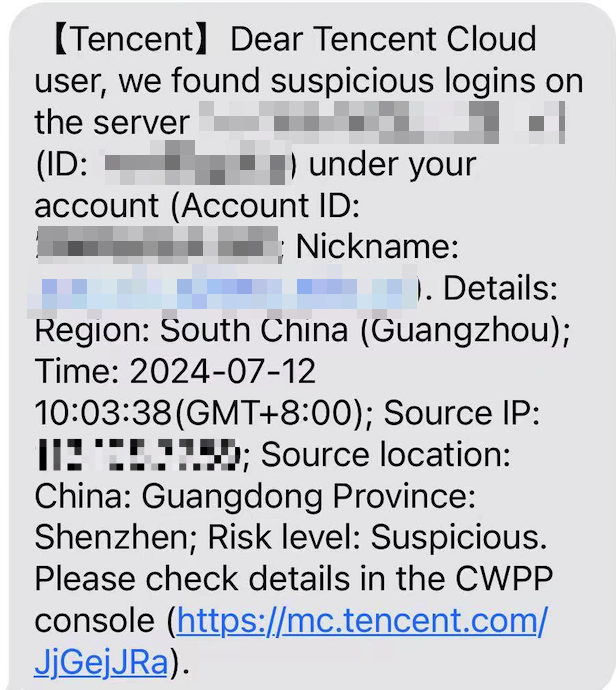
The user receives a notification from Tencent Cloud about an abnormal log-in to the server. Take the SMS below as an example:
Possible Causes
When log-in activities occur on the servers under your Tencent Cloud account, if Tencent Cloud CWPP founds that the log-in does not match any entries in the log-in allowlist, it will use intelligent algorithms to mark the log-in record as "Suspicious" or"High-risk"and trigger real-time alarms.
Note
By default, you can enable triggering alarms by going to Settings > and tick Alarm Settings only for those abnormal log-in events with a hazard level of "High-risk".
The hazard level of an abnormal log-in is determined by an algorithm that comprehensively evaluates previous log-in patterns on the server.
Directions
After receiving an abnormal log-in alarm, please follow these steps for confirmation:
1. Verify if this log-in behavior is authorized.
If yes, add this log-in record to the allowlist. If this behavior occurs again, no alarms will be generated.
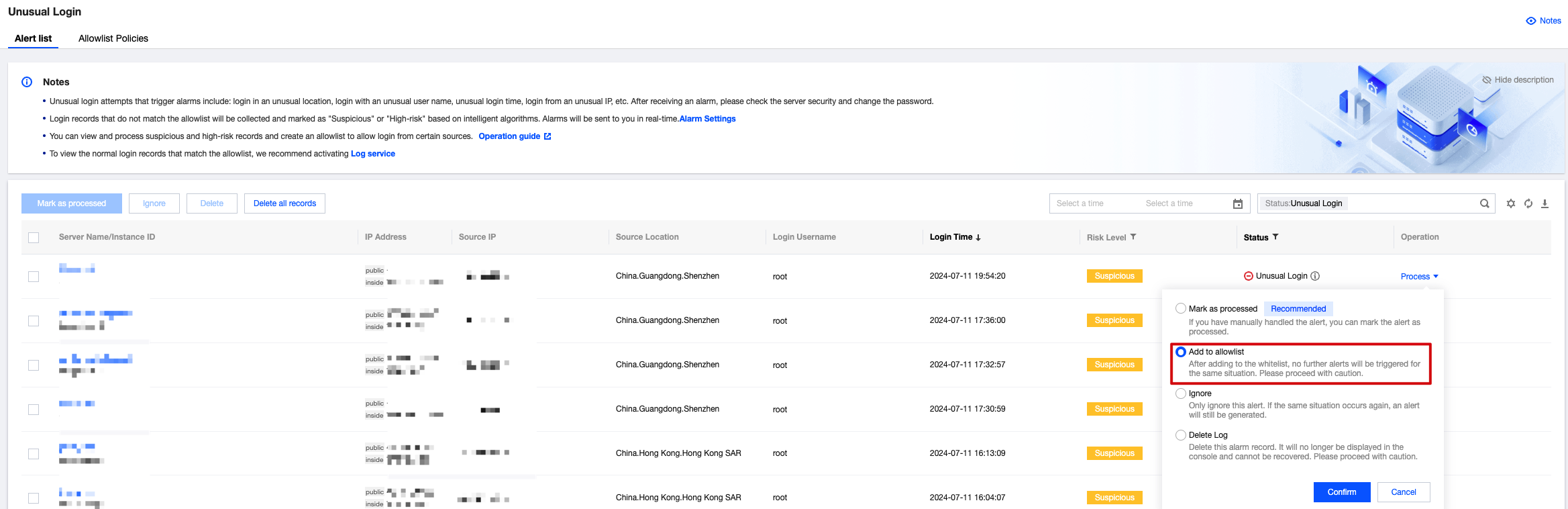
If not, go to step 2.
2. If you have determined that the log-in is unauthorized, it is preliminarily concluded that the alarm for an abnormal log-in event on your server is due to a less frequently used user account being compromised. It is recommended that you immediately change the log-in password and update any related authentication credentials stored on the server. You can see Linux Intrusion Issue Troubleshooting Approach and Windows Intrusion Issue Troubleshooting Approach for routine investigations on your server.
Reinforcement Methods
Subsequently, you can enhance server security through the following reinforcement methods:
Set a complex password for the server which consists of a combination of uppercase letters, lowercase letters, special characters, and numbers, with a length of 12 to 16 characters.
Change the default remote log-in port for the Linux-based CVM as shown below:
Modify file /etc/ssh/sshd_config.
Port 22 # is located in the third or fourth line. If there is a hash tag in front of this port number, please move it to any port number below 65534.
You can use the vi command in a remote connection or download the file to your local machine via sftp and modify it there. After modifying the file, use the following command to restart the SSH service:
/etc/init.d/sshd restart #centos system, which is used to restart the sshd service command.etc/init.d/ssh restart #debian/ubuntu system, which is used to restart the ssh service command.
Tencent Cloud Platform provides a Security Group feature. We suggest you only use it to only allow the necessary protocols and ports required for your business operations, and not to open all protocols and all ports. For details, refer to Creating Security Groups.
To configure the system firewall for your CVM, it is recommended to enable CFW and set Internet boundary rules.
Ensure that the protection software installed on the CVM CWPP agent process is running normally and that the real-time alarm is enabled. This will promptly notify you in case of any abnormal log-in.
Promptly fix any security vulnerabilities in the CVM system components and Web components.
Note
While implementing the aforementioned CVM system security measures effectively reduces security risks, it cannot guarantee absolute security. Therefore, it is recommended to regularly conduct security inspections and data backups for CVM system to prevent data loss or service unavailability due to unexpected incidents.
In addition to security reinforcement, it is also strongly recommended to back up your data by creating system images, creating data snapshots, and setting up automatic periodic snapshots to ensure data safety.
FAQs
Can abnormal log-in detection be disabled?
Abnormal log-in detection cannot be disabled.
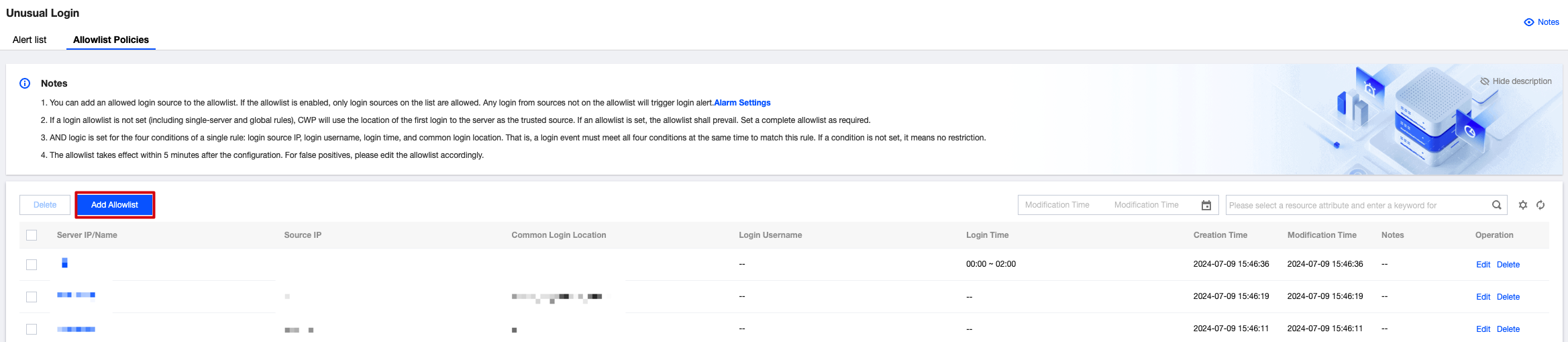
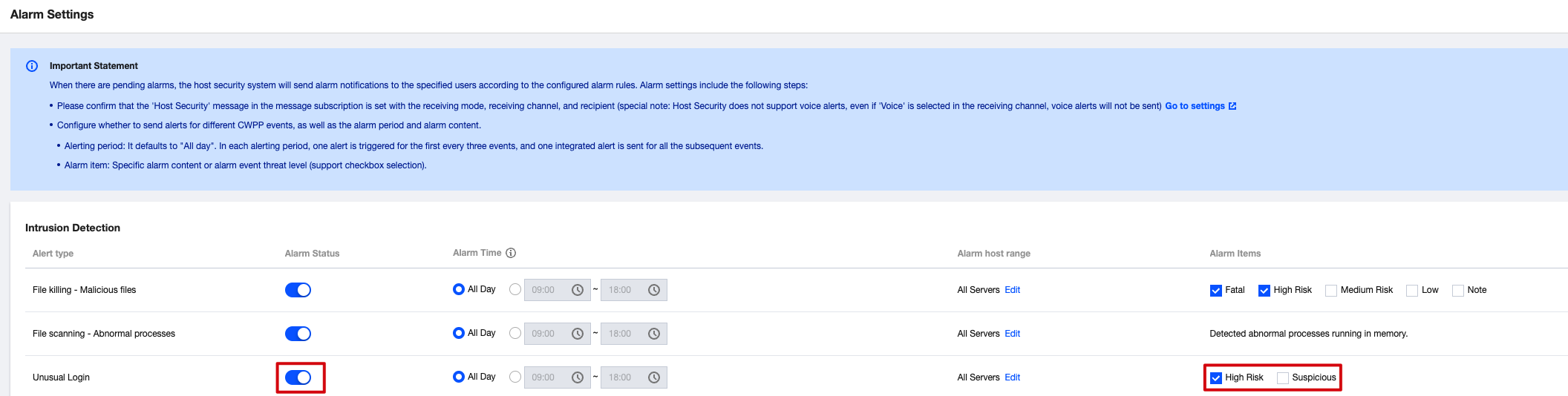
If you do not want to receive alarm notifications for abnormal log-in, you can try to complete the log-in allowlist or disable the abnormal log-in alarm.
To complete the log-in allowlist: On the Unusual Login Page, select Allowlist Management > Add to Allowlist and add commonly used log-in source IPs to the allowlist.
To disable the abnormal log-in alarm: On the Alarm Settings Page, set the alarm status to disabled or do not tick the alarm item High-risk or Suspicious.
Bantuan dan Dukungan
Apakah halaman ini membantu?
Anda juga dapat Menghubungi Penjualan atau Mengirimkan Tiket untuk meminta bantuan.
masukan