クライアントURL情報の取得
ダウンロード
フォーカスモード
フォントサイズ
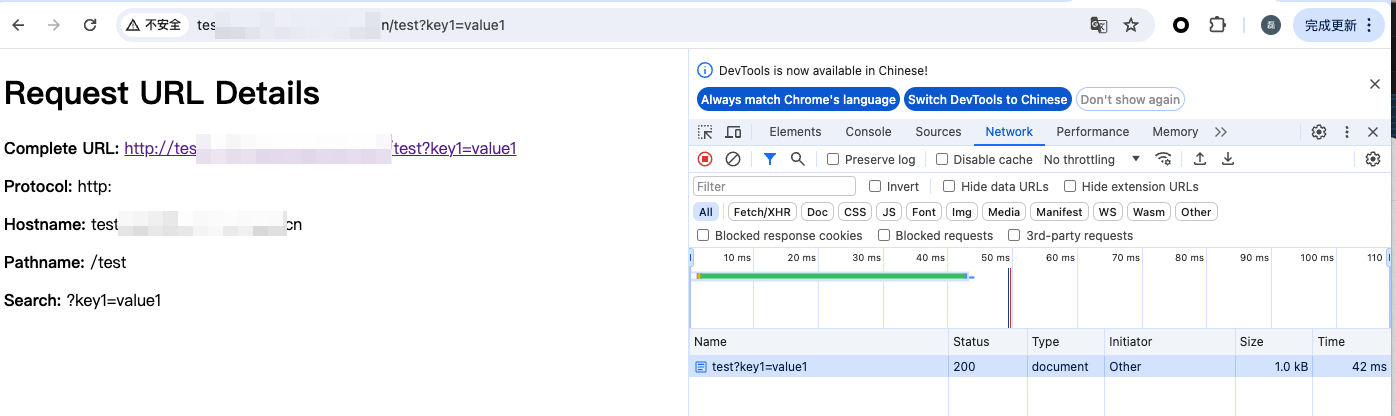
この例では、受信した HTTP リクエストをキャプチャし、HTML ページを返します。このページにはリクエスト URL の詳細情報が表示され、リクエストパラメータ、パス、送信元などのデバッグと表示に使用できます。
サンプルコード
fetchイベントリスナーを追加し、リクエストが入るとトリガーされ、handleRequest関数を使用してリクエストを処理し、レスポンスを返します。addEventListener('fetch', event => {event.respondWith(handleRequest(event.request))})function handleRequest(request) {リクエストURLを解析します。const url = new URL(request.url)URLの各構成要素を抽出します。const {href、// 完全なURLprotocol、// プロトコル(例:http:)hostname、// ホスト名(例:example.com)port、// ポート(指定されている場合)pathname、// パス(例:/path)search、// クエリ文字列(例:?query=123)hash、// 井号の後ろのフラグメント(例:#section)} = url// HTMLレスポンス内容を構築します。const htmlContent = `<!DOCTYPE html><html lang="en"><head><meta charset="UTF-8"><meta name="viewport" content="width=device-width, initial-scale=1.0"><title>Request URL Details</title></head><body><h1>Request URL Details</h1><p><strong>Complete URL:</strong> <a href="${href}">${href}</a></p><p><strong>Protocol:</strong> ${protocol}</p><p><strong>Hostname:</strong> ${hostname}</p>${port ? `<p><strong>Port:</strong> ${port}</p>` : ''}<p><strong>Pathname:</strong> ${pathname}</p><p><strong>Search:</strong> ${search}</p>${hash ? `<p><strong>Hash:</strong> ${hash}</p>` : ''}</body></html>`;// HTML形式のレスポンスを返します。return new Response(htmlContent, {headers: {'Content-Type': 'text/html;charset=UTF-8'}})}
サンプルプレビュー
ブラウザのアドレスバーにエッジ関数のトリガールールに一致するURLを入力すると、サンプル効果をプレビューできます。
関連参考
フィードバック