Implementing LiveActivity
Unduh
Mode fokus
Ukuran font
Limitations
Supported on iOS 16.1 and later.
Remote start (push-to-start) requires iOS 17.2 or later; for iOS 17.1 and earlier, only remote update and end are supported.
Real-time activities can appear on Dynamic Island for up to eight hours, and on the lock screen for up to twelve hours.
Remote operations require users to configure a P8 certificate.
Only iPhone devices are supported, specifically iPhone 14 Pro, 14 Pro Max, and newer models.
Integration Guide
Step 1: Configure Live Activities Support
Add the following key-value pair to your main app's Info.plist: Supports Live Activities set to YES.

Step 2: Create WidgetExtension
If your project already includes this, you can skip this step.
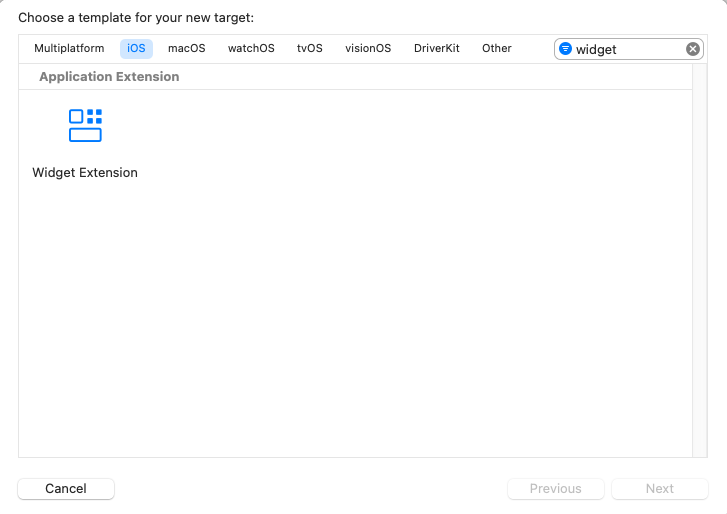
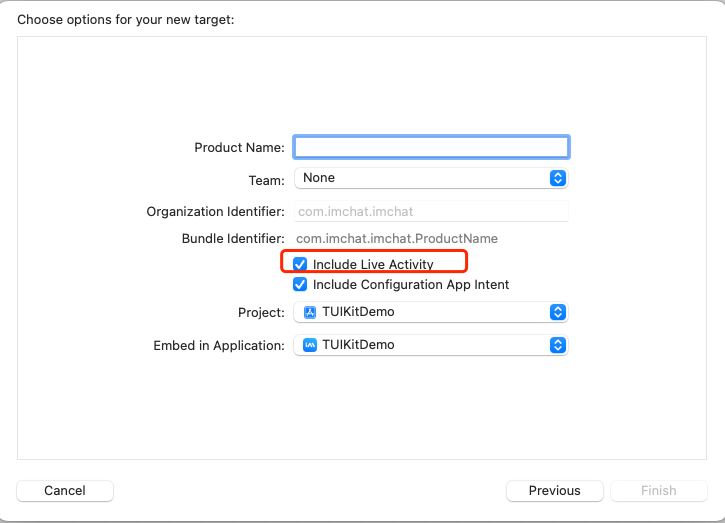
Step 3: Implement Code
1. Define Activity Attributes
Adapt the following implementation to fit your business data model. The ContentState struct holds data that can be updated dynamically. It is recommended to use activityID as the unique identifier for each LiveActivity.
import Foundationimport ActivityKitstruct LiveActivityAttributes: ActivityAttributes {public struct ContentState: Codable, Hashable {// Add dynamic stateful properties for your activity herevar text: Stringvar pauseTime: Date?var endTime: Date?}// Add fixed properties for your activity here// Custom activityID when creating a LiveActivityvar activityID: String}
2. Build UI
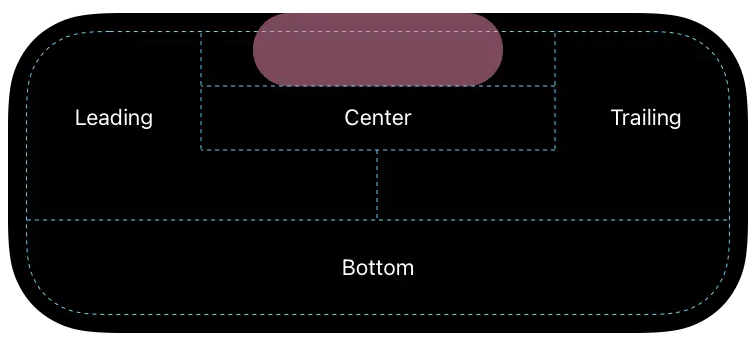
Implement the UI based on your business requirements, including layouts for both the lock screen and Dynamic Island.
import ActivityKitimport WidgetKitimport SwiftUIstruct LiveActivityLiveActivity: Widget {var body: some WidgetConfiguration {ActivityConfiguration(for: LiveActivityAttributes.self) { context in// Lock screen/banner UIVStack {Text("Hello \\(context.state.text)")}.activityBackgroundTint(Color.cyan).activitySystemActionForegroundColor(Color.black)} dynamicIsland: { context inDynamicIsland {// Expanded UI. Compose the expanded UI using// regions like leading, trailing, center, and bottomDynamicIslandExpandedRegion(.leading) {Text("Leading \\(context.attributes.activityID)\\(context.state.text)")}DynamicIslandExpandedRegion(.trailing) {Text("Trailing \\(context.state.text)")}DynamicIslandExpandedRegion(.center) {Text("Center \\(context.state.text)")}DynamicIslandExpandedRegion(.bottom) {Text("Bottom \\(context.state.text)")// Add more content as needed}} compactLeading: {Text("CL \\(context.state.text)")} compactTrailing: {Text("CT \\(context.state.text)")} minimal: {Text("CB \\(context.state.text)")}.widgetURL(URL(string: "https://www.tencentcloud.com/document/product/269/100621?from_cn_redirect=1")).keylineTint(Color.red)}}}
The Dynamic Island UI layout is structured as follows:
3. Client Operations: Start, Update, and Stop Logic
// startlet activity = try Activity.request(attributes: adventure,content: .init(state: initialState, staleDate: nil),pushType: .token)// updateawait activity.update(ActivityContent<AdventureAttributes.ContentState>(state: contentState,staleDate: Date.now + 15,relevanceScore: alert ? 100 : 50),alertConfiguration: alertConfig)// endawait activity.end(ActivityContent(state: finalContent, staleDate: nil), dismissalPolicy: dismissalPolicy)
4. Remote Reporting Configuration and Update Operations
Monitor token updates and reporting
Task {for await pushToken in activity.pushTokenUpdates {let pushTokenString = pushToken.hexadecimalStringLogger().debug("New push token: \\(pushTokenString)")try await self.setLiveActivity(activityID:activity.attributes.activityID, pushToken: pushToken)}}func setLiveActivity(activityID: String, pushToken: Data) async throws {var _apnsConfig = ImSDK_Plus.V2TIMLiveActivityConfig()_apnsConfig.businessID = xxxx // Replace with the P8 certificate ID you uploaded in the IM Console_apnsConfig.token = pushToken_apnsConfig.activityID = activityIDos_log("%@", type: .debug, "setLiveActivity activityID: \\(activityID)\\ntoken:\\(pushToken.hexadecimalString)")ImSDK_Plus.V2TIMManager.sharedInstance().setLiveActivity(_apnsConfig, succ: {print("setLiveActivity succ")}, fail: {code, desc inprint("setLiveActivity fail, \\(code), \\(desc)")})}
Report and clear LiveActivity
func clearActivity(activityID: String) async throws {os_log("clearActivity ID: \\(activityID)")ImSDK_Plus.V2TIMManager.sharedInstance().setLiveActivity(nil, succ: {print("clearActivity succ")}, fail: {code, desc inprint("clearActivity fail, \\(code), \\(desc)")})}
Update and end iOS real-time activities from the server.
Note:
LiveActivity push is limited to P8 certificates. You must configure a P8 certificate.
If the recipient does not report the corresponding activityID, the push will automatically downgrade to a standard notification.
JSON Object Format Specification for ApnsInfo.LiveActivity
Field Name | Type | Option | Description |
Event | String | Required | LiveActivity push event type: use start to start, update to update, and end to end. For details about LiveActivity in APNs, see the APNs documentation. |
AttributesType | String | Optional | Required when Event is start. The name of the LiveActivity attribute type. This must exactly match the structure name defined on the client. |
Attributes | JSON Object | Optional | Required when Event is start. A custom key:value object. These are static properties defined in the LiveActivity attribute type, used to initialize the LiveActivity, and must match the values in the client SDK. |
LaId | String | Optional | Required when Event is update or end. The LiveActivity identifier, which corresponds to the client activityID. Must not exceed 64 bytes. |
ContentState | JSON Object | Required | Required when Event is start, update, or end. A custom key:value object. These are dynamic properties defined in the LiveActivity attribute type, and must match the values in the client SDK. |
DismissalDate | Integer | Optional | When Event is end, this is the Unix timestamp for when the LiveActivity stops displaying on the lock screen. Defaults to the current time, so the lock screen will end immediately. |
Request Example:
For parameters omitted from or not listed in the example, see Sending One-to-One Messages, Sending One-to-One Messages in Batch, and offlinePushInfo.
{// Other parameters..."OfflinePushInfo": {"Title": "Offline push title","Desc": "Offline push content","Ext": "{\\"entity\\":{\\"k1\\":\\"v1\\",\\"k2\\":\\"v2\\"}}", // Pass-through field, recommended length no more than 1k"ApnsInfo": {"LiveActivity": {"Event": "update", // Update LiveActivity push"LaId": "timpush", // LiveActivity identifier, corresponds to client activityID, must not exceed 64 bytes"ContentState": {"k1": "v1","k2": "v2",...}}},"AndroidInfo": {... // See AndroidInfo field documentation for details}}}
{// Other parameters..."OfflinePushInfo": {"Title": "Offline push title","Desc": "Offline push content","Ext": "{\\"entity\\":{\\"k1\\":\\"v1\\",\\"k2\\":\\"v2\\"}}", // Pass-through field, recommended length no more than 1k"ApnsInfo": {"LiveActivity": {"LaId": "timpush","Event": "end", // End LiveActivity push"ContentState": {"k1": "v1","k2": "v2",...},"DismissalDate": 1739502750}},"AndroidInfo": {... // See AndroidInfo field documentation for details}}}
5. Remote Start (push-to-start) Configuration and Operation
Remote start (push-to-start) refers to launching a new LiveActivity from the server when the app is not running (even if the process has been terminated). This uses a separate token mechanism from remote update/end.
Note:
Remote start requires iOS 17.2 or later. iOS 17.1 and earlier only support remote update/end.
The push-to-start token is registered by ActivityAttributes type (attributesType), independent of specific activityID. Each activity type has its own token.
The app can be remotely launched even when not running, as long as
ActivityConfiguration(for: XXXAttributes.self) is implemented for that type in WidgetExtension.Listen for push-to-start token updates and report
Similar to the update token, use the
pushToStartTokenUpdates async sequence to listen and report via V2TIMLiveActivityConfig. The difference is: When reporting, set attributesType (activity type name); activityID is not required.// ActivityAttributes type monitored for remote startstruct LiveActivityAttributes: ActivityAttributes {public struct ContentState: Codable, Hashable {var k1: String?var k2: String?}var activityID: Stringvar k1: String?var k2: String?}// Remote start requires iOS 17.2 or aboveif #available(iOS 17.2, *) {Task {for await tokenData in Activity<LiveActivityAttributes>.pushToStartTokenUpdates {Logger().debug("New push-to-start token: \\(tokenData.hexadecimalString)")try await self.setStartLiveActivity(attributesType: "LiveActivityAttributes", pushToken: tokenData)}}}@available(iOS 17.2, *)func setStartLiveActivity(attributesType: String, pushToken: Data) async throws {let config = ImSDK_Plus.V2TIMLiveActivityConfig()config.businessID = xxxx // Replace with your P8 certificate ID uploaded in the IM Consoleconfig.token = pushToken// Remote start scenario: set attributesType (must exactly match the client ActivityAttributes class name), no need to set activityIDconfig.attributesType = attributesTypeImSDK_Plus.V2TIMManager.sharedInstance().setLiveActivity(config, succ: {print("setStartLiveActivity succ")}, fail: { code, desc inprint("setStartLiveActivity fail, \\(code), \\(desc)")})}
Note:
If you need to test or support multiple ActivityAttributes types, listen to
pushToStartTokenUpdates for each type separately, and report the corresponding attributesType for each.Remotely start iOS LiveActivity via server
Note:
P8 certificate configuration is required.
attributes-type must exactly match the client ActivityAttributes class name; otherwise, the system will not find the corresponding type and will discard it.Fields for
attributes and content-state must be decodable by the corresponding client ActivityAttributes and ContentState. If any required (non-optional) field is missing, the entire start will fail. The start event must include alert.APNs start request example:
{// Other parameters..."OfflinePushInfo": {"Title": "Offline push title","Desc": "Offline push content","Ext": "{\\"entity\\":{\\"k1\\":\\"v1\\",\\"k2\\":\\"v2\\"}}", // Pass-through field, recommended length no more than 1k"ApnsInfo": {"LiveActivity": {"Event": "start", // Start LiveActivity push"AttributesType": "LiveActivityAttributes", // LiveActivity attribute type name, must exactly match the type struct name defined on the client."Attributes":{"k1": "v1","k2": "k2",...},"ContentState": {"k1": "v1","k2": "v2",...}}},"AndroidInfo": {... // See AndroidInfo field documentation for details}}}
Bantuan dan Dukungan
Apakah halaman ini membantu?
Anda juga dapat Menghubungi Penjualan atau Mengirimkan Tiket untuk meminta bantuan.
masukan