Custom Definition Badge
Unduh
Mode fokus
Ukuran font
Feature overview
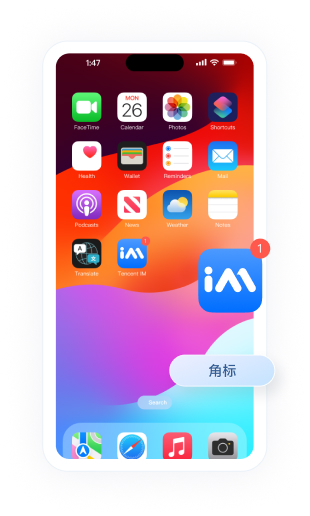
A badge is usually a red dot or number on the top-right of the app icon. It reminds users of unread items, such as unread chat messages in a social app or pending orders in an e-commerce app. This document describes manufacturer channel support for custom badges and how to implement the feature.
Example
Manufacturer channel support
Due to restrictions on different phone operating systems, not all manufacturer channels support custom badges. Support is as follows:
Device type | Custom badge supported | Remarks |
iOS | Supported | - |
Google FCM | Follows the system | Customization not supported |
Configuration
After you complete configuration for the manufacturers listed below, the app badge automatically follows the total unread Chat message count. No extra development is required. Behavior is as follows:
Baseline badge: When the app enters the background or the process exits, Chat SDK syncs the current total unread message count as the app badge. This count is the "baseline badge" for this session.
Incremental update: When the app is in the background or not running, each new offline push increments the badge by 1 based on the baseline badge, so users can see new message counts without opening the app.
Custom scenario: If the business has already set a custom badge value through an API, that custom value becomes the baseline badge. The increment rule stays the same.
Google FCM does not support custom badges.
To customize the badge, follow these steps:
1. The app calls the - (void)setAPNSListener:(id<V2TIMAPNSListener>)apnsListener API to set the listener.
2. The app implements the - (uint32_t)onSetAPPUnreadCount API, calculates the required badge total, and returns it.
// 1. Set the listener- (BOOL)application:(UIApplication *)application didFinishLaunchingWithOptions:(NSDictionary *)launchOptions {// Listen for push[V2TIMManager.sharedInstance setAPNSListener:self];// Listen for conversation unread count[[V2TIMManager sharedInstance] setConversationListener:self];return YES;}// 2. Save the unread count when it changes- (void)onTotalUnreadMessageCountChanged:(UInt64)totalUnreadCount {self.unreadNumber = totalUnreadCount;}// 3. Report the custom unread count when the app goes to the background/** After the app enters the background, customize the app unread count.* If not handled, the app unread count defaults to the sum of unread counts across all conversations.* <pre>** - (uint32_t)onSetAPPUnreadCount {* return 100; // Custom unread count* }** </pre>*/- (uint32_t)onSetAPPUnreadCount {// 1. Get the custom badgeuint32_t customBadgeNumber = ...// 2. Add the Chat message unread countcustomBadgeNumber += self.unreadNumber;// 3. Report to the Chat server through Chat SDKreturn customBadgeNumber;}
import ImSDK_Plusclass AppDelegate: UIResponder, UIApplicationDelegate, V2TIMAPNSListener, V2TIMConversationListener {// Store the unread countvar unreadNumber: UInt64 = 0// 1. Set the listenerfunc application(_ application: UIApplication, didFinishLaunchingWithOptions launchOptions: [UIApplication.LaunchOptionsKey: Any]?) -> Bool {// Listen for pushV2TIMManager.sharedInstance()?.setAPNSListener(self)// Listen for conversation unread countV2TIMManager.sharedInstance()?.setConversationListener(self)return true}// 2. Save the unread count when it changesfunc onTotalUnreadMessageCountChanged(_ totalUnreadCount: UInt64) {self.unreadNumber = totalUnreadCount}// 3. Report the custom unread count when the app goes to the background/// After the app enters the background, customize the app unread count./// If not handled, the app unread count defaults to the sum of unread counts across all conversations./// - Returns: Custom unread countfunc onSetAPPUnreadCount() -> UInt32 {// 1. Get the custom badgevar customBadgeNumber: UInt32 = 0 // ... Replace with your custom logic// 2. Add the Chat message unread countcustomBadgeNumber += UInt32(self.unreadNumber)// 3. Report to the Chat server through Chat SDKreturn customBadgeNumber}}
The Flutter Chat SDK provides methods with the same names as native. Usage is the same as native. Configure by referring to the iOS native and Android native sections above.
Supported manufacturers:
iOS
Custom badge steps:
1. Call registerPush to register the push service.
2. Listen for business badge changes, and sync the updated count to Push through setCustomBadgeNumber.
3. When the app goes to the background or offline, Push automatically updates the badge count based on offline messages.
4. When the app returns to the foreground, the business can continue to clear or update the badge count through this API.
Note:
1. Each time the app returns to the foreground, set the custom badge. Otherwise, on iOS devices, the badge count increases by 1 based on the previous custom value.
Bantuan dan Dukungan
Apakah halaman ini membantu?
Anda juga dapat Menghubungi Penjualan atau Mengirimkan Tiket untuk meminta bantuan.
masukan