tencent cloud

Video on Demand

Release Notes and Announcements
Release Notes
Announcements
Product Introduction
Overview
Product Features
Features
Strengths
Scenarios
Solutions
Professional Edition
Introduction to Video On Demand Professional Edition
Quick Start
Console Guide
Development Guide
Purchase Guide
Billing Overview
Billing Modes
Purchase Guide
Viewing Bills
Renewal
Overdue Policy
Refund Policy
Getting Started
Console Guide
Console Overview
Service Overview
Application Management
Media Management
Package Management
License Management
Real-Time Log Analysis
Practical Tutorial
Media Upload
Smart Cold Storage of VOD Media Asset Files
Video Processing
Distribution and Playback
How to Receive Event Notification
How to Migrate Files from Origin Server to VOD
Live Recording
How to Pull from Custom Origin Servers
How to Use EdgeOne to Distribute Content in VOD
Development Guide
Media Upload
Media Processing
Video AI
Event Notification
Video Playback
Media Encryption and Copyright Protection
Broadcast Channel
CAM
Media File Download
Subapplication System
Error Codes
Player SDK
Overview
Basic Concepts
Features
Free Demo
Free Trial License
Purchase Guide
SDK Download
Licenses
Player Guide
Integration (UI Included)
Integration (No UI)
Advanced Features
API Documentation
Player Adapter
Player SDK Policy
Server APIs
History
Introduction
API Category
Other APIs
Media Processing APIs
Parameter Template APIs
Task Management APIs
Media Upload APIs
Media Management APIs
Event Notification Relevant API
Media Categorization APIs
Domain Name Management APIs
Distribution APIs
AI-based Sample Management APIs
Region Management APIs
Data Statistics APIs
Carousel-Related APIs
Just In Time Transcode APIs
No longer recommended APIs
Making API Requests
AI-based image processing APIs
Task Flow APIs
Data Types
Error Codes
Video on Demand API 2024-07-18
FAQs
Mobile Playback
Fees
Video Upload
Video Publishing
Video Playback
Web Playback
Full Screen Playback
Statistics
Access Management
Cold Storage
Agreements
Service Level Agreement
VOD Policy
Privacy Policy
Data Processing And Security Agreement
Contact Us
Glossary

Service Overview

PDF
Focus Mode
Font Size
Last updated: 2023-08-18 09:59:44
Log in to the VOD console and the "Service Overview" page will be displayed by default. You can view the current usage of the VOD service, including data overview, product usage guide and billing status.

Data overview

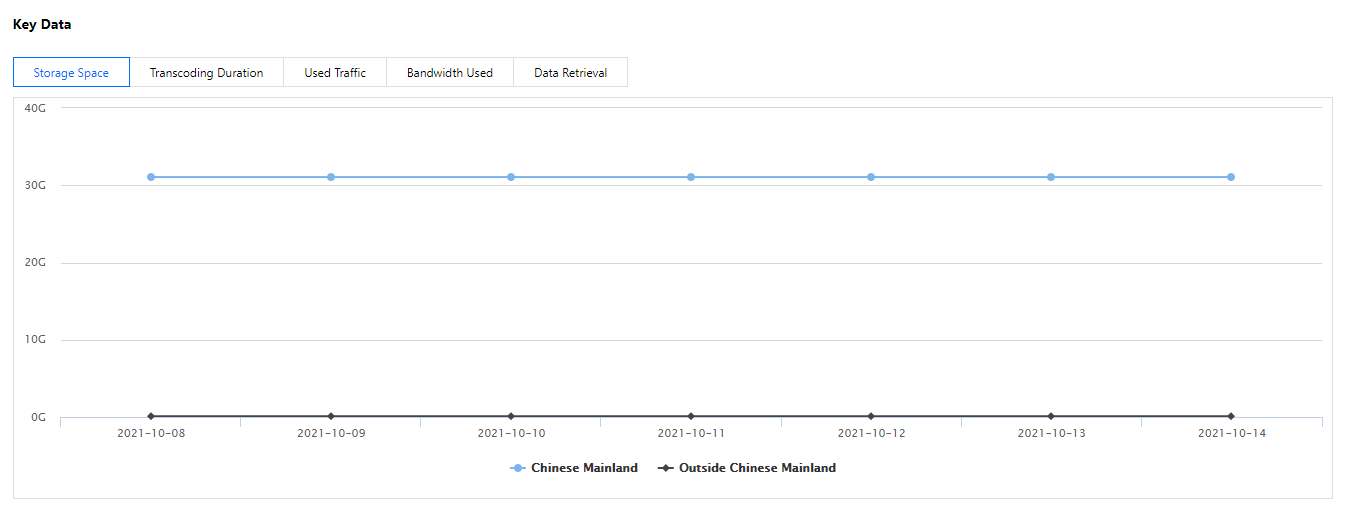
The data overview shows the resource usage information of the video on demand service in the current month, including the current total storage space, the total transcoding time of this month, the total traffic volume of this month, the total standard retrieval amount of this month, and the total moderation time of this month.


Display item
illustrate
Total current storage space
The total size of the storage capacity used by you in the video on demand console on the current day. (There may be discrepancies with the billing storage, please calculate the cost according to the bill details.)
Total transcoding time this month
The total duration of transcoding services (General transcoding, TSC transcoding, Adaptive bitrate streaming, and video editing) you used in the video on demand console in the current month.
Total traffic this month
The total traffic of the acceleration service you use in the video on demand console in the current month.
The total amount retrieved by standard this month
The total amount of storage you used for standard data retrieval in the video on demand console in the current month.
Total video review time this month
The total duration of the video review service you used in the video on demand console in the current month.
Note
The above indicator data is automatically refreshed on a daily basis.
If the sub-account needs to view the console data overview, the main account needs to authorize the sub-account TCOP access permission policy.

Product Guidelines

The user guide for video on demand products includes instructions for using functions such as media intelligent management, media processing, media AI, media encryption and copyright protection, media distribution and playback, and live on-demand conversion.


Billing

The billing status shows the billing method of the current cloud VOD account. When the billing method is daily settlement billing, the fees incurred on the previous day are settled from 12:00-18:00 every day; when the billing method is monthly settlement billing, the previous Billing will be made for monthly charges.


Item
Description
Current billing mode
Daily billing: for more information, please seePay-as-You-Go (Postpaid Daily Billing Cycle)
Monthly billing: please contact your Tencent Cloud rep for billing details
Billable bandwidth of current month (monthly billing)
Billable bandwidth of the current month for the current account.

Resource Pack Status

The resource pack status shows the total number of resource packs in the current cloud on-demand account 7 days before the expiration date, as well as the usage progress of each resource pack.


Note
Account usage is preferentially deducted from resource packs. For more details, see Resource Packs.

Common problem

Frequently Asked Questions mainly displays frequently asked questions and answers about billing and data related by current users. You can click to view more and learn about other types of frequently asked questions.


Help and Support

Was this page helpful?

Help us improve! Rate your documentation experience in 5 mins.

Feedback