HTTP/2
ダウンロード
フォーカスモード
フォントサイズ
HTTP/2とは何ですか?
EdgeOneはクライアントがHTTP/2プロトコルでリクエストを開始することをサポートします。HTTP/2(HTTP 2.0、ハイパーテキスト転送プロトコル第2版)は、HTTPプロトコルの2番目のメジャーバージョンであり、ネットワーク遅延を効果的に削減し、サイトページの読み込み速度を向上させることができます。
利用制限
アップロードシナリオ:EdgeOneのデフォルトフロー制御ウィンドウの制限により、大きなファイルのアップロードではウィンドウが枯渇して転送速度が低下する可能性があります。512 KBを超えるファイルをアップロードする必要がある場合は、HTTP/2を有効にすることは推奨されません。
ダウンロードシナリオ:クライアントまたはサーバーのHTTP/2実装で宣言されているフロー制御ウィンドウのサイズを評価することをお勧めします。クライアントのウィンドウが小さい場合(モバイル端末の弱いネットワーク環境など)、HTTP/2を有効にしても期待される加速効果が得られない可能性があります。なお、HTTP/2のフロー制御ウィンドウは512 KBです。
注意:
1. クライアントリクエストがHTTP/2を使用しない場合、EdgeOneはHTTP 1.xプロトコルでのアクセスを互換します。
2. アクセスリクエストの設定についてはこのドキュメントを参照してください。HTTP/2オリジンサーバーへの接続を設定する必要がある場合は、HTTP/2オリジンサーバーへの接続を参照してください。
3. 2023年11月23日より、セキュリティ上の考慮事項(詳細はHTTP/2プロトコルの脆弱性に対するDDoS攻撃対策を参照してください)により、増分サイトではHTTP/2はデフォルトで無効に保たれ、ユーザーは必要に応じて有効にできます。
前提条件
操作手順
シナリオ1:サイト内の全ドメインに対するHTTP/2サポートの変更
アクセスポイント全体に対してHTTP/2を有効化または無効化する必要がある場合は、以下の手順を参照してください:
1. EdgeOneコンソールにログインし、左側のメニューバーで「サービス概要」に入り、「Webサイト安全な加速」内で設定が必要なサイトをクリックします。
2. サイト詳細ページで「サイト加速」をクリックし、サイト全体設定ページに入り、右側のナビゲーションバーで「ネットワーク最適化」をクリックします。
3. HTTP/2設定カードを見つけます。デフォルトではオフになっています。「スイッチ」をクリックして設定を有効にします。

シナリオ2:指定ドメインに対するHTTP/2の有効化
指定されたドメインに対してのみHTTP/2を有効化または無効化する必要がある場合は、以下の手順を参照してください:
1. EdgeOneコンソールにログインし、左側のメニューバーで「サービス概要」に入り、「Webサイト安全な加速」内で設定が必要なサイトをクリックします。
2. サイト詳細ページで「サイト加速」をクリックし、サイト全体設定ページに入り、「ルールエンジン」タブをクリックします。
3. ルールエンジンページで「ルールを作成」をクリックし、「新しい空白のルールを追加」を選択します。
4. ルール編集ページで、指定されたドメインのリクエストをマッチングするために、Hostマッチングタイプを選択します。
5. 「操作」>「選択ボックス」をクリックし、表示される操作リスト内で操作として「HTTP/2」を選択し、「スイッチ」をクリックして有効または無効に設定します。
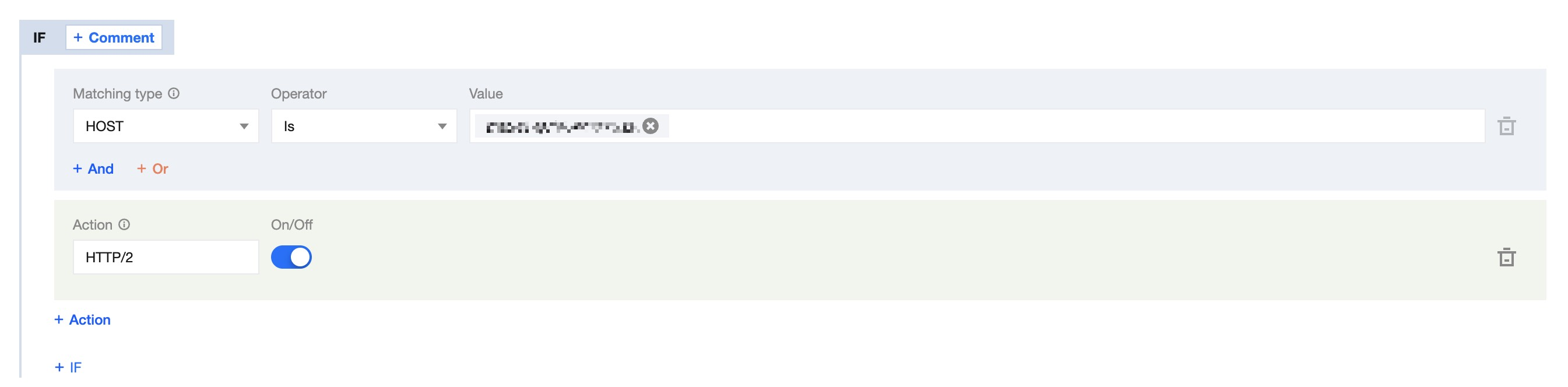
6. 「保存して公開」をクリックすると、このルールの設定が完了します。
HTTP/2トラフィック統計の説明
HTTP/2のプロトコルスイッチは、単一のドメインではなくTLS接続に作用します。そのため、複数のドメインが同じ接続を共有するシナリオでは、「あるドメインでHTTP/2が有効になっていないにもかかわらずH2トラフィックが発生する」または「H2トラフィックが特定のドメインに集中する」という現象が発生する可能性があります。これはHTTP/2の想定される動作です。
具体的な説明は以下の通りです:
前提条件:複数のドメイン名が同じIPに解決され、かつ同一証明書のSANがこれらのドメイン名を同時にカバーしていること。
1、HTTP/2のトラフィックは、接続確立時に使用されたSNIドメイン名に基づいて統計されます。例えば、AとBの2つのドメインでHTTP/2が有効になっており、接続確立時に使用されたSNIドメイン名がBである場合、この接続上のHTTP/2トラフィックはすべてBドメインに統計されます。
2、AドメインでHTTP/2が無効になり、BドメインでHTTP/2が有効になっていると仮定します。接続確立時に使用されたSNIドメイン名がAである場合、Bドメインがこの接続を再利用してリクエストを送信すると、HTTP/2が無効になっているAドメインにもHTTP/2トラフィックが統計されます。
フィードバック