Android(Compose)
Download
Focus Mode
Font Size
Component Overview
ChatSetting is a set of chat settings components built with Jetpack Compose. It mainly includes two core components: One-to-One Chat Settings (
C2CChatSetting) and Group Chat Settings (GroupChatSetting). These components provide complete conversation management features, including user information management, permission settings, and group management, and support hiding, replacing, and adding setting items.One-to-One Chat Settings Interface | Group Chat Settings Interface |
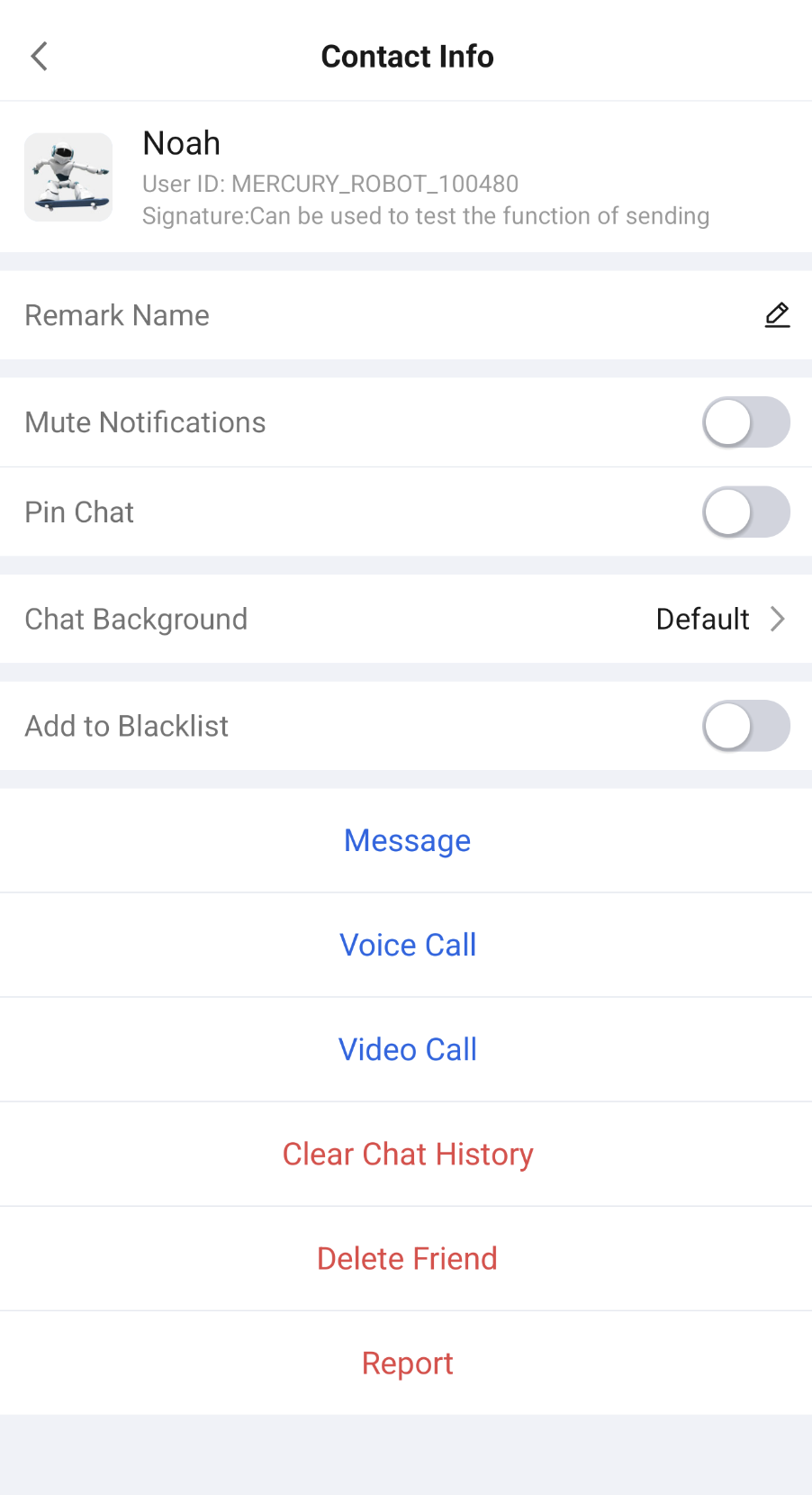 | 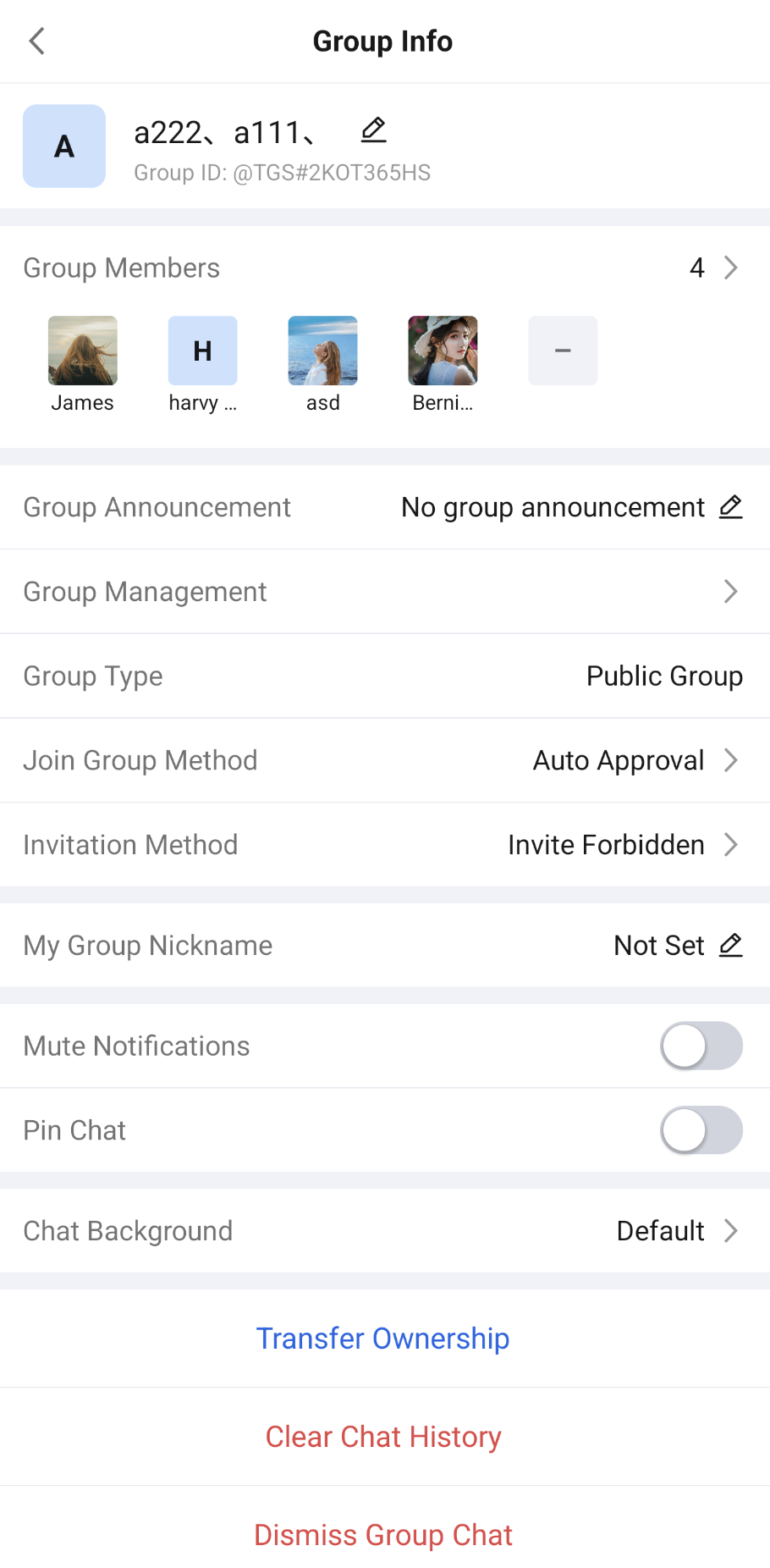 |
Component Integration
ChatSetting is a component of TUIKit Compose. Integrate TUIKit Compose to get and use ConversationList. For detailed integration steps, see the TUIKit Compose documentation.
Component Structure
ChatSetting includes two main components: C2CChatSetting (
One-to-One Chat Settings) and GroupChatSetting (Group Chat Settings). Each component provides a rich set of configuration options.One-to-One Chat Settings (C2CChatSetting)
Public Methods
Method | Parameter | Description |
C2CChatSetting | userID: String | The user ID of the chat target. |
| modifier: Modifier | Used in Jetpack Compose to set the component's style, layout, behavior, and appearance. |
| onSendMessageClick: () -> Unit | Callback for the "Message" button click. You typically navigate to the chat page with this user in this callback. Optional parameter. |
| onContactDeleted: () -> Unit | Callback after a friend is deleted successfully. You typically close the settings page in this callback. When "Delete Friend" is clicked, the component shows a confirmation dialog first and deletes the friend only after the user confirms. Optional parameter. |
| onVoiceCallClick: (() -> Unit)? | Callback for the "Voice Call" button click. Optional parameter. When it is null, the component starts a voice call to this user directly (TUICallKit integration is required). |
| onVideoCallClick: (() -> Unit)? | Callback for the "Video Call" button click. Optional parameter. When it is null, the component starts a video call to this user directly (TUICallKit integration is required). |
| config: C2CChatSettingConfigProtocol | One-to-one chat settings configuration. It controls the display of each setting item and supports editing setting items. The default value is C2CChatSettingConfig(). |
| c2cChatSettingViewModelFactory: C2CChatSettingViewModelFactory | Factory for creating the internal C2CChatSettingViewModel. Typically, you do not need to create it manually, as the component provides a default implementation. |
Group Chat Settings (GroupChatSetting)
Public Methods
Method | Parameter | Description |
GroupChatSetting | groupID: String | Group ID used to identify the group chat. |
| modifier: Modifier | Used in Jetpack Compose to set the component's style, layout, behavior, and appearance. |
| onGroupMemberClick: (GroupMember) -> Unit | Callback when a group member is clicked. You typically navigate to that member's profile page in this callback. Optional parameter. |
| onGroupDeleted: () -> Unit | Callback after leaving or dismissing the group chat succeeds. You typically close the settings page in this callback. Optional parameter. |
| config: GroupChatSettingConfigProtocol | Group chat settings configuration. It controls the display of each setting item and supports editing setting items. The default value is GroupChatSettingConfig(). |
| groupChatSettingViewModelFactory: GroupChatSettingViewModelFactory | Factory for creating the internal GroupChatSettingViewModel. Typically, you do not need to create it manually, as the component provides a default implementation. |
Basic Usage
Initialize
C2CChatSetting to display the one-to-one chat settings page directly. Sample code:import androidx.compose.foundation.layout.Boximport androidx.compose.foundation.layout.fillMaxSizeimport androidx.compose.foundation.layout.systemBarsPaddingimport androidx.compose.runtime.Composableimport androidx.compose.ui.Modifierimport io.trtc.tuikit.chat.uikit.components.chatsetting.ui.C2CChatSetting@Composablefun C2CChatSettingScreen(userID: String,onOpenChat: (conversationID: String) -> Unit,onClose: () -> Unit) {Box(modifier = Modifier.fillMaxSize().systemBarsPadding()) {C2CChatSetting(userID = userID,onSendMessageClick = {// Click "Message" to open the chat page with this useronOpenChat("c2c_$userID")},onContactDeleted = {// Friend deleted successfully. Close the current pageonClose()})}}
Initialize
GroupChatSetting to display the group chat settings page directly. Sample code:import androidx.compose.foundation.layout.Boximport androidx.compose.foundation.layout.fillMaxSizeimport androidx.compose.foundation.layout.systemBarsPaddingimport androidx.compose.runtime.Composableimport androidx.compose.ui.Modifierimport io.trtc.tuikit.chat.uikit.components.chatsetting.ui.GroupChatSetting@Composablefun GroupChatSettingScreen(groupID: String,onOpenUserProfile: (userID: String) -> Unit,onClose: () -> Unit) {Box(modifier = Modifier.fillMaxSize().systemBarsPadding()) {GroupChatSetting(groupID = groupID,onGroupMemberClick = { member ->// Group member clicked. Open this member's profile pageonOpenUserProfile(member.userID)},onGroupDeleted = {// Left or dismissed the group chat successfully. Close the current pageonClose()})}}
Customization
You can hide, replace, or add setting items. The methods are as follows.
Hide Setting Items
Use the properties in
C2CChatSettingConfig and GroupChatSettingConfig to control whether each setting item is displayed. The default value of every property is true.One-to-One Chat Setting Properties
Property | Item ID | Setting Item |
isShowHeader | ChatSettingItemIDs.C2C_HEADER | User profile at the top (avatar, nickname, user ID, and signature) |
isShowRemark | ChatSettingItemIDs.C2C_REMARK | Remark Name |
isShowDoNotDisturb | ChatSettingItemIDs.C2C_DO_NOT_DISTURB | Mute Notifications |
isShowPin | ChatSettingItemIDs.C2C_PIN | Pin Chat |
isShowChatBackground | ChatSettingItemIDs.C2C_CHAT_BACKGROUND | Chat Background |
isShowBlacklist | ChatSettingItemIDs.C2C_BLACKLIST | Add to Blacklist |
isShowSendMessage | ChatSettingItemIDs.C2C_SEND_MESSAGE | Message |
isShowVoiceCall | ChatSettingItemIDs.C2C_VOICE_CALL | Voice Call |
isShowVideoCall | ChatSettingItemIDs.C2C_VIDEO_CALL | Video Call |
isShowClearHistory | ChatSettingItemIDs.C2C_CLEAR_HISTORY | Clear Chat History |
isShowDeleteFriend | ChatSettingItemIDs.C2C_DELETE_FRIEND | Delete Friend |
Group Chat Setting Properties
Property | Item ID | Setting Item |
isShowHeader | ChatSettingItemIDs.GROUP_HEADER | Group profile at the top (group avatar, group name, and group ID) |
isShowMemberPreview | ChatSettingItemIDs.GROUP_MEMBER_PREVIEW | Group Member Preview |
isShowNotice | ChatSettingItemIDs.GROUP_NOTICE | Group Announcement |
isShowManagement | ChatSettingItemIDs.GROUP_MANAGEMENT | Group Management |
isShowGroupType | ChatSettingItemIDs.GROUP_TYPE | Group Type |
isShowJoinMethod | ChatSettingItemIDs.GROUP_JOIN_METHOD | Join Group Method |
isShowInviteMethod | ChatSettingItemIDs.GROUP_INVITE_METHOD | Invitation Method |
isShowAlias | ChatSettingItemIDs.GROUP_ALIAS | My Group Nickname |
isShowDoNotDisturb | ChatSettingItemIDs.GROUP_DO_NOT_DISTURB | Mute Notifications |
isShowPin | ChatSettingItemIDs.GROUP_PIN | Pin Chat |
isShowChatBackground | ChatSettingItemIDs.GROUP_CHAT_BACKGROUND | Chat Background |
isShowTransferOwner | ChatSettingItemIDs.GROUP_TRANSFER_OWNER | Transfer Ownership |
isShowClearHistory | ChatSettingItemIDs.GROUP_CLEAR_HISTORY | Clear Chat History |
isShowDeleteAndQuit | ChatSettingItemIDs.GROUP_DELETE_AND_QUIT | Leave Group |
isShowDismiss | ChatSettingItemIDs.GROUP_DISMISS | Dismiss Group Chat |
The following example hides "Add to Blacklist" and the audio/video call buttons in one-to-one chat settings, and adds a "Report" button at the end of the bottom action button area through customActions:
import io.trtc.tuikit.chat.uikit.components.chatsetting.config.C2CChatSettingConfigimport io.trtc.tuikit.chat.uikit.components.chatsetting.ui.C2CChatSettingimport io.trtc.tuikit.chat.uikit.components.chatsetting.ui.SettingRowButtonimport io.trtc.tuikit.chat.uikit.components.chatsetting.ui.SettingRowButtonStyleC2CChatSetting(userID = userID,config = C2CChatSettingConfig(isShowBlacklist = false, // Hide "Add to Blacklist"isShowVoiceCall = false, // Hide "Voice Call"isShowVideoCall = false // Hide "Video Call"),customActions = {// Displayed at the end of the bottom action button areaSettingRowButton(title = "Report",style = SettingRowButtonStyle.DANGER,onClick = {// Open the report page})})
Edit Setting Items
To replace, move, or add setting items, edit them through
customizeItems of C2CChatSettingConfig or GroupChatSettingConfig. In customizeItems, you can get the current chat target through editorContext.userID (one-to-one chat) or editorContext.groupID (group chat), get the Android Context through editorContext.androidContext, and call the following methods to edit setting items:Method | Description |
add(item) | Adds a setting item at the end. Throws IllegalArgumentException if the item ID is blank or duplicates an existing setting item. |
remove(ID) | Removes the setting item with the specified ID. Returns false if it does not exist. |
replace(ID) { item -> ... } | Replaces the setting item with the specified ID. Returns false if it does not exist. The replaced setting item must keep the same ID; otherwise, an exception is thrown. |
insertBefore(anchorID, item) / insertAfter(anchorID, item) | Inserts a setting item before or after the anchor setting item. Returns false and does not insert if the anchor does not exist. The ID rules for item are the same as for add. |
moveBefore(ID, anchorID) / moveAfter(ID, anchorID) | Moves a setting item before or after the anchor setting item. Returns false if either ID does not exist. |
clear() | Removes all setting items. |
items | Read-only snapshot of the current setting item list. |
The fields of the setting item
ChatSettingCustomItem are as follows:Field | Type | Description |
ID | String | Unique identifier of the setting item. Required. |
sectionID | String? | Section ID that the setting item belongs to. Defaults to null and cannot be a blank string. |
contentFactory | @Composable (C) -> Unit | Content of the setting item. The parameter is editorContext. It is C2CChatSettingItemContext for one-to-one chats and GroupChatSettingItemContext for group chats. |
Adjacent setting items with the same sectionID are displayed in the same section. Setting items within a section are separated by dividers, and sections are separated by spacing. Setting items whose sectionID is null are displayed separately. The default section IDs are defined in
ChatSettingSectionIDs:Section ID | Included Default Setting Items |
ChatSettingSectionIDs.C2C_REMARK | Remark Name |
ChatSettingSectionIDs.C2C_SWITCHES | Mute Notifications, Pin Chat |
ChatSettingSectionIDs.C2C_CHAT_BACKGROUND | Chat Background |
ChatSettingSectionIDs.C2C_BLACKLIST | Add to Blacklist |
ChatSettingSectionIDs.C2C_ACTIONS | Message, Voice Call, Video Call, Clear Chat History, Delete Friend, and customActions |
ChatSettingSectionIDs.GROUP_SETTINGS | Group Announcement, Group Management, Group Type, Join Group Method, Invitation Method |
ChatSettingSectionIDs.GROUP_ALIAS | My Group Nickname |
ChatSettingSectionIDs.GROUP_SWITCHES | Mute Notifications, Pin Chat |
ChatSettingSectionIDs.GROUP_CHAT_BACKGROUND | Chat Background |
ChatSettingSectionIDs.GROUP_ACTIONS | Transfer Ownership, Clear Chat History, Leave Group, Dismiss Group Chat |
The sectionID of the profile at the top (C2C_HEADER, GROUP_HEADER) and the group member preview (GROUP_MEMBER_PREVIEW) is null.
For custom setting item content, you can use the following components provided by the component to keep the same style as the default setting items:
Component | Description |
SettingRowNavigate(title, value, showArrow, customAccessoryResId, onClick) | A setting row with a title on the left and text and an arrow on the right. It is not clickable when onClick is null. |
SettingRowToggle(title, checked, onCheckedChange) | A setting row with a switch. |
SettingRowButton(title, style, onClick) | A button row with centered text. Style supports NORMAL (default), LINK (link color), and DANGER (error color). |
The following example hides "Group Type" in group chat settings, adds a switch after "Pin Chat", and adds a separate section after "Chat Background":
import androidx.compose.runtime.getValueimport androidx.compose.runtime.mutableStateOfimport androidx.compose.runtime.rememberimport androidx.compose.runtime.setValueimport io.trtc.tuikit.chat.uikit.components.chatsetting.config.GroupChatSettingConfigimport io.trtc.tuikit.chat.uikit.components.chatsetting.model.ChatSettingCustomItemimport io.trtc.tuikit.chat.uikit.components.chatsetting.model.ChatSettingItemIDsimport io.trtc.tuikit.chat.uikit.components.chatsetting.model.ChatSettingSectionIDsimport io.trtc.tuikit.chat.uikit.components.chatsetting.ui.GroupChatSettingimport io.trtc.tuikit.chat.uikit.components.chatsetting.ui.SettingRowNavigateimport io.trtc.tuikit.chat.uikit.components.chatsetting.ui.SettingRowToggleval groupSettingConfig = GroupChatSettingConfig(isShowGroupType = false // Hide "Group Type").customizeItems {// Add it to the section that contains "Mute Notifications" and "Pin Chat", and place it after "Pin Chat"insertAfter(ChatSettingItemIDs.GROUP_PIN,ChatSettingCustomItem(ID = "custom.group.showMemberNickname",sectionID = ChatSettingSectionIDs.GROUP_SWITCHES) {// The switch state in this example is stored in memory only. Bind it to your business data in actual usevar checked by remember { mutableStateOf(true) }SettingRowToggle(title = "Show Group Member Nicknames",checked = checked,onCheckedChange = { checked = it })})// Add a separate section after "Chat Background"insertAfter(ChatSettingItemIDs.GROUP_CHAT_BACKGROUND,ChatSettingCustomItem(ID = "custom.group.files",sectionID = "custom.section.groupFiles") { itemContext ->SettingRowNavigate(title = "Group Files",onClick = {// Open the group files page. itemContext.groupID is the current group ID})})}GroupChatSetting(groupID = groupID,config = groupSettingConfig)
Note:
In group chat settings, "Group Management", "Mute Notifications", "Pin Chat", "Transfer Ownership", "Clear Chat History", "Leave Group", and "Dismiss Group Chat" are hidden automatically based on the group type and the current user's group role.
For example, users who are not the group owner cannot see "Transfer Ownership" or "Dismiss Group Chat". Setting items replaced through replace remain subject to permission control as long as the ID is unchanged. Newly added setting items are not subject to permission control, so decide whether to display them yourself.
When inserting a setting item, if the anchor setting item is already hidden by a property, insertBefore / insertAfter returns false and does not insert.
Help and Support
Was this page helpful?
You can also Contact sales or Submit a Ticket for help.
Help us improve! Rate your documentation experience in 5 mins.
Feedback