tencent cloud

CVM Dedicated Host

Product Introduction
Overview
Regions and Zones
Strengths
Models
Purchase Guide
How to Purchase
Operation Guide
Querying CDH Instance Information
Search CDH Instance
Rename CDH Instance
Export List of CDH Instance
Assigning CVM Instances
Log into Dedicated CVM
Export List of Dedicated CVM
CVM Configuration Adjustment
Terminating Dedicated CVMs
Migrating Instances Among
FAQs
Billing
Hosts
CVM-related
문서CVM Dedicated HostOperation GuideExport List of CDH Instance

Export List of CDH Instance

PDF
포커스 모드
폰트 크기
마지막 업데이트 시간: 2019-09-20 17:16:28
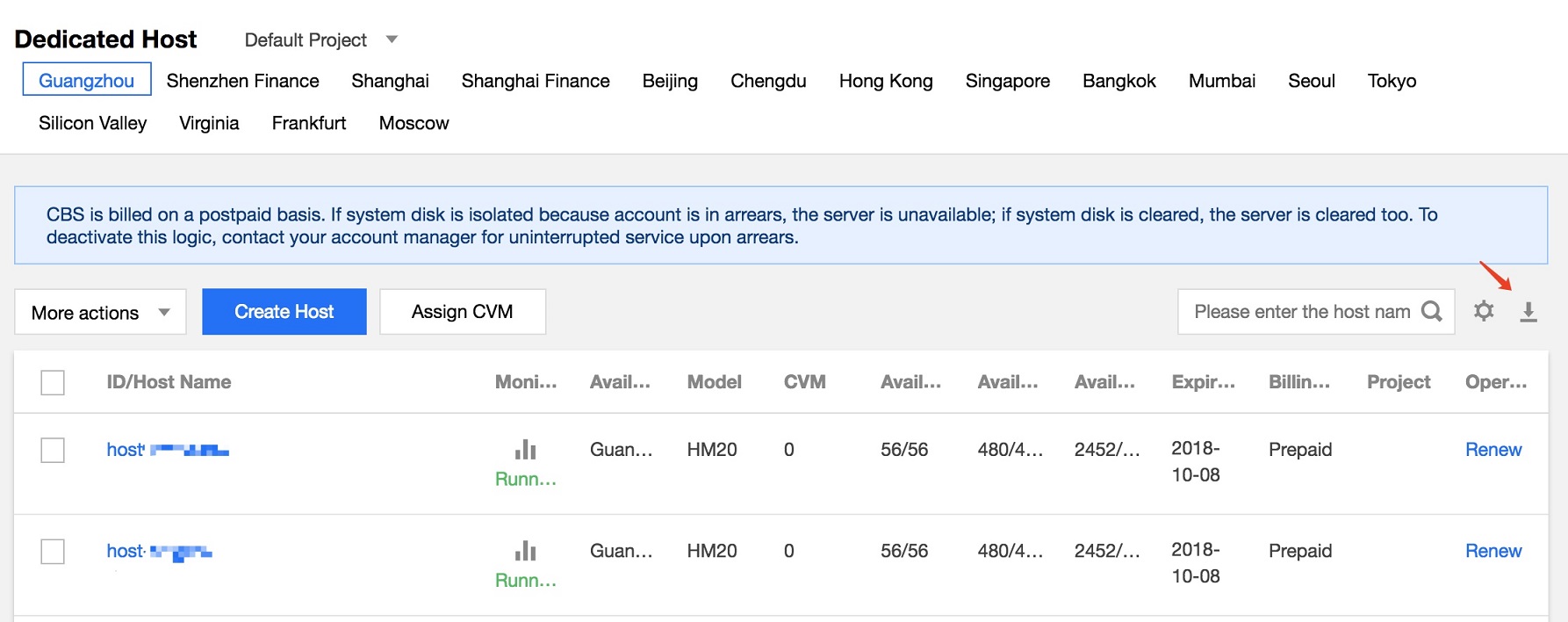
You can export the list of instances on CDH deployed in a specific region in the console. The exported fields include ID, name, model, status, number of instances, availability zone, number of available CPU cores, number of total CPU cores, available memory, total memory, available disk size, total disk size, creation time and expiration time.

Steps

1. Log in to the CDH Console.
2. Select a region and click the download icon as shown below.

3. Download the cvm.csv which contains the following items:
Export file


도움말 및 지원

문제 해결에 도움이 되었나요?

피드백