CLB(Cloud Load Balancer)에서 클라이언트 리얼 IP 가져오기 관련 참고 사항
모든 레이어 4(TCP/UDP/TCP SSL) 및 레이어 7(HTTP/HTTPS) CLB 서비스는 추가 구성 없이 백엔드 CVM 인스턴스에서 직접 실제 클라이언트 IP 가져오기를 지원합니다.
레이어 4 CLB의 경우 백엔드 CVM 인스턴스에서 얻은 원본 IP는 클라이언트 IP입니다.
레이어 7 CLB의 경우 X-Forwarded-For 또는 remote_addr 필드를 사용하여 클라이언트 IP를 직접 가져올 수 있습니다. 레이어 7 CLB의 액세스 로그는 Configuring Access Logs를 참고하십시오.
설명:
레이어 4 CLB의 경우 백엔드 CVM 인스턴스에서 추가 구성 없이 클라이언트 IP를 직접 가져올 수 있습니다.
SNAT가 활성화된 다른 레이어 7 로드 밸런싱 서비스의 경우 백엔드 CVM 인스턴스를 구성한 다음 X-Forwarded-For를 사용하여 실제 클라이언트 IP를 가져와야 합니다.
다음은 일반적으로 사용되는 애플리케이션 서버 구성 스키마입니다.
IIS 6 구성 스키마
1. F5XForwardedFor 플러그인 모듈을 다운로드하여 설치하고 서버 운영 체제 버전에 따라 x86\\Release 또는 x64\\Release 디렉터리의 F5XForwardedFor.dll을 특정 디렉터리(예시: 본문의 C:\\ISAPIFilters)에 복사하고 IIS 프로세스에 이 디렉터리에 대한 읽기 권한이 있는지 확인합니다.
2. IIS 관리자를 열고 현재 열려 있는 웹 사이트를 찾은 다음 웹 사이트를 우클릭하고 속성을 선택하여 속성 페이지를 엽니다.
4. 필터 속성 추가/편집 창에서 ‘필터 이름’에 ‘F5XForwardedFor’를 입력하고 ‘실행 파일’에 F5XForwardedFor.dll의 전체 경로를 입력한 다음 확인을 클릭합니다.
5. 구성을 적용하려면 IIS 서버를 다시 시작합니다.
IIS 7 구성 스키마
1. F5XForwardedFor 플러그인 모듈을 다운로드하여 설치하고 서버 운영 체제 버전에 따라 x86\\Release 또는 x64\\Release 디렉터리의 F5XFFHttpModule.dll 및 F5XFFHttpModule.ini를 특정 디렉터리(예시: 본문의 C:\\x_forwarded_for)에 복사하고 IIS 프로세스에 이 디렉터리에 대한 읽기 권한이 있는지 확인합니다.
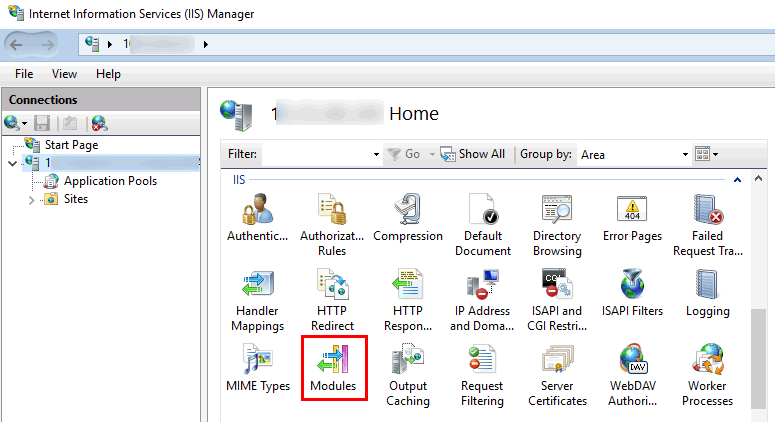
2. IIS 서버를 선택하고 모듈을 더블클릭합니다.
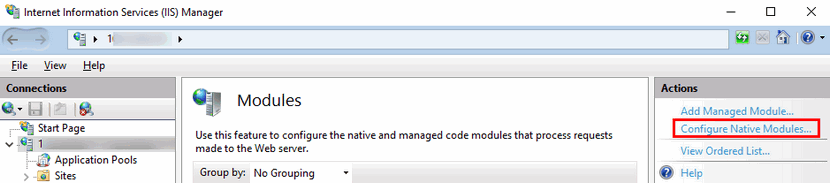
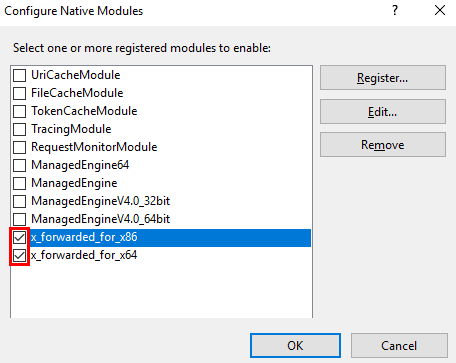
3. 네이티브 모듈 구성을 클릭합니다.
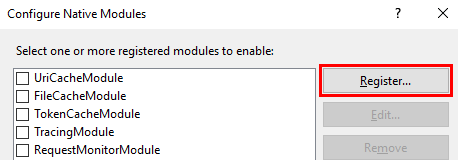
4. 팝업 창에서 등록을 클릭합니다.
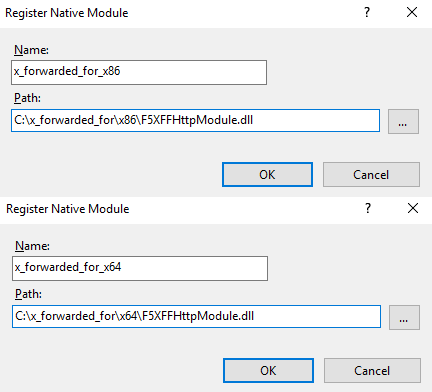
5. 다운로드한 DLL 파일을 아래와 같이 추가합니다.
6. 파일을 추가한 후 파일을 선택하고 확인을 클릭합니다.
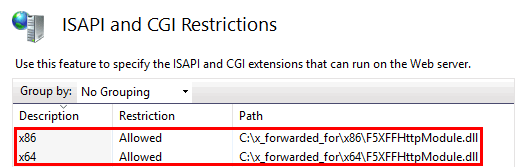
7. ‘ISAPI 및 CGI 제한’에 위의 두 DLL 파일을 추가하고 제한을 허용으로 설정합니다.
2. 파일 끝에 다음을 추가하여 Apache 구성 /etc/httpd/conf/httpd.conf를 수정합니다.
LoadModule rpaf_module modules/mod_rpaf-2.0.so
RPAFenable On
RPAFsethostname On
RPAFproxy_ips IP 주소(CLB에서 제공하는 공중망 IP가 아니며, 특정 IP에 대해서는 Apache 로그를 조회하고, 일반적으로 두 개의 IP 주소가 있으며 둘 다 입력해야 함)
RPAFheader X-Forwarded-For
3. 위의 내용을 추가한 후 Apache를 다시 시작합니다.
/usr/sbin/apachectl restart
Nginx 구성 스키마
1. Nginx를 서버로 사용할 때 http_realip_module을 사용하여 실제 클라이언트 IP를 가져올 수 있습니다. 그러나 이 모듈은 기본적으로 Nginx에 설치되어 있지 않으며 --with-http_realip_module을 추가하려면 Nginx를 다시 컴파일해야 합니다.