Anti-DDoS EIPs can only be created by the standard account type. If you are unsure of your account type, see EIP - Account Type Description.
Currently, Anti-DDoS EIPs are available in the following regions: Beijing, Guangzhou, Hong Kong (China), Singapore, Silicon Valley, Frankfurt, Tokyo, Virginia, São Paulo, and Jakarta. If you need to use it in the Shanghai region, please submit a ticket for consultation.
If you have already created a general BGP bandwidth package in the required region, you can skip this step and proceed to Step 3.
Step 3: Creating an Anti-DDoS EIP
1. Log in to the CVM console. In the left operation column, click Public IP.
2. On the public IP address page, select the region and click Apply.
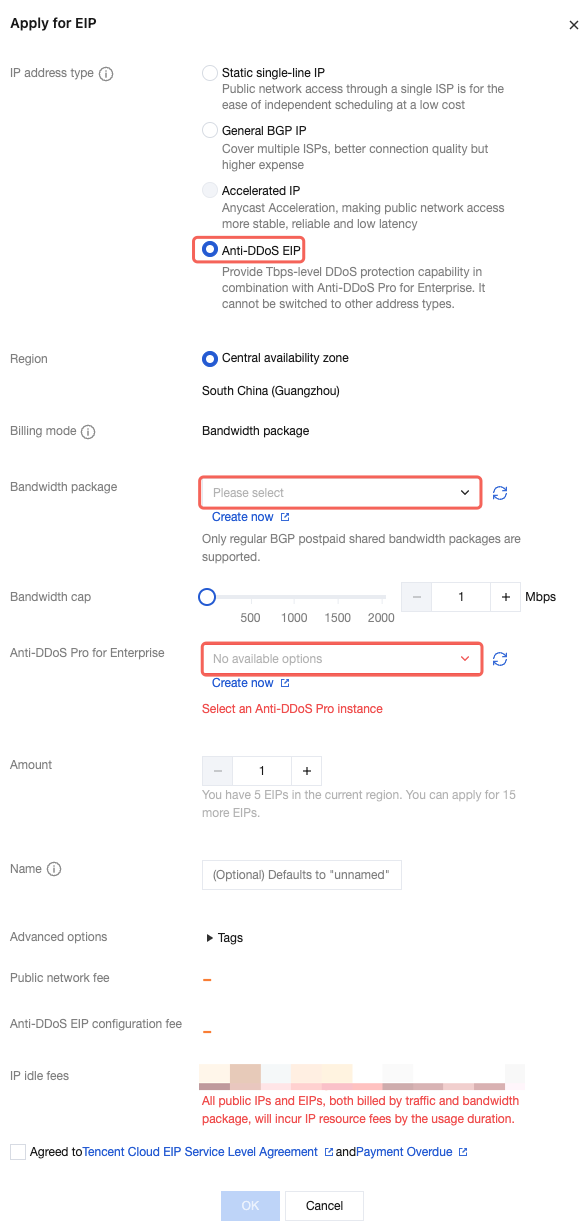
3. In the Apply for EIP window, configure the parameters, and click Confirm to complete the EIP application.
Parameter
Description
IP Address Type
Select Anti-DDoS EIP.
Billing Mode
No selection is required. Anti-DDoS EIPs only support the BWP billing mode.
Bandwidth Package
Select the general BGP BWP to be added.
Bandwidth Cap
Set the bandwidth cap as needed and allocate bandwidth resources appropriately.
Anti-DDoS Pro for Enterprise
Select the Anti-DDoS Pro for Enterprise to be bound.
Quantity
Specify the number of EIPs to apply for as needed and ensure that the total number of EIPs does not exceed the total quota for the product. For more information, see Use Limits.
Name
EIP instance name, which is not required.
Tag
If you need to add tags, you can add them here. Then, you can perform permission management by tags.