Tencent Cloud accounts are divided into the Standard Account Type and the Traditional Account Type in the public network attribute. Since the latter will not support new features in the future, if your account is the Traditional Account Type, it is recommended to upgrade it to the Standard Account Type.
Note
The upgrade operation is irreversible, that is, the standard account type cannot be downgraded to the traditional account type.
Determining Account Type
All accounts registered after 00:00 AM on June 17, 2020, are the Standard Account Type. However, some new account registration channels (such as mini programs, enterprise accounts under an organization account, and international site channel merchant accounts) may have overlooked the registration of the Standard Account Type. This issue has been fixed now. You can check your account type using the following two methods:
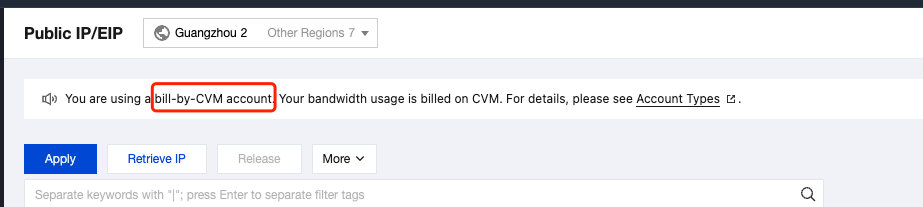
Log in to the public IP address console. At the top of the public IP address instance list page, check whether there is a prompt message.
If there is no prompt message, your account is the Standard Account Type.
If there is the following prompt message, your account is the Traditional Account Type.
Account Type Differences
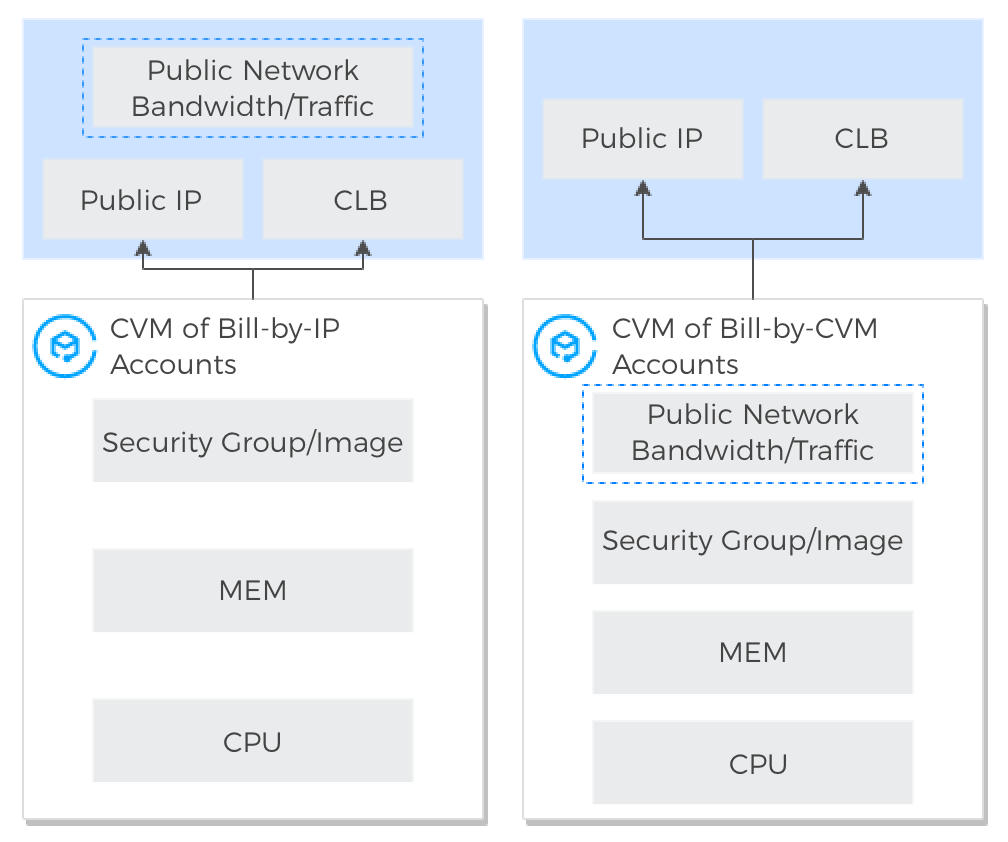
Standard Account Type: Bandwidth and traffic are managed on IP addresses or Cloud Load Balancers (CLBs). For the Standard Account Type, public IP addresses or CLBs have the public network bandwidth and traffic resources, while CVMs do not.
Traditional Account Type: Bandwidth and traffic are managed on CVMs. For the Traditional Account Type, public IP addresses and CLBs do not have the network bandwidth or traffic attribute, so they need to be purchased and managed on CVMs.
Account Upgrade
Upgrade Advantages
The comparison of advantages between the Standard Account Type and the Traditional Account Type is shown in the table below:
Difference Item
Standard Account Type
Traditional Account Type
Whether the network bandwidth can be migrated to other CVMs
Network billing is based on IP addresses, so the network bandwidth can be migrated to other CVMs.
Network billing is based on the bound cloud resource instance, so the network bandwidth cannot be migrated to other cloud resources.
Elastic Public IPv6 (EIPv6) billing
IPv6 and IPv4 can be added to the same BWP and billed together.
IPv6 can only be billed separately.
NAT Gateway public network billing
Multiple public network billing modes are supported, such as the traffic and BWP billing modes.
Only billing by traffic is supported.
Whether you need to purchase a public network for the CLB's backend CVM
You do not need to purchase a public network for the CLB's backend CVM. You only need to purchase bandwidth for the CLB, which facilitates management.
You need to purchase a public network for all backend CVMs of the CLB, which complicates management.
New network-related features in the future
All are supported, such as dedicated EIPs, Anti-DDoS EIPs, CLB cross-region binding 2.0, and more diverse bandwidth billing modes.
New features are not supported, and only the existing features are maintained.
Upgrade Impact
Upgrade Instructions
Before the upgrade, the carrier for bandwidth and network billing modes is the CVM/NAT. After the upgrade, the carriers for bandwidth and network billing modes are the EIP and CLB.
After the upgrade, the bandwidth of the CVM refers to the bandwidth of the primary public IP address of the primary NIC. The network billing mode of the CVM refers to the network billing mode of the primary public IP address of the primary NIC.
After the upgrade, the monthly subscription common public IP addresses on the CVM cannot be directly switched to EIPs. You can switch their billing mode to billing by traffic first, and then switch the common public IP addresses to EIPs.
After the upgrade, BWPs support cost allocation by tag by default. If you need to use it, create a Cost Allocation Tag and bind it to the EIP or CLB resources in the BWPs.
Impact on Network Billing
After the upgrade, the public network price of the Traditional Account Type remains consistent with that of the Standard Account Type.
When the network billing mode of the CVM/NAT is the traffic billing mode: After the upgrade, there will be no impact, and the network billing mode and price will remain unchanged. That is, the public IP addresses on the CVM/NAT will still be billed by traffic.
When the bandwidth billing mode of the CVM is the BWP billing mode (device bandwidth package): After the upgrade, there will be no impact, and the bandwidth billing mode and price will remain unchanged. That is, the public IP addresses on the CVM or the public network CLB bound to the CVM will still be billed by BWP, and the associated bandwidth package will not change.
When the bandwidth billing mode of the CVM is not the BWP billing mode (device bandwidth package): In the scenario where the CVM is bound to a public network CLB, after the upgrade, the public network CLB will have the bandwidth billing capability, and the bandwidth billing mode will be the traffic billing mode.
In other cases, the upgrade impact on the network billing mode of the CVM is as follows:
CVM Billing Mode
Network Billing Mode
Public IP Address
Upgrade Impact
Monthly subscription
Monthly bandwidth subscription
Exactly one common public IP address
There is no impact, and the network billing mode and price will remain unchanged.
Both common public IP addresses and EIPs
There is no impact on the billing mode of the CVM, and no refunds are involved.
The common public IP addresses will inherit the monthly bandwidth subscription of the CVM, so there is no impact, and no refunds are involved.
The network billing mode of the EIPs will be the traffic billing mode by default.
No public IP addresses (including common public IP addresses and EIPs)
There is no impact on the CVM billing mode.
The purchased monthly bandwidth subscription will be refunded according to the usage duration. For more information on refunds, see Refund Instructions.
Only EIPs (with an unlimited number)
There is no impact on the CVM billing mode.
The purchased monthly bandwidth subscription will be refunded according to the usage duration. For more information on refunds, see Refund Instructions.
The network billing mode of the EIPs will be the traffic billing mode by default.
Pay-as-you-go
By hourly bandwidth
Multiple public IP addresses
The network billing mode of all public IP addresses will be the traffic billing mode by default.
Impact on Bandwidth Limit
If the public IP address is bound to the CVM, its bandwidth limit after the upgrade will remain consistent with that of the CVM before the upgrade.
If the public IP address is an IP address on the public network CLB, the bandwidth limit after the upgrade will be the maximum bandwidth value of this public IP address over the past month.
If the public IP address is not bound to any resources, the network billing mode will default to billing by traffic after the upgrade. The bandwidth limit will be set according to the following principles:
If only monthly subscription CVMs exist under the traditional account, the bandwidth limit of the public IP address after the upgrade will be 200 Mbps.
If only pay-as-you-go CVMs exist under the traditional account, the bandwidth limit of the public IP address after the upgrade will be 100 Mbps.
If both monthly subscription and pay-as-you-go CVMs exist under the traditional account, the bandwidth limit of the public IP address after the upgrade will be 200 Mbps.
Impact on IP Addresses
After the upgrade to the Standard Account Type, the public and private IP addresses will not change.
Impact on Network Connection
The network will not be interrupted during the upgrade.
Try not to operate resources (such as configuration adjustment, binding, and unbinding operations) in the console or via APIs to avoid unexpected or failed operations (failed operations have no impact on the account upgrade).
When the number of CVMs is no more than 500, the upgrade will take about 5 minutes. When the number is greater than 500, the higher the number, the longer the upgrade will take.
Impact on Console and API Calls
Business Scenario
Console
API
Difference from Traditional Account Type
Purchasing CVMs (public network bandwidth not needed)
Do not select Assign Independent Public IP Address:
When calling the RunInstances API to create a CVM, pay attention to the InternetAccessible parameter: Do not input InternetChargeType, and either do not input InternetMaxBandwidthOut or set it to 0.
Before the upgrade: When you purchase public network bandwidth for the CVM, you do not need to allocate a public IP address at the same time.
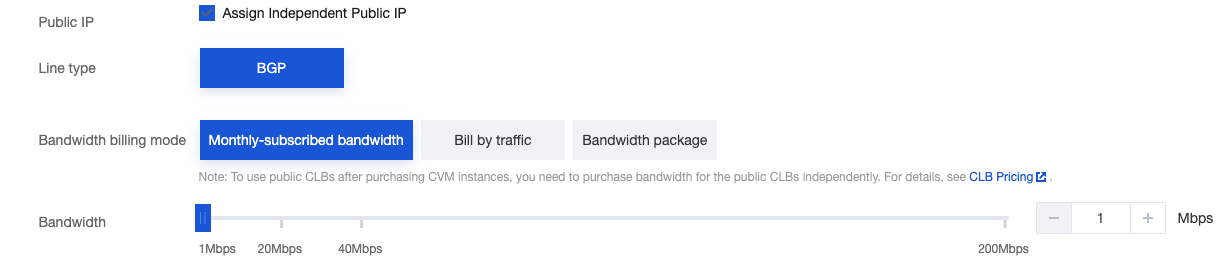
After the upgrade: When you purchase a CVM, if public network bandwidth is needed, you should purchase and allocate a public IP address at the same time, and set the billing mode and bandwidth limit of the public IP address.
Purchasing CVMs or the Auto Scaling (AS) service (public network bandwidth required)
Select Assign Independent Public IP Address and set the bandwidth billing mode and bandwidth value:
InternetChargeType: Set the bandwidth billing mode. When the billing mode is set to BANDWIDTH_PACKAGE, you should specify the BWP ID to be added in BandwidthPackageId.
InternetMaxBandwidthOut: Set the public network bandwidth limit.
PublicIpAssigned: Set it to true to allocate a public IP address.
Purchasing EIPs
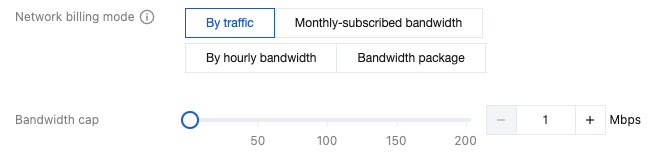
You need to set the billing mode and bandwidth limit:
When calling the AllocateAddresses API to create an EIP, you should set the bandwidth-related parameters:
InternetChargeType: Set the bandwidth billing mode. It is TRAFFIC_POSTPAID_BY_HOUR by default.
InternetMaxBandwidthOut: Set the public network bandwidth. If you do not input it, the default value of 1 Mbps will be used.
Before the upgrade: No bandwidth-related parameters are available when you purchase an EIP.
After the upgrade: You should set the bandwidth billing mode and bandwidth limit when you purchase an EIP.
Note: If an EIP is bound to a NAT Gateway, ensure that the sum of the bandwidth limit of all EIPs on the NAT Gateway is not lower than the NAT Gateway bandwidth. Otherwise, this might cause the EIPs to exceed the limit, resulting in packet loss and inefficient NAT Gateway bandwidth usage.
Purchasing public network CLBs
You need to set the network billing mode and bandwidth limit:
After the upgrade, the CVM will no longer have the bandwidth management capability:
Bandwidth-related monitoring: You can view bandwidth monitoring on the EIP or CLB. Bandwidth billing is also performed on the EIP or CLB. The bandwidth on the CVM includes the outbound/inbound bandwidth from the EIP on the CVM and the outbound/inbound bandwidth from the CLB bound to the CVM.
Bandwidth-related alarms: It is recommended to configure bandwidth alarms on the EIP/CLB.
Impact on Bandwidth Bills
Before the upgrade:You can view the public network bandwidth bills in the Bandwidth-Billing by Bandwidth and Bandwidth-Traffic-based Billing components under Cloud Virtual Machine (CVM).
After the upgrade, bandwidth is billed on the EIP or CLB. You can view the public network bandwidth bills under the Public IP or CLB products. For example:
If the CVM is bound to the public IP address, view the bills in the Public IP-Traffic-based Billing component under Public IP.
If the CVM is bound to the CLB's backend, view the bills in the Public Network CLB-Traffic component under CLB.
Upgrade Mode
Tencent Cloud will send upgrade notifications in batches to accounts of the Traditional Account Type. You can also click Submit a Ticket for an upgrade.
Attention:
Since the CVM billing mode will be switched in some upgrade scenarios, if your CVM was purchased through a promotional campaign and its billing mode cannot be switched according to the campaign rules, your account cannot be upgraded for now.