Elastic IP (EIP) can be bound to various types of cloud resource instances, such as CVM instances, NAT Gateway instances, and ENIs. In this way, you can access public networks or provide Internet services via EIPs, flexibly plan cloud networks, and significantly improve the utilization of cloud resources and the disaster recovery capability of cloud networks.
Fee Instructions
After an EIP is bound to cloud resources, the fee instructions for different account types are shown below:
Account Type
Billing Mode
Description
Traditional Account Type
-
No fees are charged for the EIP itself, but public network fees are charged for the bound cloud resources.
Standard Account Type
By traffic
Only public network fees are charged for general BGP, dedicated BGP, accelerated IP addresses, and static single-line EIPs (excluding scenarios with a large number of IP addresses).
An EIP is bound to a CVM instance and serves as the public IP address of the CVM instance. If the CVM instance fails, you can unbind the EIP and rebind it to a healthy CVM instance to quickly recover the service.
An EIP is bound to a NAT Gateway. By configuring port forwarding, you can make the resources on the CVM accessible to the public network.
An EIP is bound to an ENI's private IP address, and the ENI is bound to a CVM instance, giving the CVM instance the public network communication capability.
An EIP is bound to an HAVIP, which is mainly used to build a high-availability primary/secondary cluster. After binding the EIP to the HAVIP, you can quickly implement failover and improve the public network communication capability of the cluster.
2. At the top of the public IP address page, select the region of the EIP to be bound to the cloud resource. In the operation column of the corresponding EIP, click More > Bind.
Note
If the EIP has been bound to cloud resources, unbind it first. For example, you need to reassign an EIP from a faulty CVM instance to a healthy one.
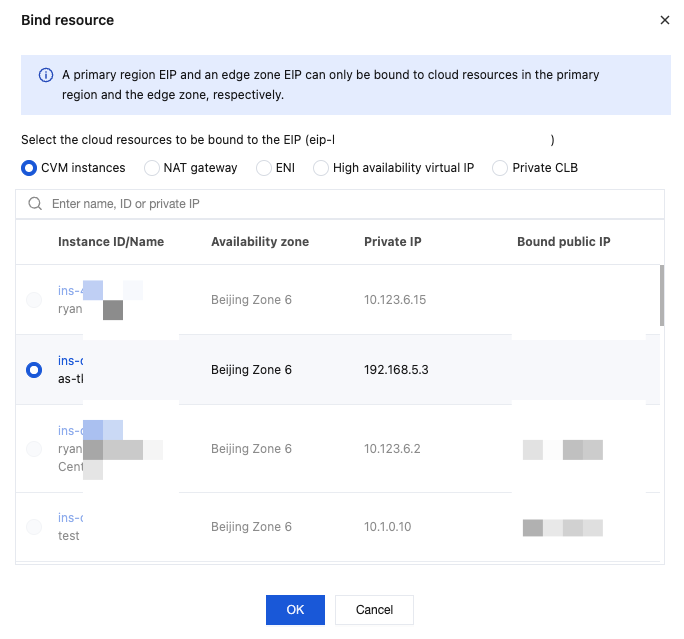
3. In the pop-up Bind resource window, select the cloud resource type and resource instance to be bound to the EIP, and click OK.
Bound Cloud Resources
Traditional Account Type
Standard Account Type
CVM instance
An EIP can be bound to a CVM instance if the CVM instance is not bound to other EIPs. If the CVM instance already has a common public IP address, this current common public IP address will be released after the CVM instance is bound to the EIP.
The EIP is bound to the CVM instance. The CVM instance must not be bound to other EIPs and must not be allocated an ordinary public IP.
An EIP can only be bound to a CVM instance if they are in the same region.
The limit on the number of CVM instances that can be bound to an EIP varies based on the CPU configuration of the CVM instance. See Usage Limits.
NAT Gateway
-
Only EIPs in the traffic and BWP billing modes can be bound to NAT Gateways.
An EIP can only be bound to a NAT Gateway if they are in the same region.
A NAT gateway can be bound to a maximum of 10 EIPs.
When a NAT gateway is bound to multiple EIPs, the system automatically performs a CLB.
ENI
When you try to bind an EIP to the private IP address of a primary ENI, if the CVM instance bound to the primary ENI already has a common public IP address, this current public IP address of the CVM instance will be released after the private IP address of a primary ENI is bound to the EIP.
When an EIP is bound to the private IP of a primary network interface, the CVM instance bound to the primary network interface must not have an ordinary public IP allocated to it.
An EIP can only be bound to one private IP of the ENI.
After an EIP is bound to the private IP address of the secondary ENI, this ENI has obtained a public IP address in addition to its own private IP address.
Multiple secondary ENIs bound to EIPs can be bound to a CVM instance. In this way, you can flexibly use multiple public IP addresses to provide Internet services and implement a high-availability network solution. For more information, see Binding an ENI to a CVM.
HAVIP
An EIP can be bound to a HAVIP to provide the latter with the capability to communicate with the public network.
An EIP can be bound to an elastic private IP address to enable public network access.
Endpoint
-
An EIP can be bound to an endpoint to enable public network access. This feature is currently in grayscale. If needed, you can submit a ticket for consultation.
4. In the pop-up Confirm Binding dialog box, click Confirm to complete the binding to the cloud resource.