You can convert the common public IP of the CVM to an EIP. After the conversion is completed, the EIP has the ability to be unbound and bound to the CVM at any time, making it easier to achieve flexible management of the public IP.
Note
Currently, only the general BGP IP lines are supported by the common public IP addresses.
If your account is of the standard account type, you cannot convert a bill-by-monthly bandwidth subscription common public IP address to an EIP. However, you can switch the network billing mode to billing by traffic or postpaid billing by hourly bandwidth. Note that promo vouchers and purchase discounts will not be returned after you switch the network billing mode. If you change the billing mode back to monthly bandwidth subscription later, you will need to purchase the resource again at the list price on the official website. If you cannot confirm your account type, see Determining Account Type.
Background
A public IP address is a non-reserved address on the Internet. A CVM with a public IP address can access and be accessed by other computers on the Internet.
There are two types of Tencent Cloud public IP addresses: common public IP addresses and EIPs. Both of them can provide CVMs with the capabilities to access and be accessed by public networks.
Common Public IP: It can only be allocated when the CVM is purchased and cannot be unbound from the CVM. If it is not allocated when purchasing, it cannot be obtained.
EIP: It is a public IP address resource that can be purchased and held independently and can be bound or unbound to cloud resources such as CVM and NAT gateways at any time.
Compared with a common public IP address of a CVM, an EIP provides more flexible management modes, as shown in the table below. For more information, see Public IPv4 Address.
Comparison Item
Common Public IP Address
EIP
Accessing the public network/being accessed by the public network
Before converting a common public IP to an EIP, ensure that the total number of EIPs does not exceed the total product quota. For details, see Quota Limit.
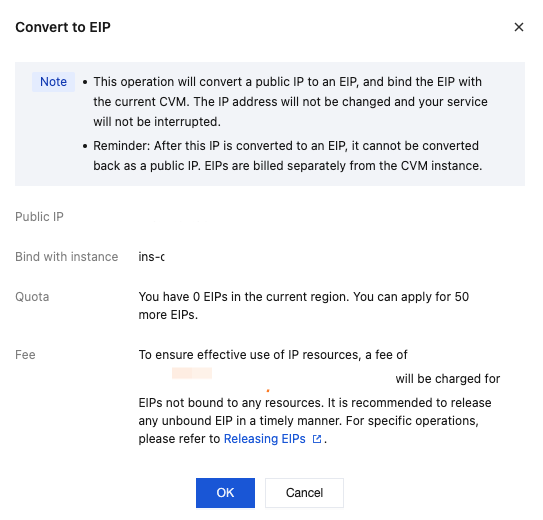
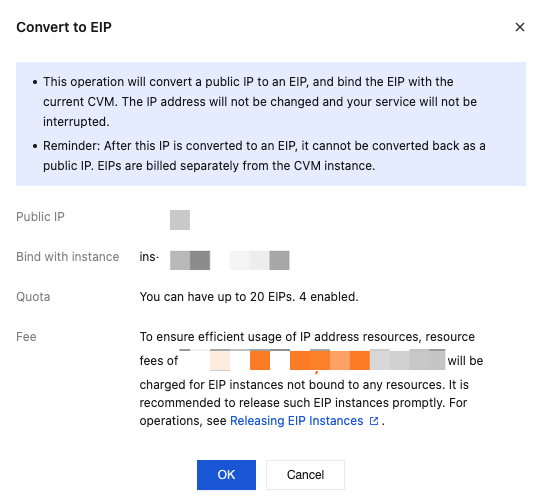
The conversion of a common public IP to an EIP does not affect the CVM's ability to access or be accessed by the public network.
After a common public IP is converted to an EIP, the original address is not changed.
After a common public IP is converted to an EIP, it cannot be converted back to a public IP.
After a common public IP address is converted to an EIP, the original public network billing mode will be retained. For example, if the public network billing mode was billing by traffic before the conversion, it would still be billing by traffic after the conversion.
Directions
You can convert a common public IP to an EIP by following the directions below:
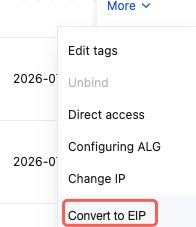
Method One: Adjusting in the Public IP Address Console