Integrating with Tencent Cloud SSM for Secure Key Management
Unduh
Mode fokus
Ukuran font
Overview
This document describes how to integrate with the Tencent Cloud Secrets Manager (SSM) on the WeData platform for secure key management. By centrally managing sensitive credentials, such as database passwords and API keys, through SSM, you can effectively mitigate the risk of password exposure in plaintext.
This document covers the following three scenarios:
Scenario | Capability Description | Applicable Module |
Scenario 1 | Supports connecting to SSM to obtain usernames, passwords, and other information when a data source is created | Project Management - Data Source Management |
Scenario 2 | Obtain secrets via dlcutils.secrets in Notebook code. | Studio - Notebook |
Scenario 3 | Obtain secrets via wedatautils.get_secret_value in Python tasks. | Orchestration Space - Python |
Prerequisites
You have activated the Tencent Cloud Secrets Manager service (SSM).
You have created the credentials that require encryption (such as usernames, passwords, and keys).
Scenario 1: Integrating with SSM in a Data Source to Obtain Passwords
Feature Description
When creating data sources such as MySQL, Oracle, PostgreSQL, or SQL Server, you can choose to obtain passwords through SSM to avoid entering them in plaintext.
Supported Data Source Types:
Data Source Type | Data source type | Encryption Target |
Relational databases | Tencent Cloud MySQL | Password |
| MySQL | Password |
| TCHouse-P | Password |
| Oracle | Password |
| PostgreSQL | Password |
| SQL Server | Password |
Big data | TCHouse-D | Password |
Semi-Structured | SFTP | Password (Password Authentication Mode) |
| COS | SecretKey |
| REST API | Password/Token/Client Secret |
| S3 | AccessKeySecret |
| Azure Blob | AccessKey / SAS Token |
Operation Steps
Step 1: Creating a Credential in SSM
Note:
If you have already created credentials in SSM, you can skip this step.
1. Log in to the Tencent Cloud SSM console.
2. Choose Secrets Management > Custom Secrets in the left sidebar.
3. Click Create Secret.
4. Configure the secret information:
Parameter | Description |
Secret Name | A custom credential identifier used for referencing in WeData, for example, mysql-prod-password. |
Secret Version | For example, v1 and 1.0, supporting multiple version control. |
Secret Content | Enter the sensitive information that needs to be encrypted, for example, a database password. |
Step 2: Creating a WeData Data Source
1. Log in to the WeData console and go to the target project.
2. Choose Project Management > Data Source Management in the top navigation bar.
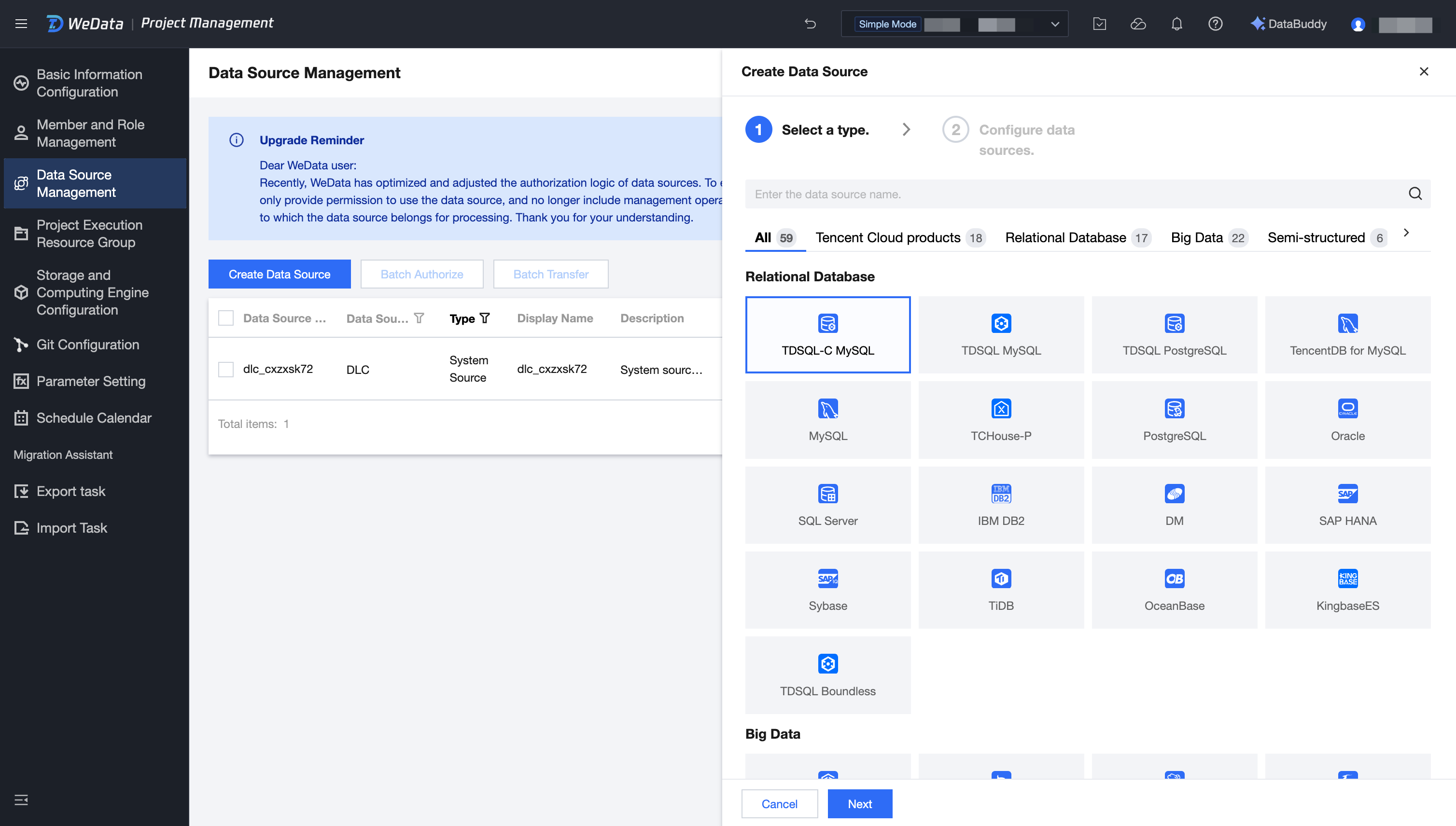
3. Click New Data Source.
4. Select the target data source type (for example, Tencent Cloud MySQL).
Step 3: Configuring SSM Password Retrieval
1. On the data source configuration page, locate the Password field.
2. Above the Password field, click the SSM Password Obtain switch to enable it.
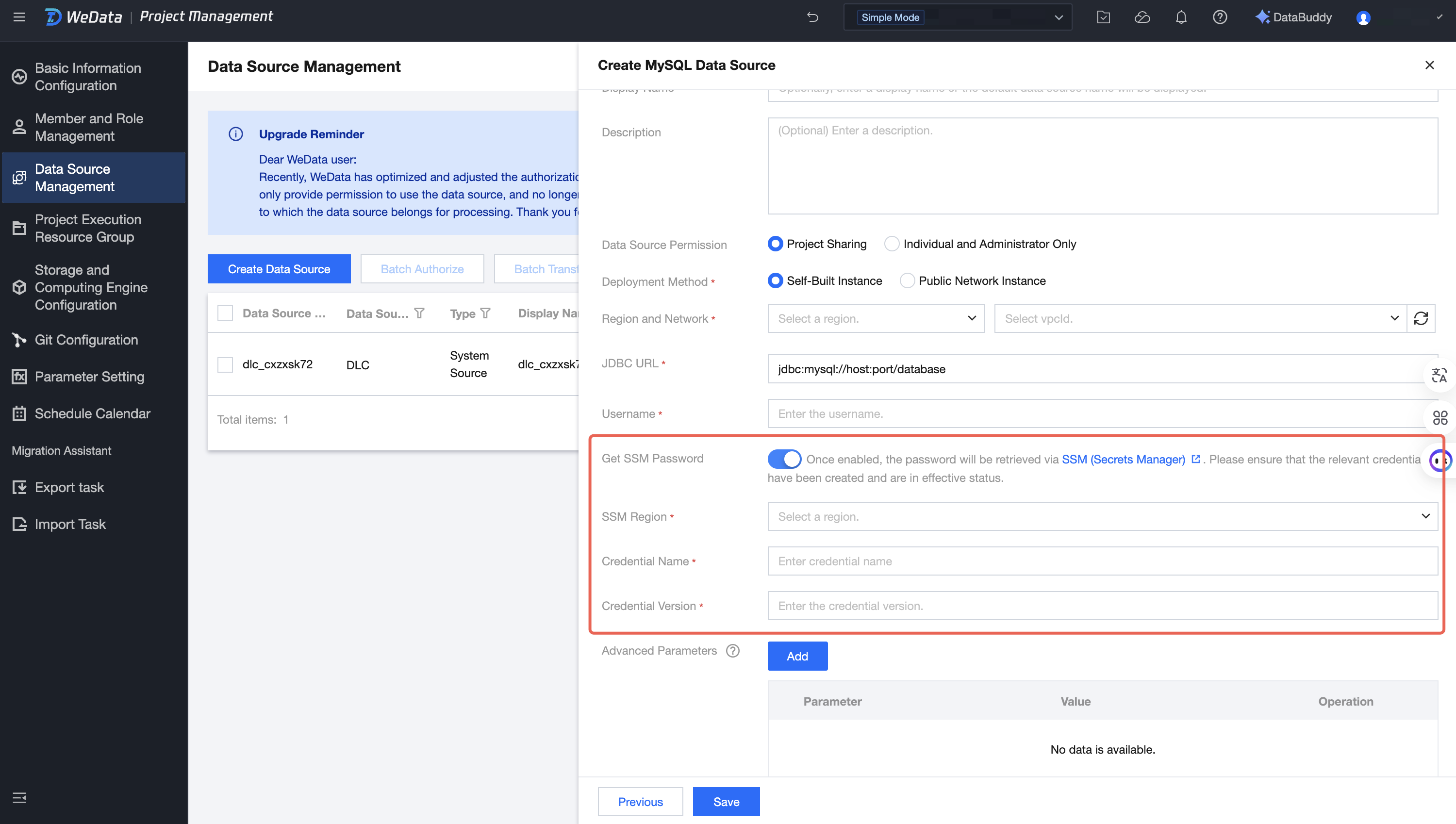
3. Configure the SSM connection information:
Parameter | Description | Required |
SSM Region | Select the Tencent Cloud region where the credential is located, such as Guangzhou. | Yes |
Secret Name | Name of the secret created in SSM | Yes |
Secret Version | Secret version number, such as v1 | Yes |
Step 4: Saving and Testing the Connection
1. Complete the configuration of other required fields.
2. Click Test Connection to verify the configuration correctness.
3. After the test passes, click Save.
Scenario 2: Obtaining a Key in a Notebook
Feature Description
In the WeData Studio Notebook, you can use the
dlcutils.secrets function to obtain secret values stored in SSM, avoiding writing sensitive information in plaintext in the code.Note:
The
dlcutils function library is applicable only to the DLC engine machine learning resource group - Spark MLlib type.Operation Steps
Step 1: Creating a Credential in SSM
1. Log in to the Tencent Cloud SSM console.
2. Create a custom secret and record its name and version.
Step 2: Calling a Function in a Notebook
In the code cell of the Notebook, call the
dlcutils.secrets.get() function:# Obtain Secrets from SSMsecret_value = dlcutils.secrets.get(secretName="your_secret_name", # Secret namesecretVersion="v1", # Secret versionregion="ap-guangzhou" # Region, e.g., Guangzhou)# Print the resultprint(secret_value)
Function Parameter Description
Parameter Name | Type | Required | Description |
secretName | string | Yes | Name of the secret, which is the key identifier defined in SSM |
secretVersion | string | Yes | Secret version number, such as v1 and 1.0 |
region | string | Yes | Region ID, such as ap-guangzhou (Guangzhou) and ap-shanghai (Shanghai) |
Typical Use Cases
Scenario | Example code |
Obtaining Tencent Cloud API Keys | ak = dlcutils.secrets.get("my-ak", "v1", "ap-guangzhou")sk = dlcutils.secrets.get("my-sk", "v1", "ap-guangzhou") |
Obtaining Database Connection Passwords | password = dlcutils.secrets.get("db-password", "v1", "ap-guangzhou") |
Obtaining Third-Party API Tokens | api_token = dlcutils.secrets.get("api-token", "v1", "ap-guangzhou") |
Scenario 3: Obtaining a Key in a Python Task
Feature Description
In Python tasks within the orchestration space, you can use the
wedatautils.get_secret_value function to obtain secret values stored in SSM.Operation Steps
Step 1: Create a secret in SSM.
1. Log in to the Tencent Cloud SSM console.
2. Create a custom secret and record its name and version.
Step 2: Call the function in a Python task.
Directly call
wedatautils.get_secret_value in the Python task code:import wedatautils# Configure the secret informationsecret_name = "your_secret_name" # Secret nameversion_id = "1.0" # Secret versionregion = "ap-guangzhou" # Region where the secret is located# Obtain the secret contentsecret_value = wedatautils.get_secret_value(secret_name,version_id,region)# Use the secretprint("this is " + secret_value)
Function Parameter Description
Parameter Name | Type | Required | Description |
secret_name | string | Yes | Name of the secret created in SSM |
version_id | string | Yes | Secret version number, such as 1.0 and v1 |
region | string | Yes | Region ID, such as ap-guangzhou |
References
Bantuan dan Dukungan
Apakah halaman ini membantu?
Anda juga dapat Menghubungi Penjualan atau Mengirimkan Tiket untuk meminta bantuan.
masukan