This article describes how to deliver data to the Elasticsearch Serverless service through Logstash.
Prerequisites
Sign in to the ES Console and enter the Logstash Management interface.
If you already have a Logstash instance, you can go directly to Next. If you have not purchased a Logstash instance, click Create New Instance to enter the Logstash purchase page. Select the VPC that matches the index; for the Logstash version, select 7.10.2 or 7.14.2; for advanced features, select "X-Pack Edition"; then click Purchase Now.
Operation step
1. In the console Logstash Management interface, click the corresponding Logstash name, and after entering the subpage, click Pipeline Management > Create New Pipeline.
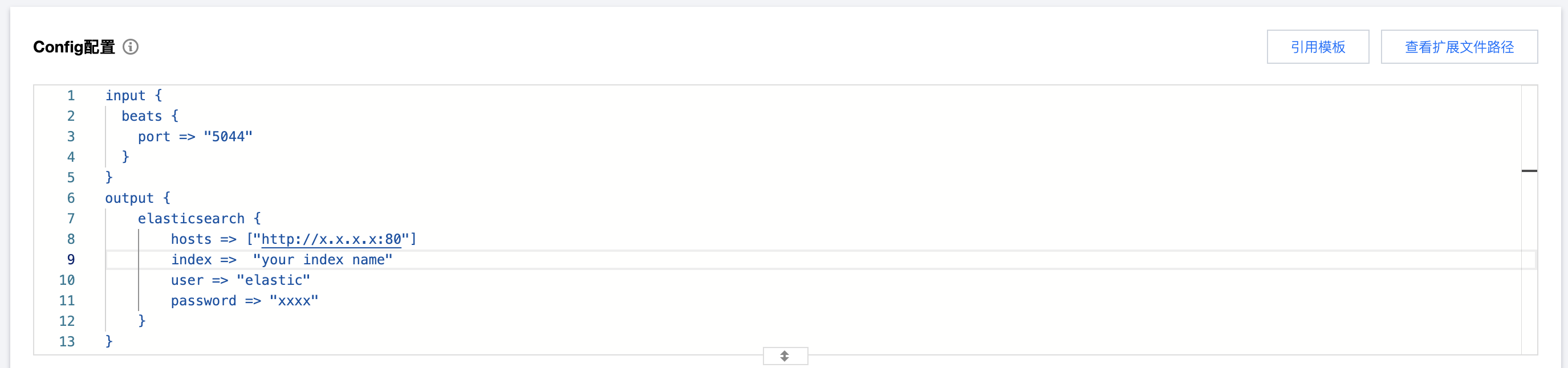
2. In the Config configuration section, enter the relevant information for the input and output endpoints. The configuration instructions for the output endpoint are as follows:
hosts: Index Intranet Access Address.
index: Index Name.
user: Index Username, you can access it in the Access Control module of the corresponding index.
password: Index Password, you can access it in the Access Control module of the corresponding index.
In the parameter configuration, the Pipeline ID is required, but you may choose whether to fill in the other parameters depending on your business needs. After completing, click Save and Deploy, and wait for the status to be Running.