tencent cloud

Tencent Real-Time Communication

Release Notes and Announcements
Release Notes
Recent Product Announcement
TRTC Live (TUILiveKit) Product Launch Announcement
TRTC Conference Official Editions Launched
The commercial version of Conference is coming soon
Terms and Conditions Applicable to $9.9 Starter Package
Rules for the "First Subscription $100 Discount" Promotion
Announcement on the Start of Beta Testing for Multi-person Audio and Video Conference
TRTC Call Official Editions Launched
License Required for Video Playback in New Version of LiteAV SDK
TRTC to Offer Monthly Packages
Product Introduction
Overview
Concepts
Features
Strengths
Use Cases
Performance Statistics
Tencent RTC Quickplay: Experience Ultimate Real-Time Audio and Video Interaction!
Purchase Guide
Billing Overview
Free Minutes
Monthly subscription
Pay-as-you-go
TRTC Overdue and Suspension Policy
FAQs
Refund Instructions
User Tutorial
Free Demo
Call
Overview
Activate the Service
Run Demo
Integration
Offline Call Push
Conversational Chat
On-Cloud Recording
AI Noise Reduction
UI Customization
Calls integration to Chat
Additional Features
No UI Integration
Server APIs
Client APIs
Solution
ErrorCode
Release Notes
FAQs
Conference
Overview(TUIRoomKit)
Activate the Service (TUIRoomKit)
Run Demo(TUIRoomKit)
Integration(TUIRoomKit)
Screen Sharing (TUIRoomKit)
Schedule a meeting (TUIRoomKit)
In-meeting Call (TUIRoomKit)
UI Customization(TUIRoomKit)
Virtual Background (TUIRoomKit)
Conference Control (TUIRoomKit)
Cloud Recording (TUIRoomKit)
AI Noise Reduction (TUIRoomKit)
In-Conference Chat (TUIRoomKit)
Robot Streaming (TUIRoomKit)
Enhanced Features (TUIRoomKit)
Client APIs (TUIRoomKit)
Server APIs (TUIRoomKit)
FAQs (TUIRoomKit)
Error Code (TUIRoomKit)
SDK Update Log (TUIRoomKit)
Live
Billing of Video Live Component
Overview
Activating the Service (TUILiveKit)
Run Demo
No UI Integration
UI Customization
Live Broadcast Monitoring
Video Live Streaming
Voice Chat Room
Advanced Features
Client APIs
Server APIs
Error Codes
Release Notes
FAQs
RTC Engine
Activate Service
SDK Download
API Examples
Usage Guidelines
API Reference Manual
Advanced Features
AI Integration
Overview
Configure MCP Server
Install Skills
Integration Guide
FAQ
RTC RESTFUL API
History
Introduction
API Category
Room Management APIs
Stream mixing and relay APIs
On-cloud recording APIs
Data Monitoring APIs
Pull stream Relay Related interface
Web Record APIs
AI Service APIs
Cloud Slicing APIs
Cloud Moderation APIs
Making API Requests
Call Quality Monitoring APIs
Usage Statistics APIs
Data Types
Appendix
Error Codes
Console Guide
Application Management
Package Management
Usage Statistics
Monitoring Dashboard
Development Assistance
Solution
Real-Time Chorus
FAQs
Migration Guide
Billing
Features
UserSig
Firewall Restrictions
How to Downsize Installation Package
Android and iOS
Web
Flutter
Electron
TRTCCalling for Web
Audio and Video Quality
Others
Legacy Documentation
RTC RoomEngine SDK(Old)
Integrating TUIRoom (Web)
Integrating TUIRoom (Android)
Integrating TUIRoom (iOS)
Integrating TUIRoom (Flutter)
Integrating TUIRoom (Electron)
TUIRoom APIs
On-Cloud Recording and Playback (Old)
RTC Analytics Monthly Packages (Previous Version)
Protocols and Policies
Compliance
Security White Paper
Notes on Information Security
Service Level Agreement
Apple Privacy Policy: PrivacyInfo.xcprivacy
TRTC Policy
Privacy Policy
Data Processing And Security Agreement
Glossary

Android and iOS

PDF
Focus Mode
Font Size
Last updated: 2024-03-11 17:04:23

What system volume types does TRTC support on mobile devices (Android and iOS)?

It supports two system volume types: call volume and media volume.
Call volume is designed for call scenarios. It uses phones’ built-in acoustic echo cancellation (AEC) technique and has lower audio quality than media volume. In the call volume mode, the volume cannot be turned to 0 with the volume buttons, but the mics of Bluetooth earphones can be used for audio capturing.
Media volume is designed for music scenarios. It has higher audio quality than call volume. In the media volume mode, the volume can be turned to 0 with the volume buttons, and if you want to enable the AEC feature, the SDK will use its built-in acoustic processing algorithm to process the audio. With media volume, only the mics on phones can be used to capture audio.

How do I set the resolution for push to 1080p in the SDK on mobile devices?

1080p is defined as 114 in TX_Enum_Type_VideoResolution. You can use the resolution simply by passing in the enumerated value.

Can I enter a room created on Mini Program from a mobile client?

Yes. TRTC supports communication across all platforms.

How do I use the screen sharing feature in TRTC on mobile devices?

Android: 7.2 and later versions support screen sharing. For detailed directions on how to implement the feature, see Real-Time Screen Sharing (Android).
iOS: 7.2 and latter versions support in-app screen sharing. 7.6 and later versions support both system-level and in-app screen sharing. For detailed directions on how to implement the feature, see Real-Time Screen Sharing (iOS).

Does TRTC support the 64-bit arm64-v8a architecture on Android?

TRTC has supported the arm64-v8a ABI since v6.3.

Does TRTC support Swift integration on iOS?

Yes. Just integrate the SDK in the same steps as you do a third-party library or by following the steps in Demo Quick Start (iOS & macOS).

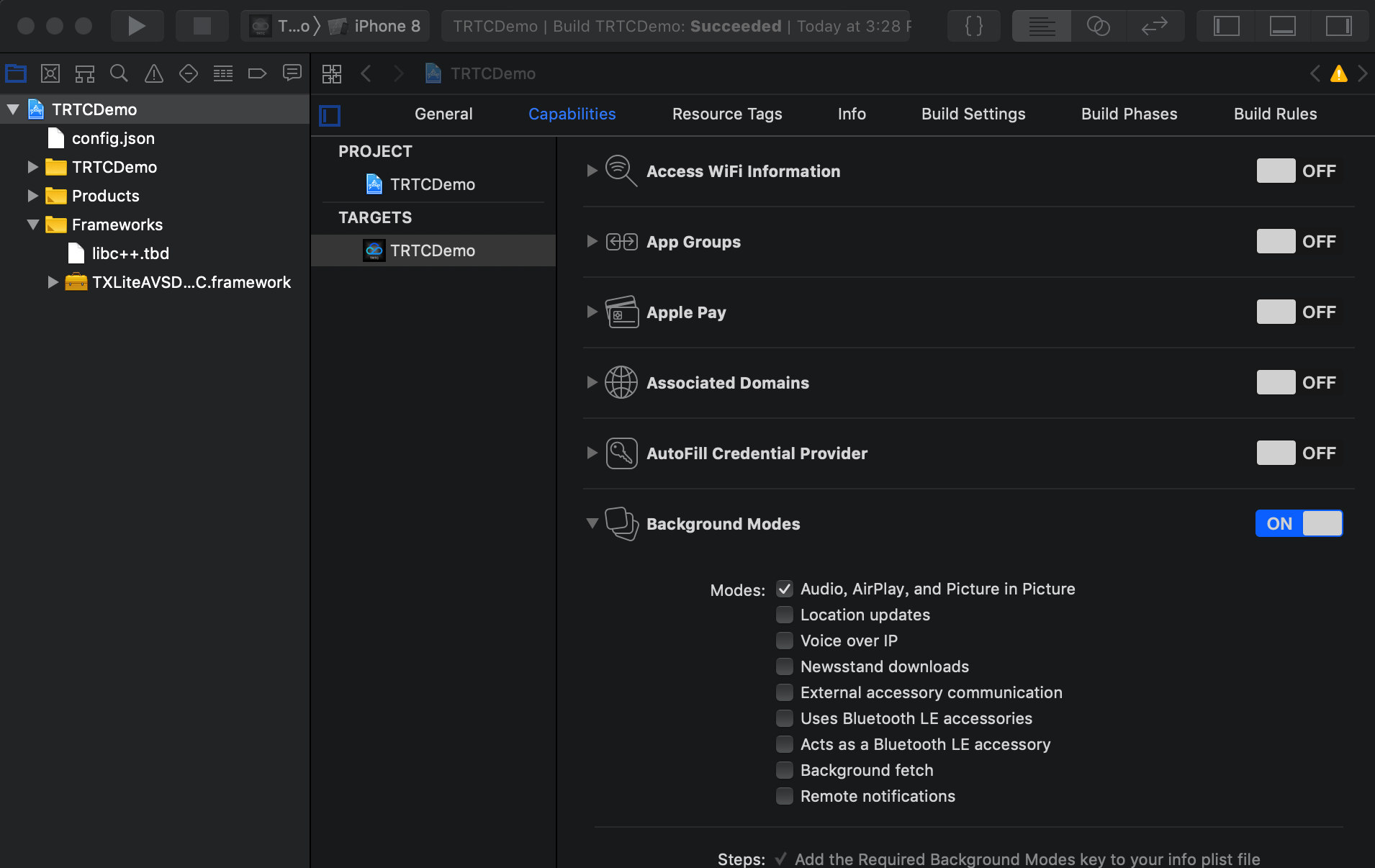
Can I run the TRTC SDK in the background on iOS?

Yes, you can. To run the SDK in the background, select your project, set Background Modes under Capabilities to ON, and select Audio, AirPlay, and Picture in Picture.


Can I listen for room exit by remote users on iOS?

You can use onRemoteUserLeaveRoom to listen for the room exit event. In the VideoCall mode, this callback is triggered when any user leaves the room; in the LIVE mode, it is triggered only when an anchor leaves the room.

How to call a user whose phone screen is locked or when the application is in the background or closed on the user’s phone?

You can achieve this using the offline answering feature. For details, see Audio Call (Android).

Can Android and web users call each other?

Yes. They just need to use the same SDKAppID and enter the same room. For more information, see the documents below:

Can both anchors and audience members initiate co-anchoring during live streaming?

Yes. Both anchors and audience can initiate co-anchoring using the same logic. For more information, see Live Streaming Mode (Android).

In the audio/video conference scenario, can mobile users and web users enter the same room?

Yes, make sure the SDKAppID and room ID are the same while the user IDs are different.

Can I create N TRTC objects and log in to N rooms with N user IDs on the same page?

Yes. Since version 7.6, a user can enter multiple rooms.

How do I view the latest version number of the SDK?

In the case of automatic loading, latest.release will load the latest version automatically. You don’t need to modify the version number. For detailed directions on integration, see SDK Quick Integration.
You can find the latest version number of the SDK on the release notes page.
For iOS & Android, see Release Notes (App).
For web, see Release Notes (Web).
For Electron, see Release Notes (Electron).

Help and Support

Was this page helpful?

Help us improve! Rate your documentation experience in 5 mins.

Feedback