Log Transition
Download
Focus Mode
Font Size
The log transition feature of Cloud Log Service (CLS) can transition data to STANDARD_IA storage after logs are ingested into STANDARD storage for a specific period of time. This significantly reduces log storage costs while maintaining certain log analysis capabilities. For details, see Log Storage Overview.
Scenarios
Operation and access logs hold significant business value and can be used for business insights, customer service, marketing operations, and user behavior analytics. Statistical analysis is required on daily and weekly data. Additionally, such logs must meet 180-day retention compliance requirements to ensure query availability for scenarios such as attack source tracing.
These logs have the following characteristics:
Daily and weekly data holds significant business value and is used for various statistical analysis charts. It has high usage frequency and requires timely responses. The focus is on real-time performance and analytical capabilities.
Monthly data holds low business value and rarely requires analysis. It has low usage frequency and the data volume is large. The focus is on storage costs.
To address the above characteristics, the CLS log transition feature ingests high-value new data into STANDARD storage for real-time analysis, statistics, and alarms. After a specified period (typically a few days to a few weeks), it transitions older data with lower value and usage frequency to STANDARD_IA storage for long-term retention at reduced storage costs.
Operation Steps
1. Log in to the CLS console.
2. In the left sidebar, click Log Topic to go to the log topic list. Click Create Log Topic, or select an existing log topic from the list and edit it on the Basic Information page.
Configure the Log retention policy. For log ingestion, select STANDARD storage. The log retention period supports permanent retention and fixed-duration retention.
Enable the Log transition switch and select the log retention period for STANDARD storage based on your business requirements.
Note:
The log transition feature can be enabled only when the log retention period is 7 days or longer.
Specify other configurations as needed.
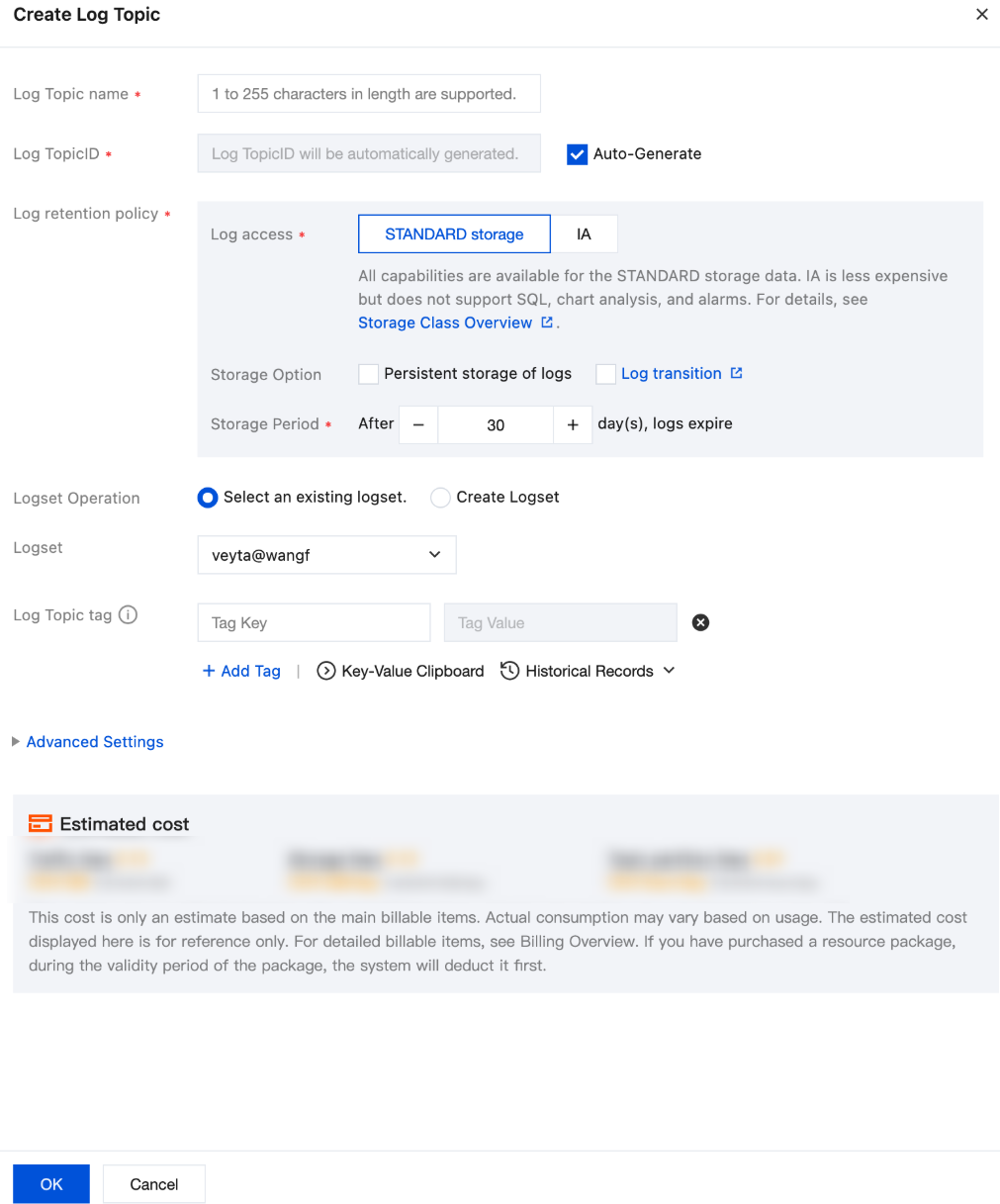
3. After you complete the configuration, click OK.
4. After the topic is saved, logs are first ingested into STANDARD storage and then transitioned to STANDARD_IA storage after the specified period, significantly reducing storage costs. As shown in the example configuration, logs are stored in STANDARD storage for 7 days, then transitioned to STANDARD_IA storage, and expire after 23 days.
Comparison of Log Storage Solutions
Feature | STANDARD_IA Storage | STANDARD Storage | STANDARD Storage Transition to STANDARD_IA Storage |
Scenario | Logs that are only searched and not analyzed. | Logs that require real-time analysis and alarms but do not need long-term retention | Logs that require real-time analysis and alarms in the short term and long-term retention for compliance |
Index creation | ✓ (Full-text index only) | ✓ | ✓ |
Context search | ✓ | ✓ | ✓ |
Quick analysis | × | ✓ | ✓ (Supported for data in STANDARD storage only) |
Full-text search | ✓ (2-second response time for 100 million data records) | ✓ (0.5-second response time for 100 million data records) | ✓ |
Key-value search | × | ✓ | ✓ |
Log download | ✓ | ✓ | ✓ |
SQL analysis | × | ✓ | ✓ (Supported for data in STANDARD storage only) |
Dashboard | × | ✓ | ✓ (Supported for data in STANDARD storage only) |
Monitoring and alarm | × | ✓ | ✓ (Supported for data in STANDARD storage only) |
Shipping to Cloud Object Storage (COS) | ✓ | ✓ | ✓ |
Shipping to TDMQ for CKafka | ✓ | ✓ | ✓ |
Shipping to Data Lake Compute (DLC) | ✓ | ✓ | ✓ |
Function processing | ✓ | ✓ | ✓ |
Log consumption | ✓ | ✓ | ✓ |
Data processing | ✓ | ✓ | ✓ |
Scheduled SQL task | × | ✓ | ✓ (Supported for data in STANDARD storage only) |
Log Transition FAQs
How is Log Transition Billed
For log topics with log transition enabled, data is first ingested into STANDARD storage, incurring charges for write traffic and STANDARD index traffic. After ingestion, the data is stored in STANDARD storage for a period of time, during which STANDARD log storage and STANDARD index storage fees apply. Then, the data is transitioned to STANDARD_IA storage for long-term storage until expiration, during which STANDARD_IA log storage and STANDARD_IA index storage fees apply.
For example, assume 1 TB of raw log data is written every day and data is saved for 180 days, with a compression ratio of 1:8 and an index ratio of 100%. The pricing in the Guangzhou region is used as an example. The monthly usage and cost are as follows:
Billable Item | STANDARD Storage | STANDARD Storage Transition to STANDARD_IA Storage |
Log retention policy | 180 days in STANDARD storage | 30 days in STANDARD storage and 150 days in STANDARD_IA storage |
Write traffic | USD 96 (usage: 3.75 TB) | USD 96 (usage: 3.75 TB) |
STANDARD index traffic | USD 1493.3 (usage: 30 TB) | USD 1493.3 (usage: 30 TB) |
STANDARD log storage | USD 1104.0 (usage: 675 TB) | USD 184 (usage: 112.5 TB) |
STANDARD index storage | USD 8831.9 (usage: 5400 TB) | USD 1472 (usage: 900 TB) |
STANDARD_IA log storage | - | USD 200 (usage: 562.5 TB) |
STANDARD_IA index storage | - | USD 1600 (usage: 4500 TB) |
Other fees | Minimal | Minimal |
Total cost (monthly) | USD 11525 | USD 5048 (total cost reduced by 56%; storage cost for data transitioned to STANDARD_IA storage alone reduced by 78.3%) |
Modifying the Log Transition Period
The log transition feature allows you to modify the transition period. The modification takes some time to take effect. For example, you can modify a log topic from 7 days in STANDARD storage and 3 days in STANDARD_IA storage to 10 days in STANDARD storage. Before the modification takes effect, data follows the original transition period. After several hours when the data migration is completed, the new transition period takes effect (restoring data from STANDARD_IA storage to STANDARD storage for standard topics does not incur fees).
Help and Support
Was this page helpful?
You can also Contact sales or Submit a Ticket for help.
Help us improve! Rate your documentation experience in 5 mins.
Feedback