通过 Grafana 使用 CLS
下载
聚焦模式
字号
操作场景
日志服务(Cloud Log Service,CLS)与 Grafana 打通,支持通过 Grafana 展示日志主题及指标主题数据并配置告警策略。本文以 CentOS 操作系统为例,指导您安装和配置 Grafana。
不用登录腾讯云账号使用日志服务的方式概览
使用方式 | 功能支持 | 是否支持免腾讯云账号登录 | 开发工作量 | 账号权限管理 |
支持 CLS 的日志检索、仪表盘、告警功能 | 支持,独立部署,免密登录或密码鉴权登录 | 无 | 无/密码鉴权,支持多角色 | |
只支持 Grafana 的仪表盘、告警功能 | 支持,数据接入 Grafana 使用 | 需要安装 CLS 插件 | Grafana 的权限管理系统,支持多角色 |
其他方案
前提条件
已安装 Grafana,具体操作请参见 Grafana 官网文档。
查看日志主题数据时,Grafana 需8.0及以上版本,如需升级版本请参见 Grafana 升级指南。查看指标主题数据无该限制。
操作步骤
步骤1:安装 CLS 插件到 Grafana(可选)
说明:
通过 Grafana 查看日志主题数据时需安装该插件,仅查看指标主题数据时无需安装插件,可跳过该步骤。
1. 请确认 Grafana 的插件目录位置。在 Centos 的插件目录
/var/lib/grafana/plugins/ 安装插件。cd /var/lib/grafana/plugins/wget https://github.com/TencentCloud/cls-grafana-datasource/releases/latest/download/tencent-cls-grafana-datasource.zipunzip tencent-cls-grafana-datasource
或者使用一键安装脚本(末尾参数为插件安装目录):
/bin/bash -c "$(curl -fsSL https://raw.githubusercontent.com/TencentCloud/cls-grafana-datasource/master/toolkit/update.sh)" bash /var/lib/grafana/plugins/
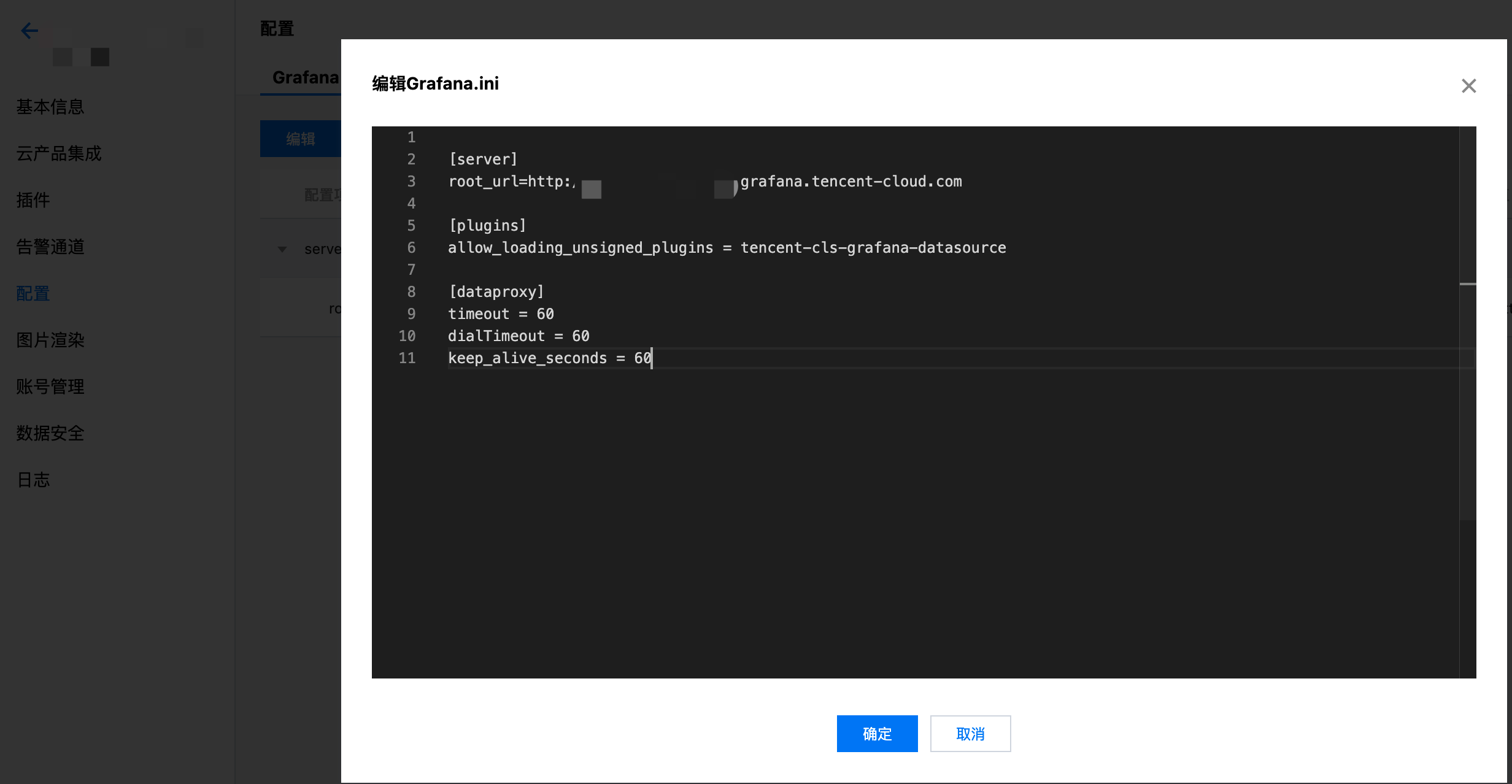
2. 修改 Grafana 配置文件,配置 CLS 数据源 ID,配置文件路径参考 配置文档。
Linux 系统配置文件路径:
/etc/grafana/grafana.inimacOS 系统配置文件路径:
/usr/local/etc/grafana/grafana.ini在 plugins 中设置 allow_loading_unsigned_plugins 参数:
allow_loading_unsigned_plugins = tencent-cls-grafana-datasource
在 dataproxy 中设置 timeout、dialTimeout、keep_alive_seconds 参数:
[dataproxy]timeout = 60dialTimeout = 60keep_alive_seconds = 60
3. 重启 Grafana 服务:
service grafana-server restart
docker run 命令:
docker run -d -p 3000:3000 --name=grafana \\-e "GF_INSTALL_PLUGINS=https://github.com/TencentCloud/cls-grafana-datasource/releases/latest/download/tencent-cls-grafana-datasource.zip;tencent-cls-grafana-datasource" \\-e "GF_PLUGINS_ALLOW_LOADING_UNSIGNED_PLUGINS=tencent-cls-grafana-datasource" \\-e "GF_DATAPROXY_TIMEOUT=60" \\-e "GF_DATAPROXY_DIALTIMEOUT=60" \\-e "GF_DATAPROXY_KEEP_ALIVE_SECONDS=60" \\grafana/grafana
docker compose:
version: '3'services:grafana:image: grafana/grafana:latestcontainer_name: grafanaports:- '3000:3000'environment:- GF_INSTALL_PLUGINS=https://github.com/TencentCloud/cls-grafana-datasource/releases/latest/download/tencent-cls-grafana-datasource.zip;tencent-cls-grafana-datasource- GF_PLUGINS_ALLOW_LOADING_UNSIGNED_PLUGINS=tencent-cls-grafana-datasource- GF_DATAPROXY_TIMEOUT=60- GF_DATAPROXY_DIALTIMEOUT=60- GF_DATAPROXY_KEEP_ALIVE_SECONDS=60
步骤2:配置数据源
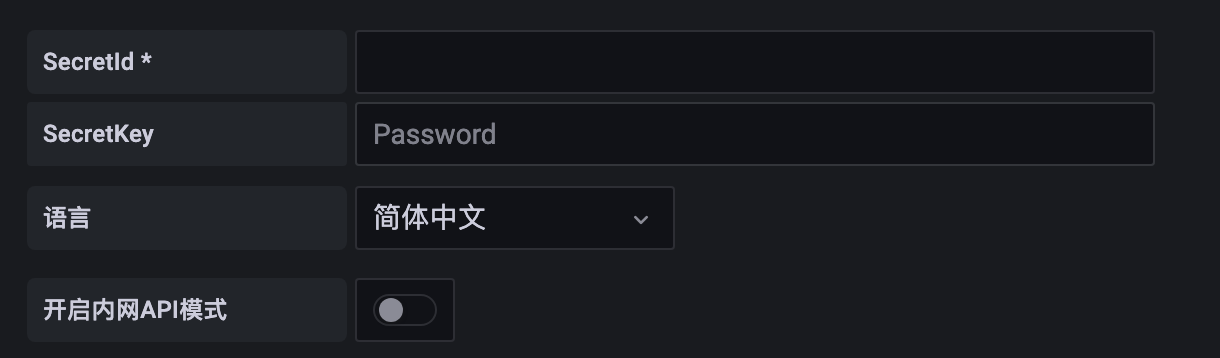
在 Data Sources 页面,单击 Add data source。选择 Tencent CLS Datasource,按照以下说明配置数据源:
指标主题兼容 Prometheus 数据模型及接口,可以直接作为 Prometheus 数据源接入 Grafana,相当于每个指标主题都是一个 Prometheus 实例。
1. 获取配置信息。
1.1 登录 日志服务控制台,在左侧导航栏中,单击指标主题。
1.2 在指标主题管理页面,单击需要添加的指标主题名称,进入指标主题基本信息页面。
1.3 在页面中,访问方式 > 数据查询 中的 URL 和鉴权方式为在 Grafana 中添加数据源所需的配置信息,鉴权方式中的 SecretId 及 SecretKey 需跳转至 访问管理 页面获取。建议您单独创建一个子账号,使用该账号的 SecretId 及 SecretKey,权限策略可使用 推荐权限策略配置。
2. 在 Data Sources 页面,单击 Add data source。
3. 选择 Prometheus,在表单中配置如下信息:
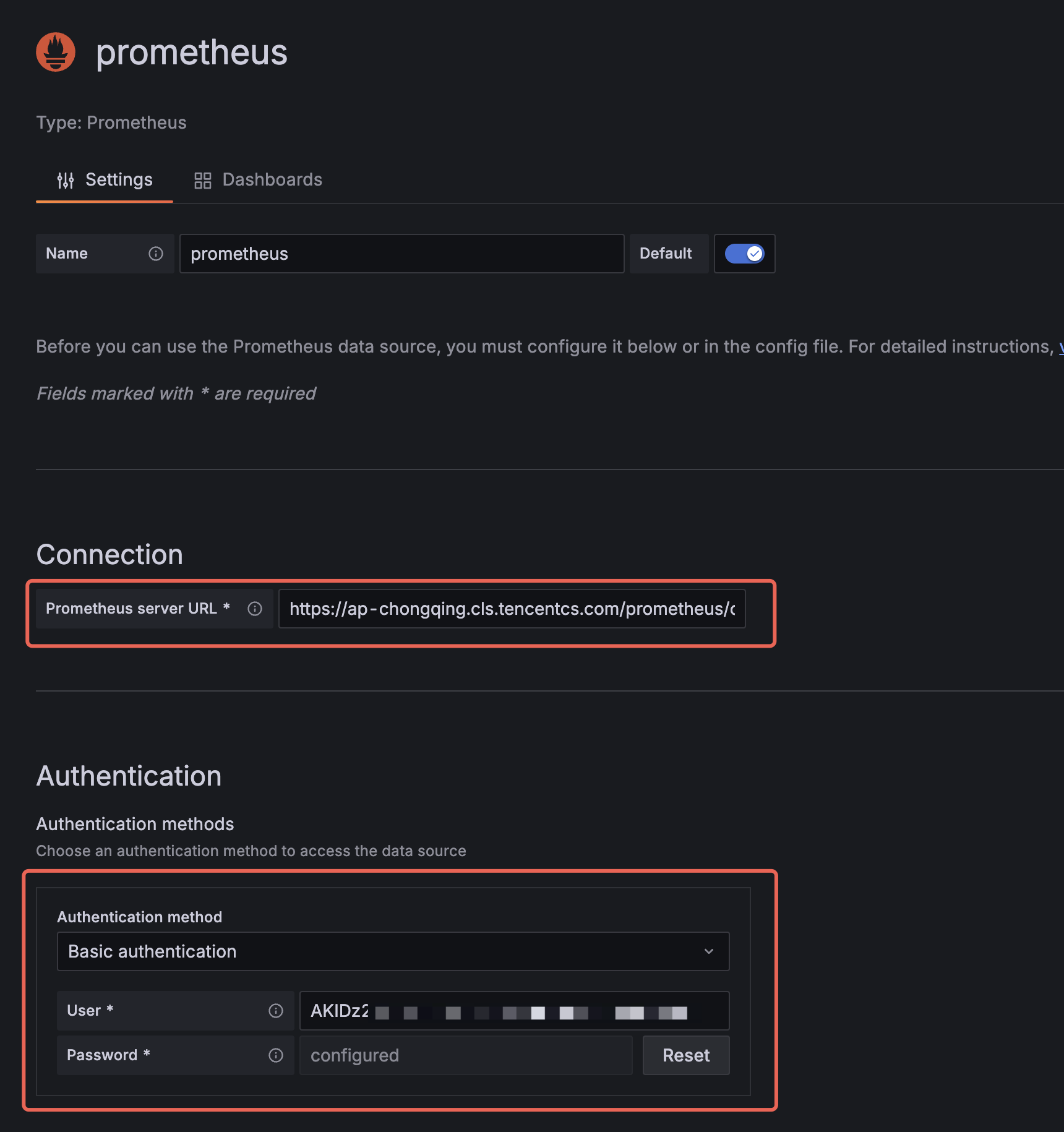
Prometheus server URL:即第1步获取配置信息中的 URL,Grafana 部署在腾讯云内网时(例如部署在 CVM 或 TKE 中)可使用内网地址,其它情况请使用外网地址。
Authentication method:Basic authentication,User 为 SecretId,Password 为 SecretKey。
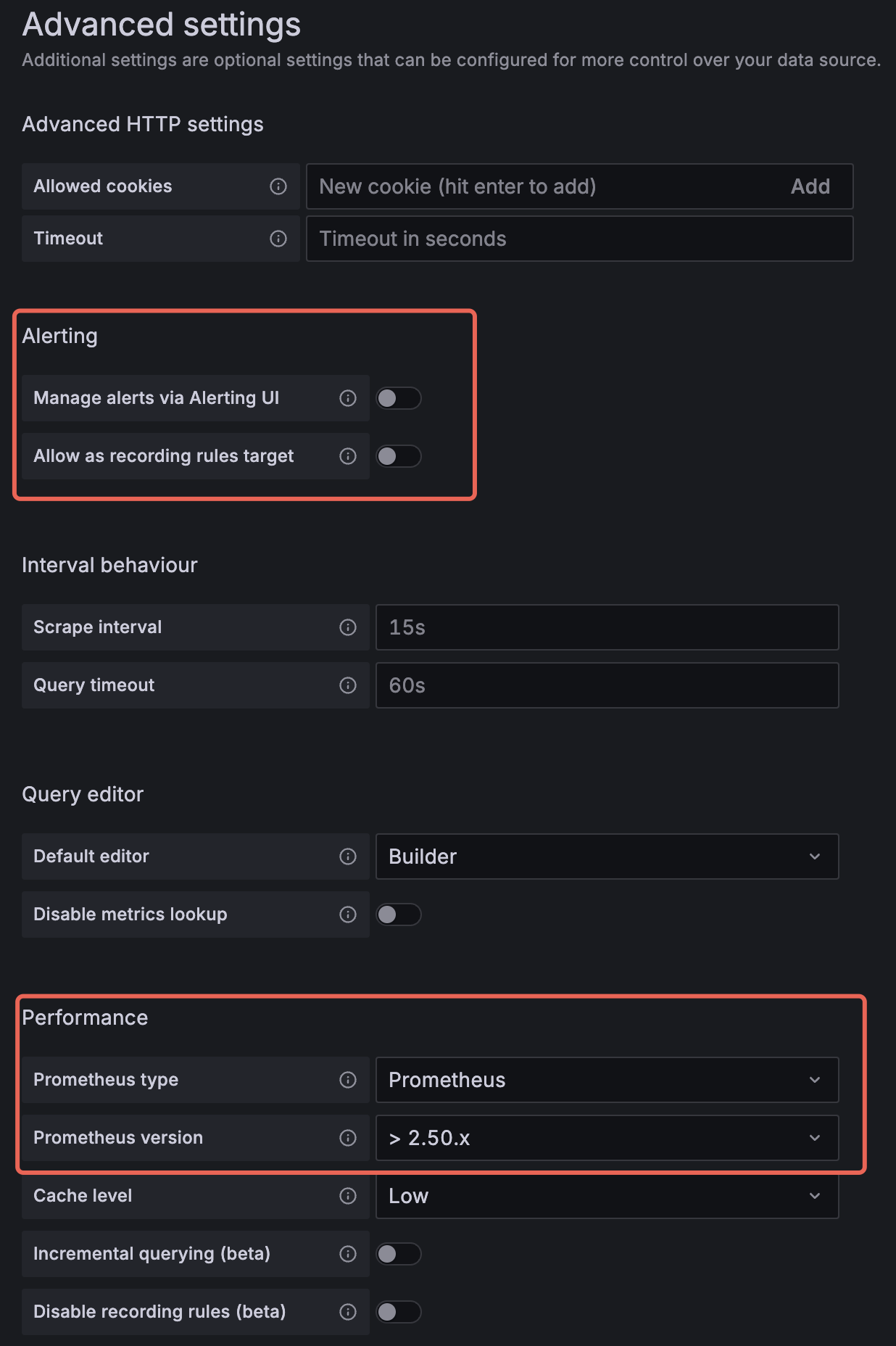
Alerting:关闭其中的开关,包括 Manage alerts via Alerting UI 及 Allow as recording rules target(旧版本 Grafana 可能无该配置项,可忽略)。
Prometheus type:选择 Prometheus。
Prometheus version:> 2.50.x(旧版本 Grafana 可能无该配置项,可忽略,但在数据量较大时会影响查询性能,此时建议升级 Grafana)。
4. 单击底部 Save & Test 测试配置信息是否正确并保存配置。
步骤3:在 Grafana 上查看数据
在 Grafana-Explore 中查看原始日志
1. 进入 Grafana-Explore,数据源选择 Tencent CLS Datasource 插件。
2. 插件类型选择日志服务,选择目标日志主题的所在地域、日志主题名称。
3. 在检索语句中输入语句,单击右上角的 Run query,即可查看日志检索结果。

在 Grafana-Dashboard 中查看原始日志
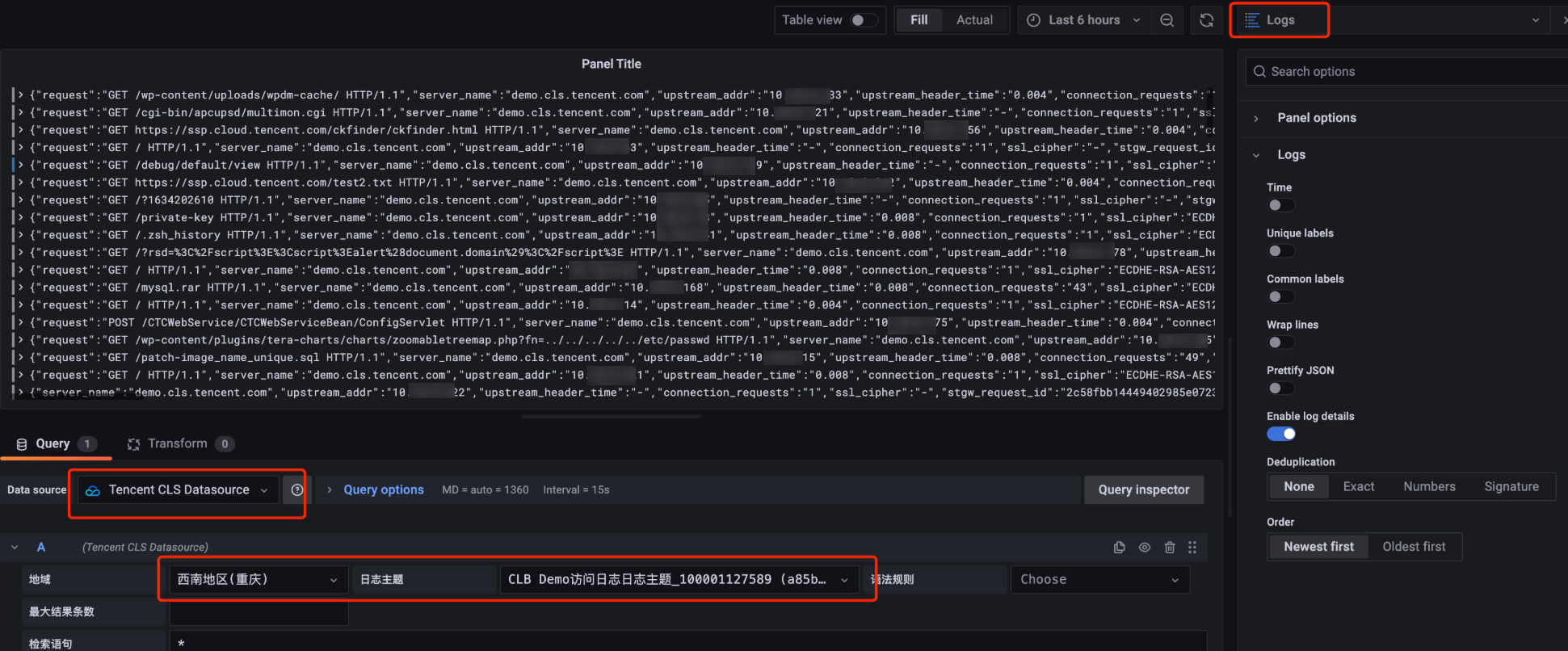
1. 进入 Grafana-Dashboard ,单击添加图表。
2. 在图表编辑页面,图表类型选择 Logs。数据源选择 Tencent CLS Datasource 插件,选择目标日志主题的所在地域、日志主题名称。
3. 在检索语句中输入语句,单击右上角的刷新按钮,即可查看日志检索结果。
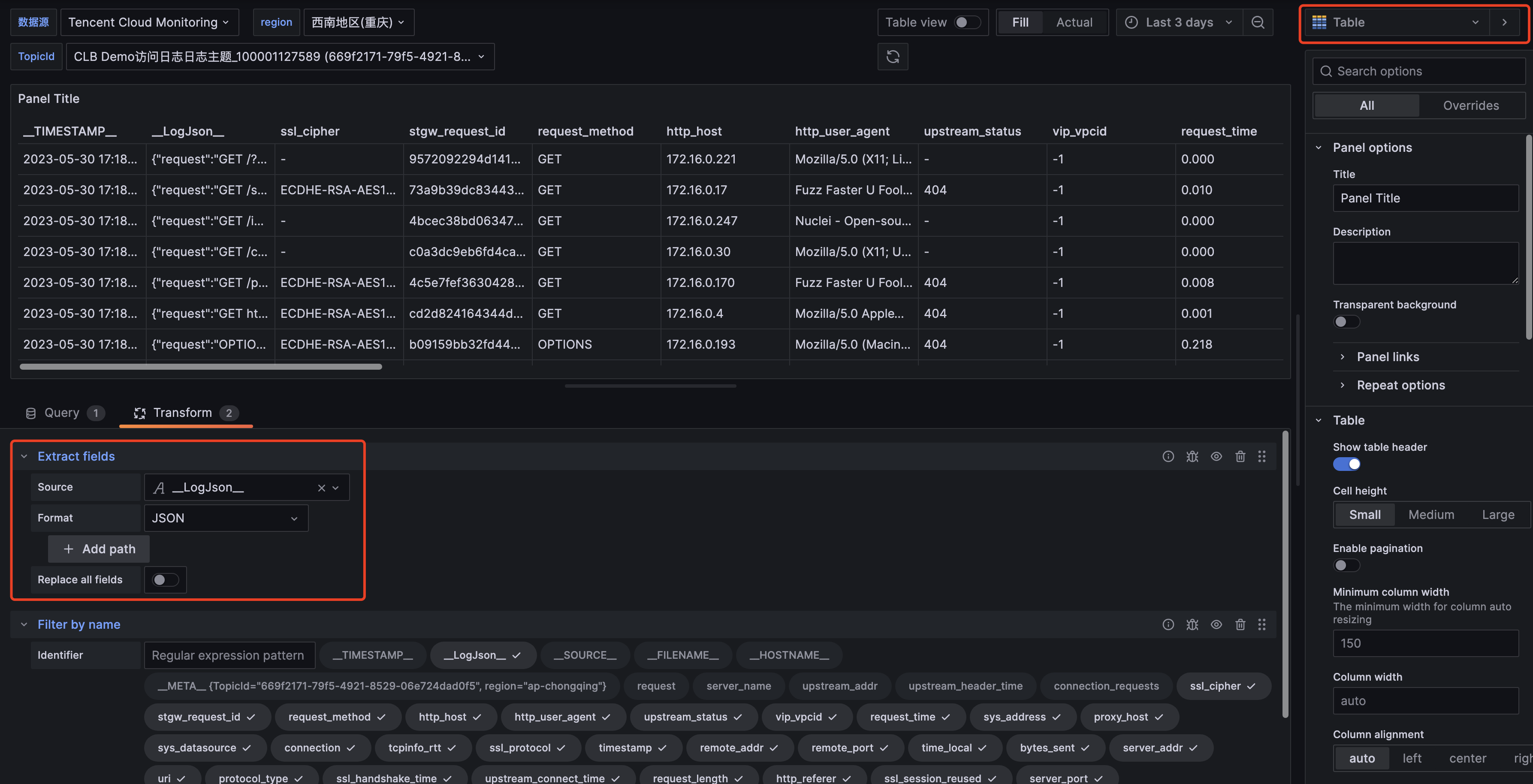
对于 Grafana v8.3以上版本用户,也可通过 Transform 功能中的 Extract fields 功能,对检索返回内容进行字段提取,在 Table 中查看日志。
在 Grafana 上配置统计图表
1. 进入 Grafana-Dashboard ,单击添加图表。
2. 在图表编辑页面,选择目标图表类型。数据源选择 Tencent CLS Datasource 插件,选择目标日志主题的所在地域、日志主题名称。
3. 在检索语句中输入SQL 语句,单击右上角的刷新,即可查看统计图表结果。
绘制时序图的语句示例
*|selecthistogram(cast(TIMESTAMPastimestamp),interval1minute)asanalytic_time,count(*)aslog_countgroupbyanalytic_timeorderbyanalytic_timelimit1000
时序图使用自适应时间粒度
*|selecttime_series(__TIMESTAMP__, '${__interval}', '%Y-%m-%dT%H:%i:%s+08:00', '0') asanalytic_time,count(*)aslog_countgroupbyanalytic_timeorderbyanalytic_timelimit1000
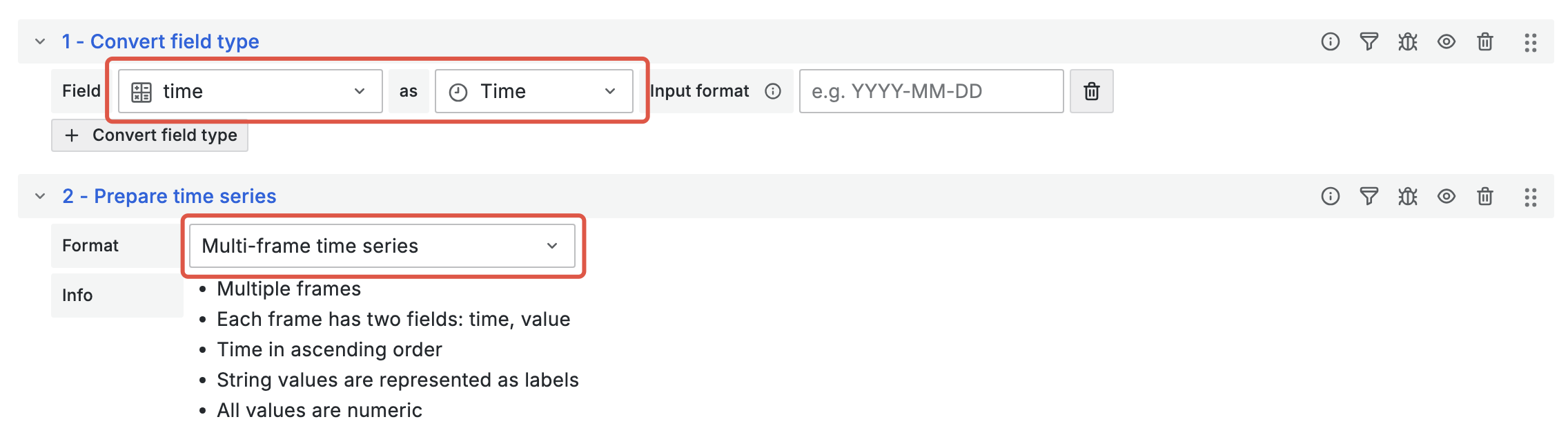
该语句需要配合 Transform 功能绘制时序图,添加 Convert field type 和 Prepare time series 配置如下:
绘制饼图的语句示例
注意右侧图表配置项
Value Options - show 选择 All values:*|selecttry_cast(statusasvarchar)asstatus,count(*)aslog_countgroupbystatu
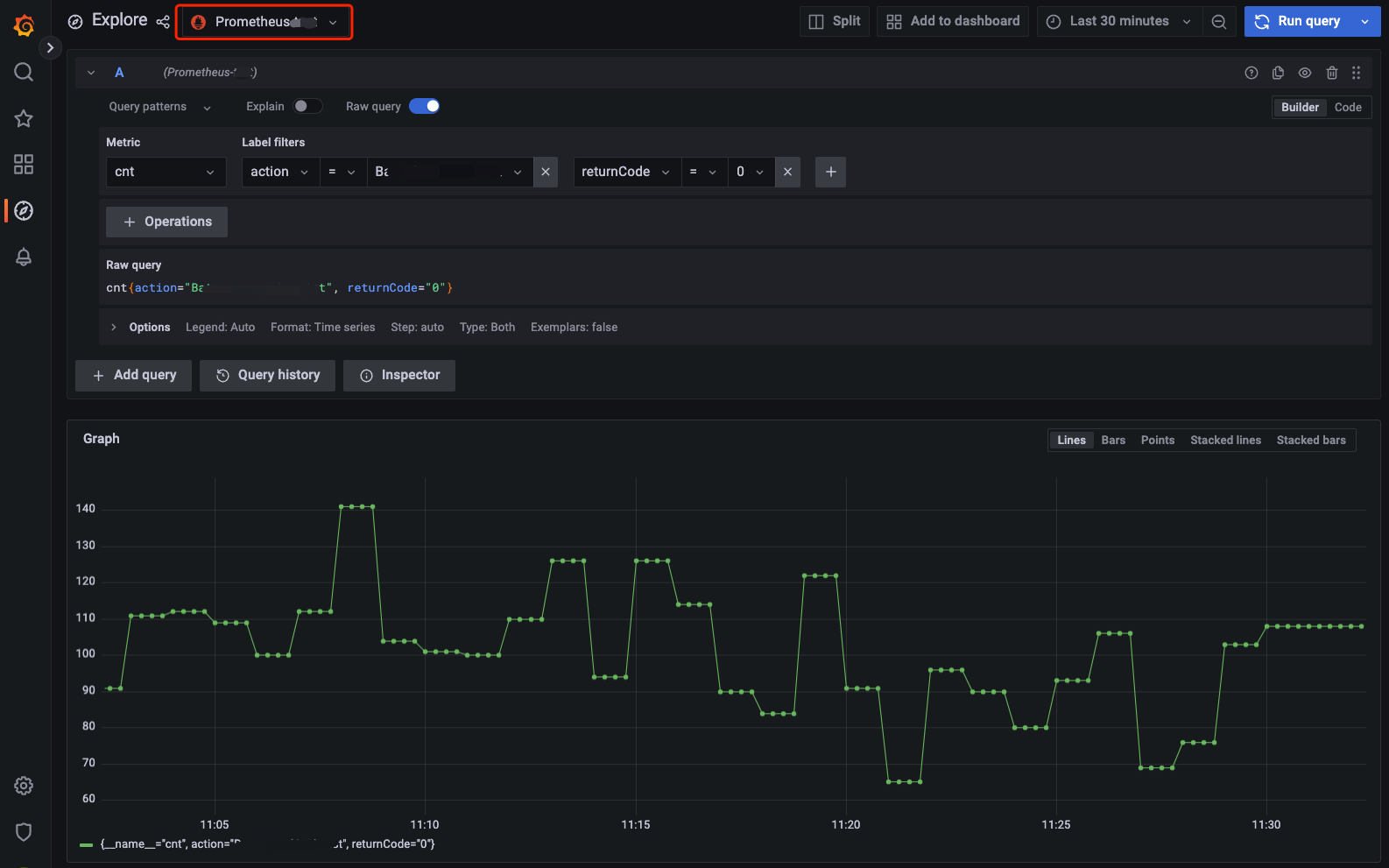
1. 进入 Grafana-Explore,数据源选择步骤2添加的 Prometheus 数据源。
2. 输入查询语句,单击右上角的 Run query,即可查看指标数据。
步骤4:在 Grafana 上配置监控告警
1. 进入 Grafana-Alert rules ,单击新建告警规则。
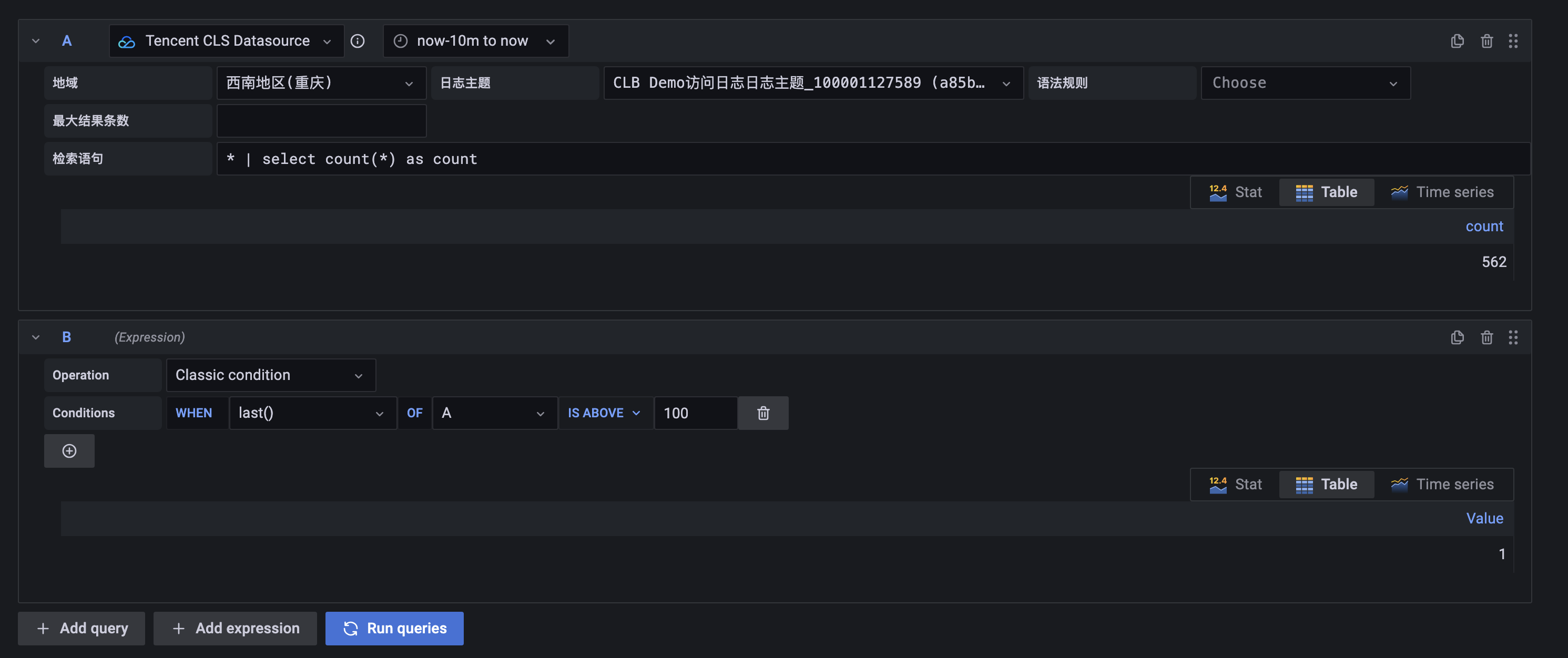
2. 进入告警规则编辑页面,在 A 中,数据源选择 Tencent CLS Datasource 插件,监控告警的统计时间范围按照需求选择。
3. 在 A 中,选择目标日志主题的所在地域、日志主题名称。
4. 在 A 中,在检索语句中输入 SQL 语句,其结果作为监控告警指标。
5. 在 B 中,选择 A 中告警指标取值,示例中取最近一个值。
6. 在 C 中,配置告警指标值的告警触发条件,示例中配置值大于100时触发告警。
7. 单击 Preview 预览告警结果。填写告警通知配置,单击保存。
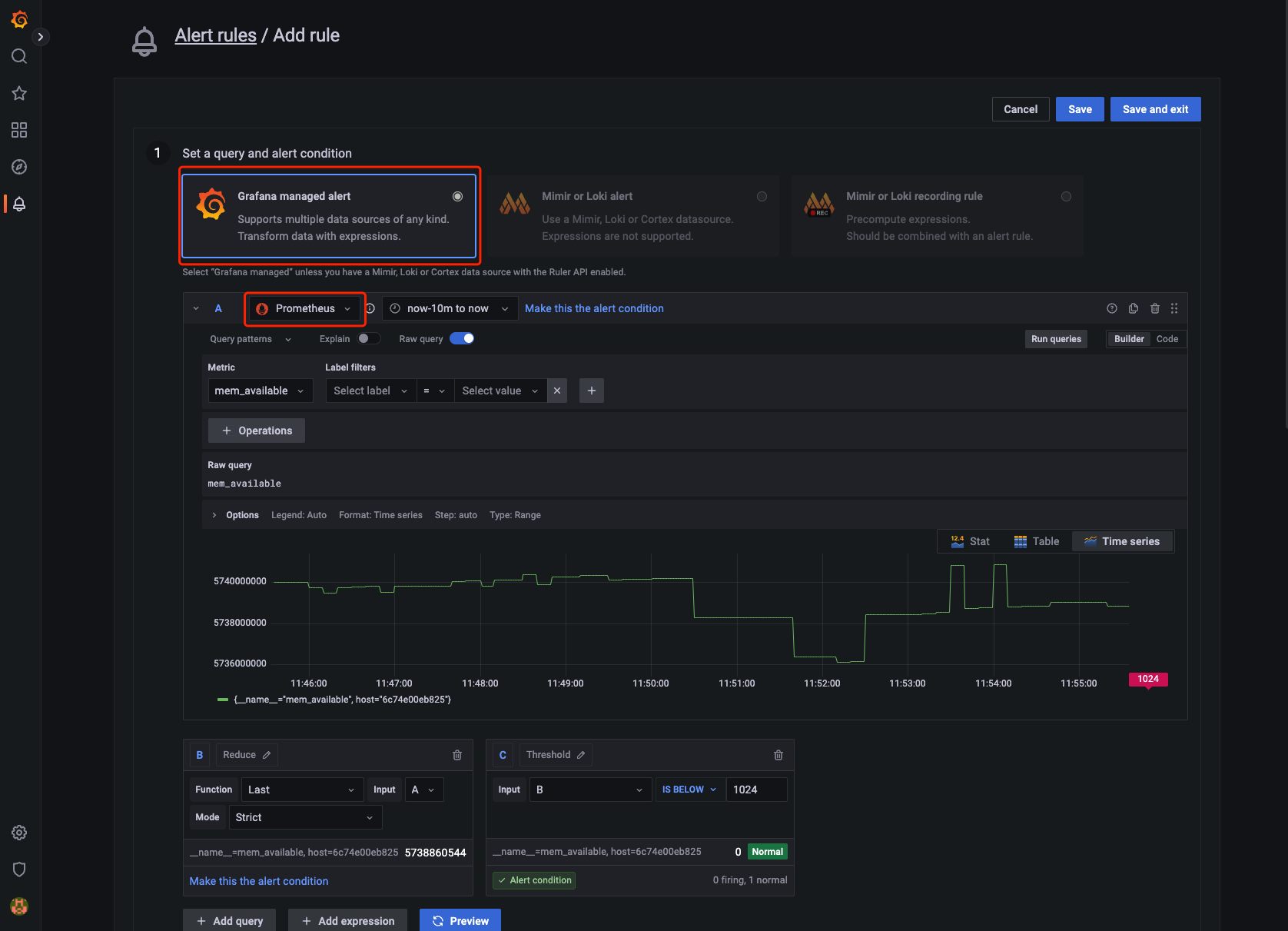
1. 进入 Grafana-Alert rules ,单击新建告警规则,由于指标主题不兼容 Prometheus Alert 相关接口,请使用 Grafana managed alert。
2. 进入告警规则编辑页面,在 A 中,数据源选择步骤2中添加的 Prometheus 数据源。
3. 在 A 中,填写指标查询语句。
4. 在 B 中,选择 A 中告警指标取值,示例中取最近一个值。
5. 在 C 中,配置告警指标值的告警触发条件,示例中配置小于1024时触发告警。
6. 单击 Preview 预览告警结果。填写告警通知配置,单击保存。
Grafana 常见问题
Grafana 图表出现超时报错怎么处理?
安装后,建议修改 grafana.ini 文件的 [dataproxy] 配置。
Grafana 默认超时时间为30s,在大数据量的检索时,可能导致 timeout 问题,详情请参见 Grafana proxy queries timeout after 30s with dataproxy。建议修改至60s,以最大限度发挥日志服务的能力。修改配置如下:
[dataproxy]timeout = 60dialTimeout = 60keep_alive_seconds = 60
Grafana 如何安装更多可视化图表?
例如,您需要安装饼图(pie panel),可执行如下命令:
grafana-cli plugins install grafana-piechart-panelservice grafana-server restart
Grafana 如何配置地域与日志主题的变量?
在 Grafana 配置地域变量与日志主题变量,并在图表中引用。可以对仪表盘图表的地域和日志主题进行替换。其配置过程如下:

1. 进入 Grafana 仪表盘配置-Variables 菜单,选择新建 Variables。先配置地域变量,再配置日志主题变量。
2. Variables type 选择 Query。
3. Query options 中 DataSource 选择 Tencent CLS Datasource 插件。
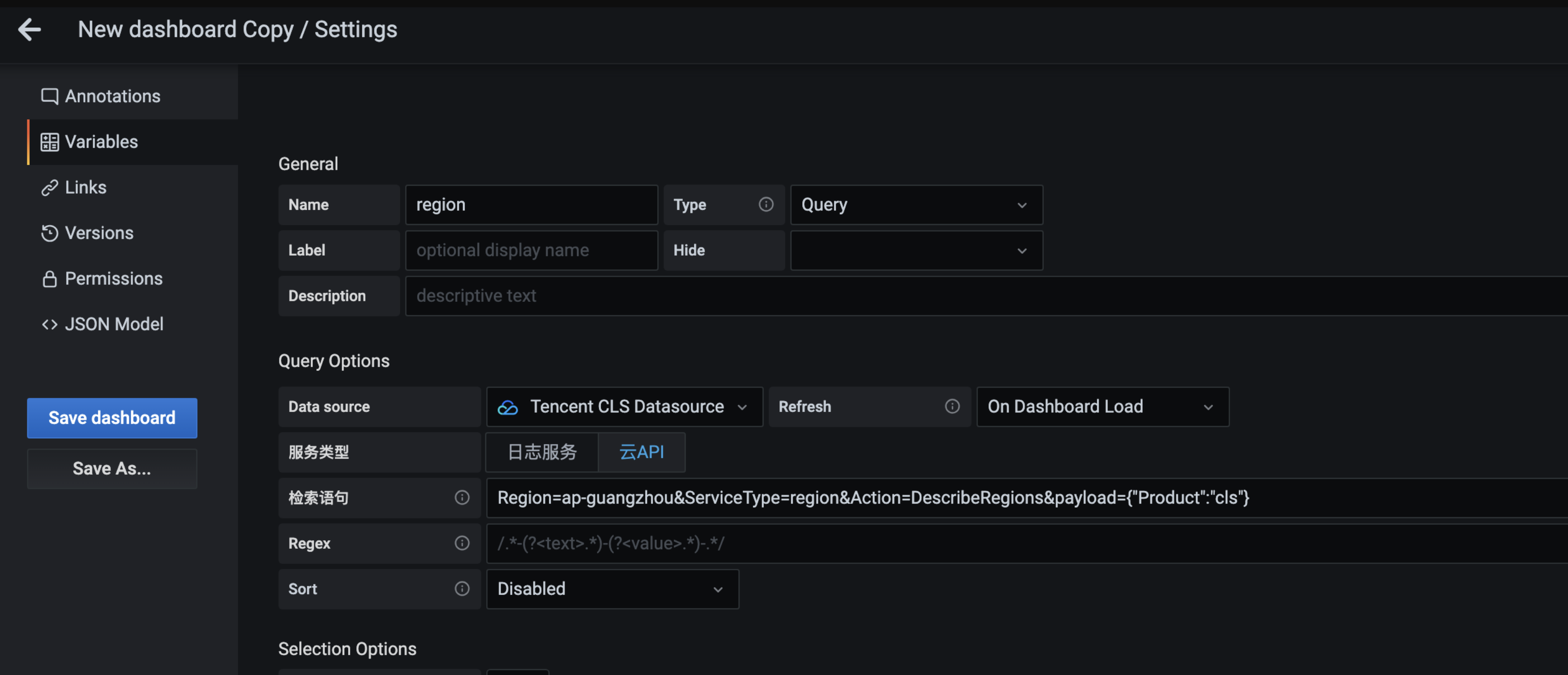
4. Query 服务类型选择云 API,查询语句如下:
地域变量:
ServiceType=region&Action=DescribeRegions&payload={"Product":"cls"}
日志主题变量:
Region=${region}&ServiceType=cls&Action=DescribeTopics&field=Topics&id=TopicId&name=TopicName
日志主题变量(根据主题名称过滤日志主题,过滤为模糊匹配):
Region=${region}&ServiceType=cls&Action=DescribeTopics&field=Topics&id=TopicId&name=TopicName&payload={"Filters":[{"Key":"topicName","Values":["your topic name"]}]}
5. 配置完成后,单击保存。
Grafana 如何使用变量过滤日志数据?
在 Grafana 配置变量,并插入到图表的查询语句中。通过选择不同的变量值,实现对图表数据的过滤。此处以配置用户 IP 过滤器为例:
1. 进入 Grafana 仪表盘配置-Variables 菜单,选择新建 Variables。
2. Variables type 选择 Query。
3. Query options 中 DataSource 选择 Tencent CLS Datasource 插件。
4. Query 服务类型选择日志服务,查询语句如下 (以 remote_addr 为例,实际使用请替换为目标字段) :
* | select remote_addr group by remote_addr limit 1000
5. (可选)Selection options 勾选多选与全选操作,全选的默认值填写为:*。
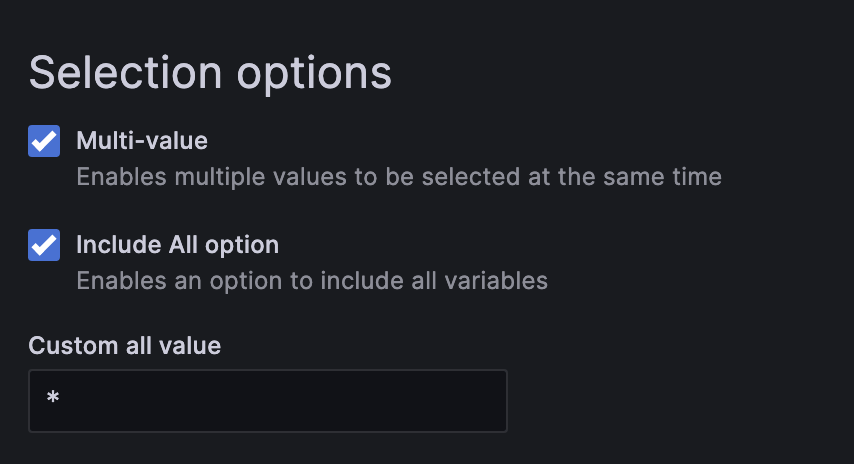
6. 在语句中插入变量 ${IP:raw} ,即可配置完成(其中
:raw 为变量的后缀,指定变量格式为原始格式,避免特殊符号被转义)。
Grafana 时序图提示 Data is missing a time field 如何处理?
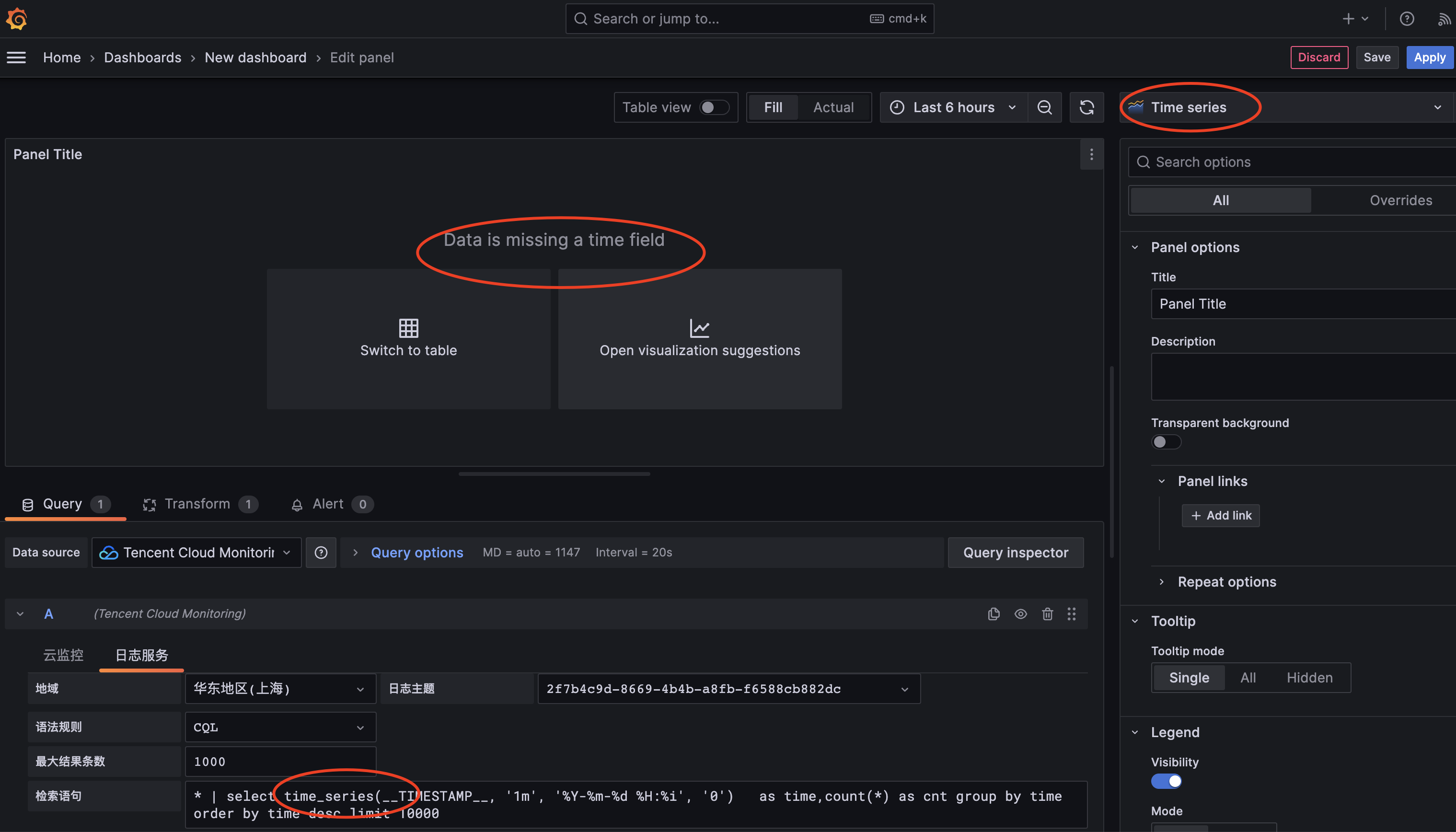
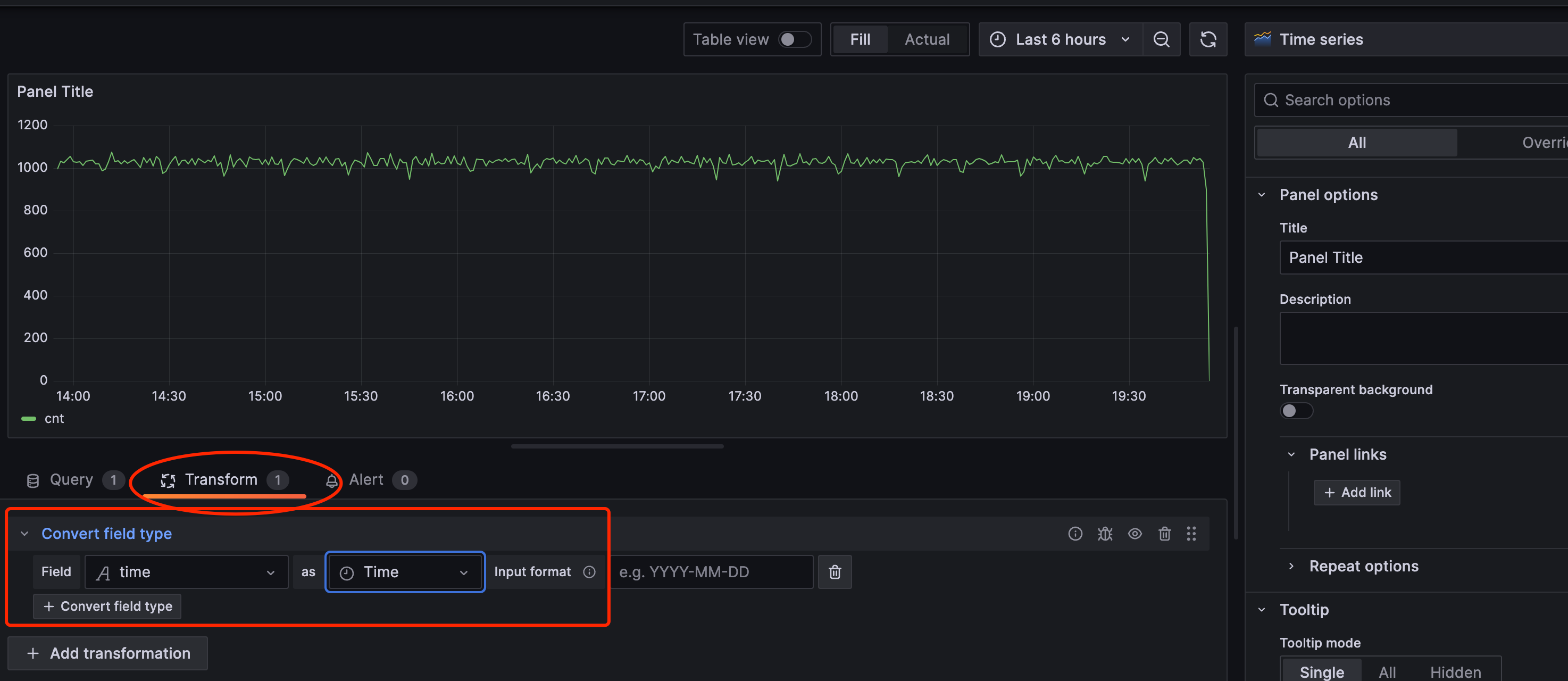
解决方法:
1. 单击切换到 Transform 的 Tab 页面,添加 Convert field type。
2. 配置 Convert field type,Field 选择 SQL 里的时间字段,as 为 Time 类型。
更多模板变量配置
文档反馈