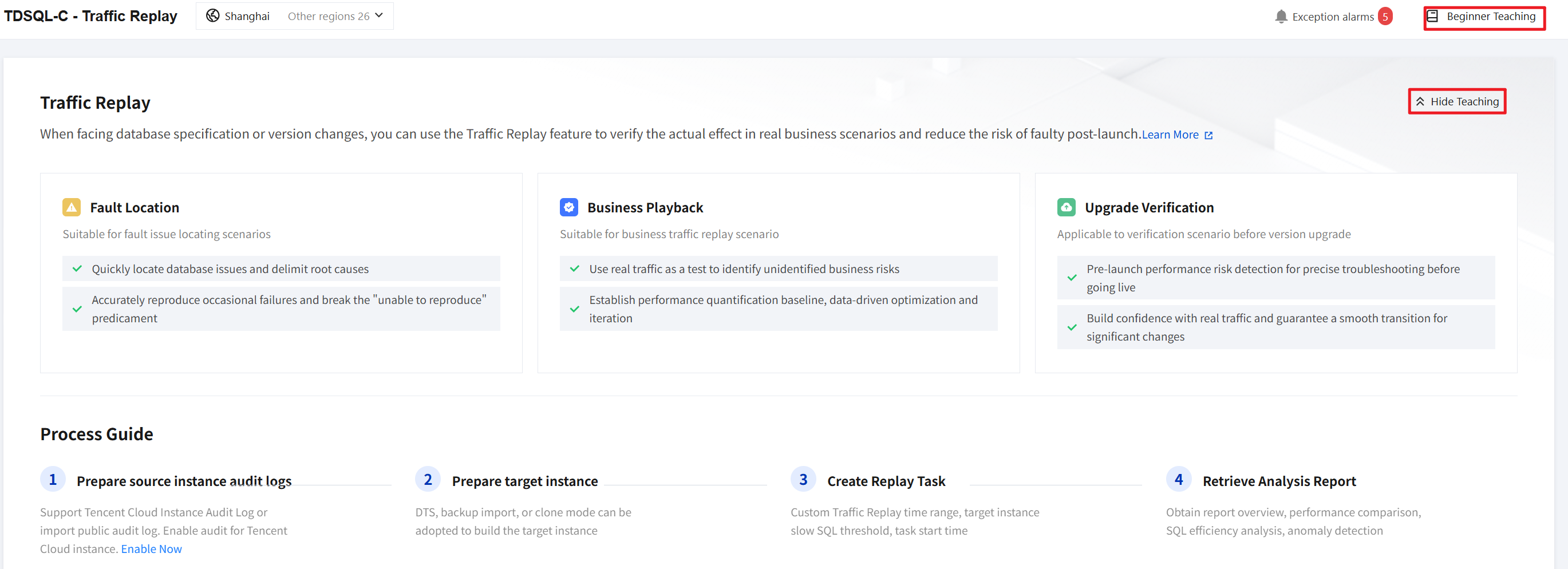
TDSQL-C for MySQL provides a traffic replay feature. This feature works by recording real SQL traffic from the production database and replaying it on a target database. This enables precise validation of the stability and performance of a database after changes, helping to reduce the verification costs and business risks associated with database migration and version upgrades. This document introduces the traffic replay feature.
Beginner Tutorial Entry
You can view the process guide for using this feature in the Beginner's Tutorial section at the top right of the Traffic Replay page. This helps you get started quickly. Click Hide Teaching to hide the Beginner's Tutorial section. Click Beginner Teaching to show the Beginner's Tutorial section.
Feature Applicability Scenarios
In scenarios such as database migration or version upgrades, you can use the traffic replay feature to replay real SQL data that has been executed on the production database on a target instance. This allows you to identify which statements fail or run slowly. Using this feature is more convenient than writing test cases. Moreover, the SQL statements covered are generated from real business operations, making the test results more reliable.
Use Cases
|
Database migration (from self-built / other clouds to TDSQL-C for MySQL) | Perform compatibility and performance validation in advance, and conduct simulation drills before the formal migration to identify potential issues. |
Upgrading the Database Version | Test whether the new version has any behavioral changes or performance degradation. |
Fault Reproduction | Helps replay production faults in the test environment to locate the root cause. |
Performance Stress Testing | Use real production traffic for benchmarking to evaluate the instance's load-bearing capacity. |
Features
Multi-Source Traffic Collection: This feature supports obtaining real business SQL traffic from multiple sources to provide a data foundation for subsequent traffic replay. It includes the following two types.
TDSQL-C for MySQL Instance Replay: This feature allows you to directly select a TDSQL-C for MySQL instance and a replay time period. The system automatically extracts traffic from audit logs, eliminating the need to manually export files.
Other Cloud Log Replay: This feature supports uploading audit logs exported from clouds other than Tencent Cloud (subject to the configuration page of the traffic replay feature in the console). It also supports CSV, JSON, and compressed package (tgz) formats.
Fine-Grained Replay Configuration Management: The time granularity in the replay configuration can be precise to the second. You can execute tasks immediately or schedule them to trigger at a specific time, which facilitates execution during off-peak hours. When the source instance is TDSQL-C for MySQL, the slow SQL threshold of the source instance can be automatically obtained.
Intelligent Pre-Check: This feature supports automatically performing itemized checks before replay, including file pre-checks and environment pre-checks. This helps expose potential issues, such as those related to the environment, in advance.
Generate Analysis Report: After the replay is completed, you can generate three types of reports: Report Overview, Performance Trend Comparison, and Exception Report.
Full Task Lifecycle Management: Multiple task statuses cover the complete execution cycle. The task list supports filtering by status and source type. Running tasks can be manually terminated at any time while retaining partial reports. This achieves full lifecycle management for task execution.
Field Descriptions for Other Cloud Audit Log Replay
Mandatory Fields: timestamp, nsTime, thread_id, execTime, errCode, dbName, sql.
Optional Fields: checkRows, affectRows, sentRows, lockWaitTime, cpuTime, ioWaitTime, trxLivingTime, sqlType.
Supported versions for features
This feature supports clusters of TDSQL-C for MySQL 5.7 and 8.0 with instance modes of provisioned resources or Serverless. However, Serverless instances with auto-pause enabled are not supported as target instances for replay. For Serverless source instances, only those that are running (not paused) can be selected.
Note
Before uploading audit logs from other clouds, ensure that all mandatory fields are complete. Otherwise, the pre-check will fail.
Do not perform operations on the target instance during the replay, as this may interfere with the data.
The data of the target instance must be rolled back to the state when the traffic was generated. Data inconsistency will lead to result deviation.
It is normal for the replay results of time functions such as NOW() and CURRENT_TIMESTAMP to differ from the original.
When a Tencent Cloud instance is used as the source instance for replay, ensure that full audit/rule audit is enabled on the source instance.
Related Documentation Guide
|
Traffic replay overview | Describes the traffic replay feature overview, applicable scenarios, and more. For details, refer to the description in this document. |
Execute a traffic replay task. | Describes the prerequisites and detailed steps required to execute a complete traffic replay task. For details, see Execute a Traffic Replay Task. |
FAQs | Describes common issues in the traffic replay feature. For details, see Common Issues. |