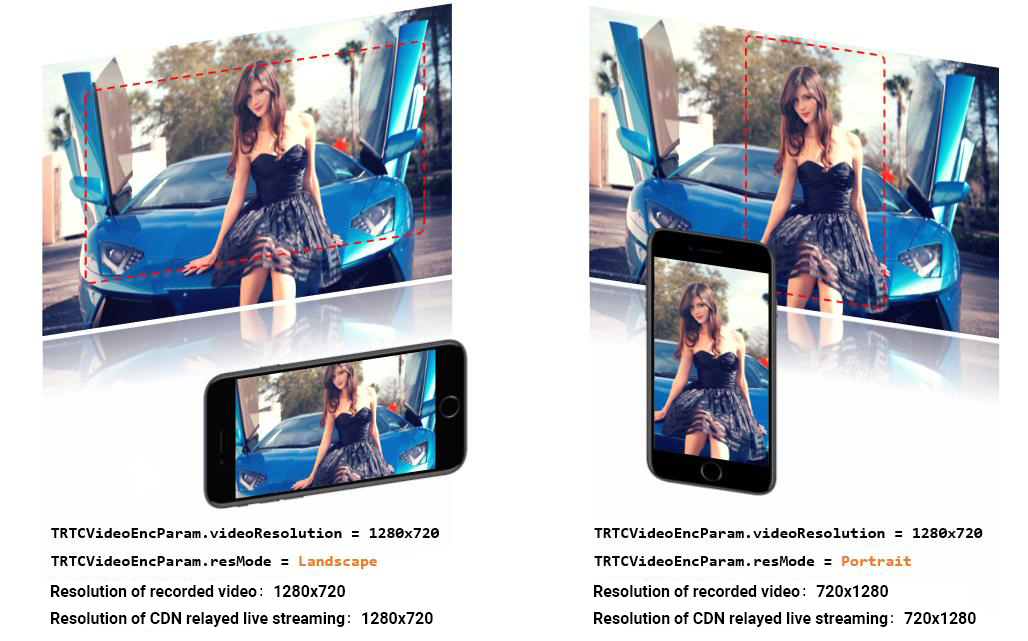
Unlike the uniform vertical-screen experience of mobile live streaming, Tencent Real-Time Communication (TRTC) needs to take into account both landscape and portrait orientations. Therefore, there will be a lot of processing logic for landscape/portrait to handle. This document mainly introduces:
how to achieve portrait mode. For example, WeChat's video call is a typical portrait experience mode.
How to achieve landscape mode. For example, apps for multi-person audio-video rooms (similar to Xiaoyu Yilian) often use landscape mode.
How to customize the rotation direction and filling mode of local screen and remote video images.
Platform Support
iOS
Android
Mac OS
Windows
Electron
Web Client
✓
✓
✓
✓
✓
×
Portrait Mode
To achieve an experience mode similar to WeChat Video Call, two tasks are required:
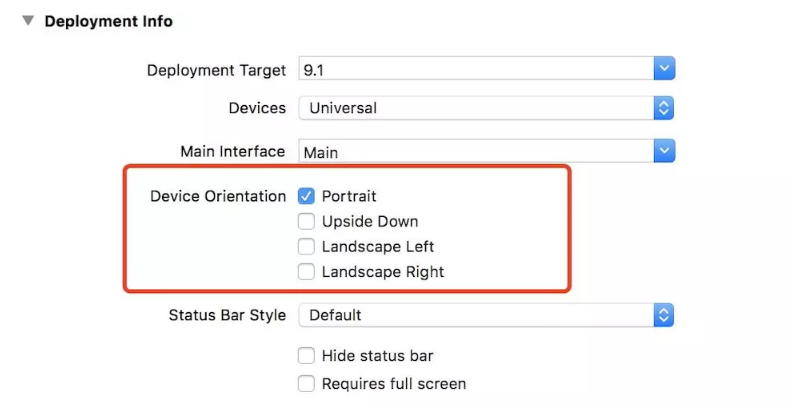
Step 1: Configure the App's UI interface in portrait mode.
IOS Platform
Android Platform
You can directly set in XCode's General > Deployment Info > Device Orientation:
Specify the activity's screenOrientation attribute as portrait to set the interface to portrait mode.
If you want to have a landscape orientation experience for the App, the work you need to do is similar to that in portrait mode. You just need to make adjustments to the parameters in step 1 and step 2.
Especially in Step 2, the value of videoResolutionMode in TRTCVideoEncParam: TRTC_VIDEO_RESOLUTION_MODE_LANDSCAPE.
Custom Control
The TRTC SDK itself provides API functions to operate the rotation direction and filling mode of local and remote video images.
API Function
Feature Role
Remarks
setVideoEncoderRotation
Set the clockwise rotation angle of the encoder output frame.
Currently only support 0 degrees and 180 degrees.
GSensorMode
Considering screen rotation involves various compatibility issues with recording and CDN bypass live streaming, TRTC SDK only provides a simple gravity sensing adaptation feature. You can enable it through the setGSensorMode API of TRTCCloud.
This feature supports adaptive rotation of 90 degrees, 180 degrees, and 270 degrees. That is, when the user's own mobile phone rotates, the orientation of the video seen by the other party remains unchanged. Moreover, this adaptation is achieved based on the orientation adjustment of the encoder. Therefore, the recorded video, as well as the video footage seen on the mini program and H5 end, can also maintain the original orientation unchanged.
Notes:
Another implementation scheme for gravity sensing adaptation is to carry the gravity direction of the current video in the video information of each frame, and then adaptively adjust the rendering direction on the remote user side. However, this scheme requires the introduction of additional transcoding resources to solve the problem of keeping the orientation of the recorded video consistent with the expected video orientation. Therefore, it is not recommended.