Electron 관련
다운로드
포커스 모드
폰트 크기
설치 관련
trtc-electron-sdk는 공식 Electron v12.0.1 버전과 호환됩니까?
호환됩니다. trtc-electron-sdk는 elecron 자체에 의존하는 sdk가 없으므로 관련 버전 종속성이 없습니다.
Electron을 다운로드할 때 404 오류가 발생합니다.

단말에 다음 명령을 입력합니다.
$ npm config set electron_custom_dir 8.1.1 # 버전 번호에 따라 결정
실행 관련
Windows 32 시스템에서 Error:resource\\trtc_electron_sdk.node is not a valid Win32 application, 프롬프트에 32비트 trtc_electron_sdk.node가 필요하다는 오류가 보고됩니다.
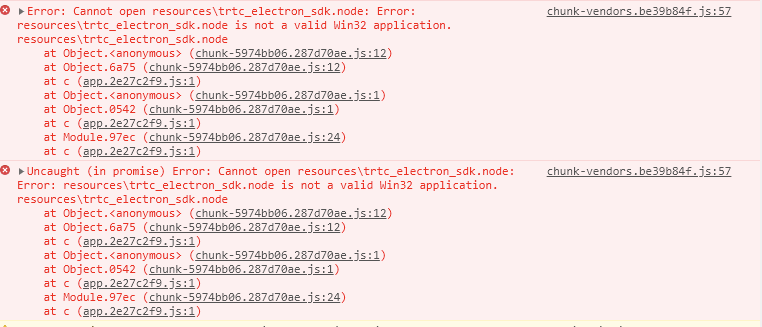
1. 프로젝트 디렉터리의 trtc-electron-sdk 디렉터리(xxx/node_modules/trtc-electron-sdk)로 이동하여 다음을 실행합니다.
npm run install -- arch=ia32
2. 32비트
trtc_electron_sdk.node 다운로드 후, 프로젝트를 다시 패키징합니다.vscode terminal에서 Electron Demo를 실행하여 방에 입장하면 빈 화면이 표시됩니다.
vscode는 카메라 권한이 필요하며 다음과 같은 방법으로 권한을 추가할 수 있습니다.
cd ~/Library/Application\\ Support/com.apple.TCC/cp TCC.db TCC.db.baksqlite3 TCC.db # sqlite> prompt appears.# for Mojave, CatalinaINSERT into access VALUES('kTCCServiceCamera',"com.microsoft.VSCode",0,1,1,NULL,NULL,NULL,'UNUSED',NULL,0,1541440109);# for BigSurINSERT into access VALUES('kTCCServiceCamera',"com.microsoft.VSCode",0,1,1,1,NULL,NULL,NULL,'UNUSED',NULL,0,1541440109);
Demo를 실행하면 정의되지 않은 널 포인터 오류 “cannot read property 'dlopen' of undefined”?가 발생합니다.
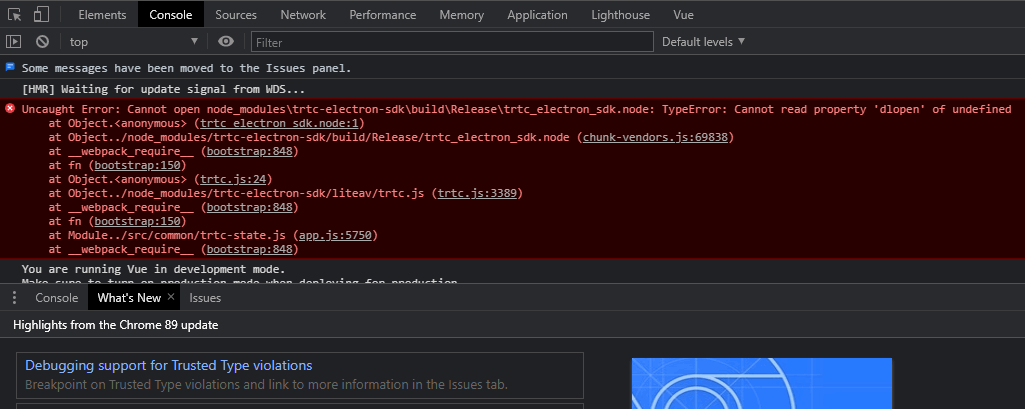
let win = new BrowserWindow({width: 1366,height: 1024,minWidth: 800,minHeight: 600,webPreferences: {nodeIntegration: true,contextIsolation: false},});
Electron 방 재입장 문제가 반복해서 발생합니다.
구체적인 case 분석이 필요합니다. 일반적인 이유는 다음과 같습니다.
클라이언트의 네트워크 상태가 좋지 않은 경우(연결이 중단되면 방 재입장이 트리거됩니다).
방 입장 신호를 2회 연속으로 발송한 경우.
디바이스 과부하로 디코딩 실패가 발생한 경우.
동일 UID로 여러 단말에서 중복 로그인한 경우.
“Electron failed to install correctly”? 라는 메시지가 단말에 나타납니다.
설치가 완료된 것으로 보이며 프로젝트가 실행될 때 단말에 다음과 같은 오류가 나타납니다.
Error: Electron failed to install correctly, please delete node_modules/electron and try installing again
아래의 세 단계에 따라 수동 다운로드합니다.
1.
npm config get cache를 실행하여 캐시 디렉터리를 조회합니다.2. Electron을 수동 다운로드하여 캐시 디렉터리에 넣습니다.
3.
npm install을 재실행합니다.카메라나 마이크를 호출하면 바로 크래쉬됩니다.
vscode 터미널을 사용하여 프로젝트를 시작합니다. trtc-electron-sdk가 카메라와 마이크를 실행하면 프로그램이 바로 크래쉬됩니다.
솔루션 A: 인증된 터미널을 사용하여 프로젝트를 실행합니다.
솔루션 B: vscode 승인: 선호 시스템 설정 > 보안 및 개인정보 보호에서 vscode 승인을 허용합니다.
솔루션 C: 보호 메커니즘을 비활성화하려면 아래 단계를 따르십시오.
1.1 시스템을 재시작하고 시스템이 보호 모드에 들어갈 때까지 command + r 키를 누릅니다.
1.2 terminal을 열고
csrutil disable을 입력하여 보호 메커니즘을 비활성화합니다.1.3 재시작하여 정상적으로 시스템에 들어가며, 이때 vscode 터미널 실행 항목을 사용할 수 있습니다.
1.4 보호 메커니즘을 다시 실행하려면 두 번째 단계에서
csrutil enable을 실행해야합니다.Electron은 콘솔에서 ‘xx is not defined’라는 오류가 보고됩니다.
프로젝트를 실행할 때 Electron은 콘솔에
xx is not defined라는 메시지를 표시합니다. 여기서 xx는 node 모듈을 나타냅니다. 예:Uncaught ReferenceError: require is not defined
Electron의 'main.js' 파일에서 'nodeIntegration'의 설정 항목을 true로 변경합니다.
let win = new BrowserWindow({width: 1366,height: 1024,webPreferences: {nodeIntegration: true, // 이 항목을 true로 설정하십시오.},});
패키징 관련
.node 모듈 로딩 문제가 발생하였습니다.
오류 메시지
패키징 및 컴파일된 프로그램이 실행 중일 때 콘솔에서 다음과 같은 오류 메시지가 보고됩니다.
NodeRTCCloud is not a constructor
Cannot open xxx/trtc_electron_sdk.node 또는 The specified module could not be found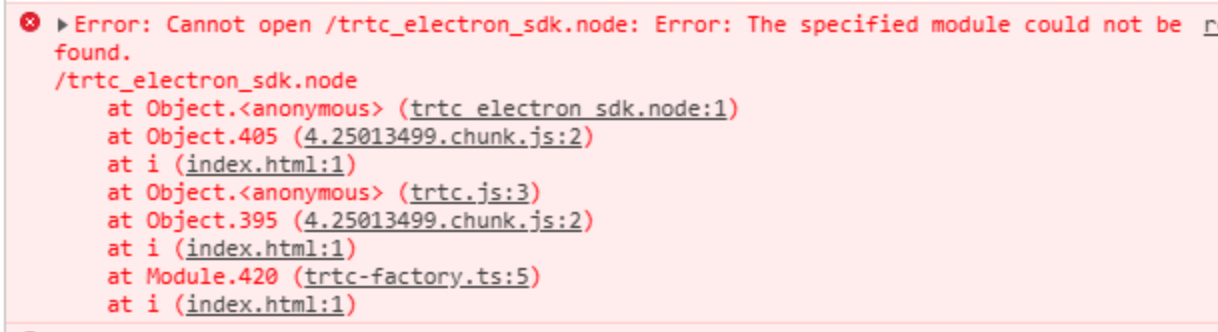
dlopen(xxx/trtc_electron_sdk.node, 1): image not found
솔루션
상기와 같은 오류 메시지는 trtc_electron_sdk.node 모듈이 프로그램에 올바르게 패키징되지 않았음을 의미하므로 아래 단계에 따라 처리합니다.
1.
native-ext-loader 설치.$ npm i native-ext-loader -D
2. webpack 설정 수정.
2.1
module.exports 전, 코드 구축 과정에서 각각의 타깃 플랫폼 특징에 따라 정확하게 패키징할 수 있도록 webpack.config.js 구축 시 --target_platform의 명령 라인 매개변수를 수신하기 위해 다음 코드를 추가합니다.const os = require('os');// target_platform 매개변수를 전달하지 않으면 프로그램은 기본적으로 현재 플랫폼 유형에 따라 패키징됩니다.const targetPlatform = (function(){let target = os.platform();for (let i=0; i<process.argv.length; i++) {if (process.argv[i].includes('--target_platform=')) {target = process.argv[i].replace('--target_platform=', '');break;}}// win32는 32비트 및 64비트를 포함하여 Windows 플랫폼을 균일하게 나타냅니다. darwin은 Mac 플랫폼을 의미합니다.if (!['win32', 'darwin'].includes) target = os.platform();return target;})();
2.2 다음 rules 구성 추가.
module: {rules: [{test: /\\.node$/,loader: 'native-ext-loader',options: {rewritePath: targetPlatform === 'win32' ? './resources' : '../Resources'}},]}
주의사항:
vue-cli를 사용하여 프로젝트를 생성한 경우 webpack 구성은 vue.config.js 파일의 configureWebpack 옵션에 저장됩니다.create-react-app을 사용하여 프로젝트를 생성한 경우, webpack 구성 파일은 [프로젝트 디렉터리]/node_modules/react-scripts/config/webpack.config.js입니다.3. packages.json 파일 구성, 패키징 구성 추가 및 스크립트 빌드 진행.
3.1
electron-builder 패키지 구성 추가(대소문자 주의):"build": {"생략": "...","win": {"extraFiles": [{"from": "node_modules/trtc-electron-sdk/build/Release/","to": "./resources","filter": ["**/*"]}]},"mac": {"extraFiles": [{"from": "node_modules/trtc-electron-sdk/build/Release/trtc_electron_sdk.node","to": "./Resources"}]},"directories": {"output": "./bin"}},
3.2 scripts를 추가하여
create-react-app 스크립트를 빌드하고 패키징합니다. 다음 구성을 참고하십시오."scripts": {"build:mac": "react-scripts build --target_platform=darwin","build:win": "react-scripts build --target_platform=win32","compile:mac": "node_modules/.bin/electron-builder --mac","compile:win64": "node_modules/.bin/electron-builder --win --x64","pack:mac": "npm run build:mac && npm run compile:mac","pack:win64": "npm run build:win && npm run compile:win64"}
3.3
vue-cli 프로젝트의 경우 다음 구성을 참고하십시오."scripts": {"build:mac": "vue-cli-service build --target_platform=darwin","build:win": "vue-cli-service build --target_platform=win32","compile:mac": "node_modules/.bin/electron-builder --mac","compile:win64": "node_modules/.bin/electron-builder --win --x64","pack:mac": "npm run build:mac && npm run compile:mac","pack:win64": "npm run build:win && npm run compile:win64"}
게이트 파일을 찾을 수 없습니다.
create-react-app으로 생성된 프로젝트는 electron-builder로 패키징할 때 이 문제가 발생할 수 있습니다.$ node_modules\\.bin\\electron-builder.cmd• electron-builder version=22.6.0 os=6.1.7601• loaded configuration file=package.json ("build" field)• public/electron.js not found. Please see https://medium.com/@kitze/%EF%B8%8F-from-react-to-an-electron-app-ready-for-production-a0468ecb1da3• loaded parent configuration preset=react-cra
그 중 'public/electron.js not found'는 게이트 파일을 찾을 수 없다는 뜻입니다.
솔루션
1. 게이트 파일을 이동하고 이름을 변경합니다.
$ cd [프로젝트 디렉터리]$ mv main.electron.js ./public/electron.js
2. pacakge.json 파일 수정:
{"main": "public/electron.js","생략": "..."}
패키지를 실행할 때 fs-extra 모듈에 구문 오류가 있습니다.
[프로젝트 디렉터리]\\node_modules\\electron-builder\\node_modules\\fs-extra\\lib\\empty\\index.js:33} catch {^SyntaxError: Unexpected token {at new Script (vm.js:51:7)
피드백