If your account's available balance is negative, you need to top up your account before you can purchase Tencent Cloud postpaid services. To avoid service interruption due to overdue payments, it is recommended that you keep your balance positive at all times. Please note that most Tencent Cloud services are billed on an hourly basis, so an overdue balance may cause services to be suspended. You can top up your account via online payment or bank transfer.
To ensure data security, only creators and collaborators with authorized financial permissions can access the payment page.
Comparison of Top-up Methods
Currency and Exchange Rate Note:
International accounts are billed in USD, and both bills and balances are displayed in USD.
If the remittance currency differs from the USD currency of the receiving account during top-up, currency conversion losses and additional fees will be incurred. The exchange rate and fees are subject to the remitting bank's transaction price, and Tencent Cloud does not participate in the currency conversion process.
The credited amount for remittances in non-USD currencies is converted at the bank's actual settlement exchange rate and may differ from the estimated amount at the time of remittance.
If the auto-payment amount exceeds USD 100,000, it will be split into multiple top-ups, with each top-up being USD 100,000.
All international site account
Large-value top-up
Scenarios requiring reduced manual operations and avoiding service suspension due to top-up delays
Online Payment
Bank Card Payment
WeChat Pay
1. To top up using
Online Payment - Bank Card
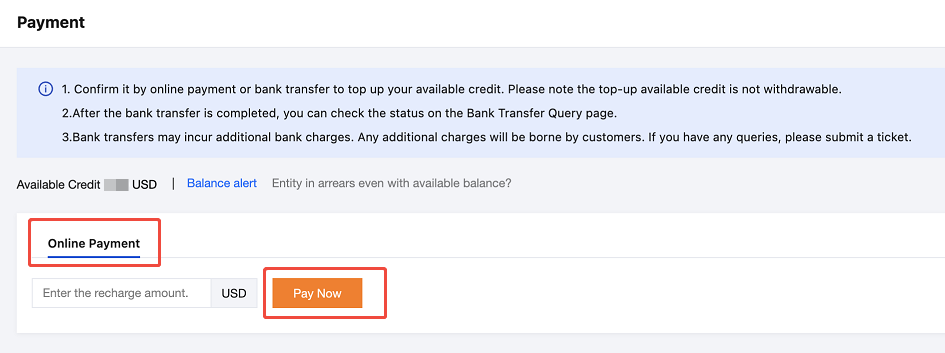
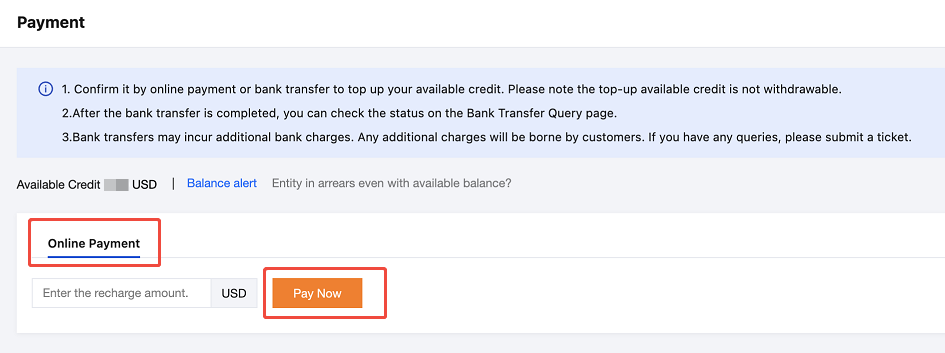
(credit card/debit card), log in to the Tencent Cloud official website and go to Billing Center > Payment Management > Payment. Click Online Payment, enter the top-up amount, and then click Pay Now to go to the payment page.
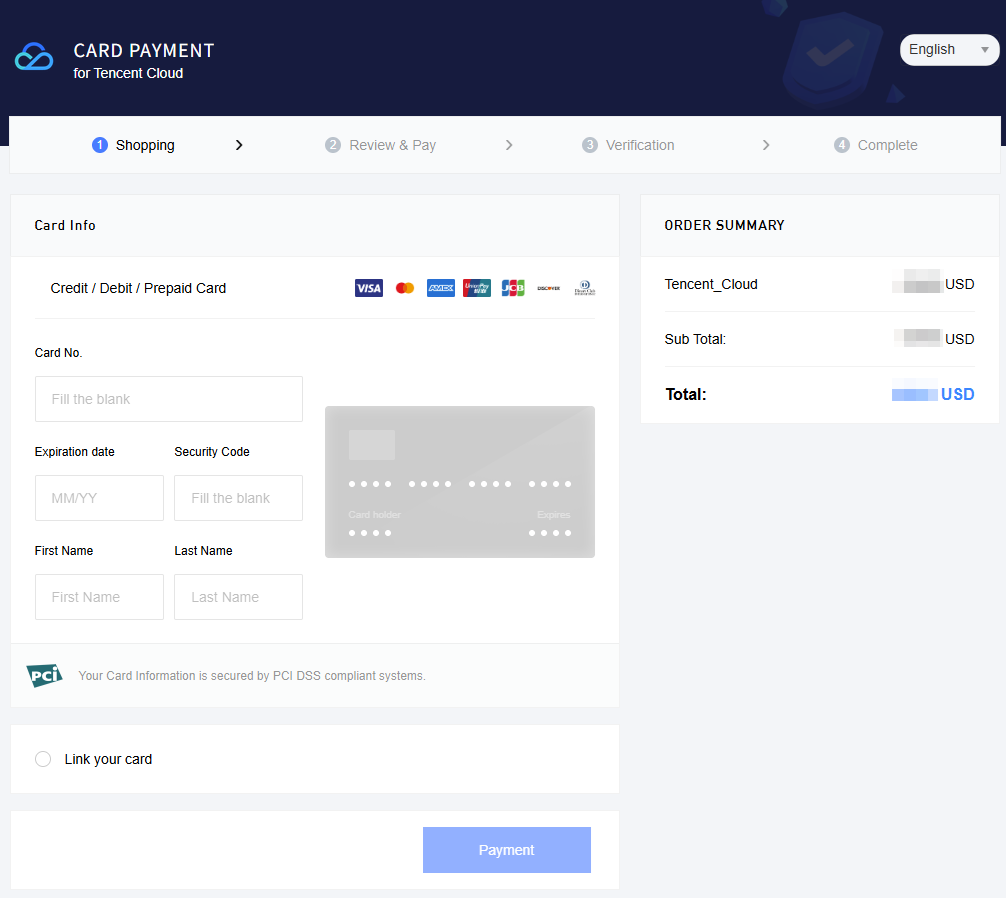
2. On the payment page, if you select Credit/Debit Card, you can choose an existing bound card or add a new payment account to top up.
Note:
If a new payment card is added during the top-up process, the credit card or debit card will only be used for the payment of this top-up order. The platform will not automatically bind this card as your payment card.
Due to the minimum payment amount restriction imposed by the payment channel, the minimum top-up amount for customers with a South Korea entity is USD 0.1.
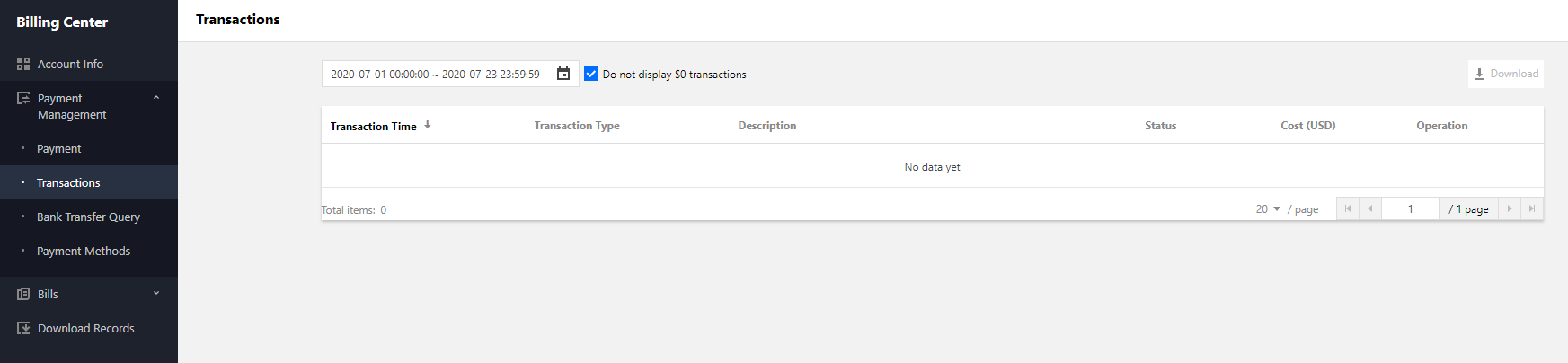
3. After the payment is complete, you can go to the Transactions page to view the payment details.
You can top up your account using the
Online Payment - WeChat Pay
method. Currently, WeChat Pay is available only to customers whose Tencent Cloud contracting entity is TENCENT CLOUD INTERNATIONAL PTE. LTD. To use WeChat Pay for cloud account top-up or order payment, please refer to the relevant procedures.
Note:
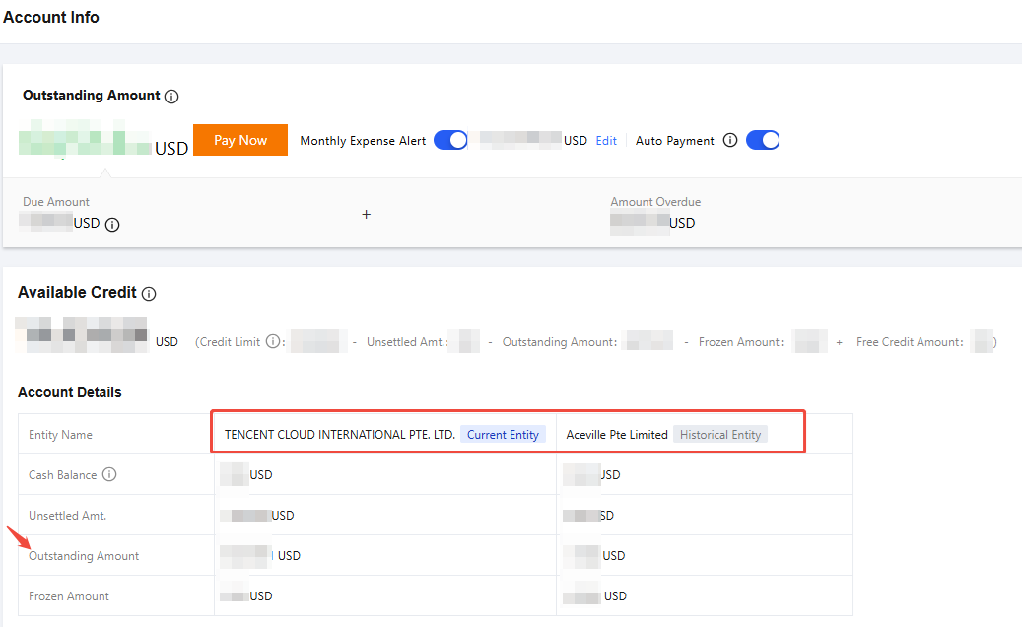
The signing entity is associated with the cloud account's registration location. Changing the registration location may result in a change of the signing entity. You can view the current signing entity in Billing Center - Account Information. For customer with a sales representative, the signing entity is subject to the sales contract.
The WeChat Pay feature is being gradually rolled out to other Tencent Cloud entities. If your account cannot use WeChat Pay, please choose Online Payment - Bank Card or Bank Transfer to top up.
The single-transaction and daily cumulative top-up limit for each WeChat account is approximately USD 4,000. For large-amount top-ups, we recommend that you choose Online Payment - Bank Card or Bank Transfer.
1. To top up using the Online Payment - WeChat Pay method, log in to the Tencent Cloud official website and go to Billing Center > Payment Management > Payment. Click Online Payment, enter the top-up amount, and then click Pay Now to go to the payment page.
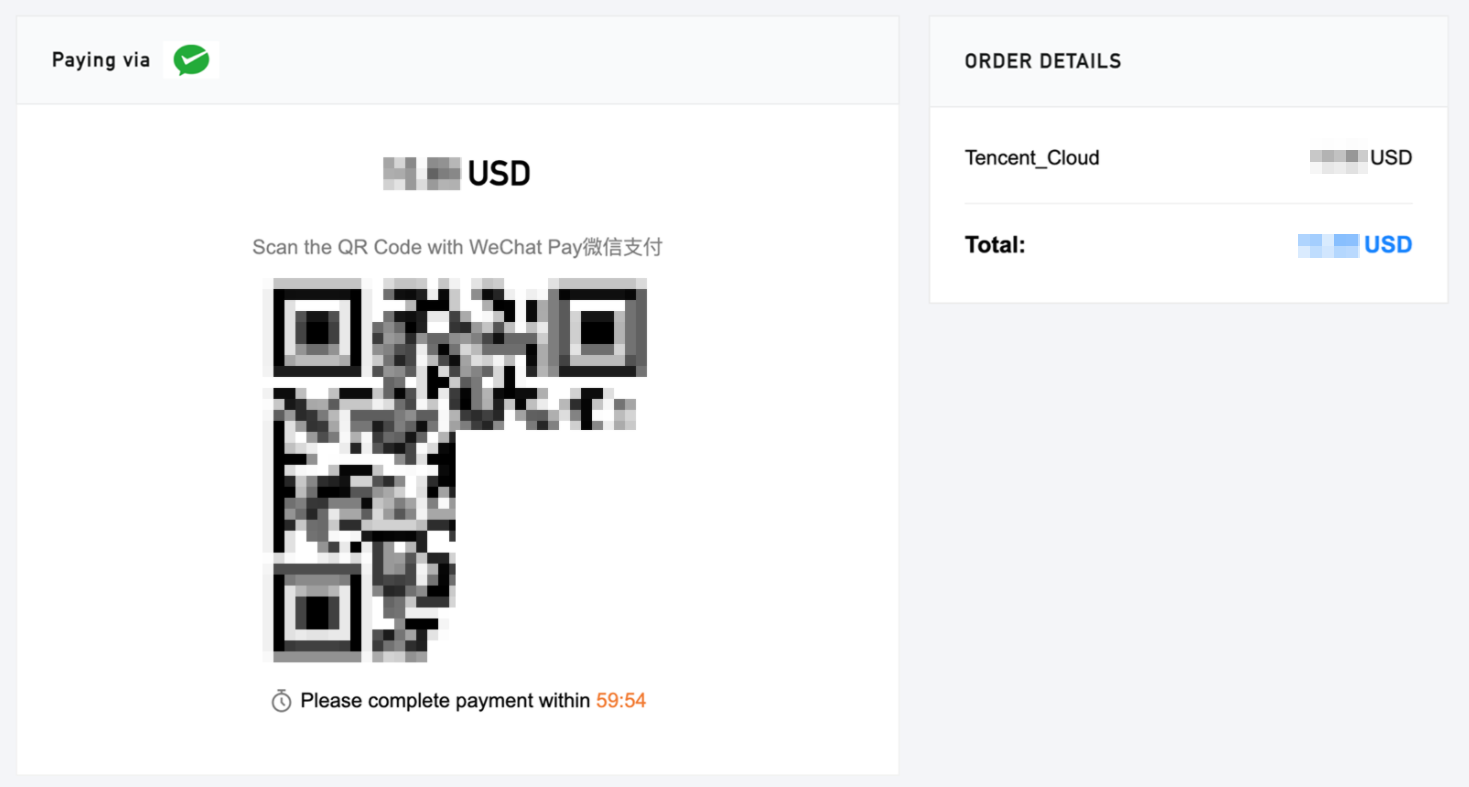
2. On the payment page, if you select WeChat Pay, please use WeChat to scan the QR code to top up your account.
3. After the payment is complete, you can go to the Transactions page to view the payment details.
Bank Transfer
If you choose bank transfer, please transfer the funds to our bank account. You can find our account information in the list below. When making the payment, please indicate your Tencent Cloud account ID in the remarks.
1. Signing Entity Inquiry
Different signing entities correspond to different receiving accounts. You can view your signing entity in Billing Center - Account Information, and then transfer the funds to the corresponding Tencent Cloud bank account.
Note:
For customers with a sales representative, the signing entity is subject to the actual contract. Please contact your sales representative to confirm the contracting entity information before remitting to the corresponding Tencent Cloud bank account.
2. Before You Transfer
Tencent Cloud payment collection typically takes 3 to 5 business days, and cross-border transfers may take longer. After the transfer is successful, please make sure to submit a ticket and provide the remittance proof to claim the payment. We will process the top-up based on your payment information.
Bank transfers may incur additional bank handling fees, which will be borne by you.
3. Receiving Accounts for Each Signing Entity
Users in North America
Users in the EEA, the UK, and Switzerland
Users in South Korea
Users in Asia Pacific and Other Regions
Customers whose registration location is in the following list:
Beneficiary Bank Address: 66 Hudson Boulevard E New York, NY 10001.
SWIFT Code: MRMDUS33(8-digit) / MRMDUS33XXX(11-digit)
If your remitting bank requires an 11-digit SWIFT/BIC code, please enter MRMDUS33XXX(11-digit). Otherwise, the 8-digit code MRMDUS33 (8-digit) is sufficient. Both refer to the same beneficiary bank.
Remarks: Cloud service fee + developer account (unique ID)
Customers whose registration location is in the following list:
Switzerland
Latvia
Sweden
Italy
Spain
Ireland
Slovenia
Iceland
Slovakia
Hungary
Romania
Greece
Portugal
Germany
Poland
France
Norway
Finland
Netherlands
Estonia
Malta
Denmark
Luxembourg
Czech Republic
Lithuania
Cyprus
Principality of Liechtenstein
Croatia
Belgium
Bulgaria
Austria
United Kingdom
Please remit the payment to.
Beneficiary Name: TENCENT CLOUD EUROPE B.V.
Beneficiary Account Number:
EUR account: NL71HSBC2031728148.
USD account: NL49HSBC2031728156.
Beneficiary Bank: HSBC BANK PLC, Amsterdam z.o. The Netherlands
Beneficiary Bank Address: De Entrée 236, 1101 EE Amsterdam Z.O. the Netherlands
SWIFT Code: HSBCNL2A (8-digit) / HSBCNL2AXXX (11-digit)
If your remitting bank requires an 11-digit SWIFT/BIC code, please enter HSBCNL2AXXX (11-digit). Otherwise, the 8-digit code HSBCNL2A (8-digit) is sufficient. Both refer to the same beneficiary bank.
Remarks: Cloud service fee + developer account (unique ID)
For customers whose registration location is South Korea, please remit the payment to.
Beneficiary Name: TENCENT KOREA YUHAN HOESA
Beneficiary Account Number:
KRW account: 002-192383-297.
USD account: 002-192383-298.
Beneficiary Bank: The Hongkong and Shanghai Banking Corporation Limited
Beneficiary Bank Address: 37, Chilpae-ro, Jung-gu, Seoul, South Korea
SWIFT Code: HSBCKRSE (8-digit) / HSBCKRSEXXX (11-digit)
If your remitting bank requires an 11-digit SWIFT/BIC code, please enter HSBCKRSEXXX (11-digit). Otherwise, the 8-digit code HSBCKRSE (8-digit) is sufficient. Both refer to the same beneficiary bank.
Remarks: Cloud service fee + developer account (unique ID)
For users in regions other than North America, Europe, and South Korea, select the payment account based on the signing entity:
Others
Philippines
Taiwan (China)
Indonesia
Macao (China)
Malaysia
Hong Kong (China)
Singapore
Bank Information
Entity Name: TENCENT CLOUD INTERNATIONAL PTE. LTD.
Beneficiary Name: TENCENT CLOUD INTERNATIONAL PTE. LTD.
Beneficiary Bank: JPMorgan Chase Bank N.A., Singapore Branch
Beneficiary Bank Address: 88 Market Street, CapitaSpring, #30-00, Singapore 048948.
SWIFT Code: CHASSGSG (8-digit) / CHASSGSGXXX (11-digit)
If your remitting bank requires an 11-digit SWIFT/BIC code, please enter CHASSGSGXXX (11-digit). Otherwise, the 8-digit code CHASSGSG (8-digit) is sufficient. Both refer to the same beneficiary bank.
Remarks: Cloud service fee + developer account (unique ID)
Beneficiary Bank: The Hongkong and Shanghai Banking Corporation Limited, Singapore.
Beneficiary Bank Address: 10 Marina Boulevard, Marina Bay Financial Centre Tower 2 #44-01
SWIFT Code: HSBCSGSG (8-digit) / HSBCSGSGXXX (11-digit)
If your remitting bank requires an 11-digit SWIFT/BIC code, please enter HSBCSGSGXXX (11-digit). Otherwise, the 8-digit code HSBCSGSG (8-digit) is sufficient. Both refer to the same beneficiary bank.
Remarks: Cloud service fee + developer account (unique ID)
View Recharge Records
For all payment methods, please go to Transaction Details to view your recharge records. For the estimated arrival time of each payment method, please refer toArrival Time. If you have any questions, please submit a ticket to contact us.
FAQs
How Long Does It Take for a Transfer to Arrive?
The arrival time varies depending on the top-up method. For details, see Top-up Method Comparison.
What Should I Do If an Online Payment Was Deducted but the Account Balance Was Not Credited?
First, check whether the top-up was made to another cloud account by switching accounts and viewing the transaction details. If the top-up account is correct and the funds have not arrived after the estimated time, submit a ticket and attach the payment receipt, payment time, and amount.
Why Is No Top-Up Record Generated When Online Top-Up Payment Is Successful?
First, check whether the top-up was made to another cloud account.
There is a delay between online payment channels and Tencent Cloud, and records are usually generated within 2 hours. Do not submit duplicate payments to avoid multiple deductions.
What Are the Possible Reasons for Bank Card Payment Failure During Online Top-Up?
Common causes include: expired bank card, risk control interception by the issuing bank, insufficient single-transaction/daily limits, and failure to enable cross-border or online payment features. Contact the issuing bank to confirm before retrying.
Why Is the WeChat Payment Option Not Visible?
First, check in Billing Center - Account Information whether the signing entity is TENCENT CLOUD INTERNATIONAL PTE. LTD. WeChat Pay is not yet available for other signing entities. Please use another payment method.
The single-transaction and daily cumulative limit for WeChat Pay is approximately USD 4,000. If the top-up amount exceeds this limit, the WeChat Pay option will not be displayed. Please use another payment method.