Calling the API
Unduh
Mode fokus
Ukuran font
Feature Introduction
Place and configure an API call node next to the upstream dialog node when a dialog turn needs to obtain data from the backend system.
Guide
Go to the created workflow canvas. Then, choose Start Call> +> API Call on the canvas in order. Fill in the following configuration items in the pop-up window.
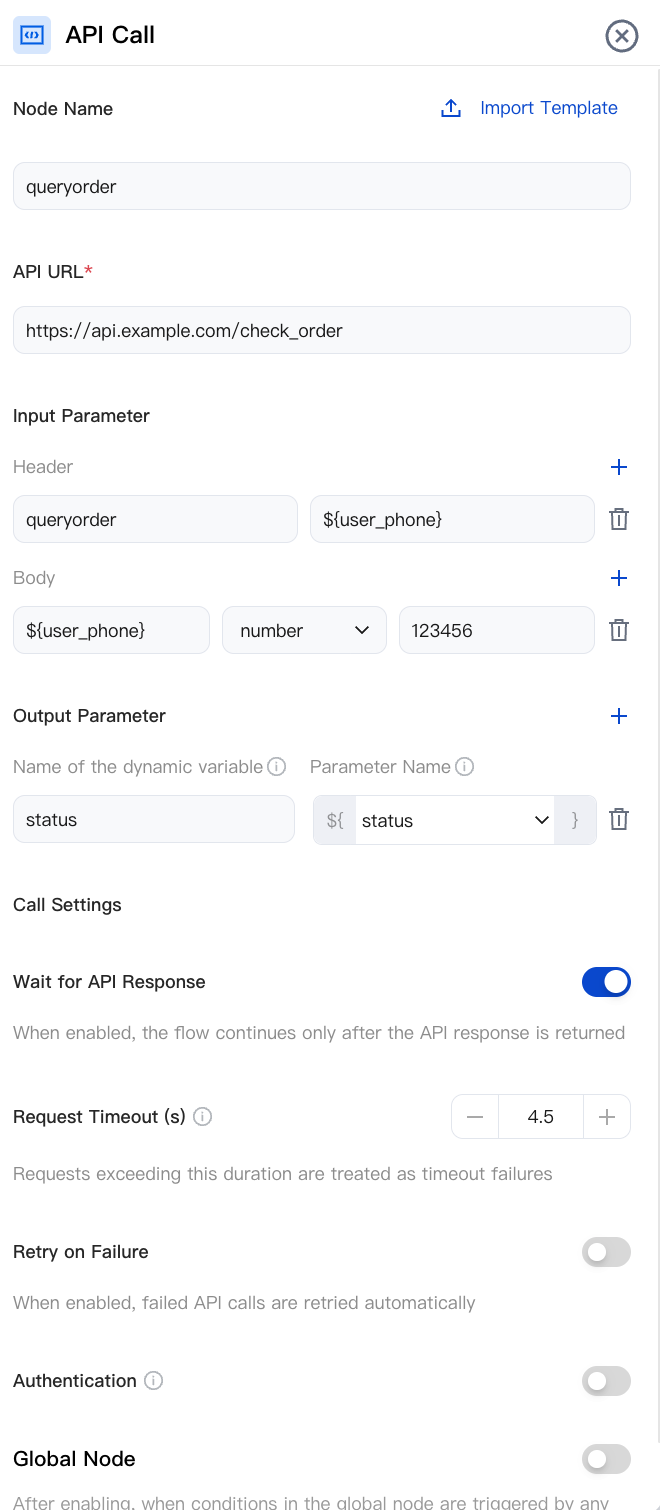
Node Name
Enter a clear and unique name, for example: Query Order.
API Endpoint
This is a required field. Enter the actual business API address, for example:
https://api.example.com/check_order.Timeout
Set the maximum duration to wait for an API response. If no result is returned within this time, the API call is considered failed and the failure branch is taken to prevent the call from being unresponsive for an extended period. You can adjust this setting based on the actual API latency and your delay budget.
Input parameters
Click + to add a parameter. For example, add
user_phone and bind it to a variable from a preceding node, thereby passing the user's phone number.Output Parameter
Add a parameter with the same name as an API response field. For example, if the response is
{ "status": "Shipped" }, add an output parameter named status. Downstream nodes can then reference it via ${status}.Waiting for the API to Return Results
Enable: The AI Agent waits for the API to return a result before going to the next node. This is suitable for scenarios where downstream nodes need to use output parameters.
Disable: The AI Agent does not wait for the API to return a result and immediately goes to the next node. This mode is suitable for scenarios where you only need to trigger the API and do not need to use the returned result.
Authentication
Authentication Method: Select an authentication method that matches your backend API.
No Authentication: Source is not verified. Use is recommended only in private networks or test environments.
basicAuth (Username and Password): Enter the username and password, which are carried via HTTP Basic Auth during requests.
OAuth 2.0 (client credentials): Enter the Token endpoint URL, ClientID, and ClientSecret. First, exchange these credentials for a Token, and then initiate the request.
Note:
Authentication credentials are sensitive information. Use HTTPS APIs for transmission.
Node Overview
Node | Purpose |
Core interaction unit plays prompts, listens to user replies, classifies replies, and branches. | |
Exchanges data with external systems during a call (for example, queries orders, writes back results). | |
Explicitly writes or updates variables within a flow (sets default values, derives values, normalizes slots). | |
Branches based on variable values using comparison operators a generalized if/else if/else logic. | |
Branches based on date, time, and time zone (for example, business hours or non-business hours). | |
Collects numeric keypad inputs (0–9, *, #) suitable for menu-based IVR branching, Captcha/PIN entry, or numeric data collection. | |
Transfers the call to an Agent skill group. | |
Transfers the call to another AI Agent (dialog flow or proprietary model), retaining conversation history and variables. | |
Terminates the call with an optional closing message. |
Related Guides
Select the corresponding path based on your deployment method:
First time user? Deploy a functional AI Agent in just five minutes create a conversation flow or integrate an external model.
Want to learn about our conversation flow nodes? Go to Conversation Nodes.
Want to build a knowledge base for your dialogue flow? Go to Build Your Knowledge Base.
How to test your model? Refer to Test Dialogue Workflow.
Configure a voice AI Agent with your own model? Go to Integrate External Model, Edit Conversation Content, Configure Voice Interaction, and Add Call Control.
Want to view application scenarios? Try Voice Notification, Lead Mining, Feedback Collection, or Customer Support.
How to make outbound and inbound calls with an AI Agent? Refer to AI Agent Outbound Calls or AI Agent Inbound Calls.
View data logs? Refer to Call Records, Call Recordings, Latency.
How to create and view post-call tags? Refer to Post-call Tags (Created via Conversation Flow) or Post-call Tags (Created via External LLM).
Bantuan dan Dukungan
Apakah halaman ini membantu?
Anda juga dapat Menghubungi Penjualan atau Mengirimkan Tiket untuk meminta bantuan.
masukan