Variable Assignment
Unduh
Mode fokus
Ukuran font
Feature Introduction
Variable Assignment nodes are used to explicitly write or update variables within a workflow. You can use them to set appropriate default values, derive new values based on other variables, or normalize raw slots before sending them to an API.
Guide
Go to the created workflow canvas. Then, choose Start Call > + > Variable Assignment on the canvas in sequence. Finally, fill in the following configuration items in the pop-up window.
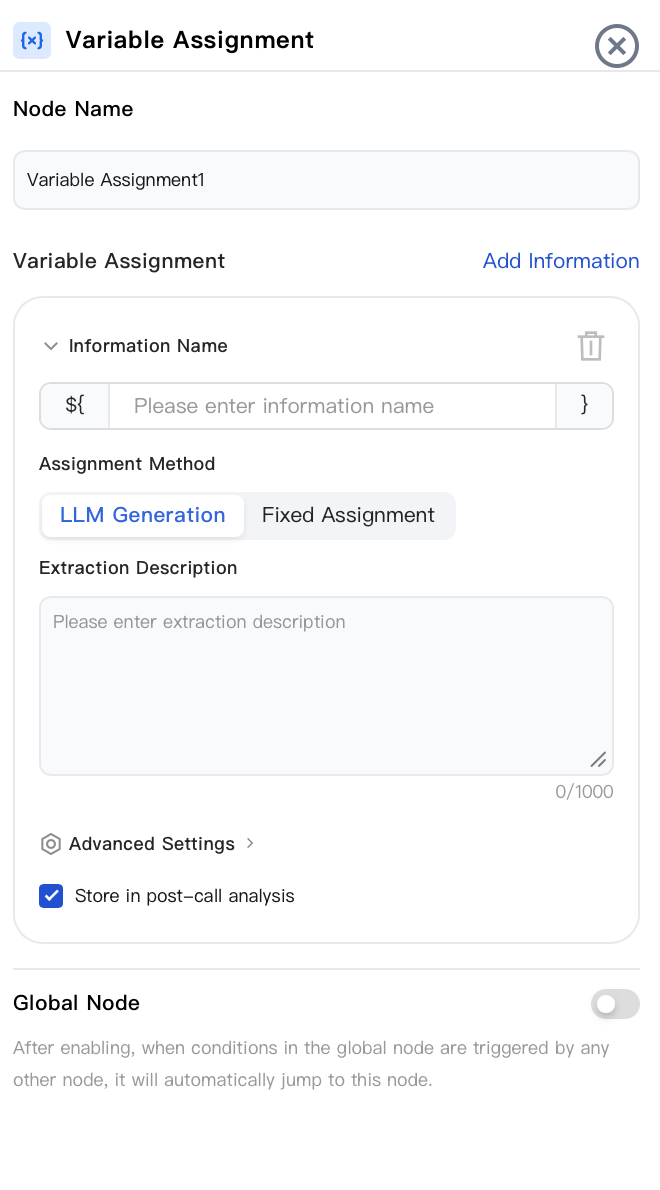
Node Name
Enter the node name, for example, "Default Region" or "Calculate Discount".
Variable Assignment
Click Add Information to set one or more rows. Each row is used for one target variable and must contain the following content:
Information Name: Enter the variable name between
${ and }. If the variable does not exist, a new one is automatically created.Assignment Method: You can choose from two options: LLM Generation or Fixed Assignment. Their fields differ. For details, see the following sections.
Large Model Generation
This method automatically extracts information from the conversation context and writes it to a variable value using a large language model. It is suitable for scenarios that require understanding and summarizing information from user replies.
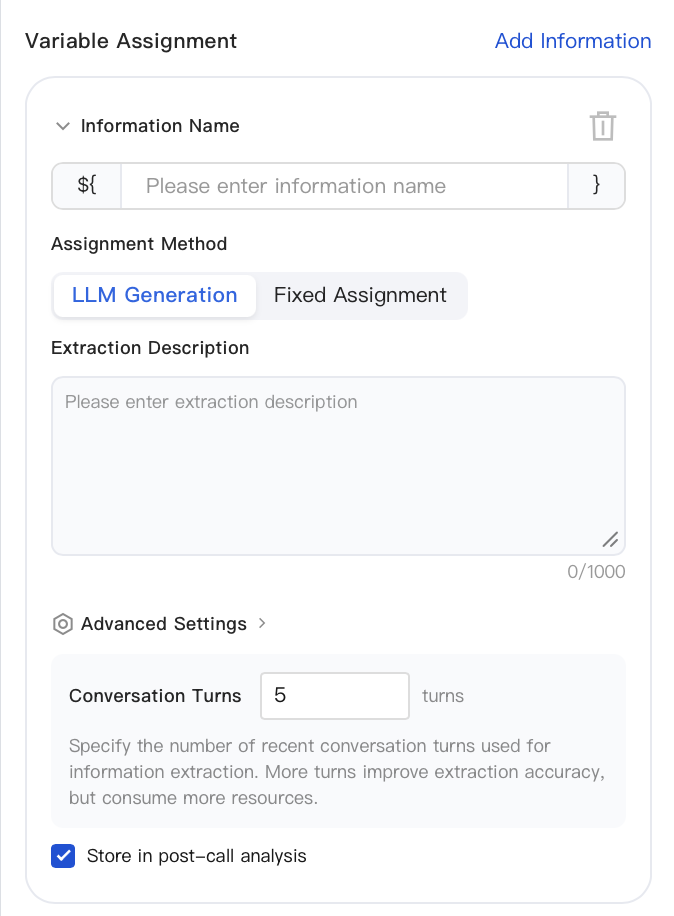
Extraction Description: Use natural language to specify what information you want the large language model to extract and in what format it should be returned (up to 1000 characters). The clearer the description, the more accurate the extraction.
Advanced Settings > Conversation Turns: Specify the number of recent conversation turns used for information extraction. The default is
5 turns. More turns lead to more accurate extraction but consume more resources.Fixed Assignment
This method directly writes a fixed value. It is suitable for scenarios such as setting default values or constants, or for concatenating or calculating values based on existing variables.
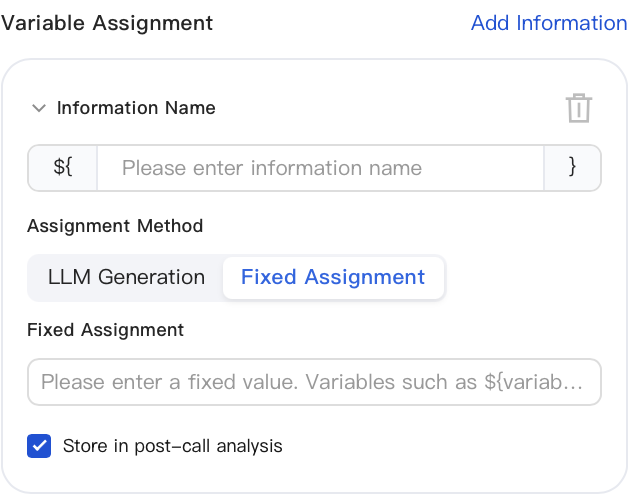
Fixed Value: Enter the value to be written in the input box. The following forms are supported:
Constant: Directly enter literals such as text, numbers, Booleans, or lists.
Variable Reference: Reference another existing variable using
${variable}, for example, ${order_total}.Expression (Advanced): A simple expression that combines variables and literals, for example,
${order_total} * 0.9 or concat(${first_name}, " ", ${last_name}).Storage for Post-Call Analysis
You can select this option regardless of which assignment method you choose. This option is selected by default. When this option is selected, the variable's value is stored along with the call in the post-call analysis data, where it can be searched and analyzed in Service Records / Post-Call Analysis. You can deselect this option for variables that are only used for temporary transfer within the workflow and do not require analysis.
This node writes all assignments at once and then proceeds along its single output branch. Variables written here can be used downstream everywhere in dialogue scripts, API parameters, conditional judgments, transfer payloads, and so on.
Common Usage:
Set
region = "South China" at the beginning of the workflow so that every downstream node can use ${region} without needing to ask again.After the dialogue node collects
phone_raw, it normalizes the data: phone = remove_spaces(${phone_raw}).Calculate a discounted price for the LLM-generated response for reading aloud:
discounted = ${order_total} * 0.85.Global Node
When enabled, this feature allows the workflow to automatically jump to this Variable Assignment node whenever any other node triggers a condition configured in a global node. It is suitable for assignment logic that needs to be executed uniformly at any point in the workflow (for example, returning to this node to reset / update a variable whenever a specific condition is met, regardless of the current step). This feature is disabled by default.
Node Overview
Node | Purpose |
Core interaction unit plays prompts, listens to user replies, classifies replies, and branches. | |
Exchanges data with external systems during a call (for example, queries orders, writes back results). | |
Explicitly writes or updates variables within a flow (sets default values, derives values, normalizes slots). | |
Branches based on variable values using comparison operators a generalized if/else if/else logic. | |
Branches based on date, time, and time zone (for example, business hours or non-business hours). | |
Collects numeric keypad inputs (0–9, *, #) applicable to menu-based IVR branching, Captcha/PIN entry, or numeric data collection. | |
Transfers the call to an Agent skill group. | |
Transfers the call to another AI Agent (dialog flow or proprietary model), retaining conversation history and variables. | |
Terminates the call with an optional closing message. |
Related Guides
Select the corresponding path based on your deployment method:
First time user? Deploy a functional AI Agent in just five minutes create a conversation flow or integrate an external model.
Want to learn about our conversation flow nodes? Go to Conversation Nodes.
Want to build a knowledge base for your dialogue flow? Go to Build Your Knowledge Base.
How to test your model? Refer to Test Dialogue Workflow.
Configure a voice AI Agent with your own model? Go to Integrate External Model, Edit Conversation Content, Configure Voice Interaction, and Add Call Control.
Want to view application scenarios? Try Voice Notification, Lead Mining, Feedback Collection, or Customer Support.
How to make outbound and inbound calls with an AI Agent? Refer to AI Agent Outbound Calls or AI Agent Inbound Calls.
View data logs? Refer to Call Records, Call Recordings, Latency.
How to create and view post-call tags? Refer to Post-call Tags (Created via Conversation Flow) or Post-call Tags (Created via External LLM).
Bantuan dan Dukungan
Apakah halaman ini membantu?
Anda juga dapat Menghubungi Penjualan atau Mengirimkan Tiket untuk meminta bantuan.
masukan