Tencent Cloud provides two types of cloud-based WAF: SaaS WAF and Cloud Native WAF. Both types offer similar security capabilities but differ in connection methods and applicable scenarios. You can choose the appropriate WAF type based on your actual deployment needs.
Item
SaaS
Cloud Native
Applicable Scenario
Suitable for all users (Tencent Cloud users or local IDC users), domain access is achieved through DNS resolution scheduling.
Tencent Cloud users who are already using or planning to use Layer-7 load balancing (CLB), Cloud Native Gateway, or SCF; users leveraging APISIX or other application gateway services seeking to integrate WAF protection capabilities.
Core strengths
Wide applicability, covering both Tencent Cloud users and non-Tencent Cloud users.
Seamless access with millisecond-level latency; domain access to WAF does not require modifying existing network architecture.
Decoupling website traffic forwarding from security protection ensures stable and reliable business traffic forwarding.
Supports multi-region access.
How to choose
If users have websites both on Tencent Cloud and on-premises that require protection, or if Layer-7 load balancing is not used on Tencent Cloud, SaaS WAF is recommended.
If webpage tampering prevention and data leakage prevention are needed, only SaaS-based WAF can be used.
Tencent Cloud users who are already using or planning to use Layer-7 load balancing (CLB), Cloud Native Gateway, or SCF, and require Web security protection, BOT traffic management, Cybersecurity Classified Protection Compliance Service, or website security operations, are recommended to adopt Cloud Native WAF.
Selecting Region
SaaS WAF requires selecting the region during purchase.
Cloud Native WAF does not require selecting a region during purchase. During console configuration, it will be associated with the supported regions of Cloud Load Balancer (CLB).
SaaS WAF
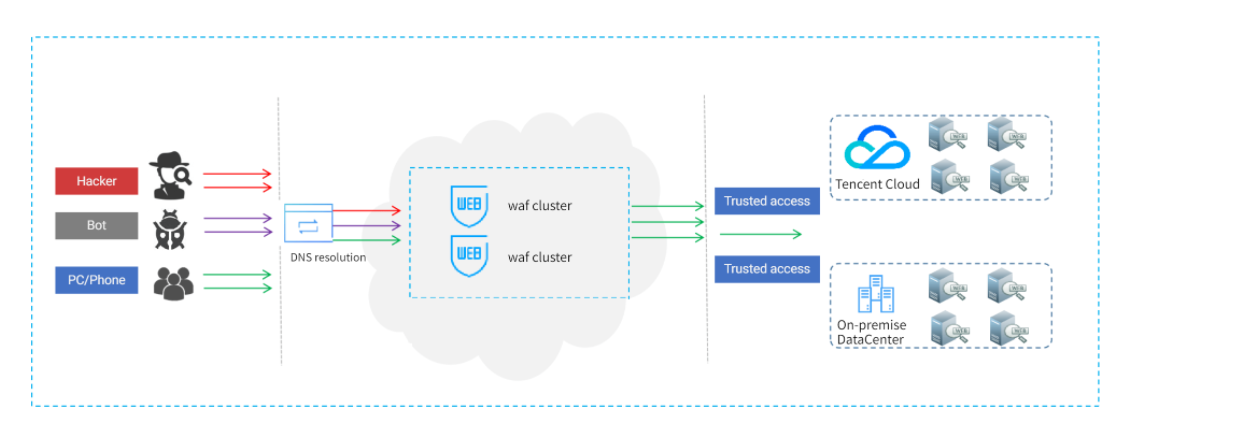
After the user adds a domain name protected by SaaS WAF and sets the origin-pull information on WAF, WAF will assign a unique CNAME address for the domain name protected by SaaS WAF. The user can modify the DNS resolution by changing the original A record to a CNAME record, and direct the traffic of the domain name protected by SaaS WAF to the WAF cluster. After the WAF cluster performs malicious traffic detection and protection for the domain name protected by SaaS WAF, it forwards the normal traffic to the origin server to protect website security.
Cloud Native WAF
Connection Method Overview
Access Type
Integration Steps
Cloud Native CLB domain configuration
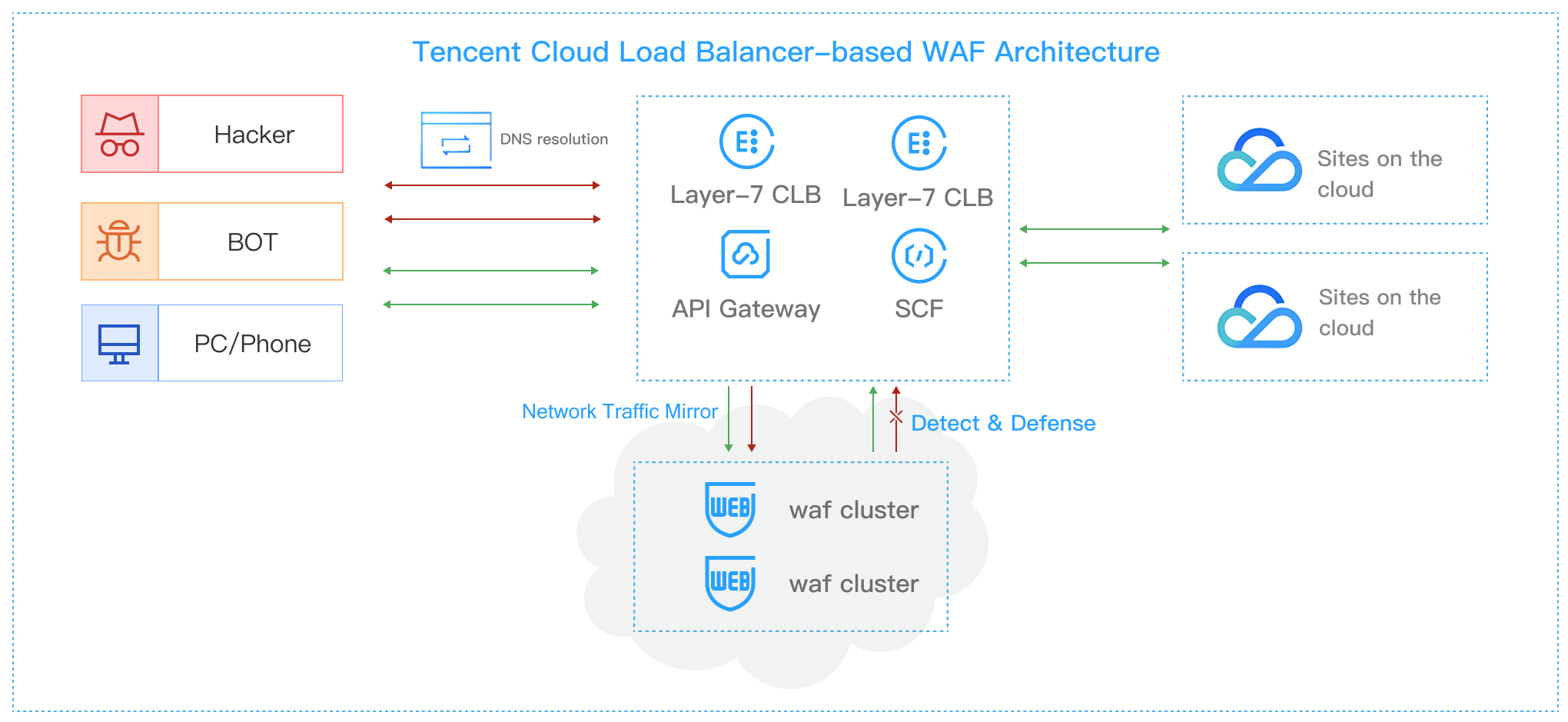
By configuring the domain name and Layer-7 CLB (listener) resources in the WAF console's domain access settings, bypass threat detection and cleansing are performed on HTTP/HTTPS traffic passing through the Cloud Native instance listener, achieving decoupling of business forwarding and security protection.
Cloud Native CLB instance configuration
By enabling Layer-7 CLB (instance) access to WAF in the object access section of the WAF console, bypass threat detection and cleansing are performed on HTTP/HTTPS traffic passing through the Cloud Native instance, achieving separation of business forwarding and security protection.
Cloud Native Gateway and SCF domain configuration
By enabling WAF protection through the API Gateway console (refer to the API Gateway product documentation) and SCF console, and configuring the domain name in the WAF console's domain access settings, bypass threat detection and cleansing are performed on HTTP/HTTPS traffic passing through the Cloud Native Gateway and SCF gateway, achieving separation of business forwarding and security protection.
By enabling WAF protection through the API Gateway console (refer to the API Gateway product documentation) and enabling Cloud Native Gateway (instance) access to WAF in the WAF console's object access section, bypass threat detection and cleansing are performed on HTTP/HTTPS traffic passing through the Cloud Native Gateway instance, achieving separation of business forwarding and security protection.
Traffic Processing Mode
Cloud Native WAF provides two traffic processing modes:
Cleaning mode
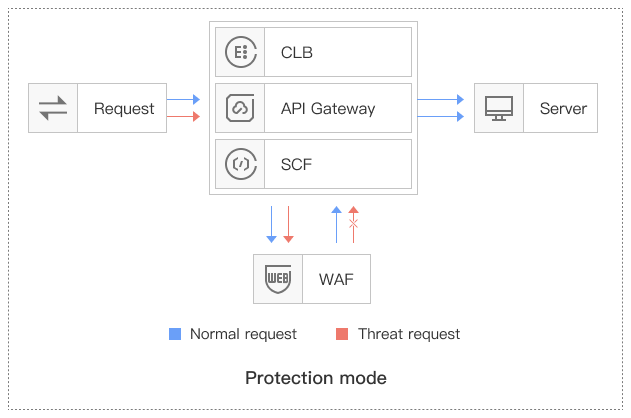
By associating through domain names, Cloud Native Layer-7 Load Balancing (CLB), Cloud Native Gateway, and SCF forward business traffic to the WAF cluster. WAF performs bypass detection and alarms, synchronizes the trust status of requests, and the gateway cluster blocks or allows requests based on the status.
Mirror Mode
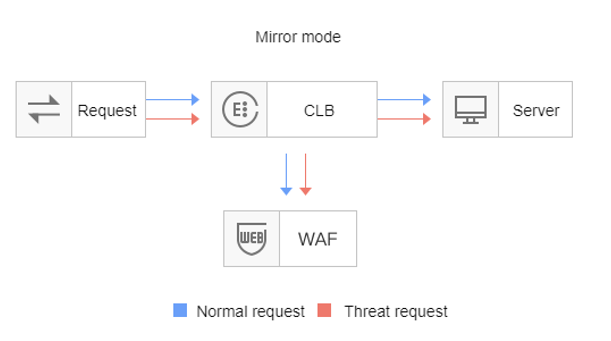
By associating through domain names, Cloud Native Layer-7 Load Balancing (CLB) mirrors traffic to the WAF cluster. WAF performs bypass detection and alarms without returning the trust status of requests.