Time-sensitive search is the ability to identify time intent in user questions (such as "latest", "this year", and "2026") during Q&A search, and to filter and rank recalled results based on the knowledge validity period configured for the knowledge.
Use Cases
When a knowledge base contains both old and new documents such as policies, guides, and version notes, time-sensitive search can reduce the recall of expired or time-inappropriate content and improve answer accuracy.
Scenario 1: The user question contains explicit time intent, such as "2024", and the knowledge base contains similar documents from multiple years.
Example: The knowledge base documents contain medical insurance policies for 2024, 2025, and 2026. User question: 2024 medical insurance policy. Search for the 2024 medical insurance policy.
Scenario 2: The user question contains vague time intent, such as "latest", and the knowledge base contains similar documents from multiple years.
Example: The knowledge base documents contain medical insurance policies for 2024, 2025, and 2026. User question: latest medical insurance policy. Search for the 2026 medical insurance policy.
Feature Activation Logic
The time-sensitive search capability requires filtering and ranking based on the knowledge validity period.
Knowledge validity period is a time range configuration attached to knowledge, used to express "the period during which the knowledge content is applicable", and consists of a start time and an end time (in the format yyyy-mm-dd hh:mm). Each document and Q&A item can be configured with a knowledge validity period.
After you enable time-sensitive search, the system identifies time intent in user questions and processes recalled results based on the knowledge validity period in the following ways:
Issue Type
Processing Method
Example
Contains an explicit time range
Filter by the knowledge validity period and retain only knowledge applicable within that period.
The library contains two documents, one from 2024 and one from 2026. When a user asks about the "2024 medical insurance policy," retain documents whose effective time covers that quarter and exclude documents that do not fall within that period.
Contains vague time intent such as "latest/current"
Sort by time weighting, increase the ranking weight of knowledge that is still applicable and relatively new, and do not directly filter out other knowledge.
When a user asks about the "latest medical insurance policy," documents with the latest effective time are ranked higher, while documents with historical effective time may still be recalled.
No time intent
Use the standard search process, consistent with the behavior when time-sensitive search is disabled.
When a user asks "What is diabetes," search behavior is not affected.
Comparison of whether to use time-sensitive search:
Case
Without Time-Sensitive Search
With Time-Sensitive Search
The knowledge base documents contain medical insurance policies for 2024, 2025, and 2026.
User question: 2024 medical insurance policy
Effective logic: User questions directly go through hybrid search to recall relevant document or Q&A segments.
Knowledge Q&A effect: Medical insurance policies from 2024, 2025, and 2026 may all be retrieved, and the large model determines the response.
Effective logic: After a user asks a question, the system extracts time intent information from the query, such as "2024". After retrieving medical insurance policies from 2024, 2025, and 2026, it retains only the 2024 policy for the large model.
Knowledge Q&A effect: Reply with the 2024 medical insurance policy.
Prerequisites
Create a knowledge base and import documents or Q&A items.
Associate the knowledge base with an application, except for the default knowledge base.
Directions
To implement time-sensitive search, complete the following configurations:
Step 1: Configuring Knowledge Validity Period
Knowledge validity period can be configured when documents or Q&A items are imported, and can also be set individually or in batches in the list. The following uses individual setting in the list as an example:
1. Log in to Tencent Cloud ADP and go to Knowledge Management/Knowledge Base.
2. In the document list or Q&A list, click Settings for the target knowledge.
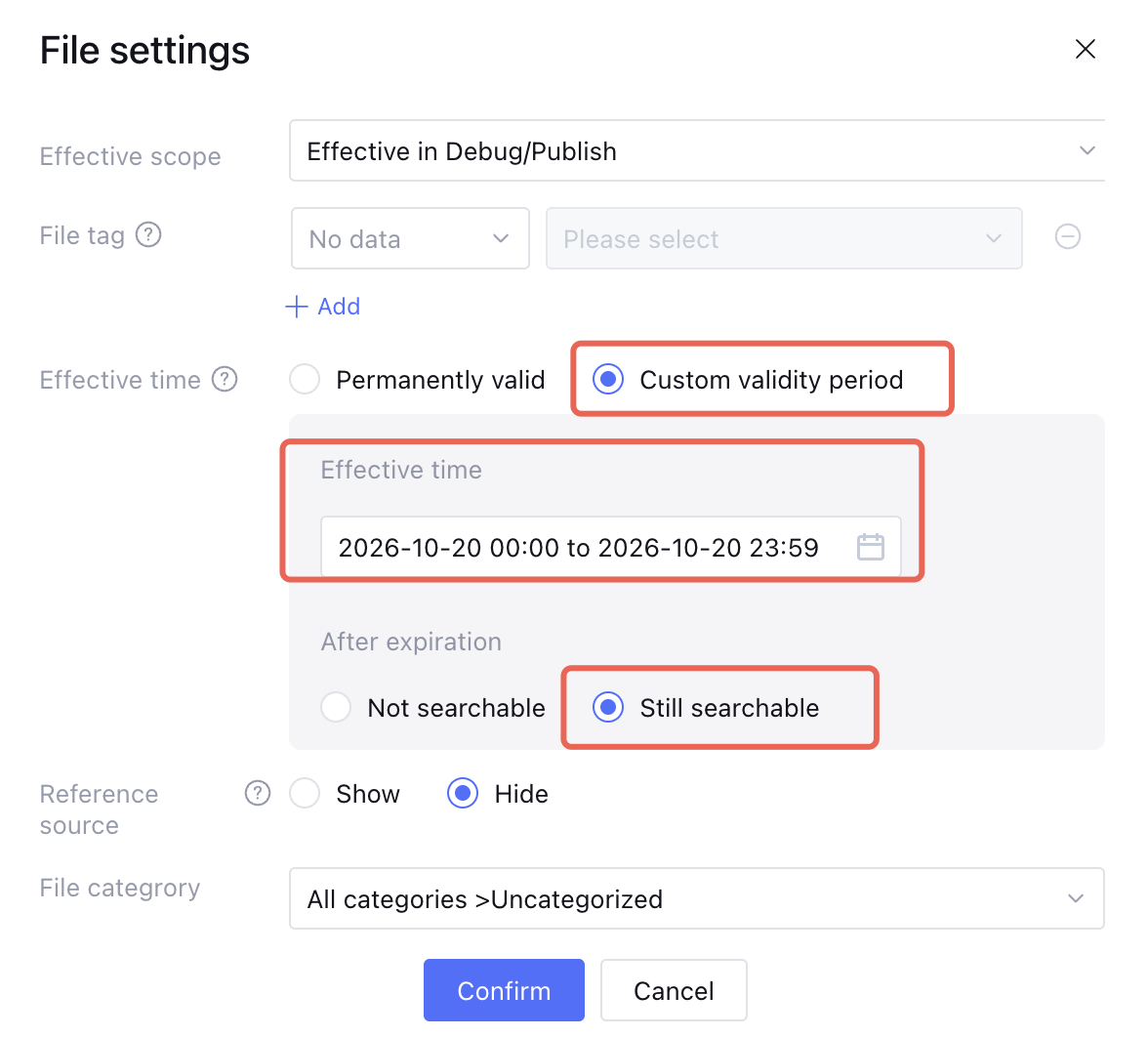
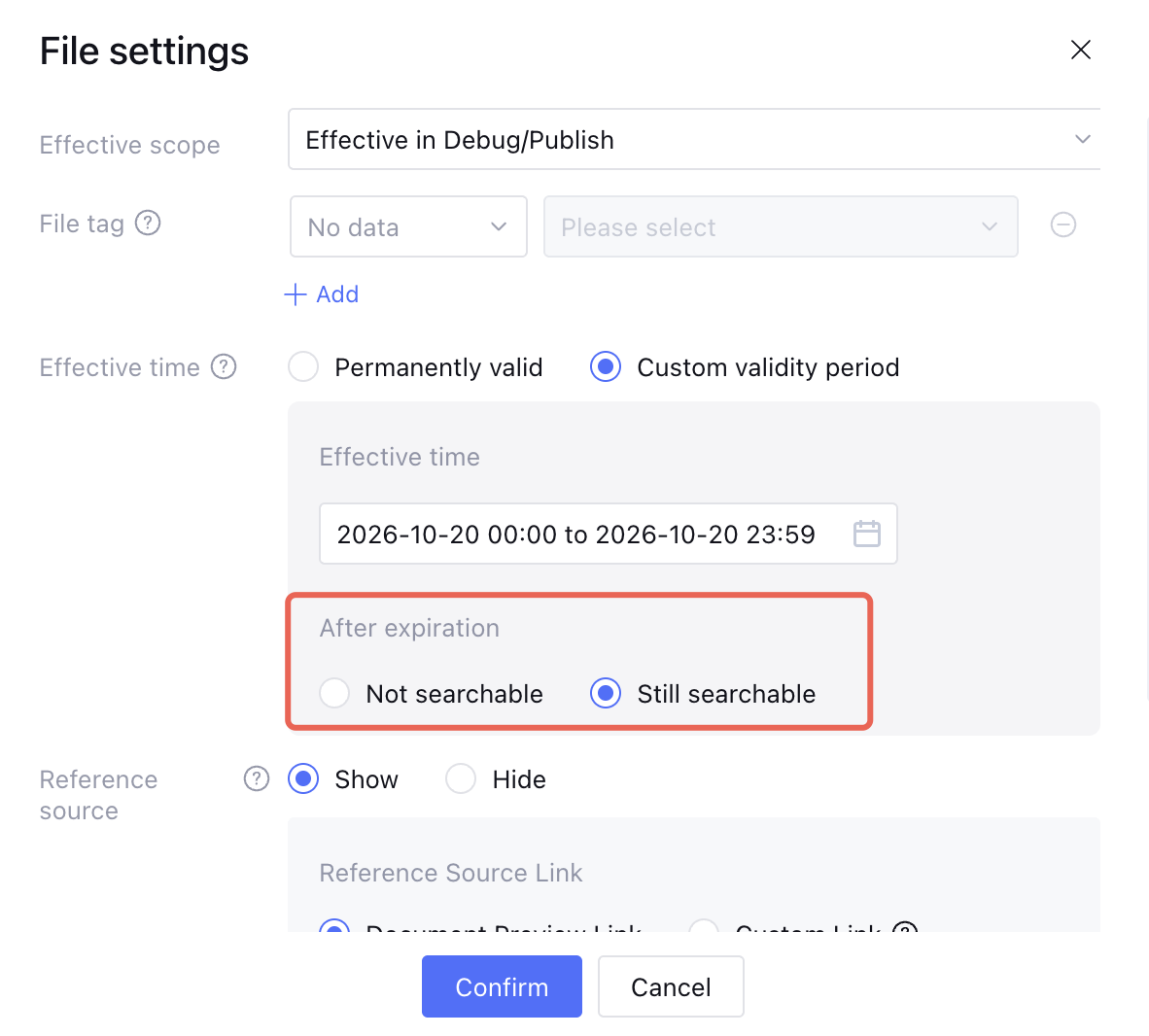
3. In the File settings, locate Effective time, select Custom Validity Period, and set the start date and end date.
4. Select Still Searchable After expiration, and click Confirm to save the settings.
Attention:
The start time cannot be later than the end time, otherwise the settings cannot be saved.
When selecting a custom validity period, you must at least specify the start time. When selecting or clearing Searchable after expiration, confirm that the specified time is the actual validity period of the knowledge.
The knowledge validity period indicates the applicable time range of the knowledge content, not the file upload time or the last modified time.
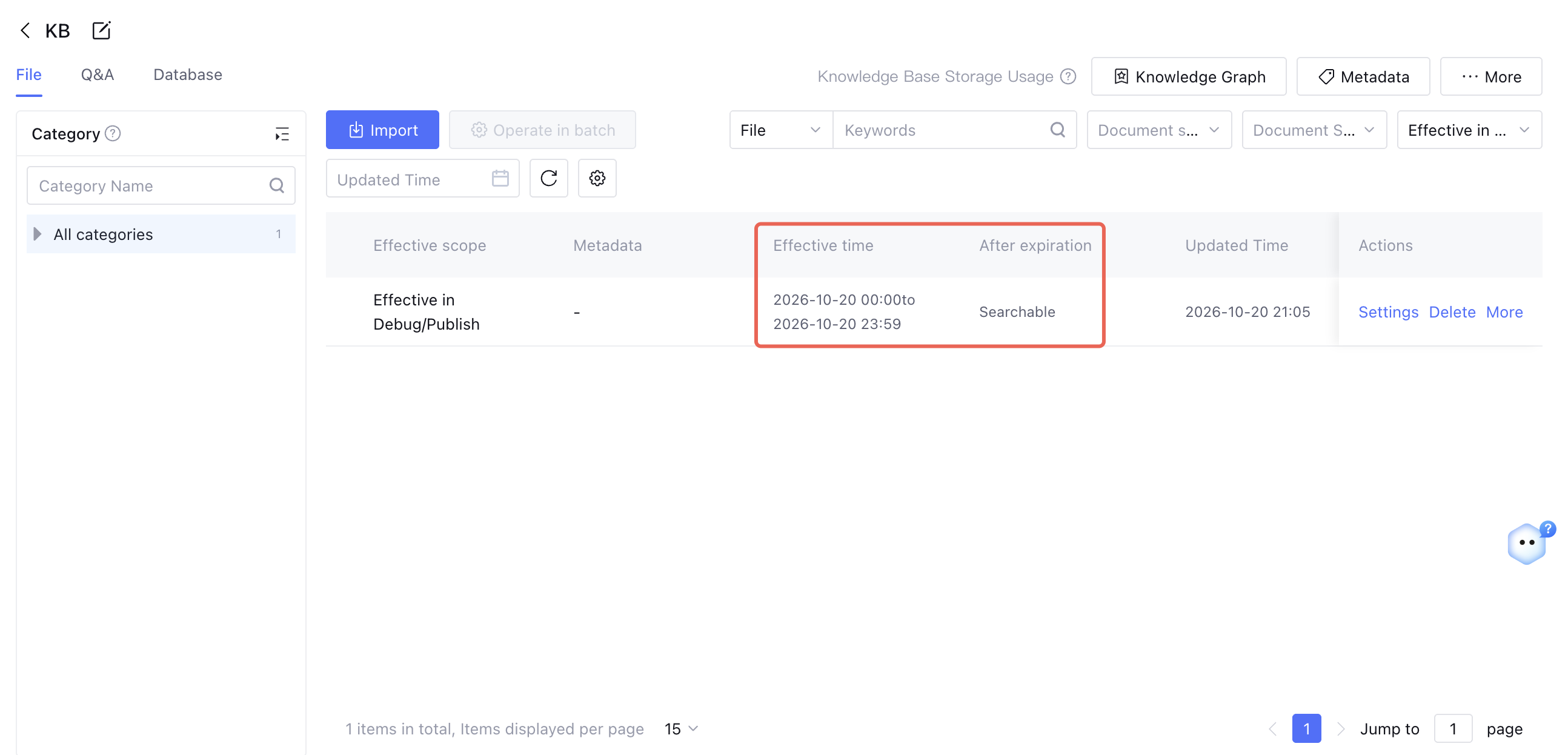
After the settings are completed, the Knowledge Validity Period column in the document/Q&A list displays the specific configuration.
Step 2: Enabling Timeliness Search Settings
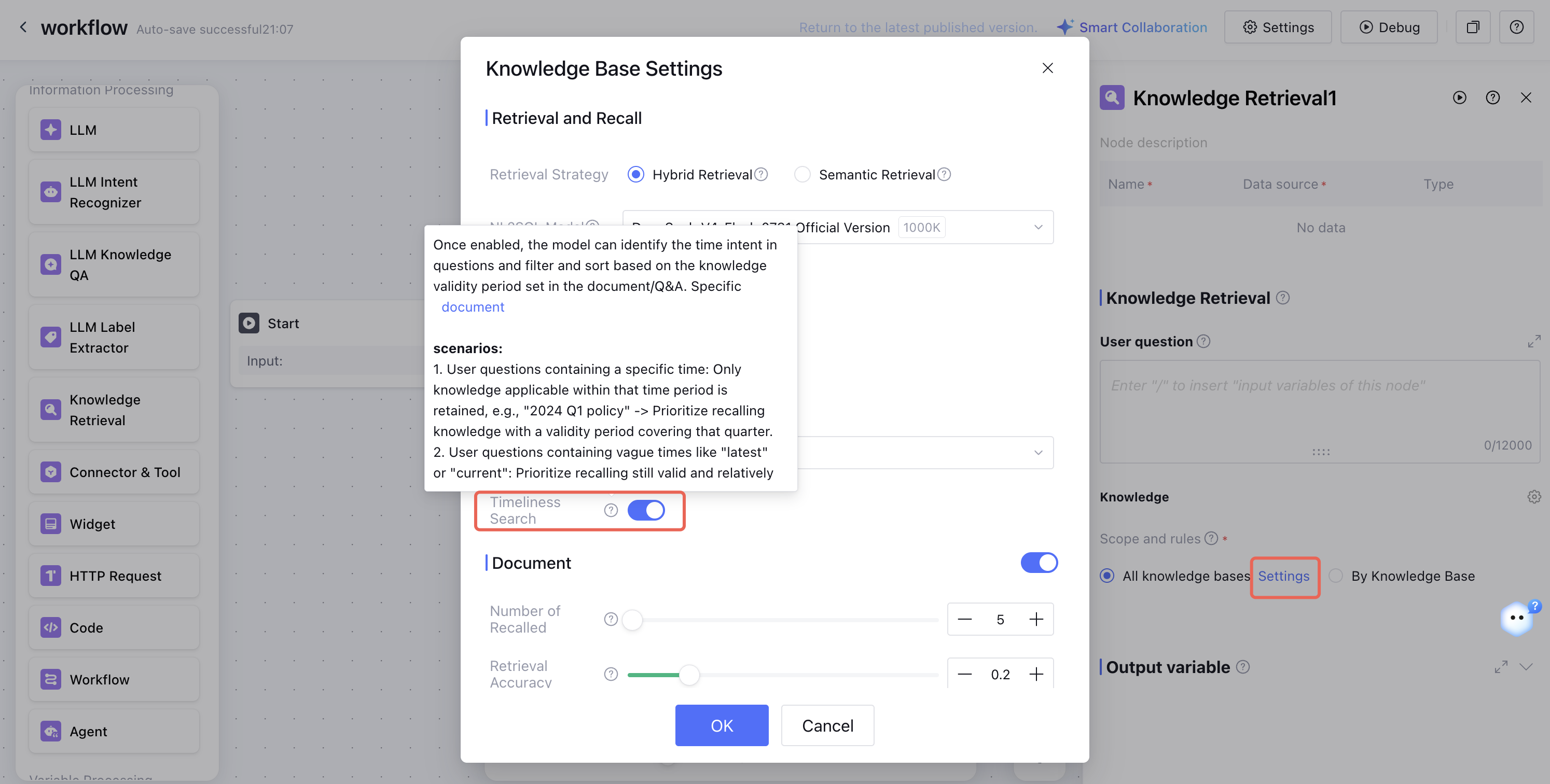
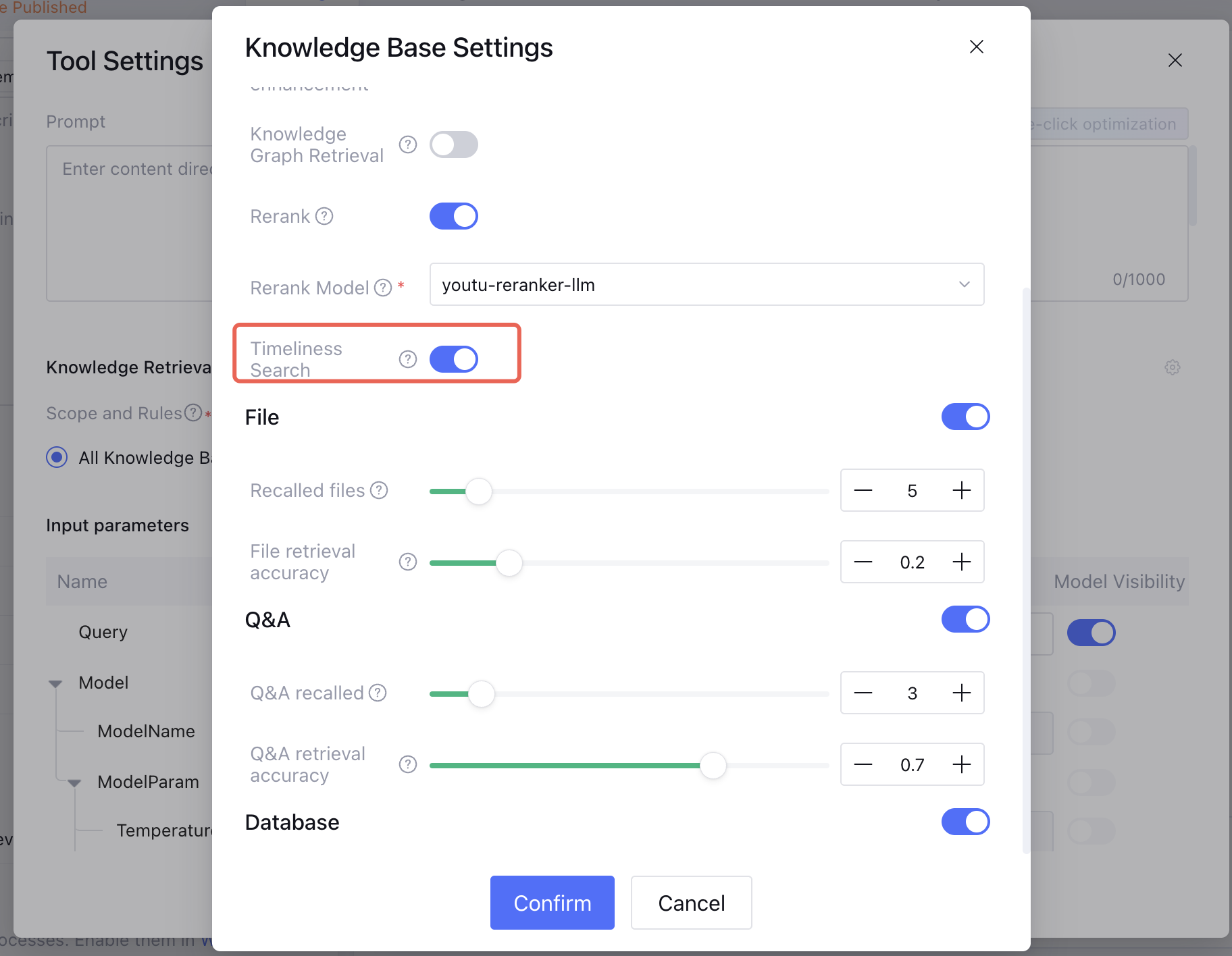
If you use single-workflow mode, enable the time-sensitive search switch in the large model knowledge Q&A/knowledge search node.
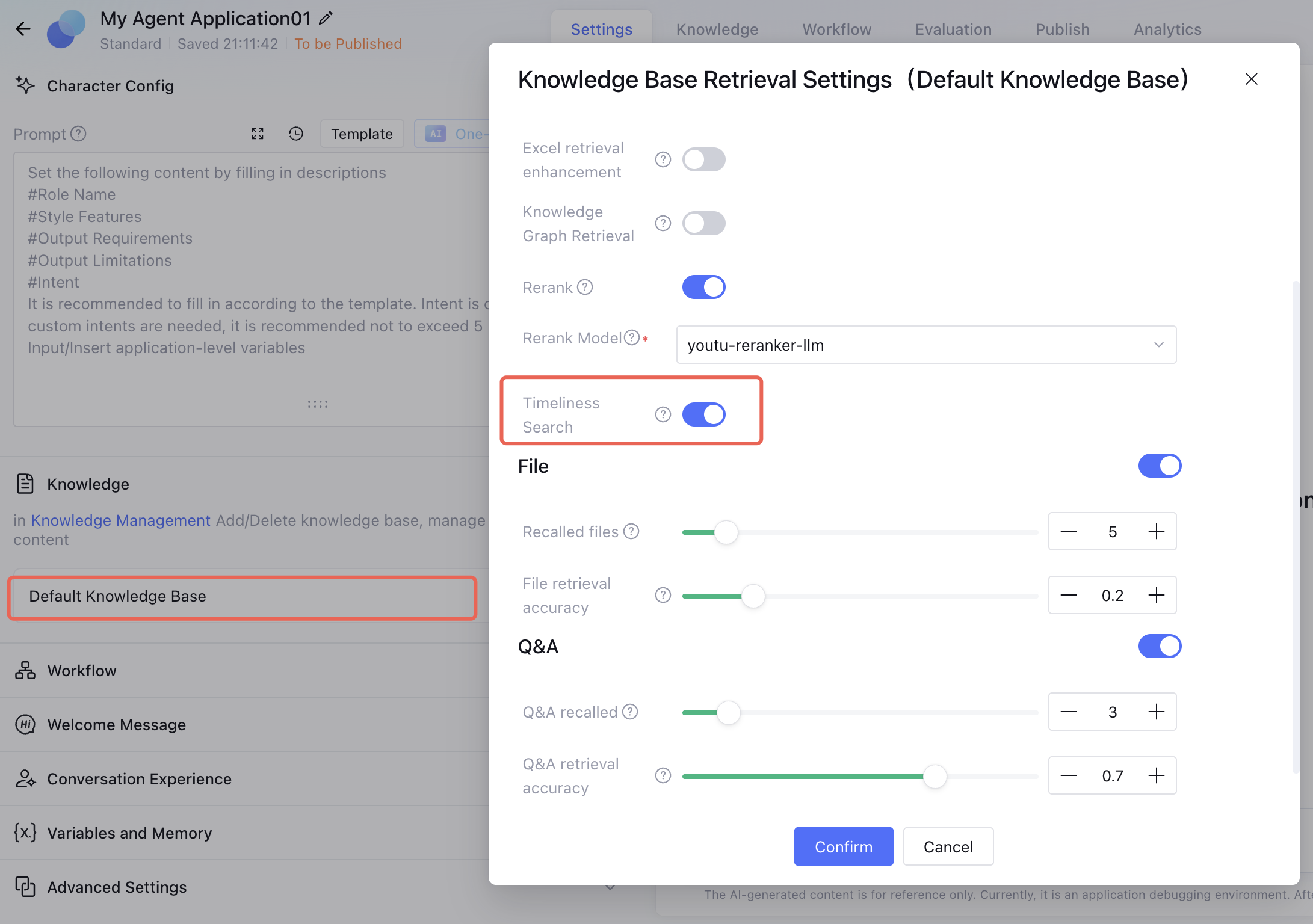
If you use standard mode, enable the time-sensitive search switch in Application Settings - select the corresponding knowledge base.
If you use Claw mode/Multi-Agent mode, enable the time-sensitive search switch in Application Settings - Knowledge Base Q&A/KnowledgeRetrievalAnswer.
Note:
If you use the AgenticRAGSearch tool, you do not need to enable the Timeliness Search switch. The configuration takes effect after you set the knowledge validity period.
After completing the preceding steps, you can use the time-sensitive search capability.
Function Description
1. Validity Period:
Permanent Validity (default): No date is displayed, and both the start time and end time are treated as empty.
Custom Validity Period: Set the start date and end date of the knowledge.
2. Policy for Knowledge After Its Validity Period Expires:
Not Searchable (default): After the end time, the knowledge cannot be searched.
Still Searchable: The knowledge remains searchable after the end time. When used with the time-sensitive search feature, it participates in filtering and sorting based on the time intent in user questions.
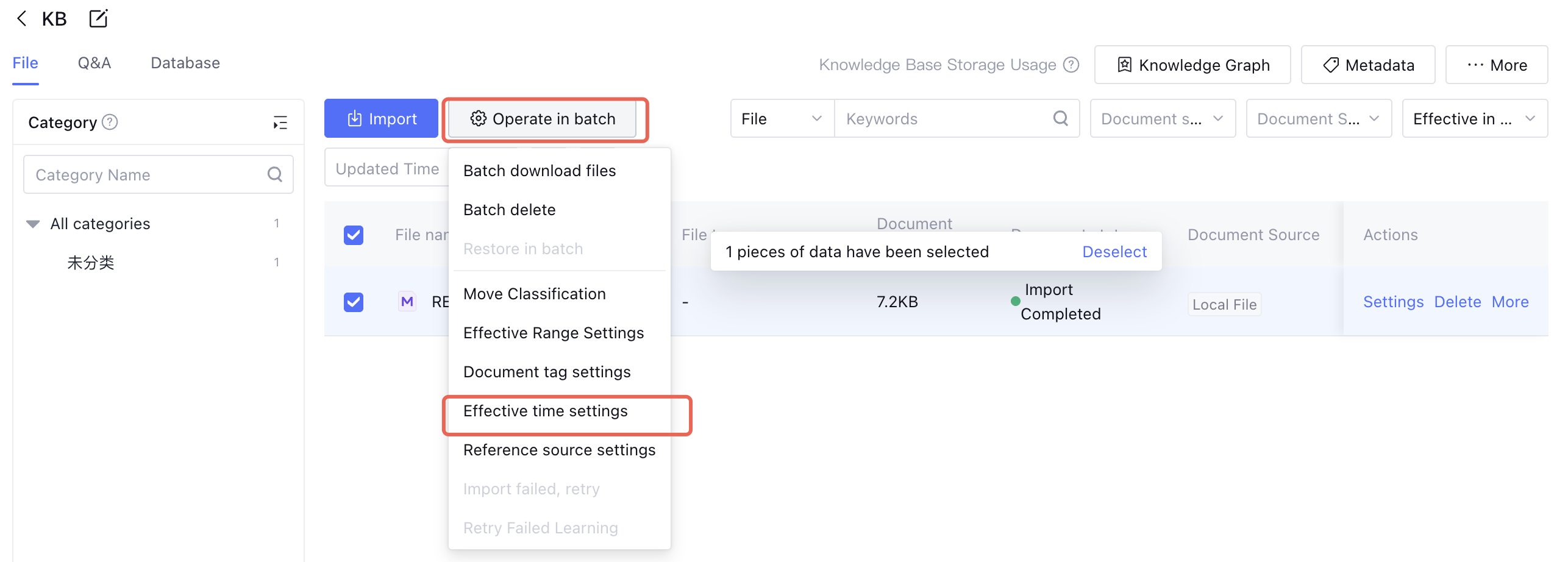
3. Batch configuration is supported:
In the document list or Q&A list, select multiple knowledge entries and click Set Validity Period in batch operations.
Note:
Knowledge configured with permanent validity will not be excluded by time-based filtering and can still be recalled normally.
Must-Knows
Time-sensitive filtering and sorting logic takes effect only after the time-sensitive search switch is enabled. When it is disabled, the entire time-sensitive logic does not take effect.
Ordinary questions without time intent are not affected by the time-sensitive logic.