Malicious attackers usually perform systematic vulnerability scanning on target sites, sending a large number of attack requests within a short time to detect security vulnerabilities. This high-frequency scanning behavior not only consumes server resources but may also result in vulnerabilities being identified and utilized, leading to severe consequences such as data leakage and business interruption. High-Frequency Scan Protection uses Intelligent Identification to detect visitors who frequently hit managed rules in a short time, enabling automatic blocking of their subsequent access, thereby blocking the attack chain and mitigating risks of systematic detection and exploitation of security vulnerabilities or weaknesses.
Note:
Note 1: High-Frequency Scan Protection only counts requests matching the rules configured as block. Requests matching the rules configured as observation mode are not counted.
Note 2: High-Frequency Scan Protection belongs to the control scope of evaluation mode. When evaluation mode is enabled, even if High Frequency Scan Protection is configured to intercept, it will only record logs instead of actually intercepting requests.
Note 3: High-Frequency Scan Protection is suitable for Standard Edition Plan or above (including trial plan).
Use Cases
High-Frequency Scan Protection can effectively respond to multiple malicious scan attacks. Typical scenarios include:
Vulnerability scan attack: Attackers use automation tools to perform large-scale vulnerability scanning on websites, attempting to detect security vulnerabilities such as SQL injection, XSS, and file inclusion. High Frequency Scan Protection can quickly identify such behavior and automatically block attacker IPs.
API interface probing: Attackers perform systematic tests on API interfaces, attempting to detect unauthorized access points or parameter injection vulnerabilities. By monitoring abnormal modes in API requests, malicious detection behavior is promptly blocked.
0-Day vulnerability exploitation: When new security vulnerabilities are made public, attackers quickly perform large-scale scanning and exploitation. High Frequency Scan Protection, combined with real-time updates of managed rules, can effectively intercept attacks before they escalate.
Configure High Frequency Scan Protection Policy
Example Scenario
A financial technology company operates an online payment and lending business platform. Since it involves user funds and sensitive financial data, the security protection requirements are extremely strict. The platform frequently faces high-frequency vulnerability scan attacks from automation tools. Attackers attempt to detect system vulnerabilities in a short time frame and initiate attacks immediately once vulnerabilities are found. To underwrite business security, any suspected scanning behavior must be handled with zero tolerance.
Business Characteristics:
Financial services have extremely high security requirements and cannot tolerate any potential security risk.
Normal user access patterns are relatively fixed and seldom trigger a large number of security rules in a short time frame.
Rapid response and blocking of any abnormal scanning behavior is required.
High business continuity requirements must not impact normal user experience due to protection policies.
Protection need:
Block any suspected scanning behavior instantly.
Minimize the attacker's detection window period.
Ensure normal business not affected.
Provide detailed attack logs for subsequent analysis.
Operation Steps
For financial services with high security requirements, recommend adopting strict high frequency scan protection configuration:
2. At the top of the protected page, select the appropriate security policy configuration method:
To configure a unified policy for the entire site, go to the site-level security policy tag page.
To configure a differentiated strategy for a specific domain name, click domain-level security policy, select target domain name, such as: pay.example.com
3. Locate the managed rule module on the page and navigate to the High-Frequency Scan Protection functional area.
4. Click High-Frequency Scan Protection on the right Configure to enable function configuration.
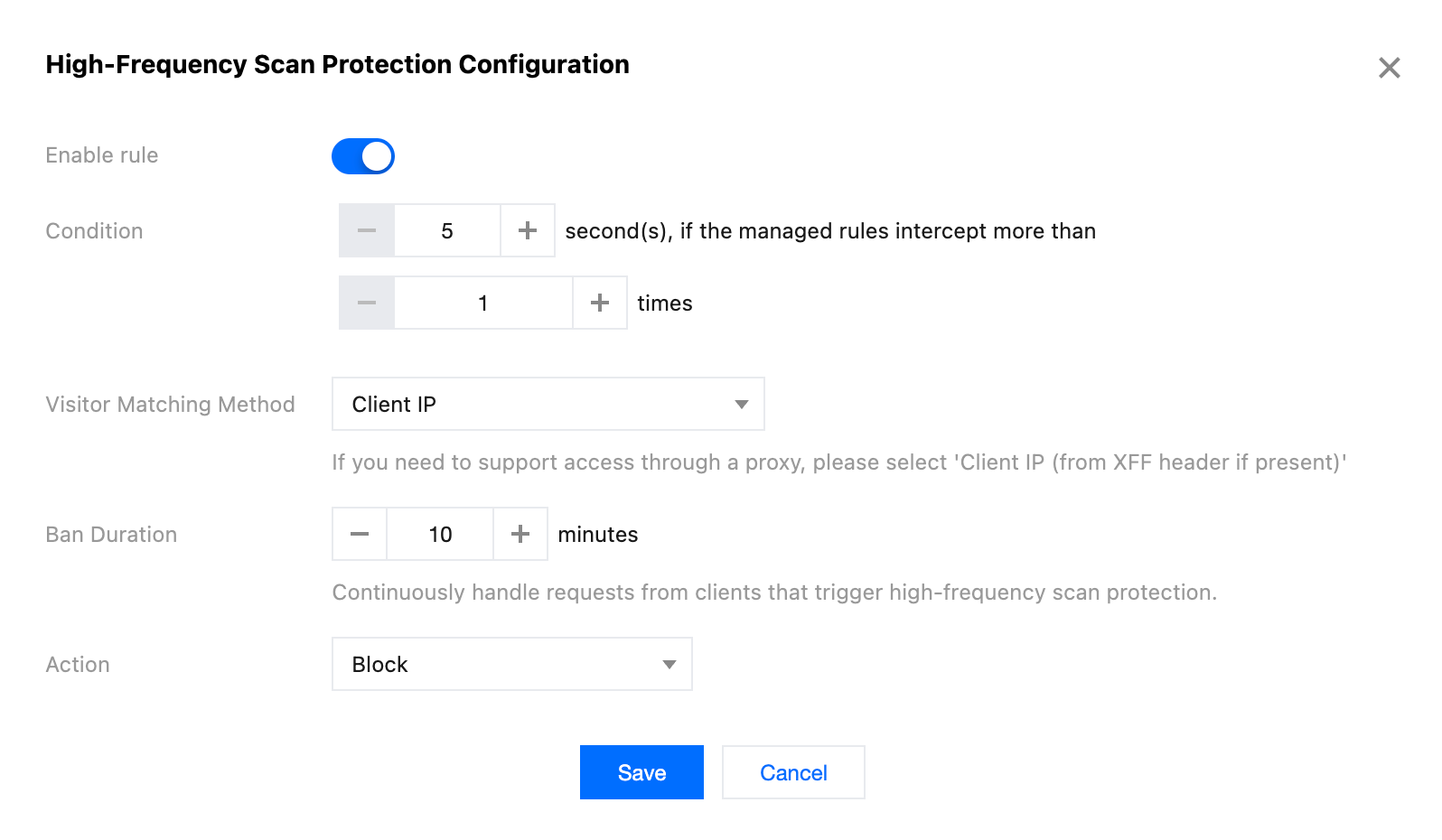
5. In the pop-up configuration window, toggle on the rule switch, fill in the protection parameters as per the scenario example. For more information, see configuration item description.
Trigger condition: Window duration is set to 5 seconds, request threshold is set to 1.
Visitor match mode: Select client IP.
Ban duration: Set to 10 minutes.
Handling method: Select block.
6. Click Save to complete the configuration. The rule will deploy immediately on global edge nodes. Any client triggering managed rule interception once within 5 seconds will be banned immediately for 10 minutes.
Configuration item description
Trigger condition: Trigger conditions determine when to start the high-frequency scan protection mechanism. The protection uses a rolling window statistical method. In any time window, as long as the matched request quantity reaches the threshold, it triggers the protection rule. During the ban period, if there are new matched requests, the ban duration will not be recalculated. The supported range for the statistical time window is 1-1800 seconds. The default value is 60 seconds.
Visitor match mode: Visitor match mode determines how to identify and distinguish different visitors.
Client IP: Match using the client IP address of the connection directly. Suitable for direct-access scenarios or situations requiring proxy server control. (Recommended)
Client IP (priority match XFF header): Preferentially obtain the real client IP from the X-Forwarded-For header. Suitable for scenarios where EdgeOne is accessed through other reverse proxy services.
Note:
Since request headers may be tampered with or spoofed, if your site accesses EdgeOne through other reverse proxy services, it is advisable to configure custom rules while selecting the Client IP (priority match XFF header) method to match visitors. Only allow designated reverse proxy services to access EdgeOne to reduce risks of bypassing protection.
Ban duration: Ban duration determines the blocking duration after high-frequency scan protection is triggered. Configurable time range: 1-1440 minutes. Default value: 30 minutes.
Note:
For clients triggering high-frequency scan protection, their requests will be continuously handled. Requests during the ban period will not trigger counting statistics again.
Handling method: The handling method determines the specific action taken against visitors triggering high-frequency scan protection, supporting the following three:
Observation: Only record logs without actual request handling. Suitable for policy testing and performance evaluation stages.
Block: Directly deny requests and return the interception page. Suitable for scenarios where malicious access must be blocked. (Recommended)
JavaScript challenge: Send a JavaScript challenge to the client, requiring execution of specific code before continuing access. It can effectively distinguish between automation tools and real users, suitable for scenarios needing a balance between security and user experience.