Exception rules provide a centralized allowlist configuration option, allowing for quick configuration of valid requests to be released, avoiding interception by other modules. In addition, when EdgeOne's built-in preset protection strategies (such as CC attack defense, managed rules, etc.) do not accurately identify valid requests, exception rules can provide you with fine-tuning configuration, accurately specifying the requests or request parameters that need to be released.
Note:
1. In the Exception rules for protection, partial request skip the scan function, which is only supported by the EdgeOne Enterprise plan. If you need to use it, contact us.
2. Exception rules take effect in real time. If a client IP or request is currently within the "action duration" of being blocked by other security modules (such as rate limiting), configuring and publishing a corresponding exception rule will allow subsequent requests to immediately match the exception rule and be allowed through, without waiting for the original blocking action duration to end.
Typical Scenarios and Usage
Based on the existing protection policies, the exception rules can specify normal requests matching certain characteristics to skip scanning of specified modules or rules. The supported protection modules include custom rules, rate limiting, CC attack protection, Bot management, and managed rules .
Example Scenario 1: Specify Trusted Client IPs (IP allowlists) to Skip Web Protection Feature Scanning
The current site domain name api.example.com trusts a specific IP range to access test devices and internal services. The trusted IP range is 123.123.123.0/24 . For access requests from the trusted IP range, no scanning related to the Web protection feature is performed to avoid false blocking. The steps are as follows:
1. Log in to the Tencent Cloud EdgeOne console, enter Service Overview in the left menu bar, and click the site to be configured under Website Security Acceleration.
2. Click Security > Web Security . By default, it is a site-level security policy. Click the Domain-level security policy tab and then click the target domain name such as api.example.com, to enter the configuration page for the security policy of the target domain name.
3. In the Exception rules tab, click Add rule .
4. Enter the rule name and select the skip type as Skip full request.
5. Configure the judgment conditions and actions. In this example scenario, you can configure the matching fields as Request domain name (Host) equal to api.example.com and Client IP equal to 123.123.123.0/24 . Select the action as all options in the specified security module, including Managed rules , rate limiting , custom rules , Adaptive Frequency Control, Client Filtering, Slow Attack Defense and Bandwidth Abuse Protection , and Bot management .
6. Click Save and publish . The rule will be issued and take effect immediately. At this time, requests from the specified trusted IP range 123.123.123.0/24 are not blocked by the security features of the Web protection module. This method avoids false blocking of the testing and internal service requests.
Example Scenario 2: Specify High-Frequency API Interface Requests to Skip CC Attack Defense Scanning
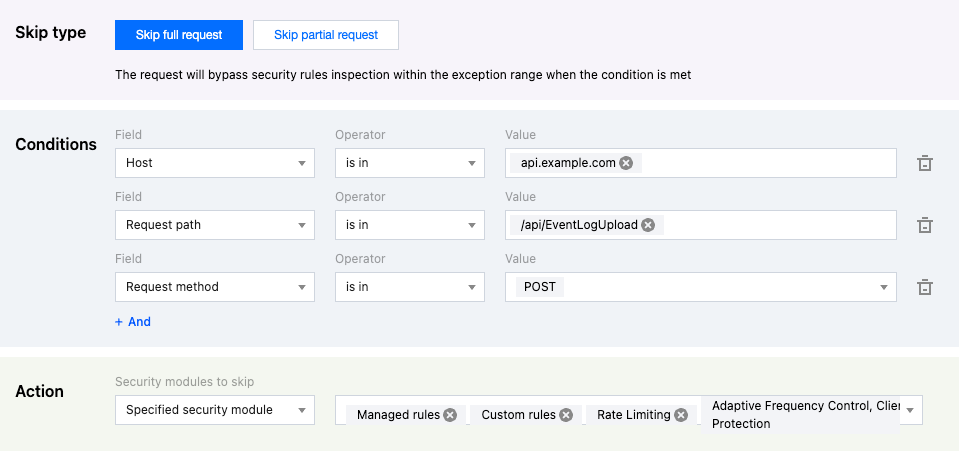
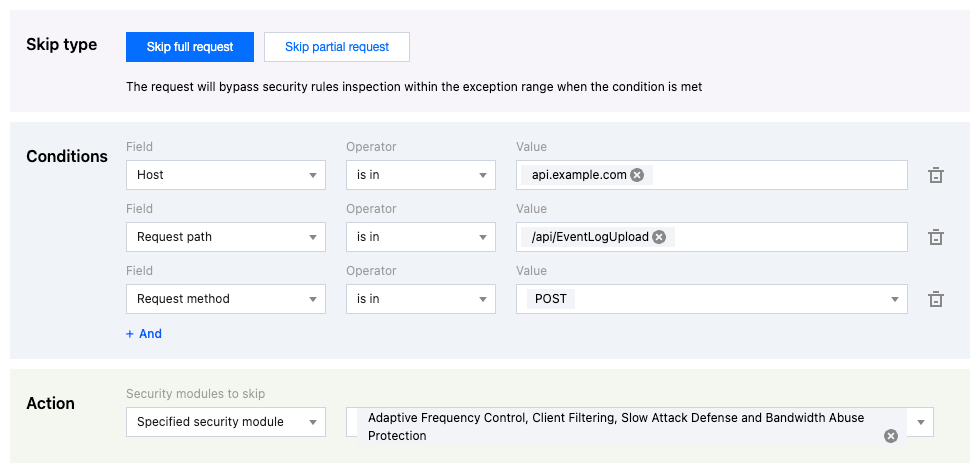
The current site domain name is api.example.com, and the API interface for event reporting is /api/EventLogUpload. In the event of a business surge, there may be a burst of high-frequency access scenarios. Such access patterns are highly likely to be identified as attacks by CC attack defense and intercepted. For this interface, you can configure exception rules to skip the CC attack defense module to avoid false interception. The operation steps are as follows:
1. Log in to the Tencent Cloud EdgeOne console, enter Service Overview in the left menu bar, and click the site to be configured under Website Security Acceleration.
2. Click Security > Web Security . By default, it is a site-level security policy. Click the Domain-level security policy tab and then click the target domain name such as api.example.com, to enter the configuration page for the security policy of the target domain name.
3. In the Exception rules tab, click Add rule .
4. Enter the rule name and select the skip type as Skip full request .
5. Configure the judgment conditions and actions. In this example scenario, you can configure the matching fields as Request domain name (Host) equal to api.example.com , Request method (Method) equal to POST , and Request path (Path) equal to /api/EventLogUpload . Select the exception rule range as Adaptive Frequency Control, Client Filtering, Slow Attack Defense and Bandwidth Abuse Protection in the specified security module. You can configure multiple matching fields, and there is an AND relationship between the matching fields. For details of the matching conditions, see Match Conditions.
6. Click Save and publish . The rule will be issued and take effect immediately. At this time, the POST requests from the API for reporting the event logs are not blocked by feature modules such as Adaptive Frequency Control. This method avoids false blocking due to high-frequency log reporting, and meanwhile enables normal detection and protection for other APIs.
Example Scenario 3: Avoid False Interception of Personal Blog Content by Vulnerability Protection
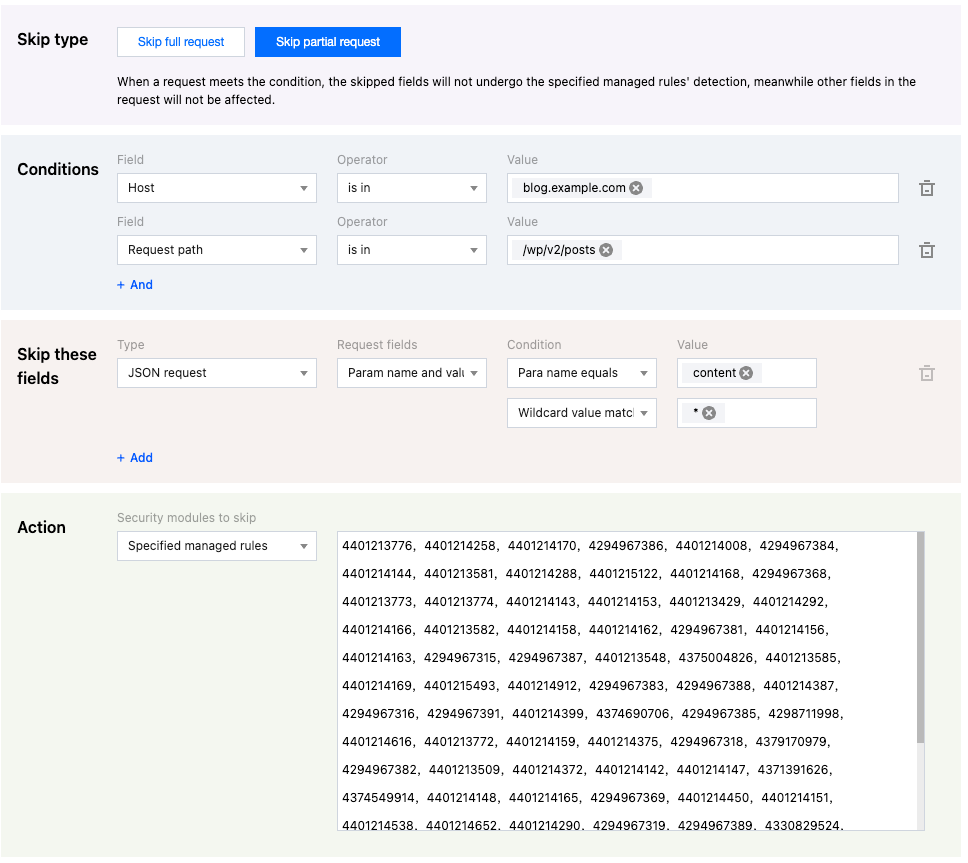
The current site domain name is blog.example.com, which is used for blog content sharing. The blog is based on WordPress. The blog content may share technical content related text (such as: SQL and Shell command examples), and when publishing the blog, the blog content text may trigger the attack defense rule due to matching SQL injection attack features. Through exception rules, you can configure request parameter allowlist, match the blog publishing API interface path /wp/v2/posts, and specify that the text parameter Content in the publishing content request does not participate in SQL injection attack rule scanning, avoiding false alarms and interception of blog content. The operation steps are as follows:
1. Log in to the Tencent Cloud EdgeOne console, enter Service Overview in the left menu bar, and click the site to be configured under Website Security Acceleration.
2. Click Security > Web Security . By default, it is a site-level security policy. Click the Domain-level security policy tab and then click the target domain name such as blog.example.com, to enter configuration page for the security policy of the target domain name .
3. In the Exception rules tab, click Add rule .
4. Enter the rule name and select the skip type as Skip Partial request .
5. Configure the judgement conditions, skipped fields, and actions. In this example scenario, you can configure the matching fields as Request domain name (Host) equal to blog.example.com and Request path equal to /wp/v2/posts . Select the exception rule range as Specified managed rules, including all SQL injection attack protection rules. Configure no scanning for the parameter content with the parameter name equal to content and the parameter value matching the wildcard * in JSON requests. For details of the matching conditions, see Match Conditions.
6. Click Save and publish . The rule will be issued and take effect immediately. At this time, when a blog post is published through the /wp/v2/posts request path, the blog content is not verified by the SQL injection attack protection rules. This method prevents normal text content from being wrongly identified as an attack through scanning.
Related References
The exception field types supported when skipping rule scanning for partial request fields are as follows:
Category
Option
JSON Request Content
All parameters
Match specified parameter name
Match condition parameter
Cookie Header
All parameters
Match specified parameter name
Match condition parameter
HTTP Header Parameters
All parameters
Match specified parameter name
Match condition parameter
URL Encoded Content or Query Parameters
All parameters
Match specified parameter name
Match condition parameter
Request Path URI
Query parameter part
Partial path
Complete path
Request Body Content
Complete request body
Segmented file name
Note:
Match condition parameters are completed by specifying both parameter name and parameter value match conditions, and both parameter name and value support full match and wildcard match.