CentOS 6 切换 YUM 源
Download
フォーカスモード
フォントサイズ
操作背景
CentOS 6操作系统版本生命周期(EOL)于2020年11月30日结束,Linux 社区不再维护该操作系统版本。按照社区规则,CentOS 6的源地址
http://mirror.centos.org/centos-6/ 内容已移除,且目前第三方的镜像站中均已移除 CentOS 6的源。腾讯云的源 http://mirrors.tencent.com/ 和http://mirrors.tencentyun.com/ 也无法同步到 CentOS 6的源,当您在腾讯云上继续使用默认配置的 CentOS 6的源会发生报错。说明:
建议您升级操作系统至 CentOS 7及以上,如果您的业务过渡期仍需要使用 CentOS 6操作系统中的一些安装包,请根据本文提供的信息切换 CentOS 6的源。
操作步骤
1. 使用标准方式登录 Linux 实例(推荐)。您也可以根据实际操作习惯,选择其他不同的登录方式:
2. 执行以下命令,查看当前操作系统 CentOS 版本。
cat /etc/centos-release
返回结果如下图所示,则说明当前操作系统版本为 CentOS 6.9。

3. 执行以下命令,编辑
CentOS-Base.repo 文件。vim /etc/yum.repos.d/CentOS-Base.repo
4. 按 i 进入编辑模式,根据 CentOS 版本及网络环境修改 baseurl。
说明:
内网访问需切换为:
http://mirrors.tencentyun.com/centos-vault/6.x/ 源。公网访问需切换为:
http://mirrors.tencent.com/centos-vault/6.x/ 源。本文以实例操作系统为 CentOS 6.9,使用内网访问为例。修改完成后 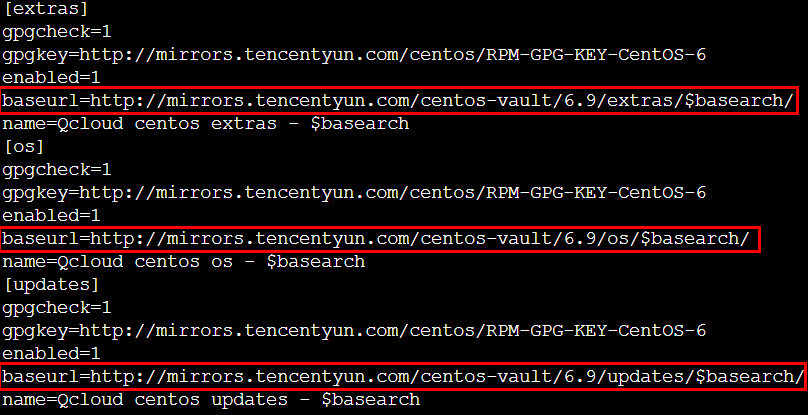
CentOS-Base.repo 文件如下图所示:
[extras]gpgcheck=1gpgkey=http://mirrors.tencentyun.com/centos/RPM-GPG-KEY-CentOS-6enabled=1baseurl=http://mirrors.tencentyun.com/centos-vault/6.9/extras/$basearch/name=Qcloud centos extras - $basearch[os]gpgcheck=1gpgkey=http://mirrors.tencentyun.com/centos/RPM-GPG-KEY-CentOS-6enabled=1baseurl=http://mirrors.tencentyun.com/centos-vault/6.9/os/$basearch/name=Qcloud centos os - $basearch[updates]gpgcheck=1gpgkey=http://mirrors.tencentyun.com/centos/RPM-GPG-KEY-CentOS-6enabled=1baseurl=http://mirrors.tencentyun.com/centos-vault/6.9/updates/$basearch/name=Qcloud centos updates - $basearch
5. 按 ESC 输入 :wq 后,按 Enter 保存修改。
6. 执行以下命令,修改
CentOS-Epel.repo 文件。vim /etc/yum.repos.d/CentOS-Epel.repo
7. 按 i 进入编辑模式,根据实例网络环境修改 baseurl。
本文以使用内网访问为例,则将 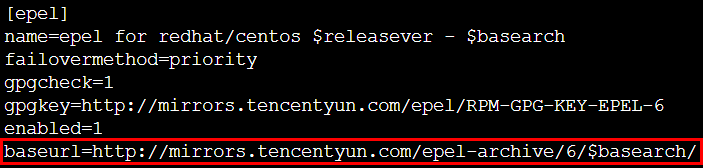
baseurl=http://mirrors.tencentyun.com/epel/$releasever/$basearch/ 修改为 baseurl=http://mirrors.tencentyun.com/epel-archive/6/$basearch/ 即可。修改完成后如下图所示:
[epel]name=epel for redhat/centos $releasever - $basearchfailovermethod=prioritygpgcheck=1gpgkey=http://mirrors.tencentyun.com/epel/RPM-GPG-KEY-EPEL-6enabled=1baseurl=http://mirrors.tencentyun.com/epel-archive/6/$basearch/
8. 按 ESC 输入 :wq 后,按 Enter 保存修改。
9. 至此已完成 YUM 源切换,您可使用
yum install 命令安装所需软件。フィードバック