步骤3:配置 CA 证书
Download
聚焦模式
字号
消息队列 MQTT 版支持使用客户端证书进行客户端的接入认证,CA 证书可用于签发客户端证书、服务器证书和验证证书。客户端发起连接请求时,会将客户端证书传递到服务端,服务端将根据客户端关联 CA 证书验证该客户端证书的正确性,验证通过则允许客户端连接服务端。
约束与限制
单集群内可以注册的 CA 证书最大数量为 32 个。
签发 CA 证书
您可直接向可信机构购买签发的 CA 证书,也可通过自签名生成私有的 CA 证书,以下简要介绍签发 CA 证书的步骤,如您已有完成签发的 CA 证书可以跳过当前的“签发 CA 证书”步骤。
1. 下载并安装 OpenSSL。
注意:
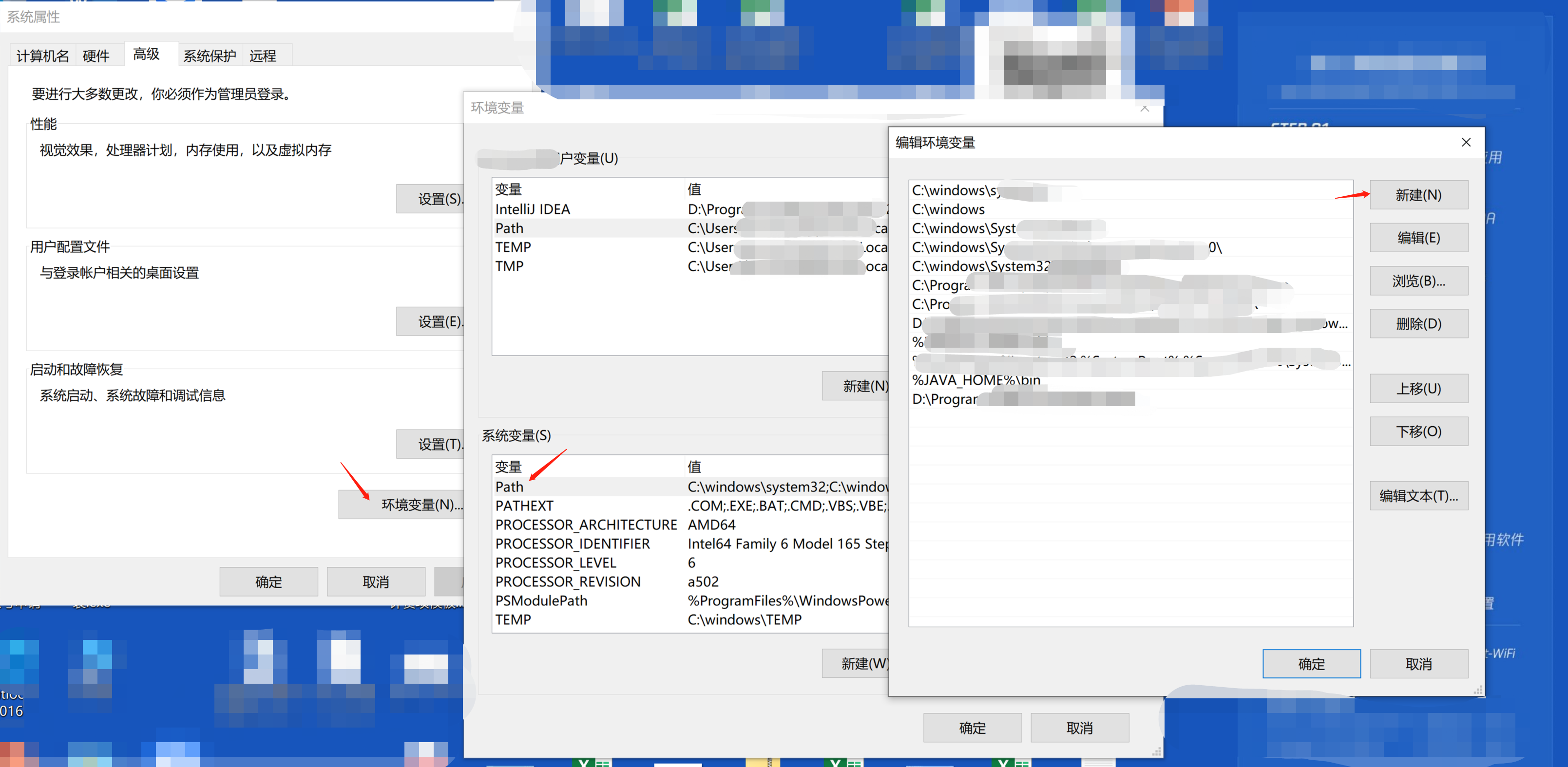
如您使用的是 Windows 系统,需要将 OpenSSL 的安装目录的 bin 子目录添加到您的系统 PATH 环境变量中,如下图所示。
2. 以下均以 RSA 算法证书为例,使用以下命令生成一个密钥对。
openssl genrsa -out CA.key 2048
3. 使用上一步生成的密钥对中的私钥(private key)生成证书签发请求文件(csr)。
openssl req -new -key CA.key -out CA.csr
4. 页面会返回以下示例,根据提示输入对应的参数。
Country Name (2 letter code) [AU]:State or Province Name (full name) []:Locality Name (for example, city) []:Organization Name (for example, company) []:Organizational Unit Name (for example, section) []:Common Name (e.g. server FQDN or YOUR name) []:Email Address []:
注意:
Common Name 字段填写的域名需要和集群的接入点域名保持一致,推荐使用
*.mqtt.tencenttdmq.com。如果需要保证该证书的配置仅对当前集群生效,可以根据使用场景(公网或 VPC 网络)写入对应的域名,例如公网可以填写
mqtt-xxxxxx-gz-public.mqtt.tencenttdmq.com,内网可以填写 mqtt-xxxxxx-gz-vpce-xxxxxx.mqtt.tencenttdmq.com。5. 生成自签名的 RSA 算法的 CA 证书
CA.crt 。openssl x509 -req -extfile /System/Library/OpenSSL/openssl.cnf -extensions v3_ca -in CA.csr -out CA.crt -signkey CA.key -CAcreateserial -days 3650
openssl x509 -req -extfile C:\\Progra~1\\OpenSSL-Win64\\bin\\cnf\\openssl.cnf -extensions v3_ca -in CA.csr -out CA.crt -signkey CA.key -CAcreateserial -days 3650
openssl x509 -req -extfile /etc/pki/tls/openssl.cnf -extensions v3_ca -in CA.csr -out CA.crt -signkey CA.key -CAcreateserial -days 3650
验证证书
在本地完成 CA 证书的签发后,您可以在控制台获取注册码,生成对应的验证证书,验证证书用于验证 CA 证书本身有效性,包括证书是否由可信任的 CA 机构颁发。验证证书的流程如下:
1. 以下均以 RSA 算法证书为例,使用以下命令生成验证证书的密钥对。
openssl genrsa -out VerificationCert.key 2048
2. 使用上一步生成的密钥对中的私钥(private key)生成验证证书的签发请求文件(csr)。
openssl req -new -key VerificationCert.key -out VerificationCert.csr
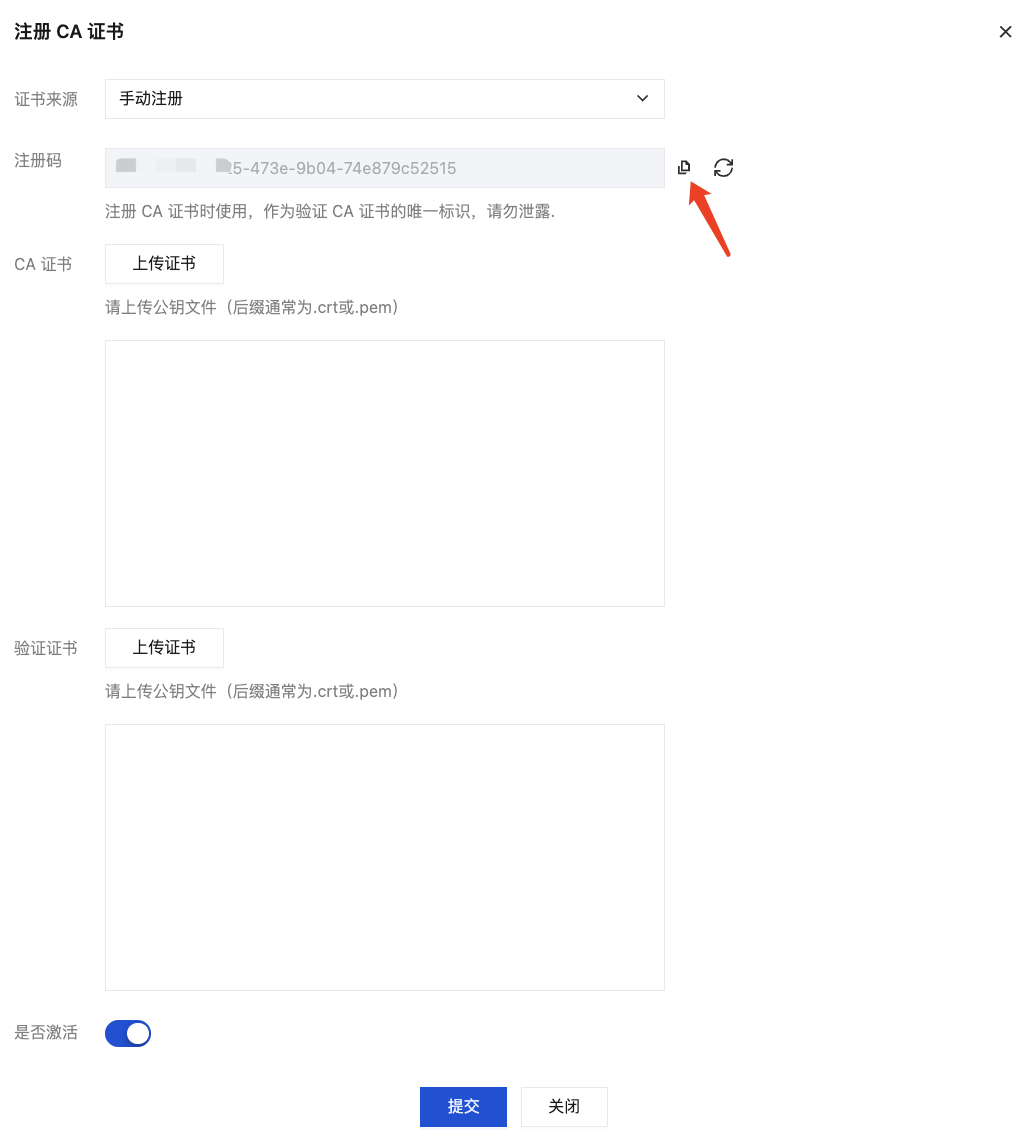
3. 登录 MQTT 控制台,在左侧导航栏单击资源管理 > 集群管理,选择好地域后,单击要配置证书的集群的“ID”,进入集群基本信息页面。在 CA 证书管理页面,单击注册 CA 证书,在弹窗中复制生成的注册码,填写到下一步的 Common Name 字段。
注意:
在本地生成并上传验证证书前,请不要关闭当前弹窗。弹窗关闭后会导致注册码重新生成,导致验证证书校验不通过。
4. 页面会返回以下示例,根据提示输入对应的参数。将上一步复制的注册码填写到 Common Name 字段中,其他字段视实际情况填写,可以为空。
You are about to be asked to enter information that will be incorporatedinto your certificate request.What you are about to enter is what is called a Distinguished Name or a DN.There are quite a few fields but you can leave some blankFor some fields there will be a default value,If you enter '.', the field will be left blank.-----Country Name (2 letter code) [AU]:State or Province Name (full name) []:Locality Name (for example, city) []:Organization Name (for example, company) []:Organizational Unit Name (for example, section) []:Common Name (e.g. server FQDN or YOUR name) []:your_registration_codeEmail Address []:Please enter the following 'extra' attributesto be sent with your certificate requestA challenge password []:An optional company name []:
5. 执行如下命令,生成 CA 证书的验证证书 VerificationCert.crt。
openssl x509 -req -in VerificationCert.csr -CA CA.crt -CAkey CA.key -CAcreateserial -out VerificationCert.crt -days 600 -sha512
上传证书
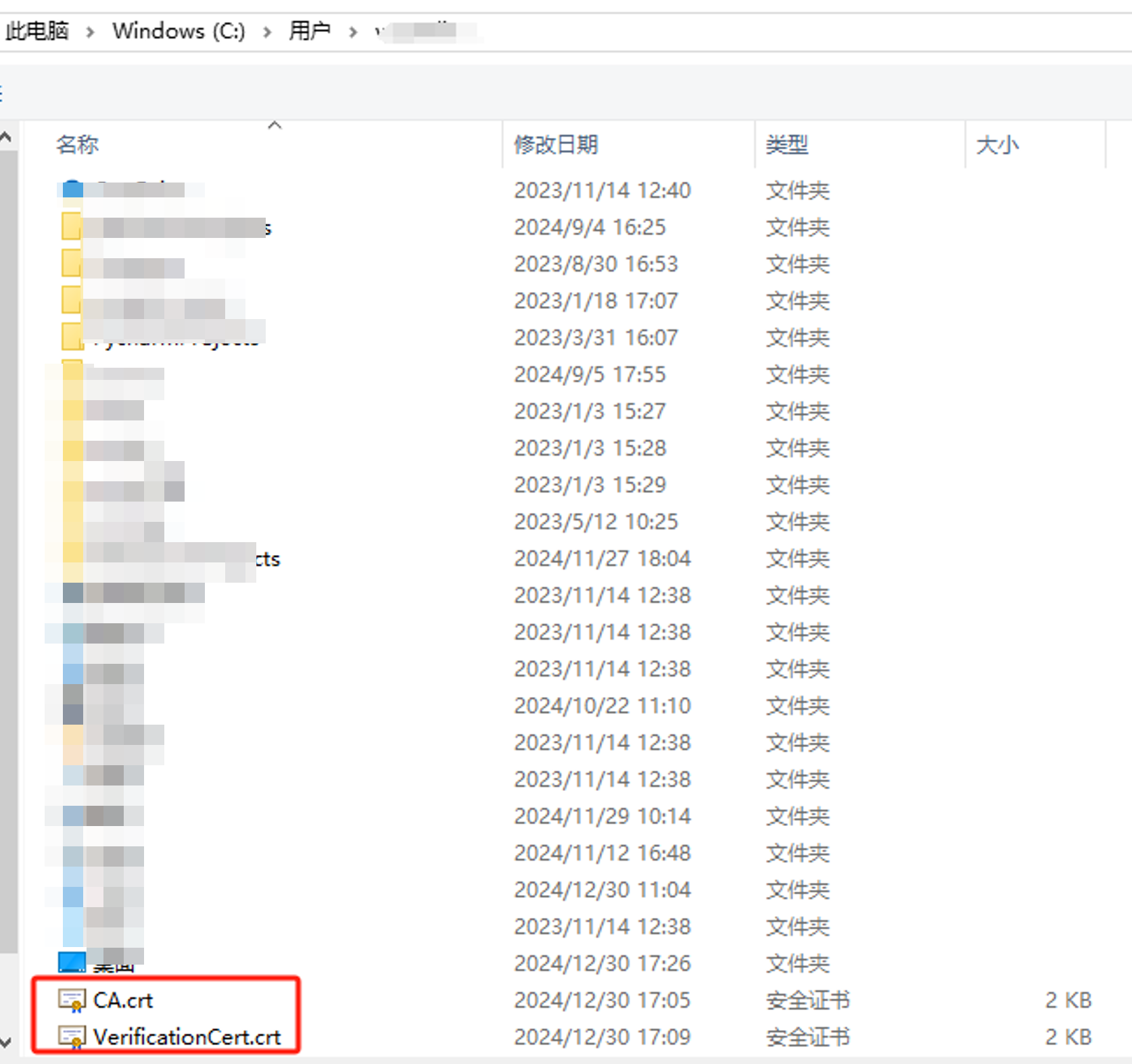
返回到控制台弹窗,上传 CA 证书 和 验证证书,确定后单击 提交。
上传证书后,服务端会使用验证证书中的公钥对 CA 证书的签名进行解密,并与验证证书中内容的哈希值进行比较。如果两者匹配,则表明签名有效,进而证明 CA 证书是可信的。
管理 CA 证书
CA 证书完成注册后,在 CA 证书的列表页,可以查看已经注册的 CA 证书的状态,CA 证书有两种状态:已激活和未激活,未激活的证书可以被删除。

您可以随时在页面管理已注册的 CA 证书。
操作 | 操作路径 | 说明 |
取消激活证书 | 单击操作栏的取消激活 | CA 证书取消激活后,使用当前 CA 证书的客户端证书在连接时会被拒绝,因此在进行 CA 证书的状态流转时需要特别注意对于客户端连接的影响。 |
删除证书 | 单击操作栏的删除 | CA 证书在删除时,会校验当前 CA 证书下是否有处于“已激活”状态下的客户端证书(设备证书),如果有的话会禁止当前的删除 CA 证书操作;如当前 CA 证书下的客户端证书(设备证书)处于“未激活”或者“已吊销”状态,则 CA 证书可以正常删除。 |
查看证书详情 | 点击证书的序列号 | 在证书详情页面,会展示证书如下信息: 基础信息: 展示 CA 证书的状态、Common Name、Serial Number 等信息。 关联的客户端证书:展示关联了当前 CA 证书的客户端证书,单击客户端证书的序列号可以查看客户端证书的详情,在操作栏可以对客户端证书进行下载、激活、吊销等管理操作。 |
文档反馈