Angel 训练加速功能介绍
下载
聚焦模式
字号
训练加速功能介绍
Tilearn-Angel 由 tiacc_training 升级而来,提供兼容 huggingface 生态的大模型训练加速能力,支持手工 cuda 算子结合自动编译优化的计算优化能力,支持兼容 huggingface 生态的 3D 混合并行(TensorParallel、PipelineParallel、DateParallel),支持兼容原生的 DDP 的通信加速能力,用户无需修改原生的使用代码、无需进行模型转换可直接进行使用。此外支持优化器融合、CPU/GPU 亲和性优化、自适应混合精度等通用训练加速能力和模型压缩能力,用户仅需增加几行代码即可开启。
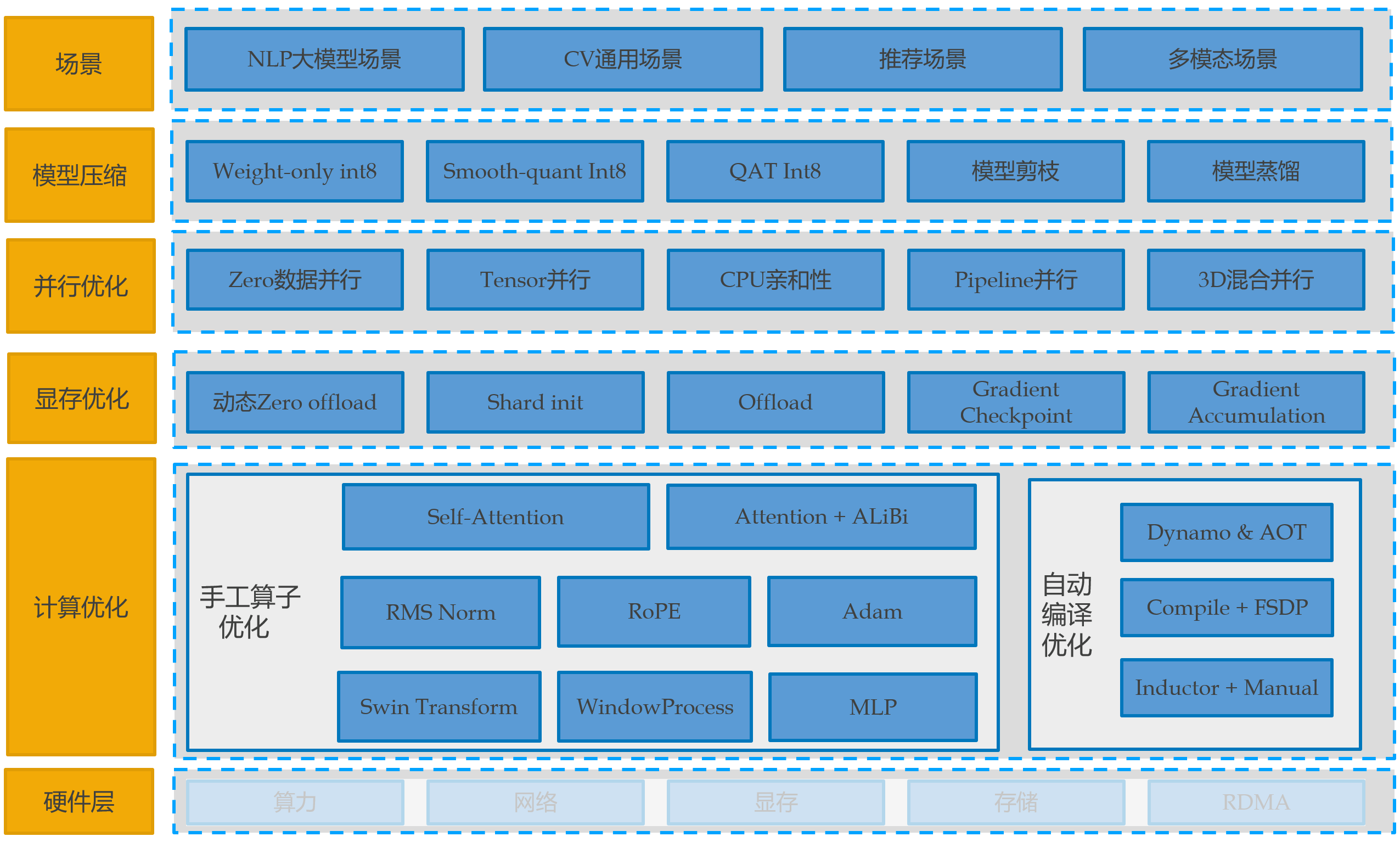
一、Tilearn-Angel 大模型训练加速镜像
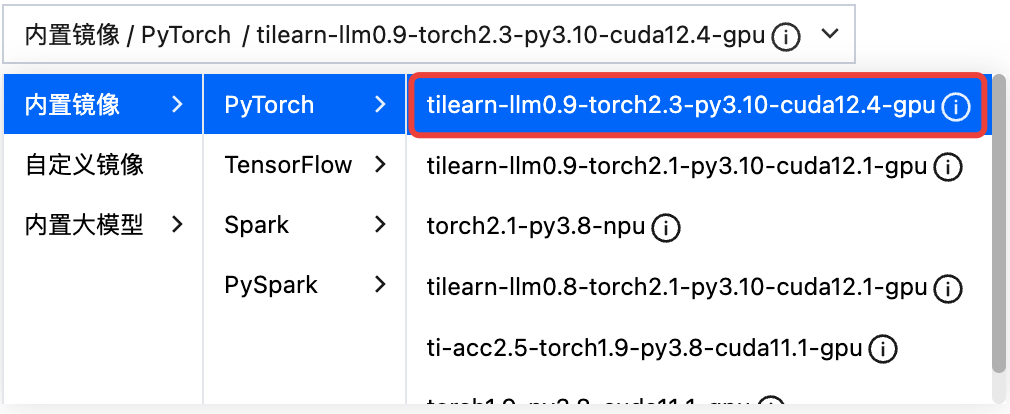
推荐使用平台最新内置镜像:
tilearn-llm0.9-torch2.3-py3.10-cuda12.4-gpu
在镜像内更新最新的 tilearn.llm 和 tilearn.ops 包(可选)
# tilearn-llm>=0.9.3# tilearn.ops>=0.2.1.172pip3 uninstall -y tilearn.llm tilearn.opspip3 install tilearn-llm==0.9.3 -i https://pypi.tuna.tsinghua.edu.cn/simplepip3 install tilearn.ops==0.2.1.172 -i https://g-bnvx3728-pypi.pkg.coding.net/tione/tilearn/simplewget https://tione-public-cos-1308945662.cos.ap-shanghai.myqcloud.com/tilearn/hybrid_parallel/colossalai-0.3.4.1-cp310-cp310-linux_x86_64.whlpip3 install colossalai-0.3.4.1-cp310-cp310-linux_x86_64.whl
在自定义镜像使用需满足以下条件:
基于 pytorch/pytorch:2.1.2-cuda12.1-cudnn8-devel 制作的自定义镜像,镜像中的 torch.version=='2.1.2'。
或基于平台镜像 tilearn-llm1.0-torch2.1-angel-vllm1.0-py3.10-cuda12.1-gpu 制作的自定义镜像。
其他情况请联系加速团队进行支持。
二、Tilearn-Angel 使用文档
2.1 Tilearn-Angel 计算加速
主要介绍大模型计算优化能力,通用训练加速能力详细使用文档(通信优化、优化器融合、CPU/GPU 亲和性优化、自适应混合精度)
以 llama 模型为例,计算优化使用方法-代码修改如下:
### TILEARN.LLMfrom tilearn.llm.transformers import LlamaForCausalLM### 模型接口与标准huggingface一致model = LlamaForCausalLM.from_pretrained(...)
使用 AutoModelForCausalLM 接口
### TILEARN.LLMfrom tilearn.llm.transformers import AutoModelForCausalLM### 模型接口与标准huggingface一致model = AutoModelForCausalLM.from_pretrained(...)
特殊说明:
由于 baichuan1 13B 和 baichuan2 13B 会产生冲突,目前 tilearn.llm.transformers.AutoModelForCausalLM 默认开启了 baichuan1 13B,如果需要使用 baichuan2 13B,需要在启动训练脚本中设置环境变量:
export TILEARN_LLM_BAICHUAN_13B=2目前加速已经支持的模型llama、bloom、baichuan1、baichuan2,详情请参考 Tilearn.llm使用说明。
2.2 Tilearn-Angel 3D 混合并行加速
Tilearn-Angel 支持兼容 huggingface 生态的 3D 混合并行(TensorParallel、PipelineParallel、DateParallel),无需进行模型转换,使用 huggingface trainer 即可进行 3D 并行训练,使用方法如下。详情请参考 3d 混合并行 notebook 案例集。
环境变量配置
export TILEARN_HYBRID_TP_SIZE=1export TILEARN_HYBRID_PP_SIZE=2
训练代码配置
### 计算优化from tilearn.llm.transformers import LlamaForCausalLMfrom tilearn.llm.transformers import AutoModelForCausalLM### 3D并行import tilearn.llm.hybrid_paralleldef main():### 模型接口与标准huggingface一致model = AutoModelForCausalLM.from_pretrained(...)run_exp()
大模型精调时的参数配置建议
llama3 8b 模型 (seqlength=4096)
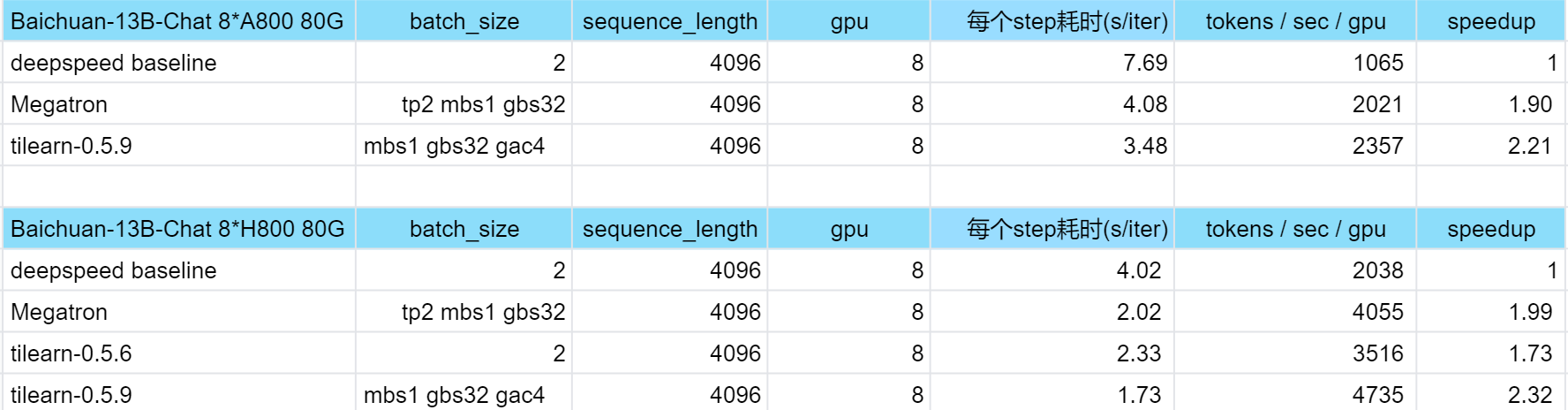
# 8 x A100 40G 默认参数GradienAccumulationSteps=64BatchSize=1GradientCheckPointing=FalseTilearnHybridTPSize=2TilearnHybridPPSize=2# 8 x A800 80G 默认参数GradienAccumulationSteps=32BatchSize=1GradientCheckPointing=FalseTilearnHybridTPSize=1TilearnHybridPPSize=2TilearnHybridZeroStage=1 三、Tilearn-Angel训练加速效果
三、附录:Tiacc_training 旧版训练加速
使用新的平台镜像 tilearn-llm0.4.2-torch2.1-deepspeed0.10.0-py3.10-cuda12.1-gpu 可直接使用旧版功能
环境相关
推荐使用平台内置 torch 镜像和 tensorflow 镜像:
torch 镜像:
ti-acc2.0-torch1.9-py3.8-cuda11.1-gpu 
tensorflow 镜像:
ti-acc1.0-tf1.15-py3.6-cuda10.0-gpu
使用 DDP 分布式训练通信优化(PyTorch + DPP)
以兼容原生 DDP 的方式启动训练脚本,无需进行训练代码的修改,启动命令参考示例如下:
python3 -u -m tiacc_training.distributed.launch --nproc_per_node $GPUS_PER_NODE --nnodes $NNODES --node_rank $NODE_RANK --master_addr $MASTER_ADDR --master_port $MASTER_PORT main.py
DDP 分布式训练通信优化实测效果:
(加速效果在多机多卡场景方有体现,单机多卡场景与原生 DDP 性能无异。)
硬件环境 | 模型 | GPU 卡数 | 原生 DDP(examples/sec per V100) | TI-ACC 通信优化(examples/sec per V100) |
腾讯云GN10Xp.20XLARGE320 | resnext50_32x4d | 1(单机) | 227 | 227 |
| | 8(单机) | 215 | 215 |
| | 16(双机) | 116 | 158.6 |
使用自适应混合精度优化(PyTorch)
import torch.cuda.amp as ampimport tiacc_training.torchscaler = amp.GradScaler()#实例化自适应混合精度策略类的对象policy = tiacc_training.torch.tiacc_torch_warp.MixedPrecision_TrainingPolicy(policy,start_step,hold_step,end_step,interval_time,interval_hold_time)#根据输入的参数得到当前epoch是否需要开启混合精度mixed_precision = policy.enable_mixed_precision(epoch,lr=lr,loss=loss,scaler=scaler)with amp.autocast(enabled=mixed_precision):outputs = model(inputs)loss = criterion(outputs, targets)scaler.scale(loss).backward()scaler.step(optimizer)scaler.update()
自适应混合精度优化实测效果:
硬件环境 | 模型 | GPU 卡数 | 原生PyTorch(examples/sec per V100) | TI-ACC 数据 IO 优化(examples/sec per V100) | TI-ACC 数据 IO + 自适应混合精度优化(examples/sec per V100) |
腾讯云GN10Xp.20XLARGE320 | resnet50 mmcls | 8(单机) | 70.8 | 350.5 | 379.2 |
| centernet mmdet | 8(单机) | 26.4 | 28.6 | 30.6 |
使用优化后的 embedding 变量构造(TensorFlow + PS)
# 启动容器docker run -itd --name tiacc-rec-fm --network=host --ipc=host ccr.ccs.tencentyun.com/ti-platform/tensorflow:1.15.5-py3-rec-0121# 进入容器docker exec -it tiacc-rec-fm bash# 原生tensorflow embedding使用方法cd wideanddeep && bash start_all.sh --fm# tiacc lookup优化使用方法cd wideanddeep && bash start_all.sh --tiacc --fm
embedding 变量构造 + lookup 计算优化实测效果:
硬件环境 | 模型 | GPU 卡数 | 原生 TensorFlow(global_steps/sec per V100) | TI-ACC 优化后(global_steps/sec per V100) |
腾讯云GN10Xp.20XLARGE320 | DeepFM | 16(双机) | 41.9 - 56 | 96.1 - 103.3 |
| Wide & Deep | 16(双机) | 49.9 - 69 | 120 - 128 |
Acknowledgement
Tilearn-Angel 加速引擎和相关案例集 demo 受益于Deepspeed, ColossalAI, transformers, LLaMA-Factory, flash-attention 和 pytorch感谢以上项目作者的付出。
训练加速类/函数说明
一、Tilearn.llm 大模型训练加速
1.1 计算优化相关 API
计算优化接口与 huggingface 完全兼容,以 llama 模型为例使用方法如下:
### TILEARN.LLMfrom tilearn.llm.transformers import LlamaForCausalLM### 模型接口与标准huggingface一致model = LlamaForCausalLM.from_pretrained(...)
1.2 3D 混合并行优化相关API
3D 并行混合优化功能完全兼容 huggingface 生态,huggingface trainer 无需进行模型转换即可使用,以 llama3 模型为例使用方法如下:
环境变量配置
export TILEARN_HYBRID_TP_SIZE=1export TILEARN_HYBRID_PP_SIZE=2
训练代码配置
### 计算优化from tilearn.llm.transformers import LlamaForCausalLMfrom tilearn.llm.transformers import AutoModelForCausalLM### 3D并行import tilearn.llm.hybrid_paralleldef main():### 模型接口与标准huggingface一致model = AutoModelForCausalLM.from_pretrained(...)run_exp()
大模型精调时的参数配置建议
llama3 8b 模型 (seqlength=4096)
# 8 x A100 40G 默认参数GradienAccumulationSteps=64BatchSize=1GradientCheckPointing=FalseTilearnHybridTPSize=2TilearnHybridPPSize=2TilearnHybridZeroStage=1# 8 x A800 80G 默认参数GradienAccumulationSteps=32BatchSize=1GradientCheckPointing=FalseTilearnHybridTPSize=1TilearnHybridPPSize=2TilearnHybridZeroStage=1
二、tiacc_training 旧版训练加速
tilearn.llm>=0.7.12,tilearn.ops>=0.2.0.1 已经支持旧版 tiacc_training 加速能力(Tilearn.llm 使用说明 第2节-通用训练加速功能介绍)
使用新的平台镜像 tilearn-llm0.4.2-torch2.1-deepspeed0.10.0-py3.10-cuda12.1-gpu 可直接使用
tiacc_training.distributed.launch 函数
初始化 DDP 通信加速优化,接口与原生 torch.distributed.launch 完全一致,会默认将原生 DDP 相关的函数调整为调用 TI-ACC 通信加速能力,原生 DDP 相关的主要模块/类包括:torch.distributed和 torch.nn.parallel.DistributedDataParallel()。
adaptfp16.MixedPrecision_TrainingPolicy 类
实现对训练过程中自动混合精度自适应策略的实例化,自适应策略包括时间混合精度、时间学习率混合精度策略、损失函数混合精度策略。
初始化参数:
参数 | 类型 | 是否必填 | 参数说明 | 示例 | 默认值 |
policy | INT | 是 | 自适应混合精度策略, 0:时间混合精度,适用于通用自适应情况; 1:时间学习率混合精度策略,适用于训练过程中某一阶段 loss 波动出现异常的情况; 2:损失函数混合精度策略,适用于训练过程中 loss 下降过快或过慢情况。 | 0 | 无 |
start_time | INT | 否 | 开启自适应混合精度的开始时间,一般建议设为10。策略为0和1时必填,为2时非必填。 | 10 | 10 |
end_time | INT | 否 | 开启自适应混合精度的结束时间,一般建议设为最后一个 epoch 时间。策略为0和1时必填,为2时非必填。 | 1000 | None |
hold_time | INT | 否 | 开启策略1时的保持时间,在保持时间内采用统一策略:开启或者不开启。一般建议为训练过程中 loss 异常波动的持续时间。策略为1时必填,为0和2时非必填。 | 20 | None |
interval_time | INT | 否 | 开启策略2的间隔时间,默认值为1000,即每间隔1000轮 epoch 开启策略2。策略为2时需要填写,为0和1时无需必填。 | 1000 | 1000 |
interval_hold_time | INT | 否 | 在 interval_time 间隔时间开启策略2后的保持时间,默认值为100,如 interval_time 为1000,即在1000-1100,2000-2100...开启策略2。策略为2时需要填写,为0和1时无需必填。 | 100 | 100 |
实例化对象:
对象 | 类型 | 对象说明 |
policy | MixedPrecision_TrainingPolicy 类 | 训练过程中自动混合精度自适应策略的实例化对象 |
enable_mixed_precision 函数方法
属于 MixedPrecision_TrainingPolicy 类,根据输入的参数得到当前 epoch 是否需要开启自动混合精度。
输入参数:
参数 | 类型 | 是否必填 | 参数说明 | 示例 | 默认值 |
epoch | INT | 是 | 当前的 epoch | 20 | 无 |
scaler | torch.cuda.amp.GradScaler | 是 | 梯度缩放实例化对象 | scaler | 无 |
lr | float | 否 | lr 是当前 epoch 的学习率 | 0.01 | None |
loss | float | 否 | loss 是上一轮 epoch 的损失值 | 0.1 | None |
输出参数:
输出参数 | 类型 | 参数说明 |
mixed_precision | BOOL | 输入的参数得到当前 epoch 是否需要开启自动混合精度,是返回 TRUE,否则返回 FLASE。 |
文档反馈