Using TCHouse-C Cloud Data Warehouse for CKafka to ClickHouse
Baixar
Modo Foco
Tamanho da Fonte
I. Migration Scenarios
Objective: CKafka data is written to the data warehouse (ClickHouse).
Existing data migration solution: Real-time consumption data in CKafka is synchronized to the cloud data warehouse TCHouse-C.
For new synchronization links, refer directly to Part IV of this document.
II. Migration Steps
Brief description: Create a kafka engine table and a materialized view on the clickhouse platform to import kafka table data into the data warehouse.
Query topic and group information in the ckafka console, as well as clickhouse warehouse table information.
Double writing: Create a kafka consumption table and a new consumer group on the TCHouse-C platform. Create a separate data import task, which is distinguished from the connector task, to independently consume kafka data.
Collective consumption: The connector's consumer group is shared. The clickhouse data import task is equivalent to adding a consumer group, and it collectively consumes kafka data with the connector task.
Single writing: Stop the connector task in the ckafka console.
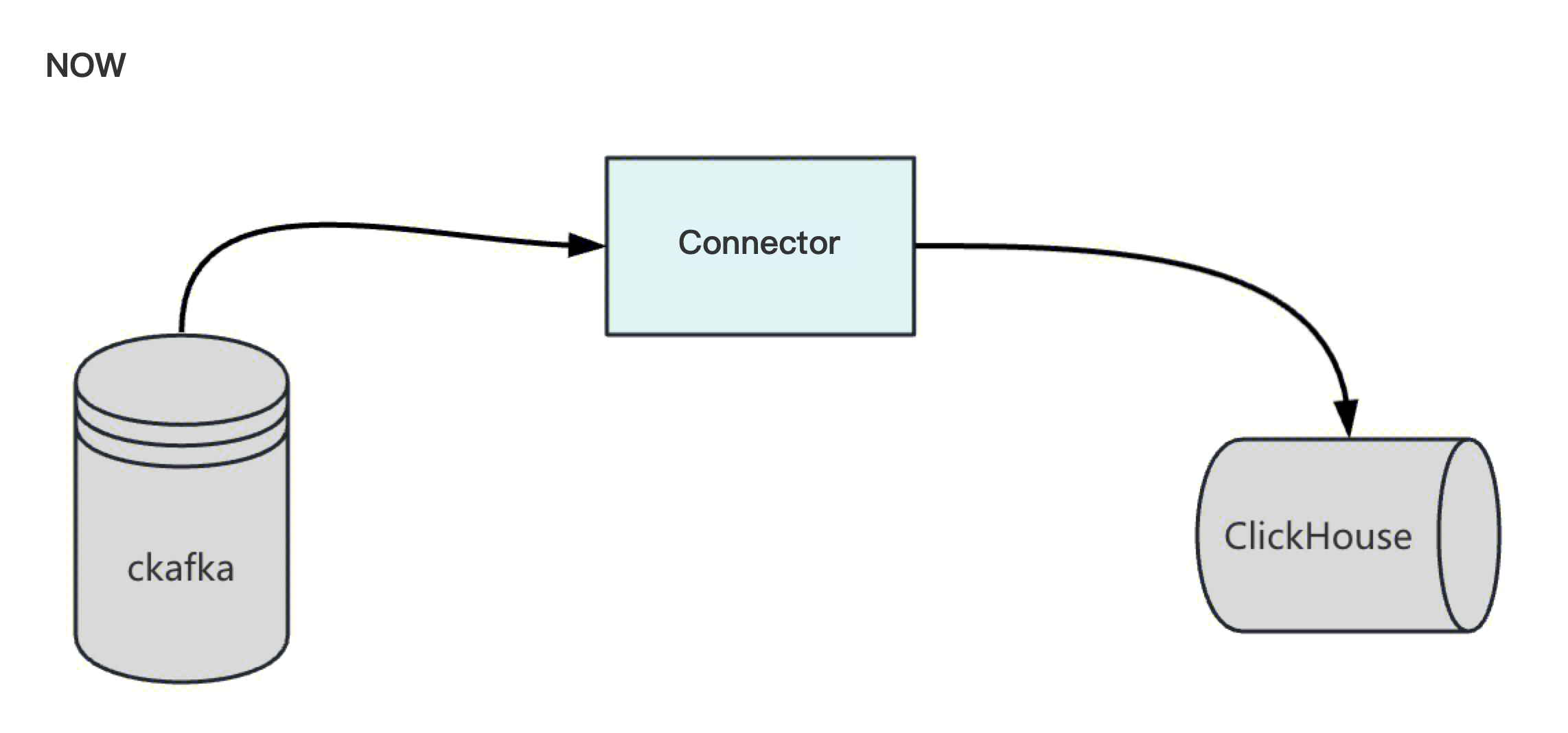
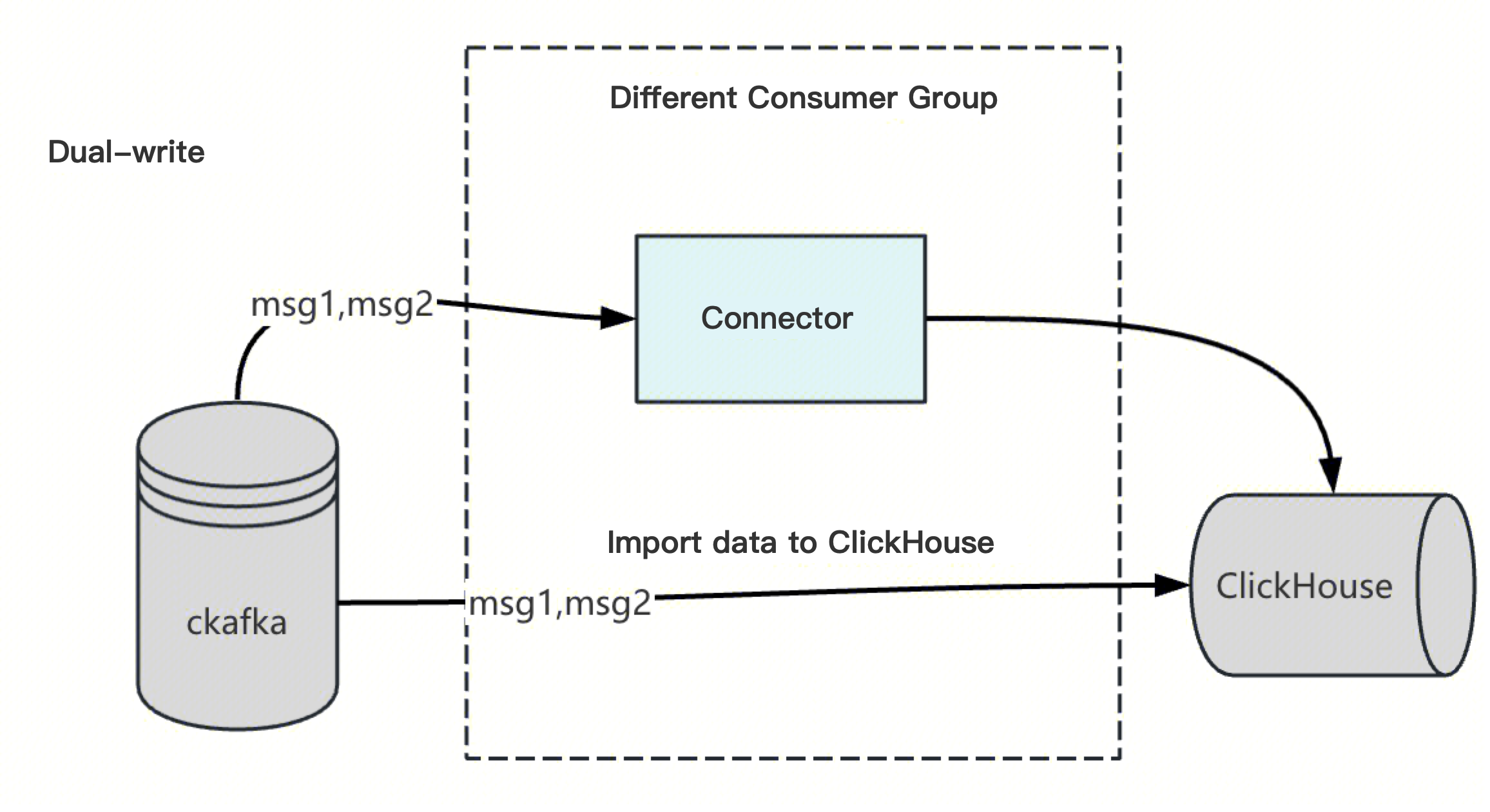
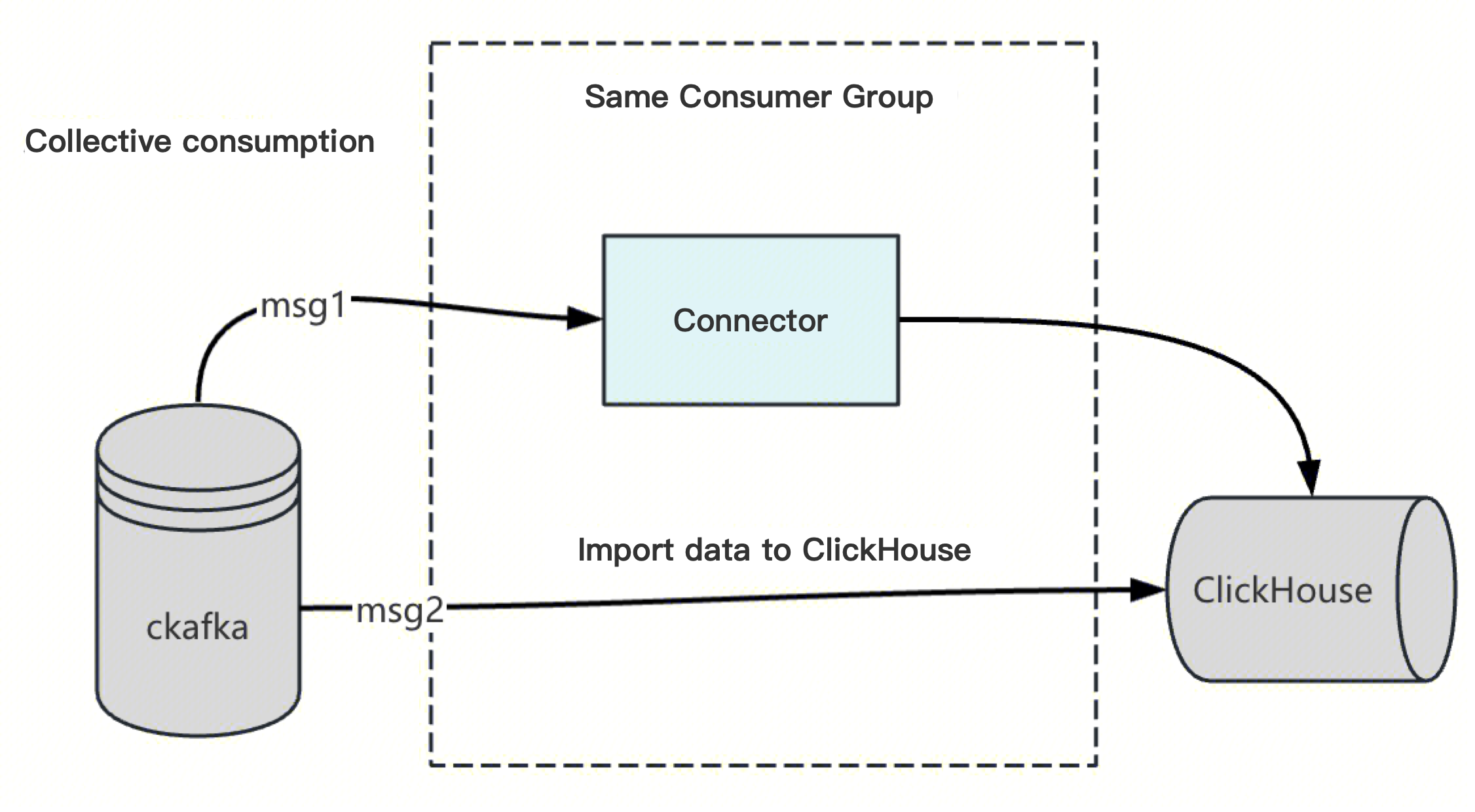
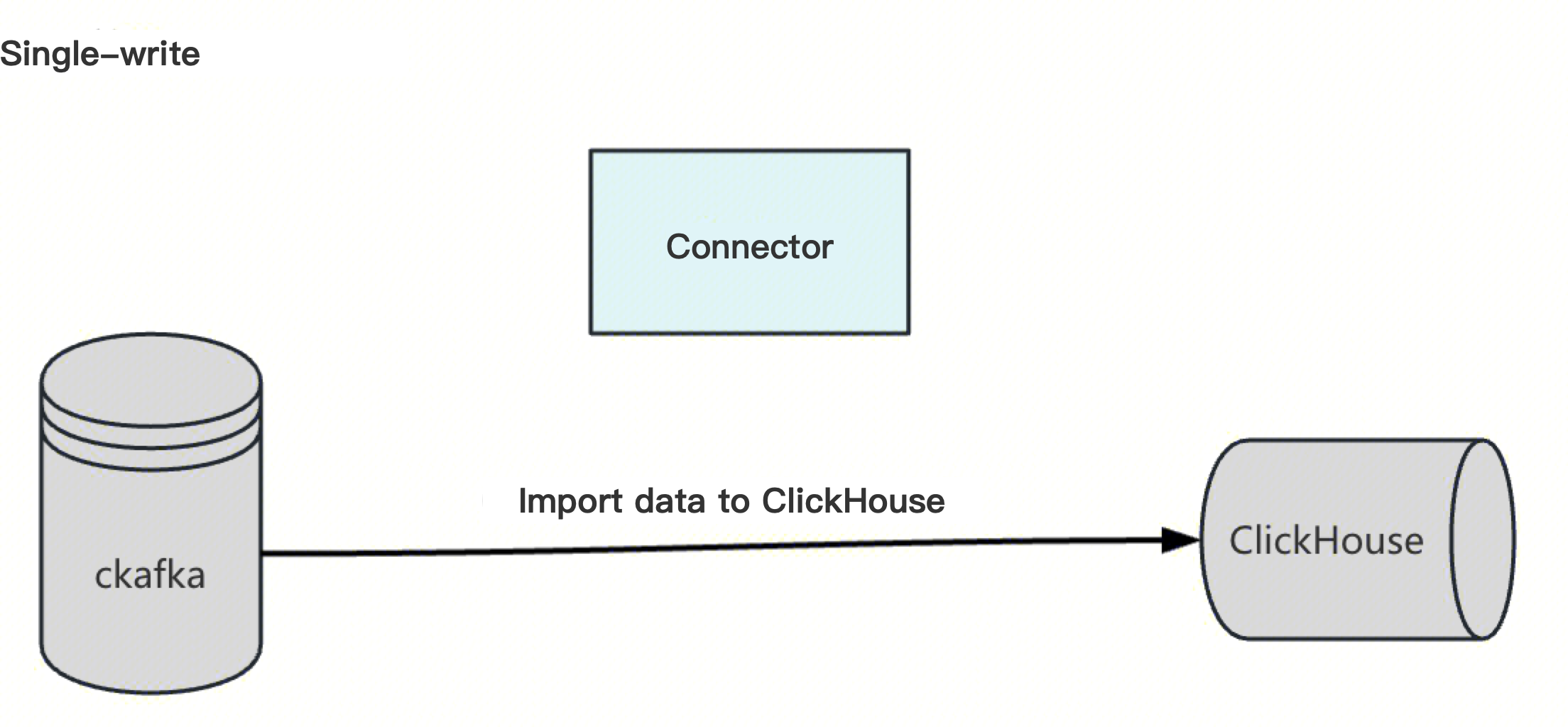
III. Solution
3.1. Solution Comparison
Solution | Solution 1: Dual-Write -> Single-Write | Solution 2: Collective Consumption |
Approach | Create a new consumer group and set up a separate data import task on the TCHouse-C platform. | Share the connector's consumer group. The ClickHouse data import task essentially adds a consumer group and, together with the connector task, collectively consumes kafka data. |
Implementation Policy | Proactively migrate to avoid risks in advance. Actively start the ClickHouse kafka data import task during off-peak hours and decommission the ckafka connector. Operations during off-peak hours have controllable risks. | Migrate passively to prevent secondary failures. Prepare the SQL contingency plan for the ClickHouse kafka data import task in advance, and start the task after the connector fails. Create a new consumer group or use an existing consumer group on the kafka platform. After a connector failure or exception, create a kafka consumption table and generate a materialized view to import data on the TCHouse-C platform. |
Advantages | The links are independent and do not affect each other. Operations during off-peak hours have controllable risks. | Data will not be duplicated. Existing tasks remain unchanged for now, and business operations are unaffected in the short term. |
Disadvantages | Log data generated by dual writes may have minor duplicates. | Collective consumption carries a rebalance risk. If a topic has only a single partition, you cannot determine whether the clickhouse import task is functioning normally. Creating custom tables has high requirements. If a task is misconfigured, there is a risk of data loss. The consumer group information of the connector needs to be collected in advance. It is deeply hidden and has poor usability. The post-failure mitigation plan has low timeliness, and the scope of the failure impact is uncontrollable. The warehouse table may contain a small amount of duplicate data. |
Rollback Plan | - | Dual-write phase: If the outcome does not meet expectations, you can directly delete the kafka data import task on the TCHouse-C platform. Single-write phase: If the outcome does not meet expectations, you can restart the connector and delete the kafka data import task on the TCHouse-C platform. |
Fallback Plan | - | Deleting the kafka data import task on the TCHouse-C platform means deleting the kafka consumption tables and materialized views. Restart the ckafka connector task. |
3.2. Precautions
The kafka_auto_offset_reset configuration is no longer effective. If a consumer group does not exist, a new one starts consumption from the oldest offset by default. For existing consumer groups, consumption starts from the consumption offsets by default.
IV. POC Verification
Step 1: Identify the kafka topic and consumer group name to be imported, as well as the ckafka server vip address. Create the consumer group on the ckafka platform. By default, consumption starts from the latest offset.
If a consumer group is not created in advance, the TCHouse-C platform starts consumption from the oldest offset by default.
(As shown in the figure below) Create a consumer group in the CKafka console. By default, consumption starts from the latest offset.
Step 2: On the TCHouse-C SQL platform, create the following tables and views.
-- 0 Query topic information imported to ClickHouse in ckafka-- 1 Create a Kafka engine table in ClickHouseCREATE TABLE kafka_table_qiang_test_1 ON CLUSTER default_cluster (key String,value String) ENGINE = KafkaSETTINGSkafka_broker_list = '10.0.x.x:9092',kafka_topic_list = 'qiang-test-mysql',kafka_group_name = 'cg_qiang-test-mysql_1',kafka_format = 'JSONEachRow', -- Select an appropriate format based on your data format, such as JSON, Avro, or CSV.kafka_num_consumers = 1, -- Adjust as needed.kafka_max_block_size = 65536,kafka_skip_broken_messages = 0; -- The default value is 0.-- 2 Create a target table for storing data.-- The Kafka engine table itself only consumes data and does not persist it. Therefore, you need to create a table for actually storing data.CREATE TABLE real_table_qiang_test_1 ON CLUSTER default_cluster (key String,value String) ENGINE = MergeTree()ORDER BY key;-- 3 Create a Materialized View to import data from the Kafka table into the actual table.CREATE MATERIALIZED VIEW view_to_real_table_qiang_test_1 ON CLUSTER default_cluster TO real_table_qiang_test_1 ASSELECTkey,valueFROM kafka_table_qiang_test_1;-- 4 Query data in ClickHouse when you start sending data to kafka.SELECT * FROM real_table_qiang_test_1;select count(1) from INFORMATION_SCHEMA.real_table_qiang_test_1 limit 5;-- 5 To pause the materialized view and stop data collectionDROP VIEW IF EXISTS view_to_real_table_qiang_test_1 ON CLUSTER default_cluster;SELECT name FROM system.tables WHERE name LIKE '%view_to_real_table_qiang_test_1%'; -- Verify that the deletion was successful.
Step 3: Check the consumption status. As shown in the following figure, verify that the clickHouse client is properly connected, and then check the consumption monitoring.
Step 4: In the TDMQ for CKafka console, navigate to Connector > Task List, locate the corresponding connection task, and pause the CKafka connector task.
V. Appendix
How to Find the Consumer Group of a Connector
Open the connector task to obtain the CKafka instance, task ID, and Topic name.
Return to the consumer group (Consumer Group), search by task ID, and locate the corresponding consumer group name.
Ajuda e Suporte
Esta página foi útil?
Você também pode entrar em contato com a Equipe de vendas ou Enviar um tíquete em caso de ajuda.
comentários