CPU Usage Priority
Baixar
Modo Foco
Tamanho da Fonte
Overview
During the deployment of services, it's common to deploy a type of business process onto a specific server. The CPU utilization of the server depends on the pressure of the business process. Generally, the overall CPU utilization of a server tends to be relatively low. To improve the CPU utilization of the server, some tasks with lower priorities can be deployed on the server in a hybrid manner. This approach can significantly enhance the overall CPU utilization and reduce hardware costs. Here, the tasks with lower priorities deployed on the machine in a hybrid manner are referred to as "offline tasks" or "low-priority tasks".
The hybrid deployment solves the problem of low CPU utilization, but can lead to CPU competition among the hybrid tasks, thereby affecting the originally important business metrics (such as runtime duration, latency, etc.). To solve this problem, CPU QoS introduces an absolute preemption mechanism, allowing important business processes to unconditionally preempt less important business processes when they are runnable. This ensures that important business processes remain unaffected while the overall CPU utilization is improved.
Basic Principles
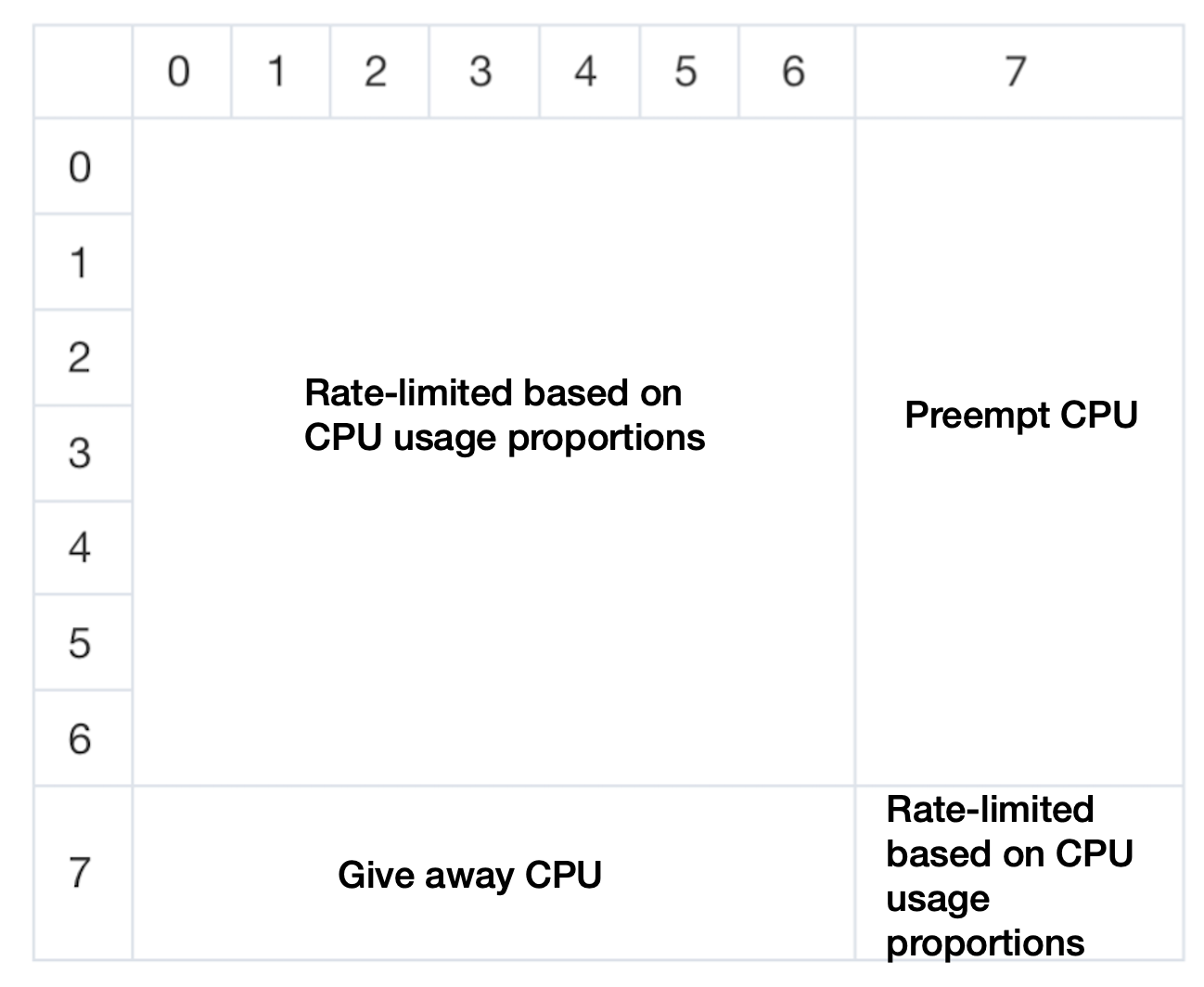
Users can set different priorities for tasks/containers to specify the scheduling behavior of the kernel for them. For instance, if a container with priority 0 and a container with priority 7 are running on the same CPU, once the container with priority 0 can run, it will unconditionally preempt the container with priority 7. The processes in the containers with lower priorities can be scheduled for execution only when the processes of the containers with higher priorities are either completed or blocked and asleep.
The QoS Agent allows users to set 8 different priority levels (0-7). Containers with priorities 0-6 do not have an absolute preemption relationship, and resources are divided and throttled based on the CPU usage proportion. For two businesses, if one is set to priority 0 and the other to priority 6, resources will not be divided based on priority. Resource division occurs only when there is node resource competition, where the resources of different Pods are proportionally divided according to the requested amount of resources. For more details, refer to Documentation. By setting some offline operations to priority 7, machine utilization is improved while ensuring that high-priority and latency-sensitive online business is not affected by offline operations.
The CPU QoS behavior among different priorities is as follows:
Operation Steps
1. Deploy QoS Agent.
2. Within the Component Management page in the cluster, locate the successfully deployed QoS Agent, and click Update Configuration on the right.
3. On the add-on configuration page for modifying QoS Agent, select CPU Usage Priority.
4. Click Complete.
5. Deploy offline services.
6. Deploy the PodQOS objects associated with the offline services, and select the business that needs to lower the priority, as shown below:
apiVersion: ensurance.crane.io/v1alpha1kind: PodQOSmetadata:name: lowspec:labelSelector:matchLabels:k8s-app: low # select the Label of the business that needs to lower the priorityresourceQOS:cpuQOS:cpuPriority: 7 # Set the cpuPriority of the specified business to 7, which means the lowest priority, and the business will be preempted first in resource competition
Ajuda e Suporte
Esta página foi útil?
Você também pode entrar em contato com a Equipe de vendas ou Enviar um tíquete em caso de ajuda.
comentários