tencent cloud

Tencent Kubernetes Engine

Release Notes and Announcements
Release Notes
Announcements
Release Notes
Product Introduction
Overview
Strengths
Architecture
Scenarios
Features
Concepts
Native Kubernetes Terms
Common High-Risk Operations
Regions and Availability Zones
Service Regions and Service Providers
Open Source Components
Purchase Guide
Purchase Instructions
Purchase a TKE General Cluster
Purchasing Native Nodes
Purchasing a Super Node
Getting Started
Beginner’s Guide
Quickly Creating a Standard Cluster
Examples
Container Application Deployment Check List
Cluster Configuration
General Cluster Overview
Cluster Management
Network Management
Storage Management
Node Management
GPU Resource Management
Remote Terminals
Application Configuration
Workload Management
Service and Configuration Management
Component and Application Management
Auto Scaling
Container Login Methods
Observability Configuration
Ops Observability
Cost Insights and Optimization
Scheduler Configuration
Scheduling Component Overview
Resource Utilization Optimization Scheduling
Business Priority Assurance Scheduling
QoS Awareness Scheduling
Security and Stability
TKE Security Group Settings
Identity Authentication and Authorization
Application Security
Multi-cluster Management
Planned Upgrade
Backup Center
Cloud Native Service Guide
Cloud Service for etcd
TMP
TKE Serverless Cluster Guide
TKE Registered Cluster Guide
Use Cases
Cluster
Serverless Cluster
Scheduling
Security
Service Deployment
Network
Release
Logs
Monitoring
OPS
Terraform
DevOps
Auto Scaling
Containerization
Microservice
Cost Management
Hybrid Cloud
AI
Troubleshooting
Disk Full
High Workload
Memory Fragmentation
Cluster DNS Troubleshooting
Cluster kube-proxy Troubleshooting
Cluster API Server Inaccessibility Troubleshooting
Service and Ingress Inaccessibility Troubleshooting
Common Service & Ingress Errors and Solutions
Engel Ingres appears in Connechtin Reverside
CLB Ingress Creation Error
Troubleshooting for Pod Network Inaccessibility
Pod Status Exception and Handling
Authorizing Tencent Cloud OPS Team for Troubleshooting
CLB Loopback
API Documentation
History
Introduction
API Category
Making API Requests
Elastic Cluster APIs
Resource Reserved Coupon APIs
Cluster APIs
Third-party Node APIs
Relevant APIs for Addon
Network APIs
Node APIs
Node Pool APIs
TKE Edge Cluster APIs
Cloud Native Monitoring APIs
Scaling group APIs
Super Node APIs
Other APIs
Data Types
Error Codes
TKE API 2022-05-01
FAQs
TKE General Cluster
TKE Serverless Cluster
About OPS
Hidden Danger Handling
About Services
Image Repositories
About Remote Terminals
Event FAQs
Resource Management
Service Agreement
TKE Service Level Agreement
TKE Serverless Service Level Agreement
Contact Us
Glossary

Beginner’s Guide

PDF
Modo Foco
Tamanho da Fonte
Última atualização: 2025-09-29 15:15:08
This document helps you quickly understand and get started with Tencent Kubernetes Engine (TKE) as instructed.

1. What Is TKE?

Based on the native Kubernetes system, Tencent Kubernetes Engine (TKE) provides container-centric, highly scalable and high-performance container management services. It works closely with Tencent Cloud IaaS products to help you quickly implement business containerization. For more information, see Overview.
TKE allows you to manipulate clusters and services in the TKE console or TencentCloud API.

2. TKE Billing

TKE allows you to create different types of Kubernetes clusters with different billable items and billing standards. For more information about the billing modes and prices, see Purchase Guide.

3. Using TKE

3.1 Register on Tencent Cloud

Before using TKE, you need to sign up for a Tencent Cloud account and complete the identity verification.

3.2 Role authorization

You need to authorize the current service role and grant operation permissions for TKE before accessing your other Tencent Cloud service resources. Open the Tencent Cloud console, select Products > Tencent Kubernetes Engine to enter the TKE console and authorize TKE according to the prompts. After that, get relevant resource operation permissions, and you can start to create a cluster. Steps are as follows:
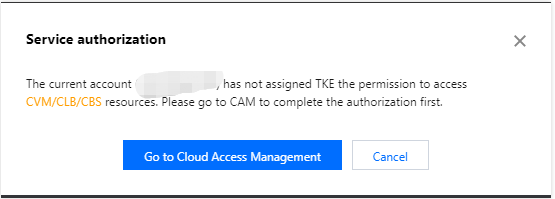
1. View information in the displayed Service Authorization dialog box, and click Go to Cloud Access Management, as shown in the following figure.

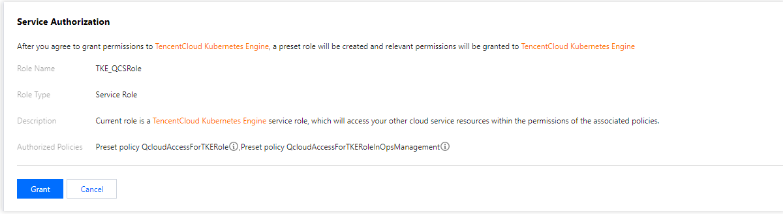
2. On the Role Management page, read information related to the role, as shown in the following figure.

3. Click Grant to grant authorization. Now you can go to the TKE console to create clusters and purchase related products.

3.3 Creating a cluster

For how to quickly create a standard managed cluster, see Quickly Creating a Standard Cluster. For the complete process of creating a standard managed cluster, see Creating a Cluster. If you need more types of clusters, see Creating Serverless Cluster, Creating a Container Instance, and Creating Edge Cluster.

3.4 Deploying workloads

You can deploy workloads by deploying images or orchestrating the YAML file.
If you want to deploy stateless workloads through image templates, see directions in Creating Simple Nginx Service or WordPress with Single Pod.
If you want to deploy workloads through custom images, see directions in Building Hello World Service Manually.

3.5 Cluster operations

TKE is a management platform for clusters, applications, storage and networks. For more information or directions, please refer to the table below.
Operation
Reference
Connect to a TKE cluster from a local client using Kubectl, the Kubernetes command line tool
Upgrade a running Kubernetes cluster
Add a pod to the created Kubernetes cluster
Manage nodes in a Kubernetes cluster
Operate native Kubernetes objects in the console
Provide a fixed access entry for a set of containers through service
Configure different forwarding rules through Ingress resources
Leverage TKE's storage capability
Assign the IP addresses within the container network address range to containers in the cluster
Store and analyze service logs in Kubernetes clusters
Monitor clusters
Use a private image hosted in Tencent Container Registry (TCR) to deploy applications

4. Beginner's Guide

Can I use TKE in classic network? No. Currently, you can use TKE in a VPC but not a classic network.
Can I add an existing CVM to a cluster?
Yes. After creating a cluster, you can add an existing CVM to it. For more information, see Adding a Node.
Why does my service keep starting? If there is no process running in the container, the service may keep starting. For more information on service startup, see Event FAQs.
How do I perform network planning before creating a cluster? When creating a cluster, make sure that the IP ranges of the cluster network and container network do not overlap. Generally, you can select a subnet of a VPC instance as the node network of the cluster. For more information, see Container Network and Cluster Network Descriptions.
How do I access a created service? Different access methods have different access entries. For more information, see the "Service Access" section in Service Management Overview.
How does a container access the public network? If the host where the container resides has a public IP address and public bandwidth, the container can directly access the public network. Otherwise, a NAT gateway is required for accessing the public network.
Can I use TKE if I don’t know how to create an image? The features related to Helm 3.0 that are integrated in TKE enable you to create products and services such as Helm Chart, TCR, and software services. Created applications will run in the cluster you specify to offer corresponding capabilities. For more information, see Managing Applications.
How do I manage configuration files or environment variables for my services? You can manage configuration files by editing configuration items.
How do services access each other? In a cluster, services with the same namespace can directly access one another, whereas those with different namespaces access one another by using <service-name>.<namespace-name>.svc.cluster.local.

5. Feedback and Suggestions

If you have any doubts or suggestions when using TKE products and services, you can submit your feedback through the following channels. Dedicated personnel will contact you to solve your problems.
For questions about the product documentation, such as links, content, or APIs, click Send Feedback on the right of the document page.
If you have any questions about products, submit a ticket.

Ajuda e Suporte

Esta página foi útil?

comentários