tencent cloud

文档Domains Domain ManagementDomain Registrant Profile

Domain Registrant Profile

下载
聚焦模式
字号
最后更新时间: 2024-01-29 18:02:39

Overview

A domain registrant profile is a pre-formatted file that contains the domain registrant's basic information to get you started with registering your domain, changing the domain registrant, applying for identity verification and performing other steps quickly by just entering the required information in the profile.

Prerequisites

You have logged in to the Domains console and entered the My Domains page.

Directions

Creating a domain registrant profile

1. On the left sidebar, choose Registrant Profile to enter the Registrant Profile page.
2. Click Create Profile to enter the Create Profile page.
3. Select a user type for the domain registrant profile as needed: Individual or Organization.
Note:
The usage of the domain registrant profile is not affected regardless of whether you select Individual or Organization as the user type.
Profile information
For an Individual user, the following parameters need to be set:
Profile Information
Description


Last Name: enter the last name of the domain registrant.
First Name: enter the first name of the domain registrant.
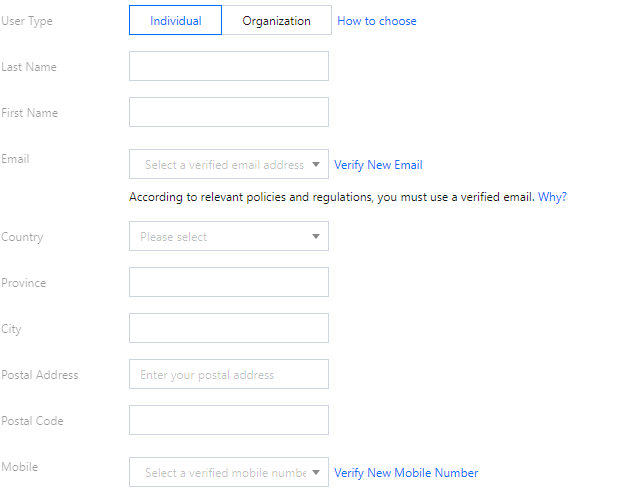
Email: select an email address that has been verified on the Phone and Email Verification page.
Country: select your country.
Province: enter your province.
City: select your city.
Postal Address: enter your postal address.
Postal Code: enter the postal code of your city.
Mobile: select a mobile number that has been verified on the Phone and Email Verification page.
For an Organization user, the following parameters need to be set:
Profile Information
Description


Organization: enter your organization name.
Last Name: enter the last name of the domain registrant.
First Name: enter the first name of the domain registrant.
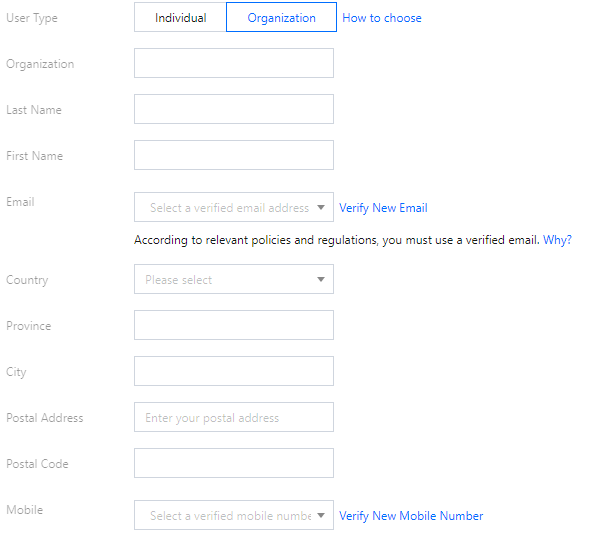
Email: select an email address that has been verified on the Phone and Email Verification page.
City: select your city.
Postal Address: enter your postal address.
Postal Code: enter the postal code of your city.
Mobile: select a mobile number that has been verified on the Phone and Email Verification page.

Managing registrant profiles

1. On the left sidebar, choose Registrant Profile to enter the Registrant Profile page.
2. To set a registrant profile as the default one, click Set as Default. See the figure below:


帮助和支持

本页内容是否解决了您的问题?

填写满意度调查问卷,共创更好文档体验。

文档反馈
