The disk in MongoDB mainly stores data and indexes, as well as some system files and log files. Disk space utilization is a very important monitoring indicator. When disk space is fully used, the MongoDB instance will be unable to continue writing new data, leading to instance failure and shutdown. Therefore, monitoring disk utilization and promptly taking measures to free up disk space is key to ensuring normal operation of the MongoDB instance.
Peek at disk space usage
Quick peek at monitoring indicators
Sign in to the MongoDB console, on the System Monitoring tab, you can peek at the trend view of disk space utilization. For specific operations, please refer to Peek Monitoring Data.
Detailed analysis of disk space usage
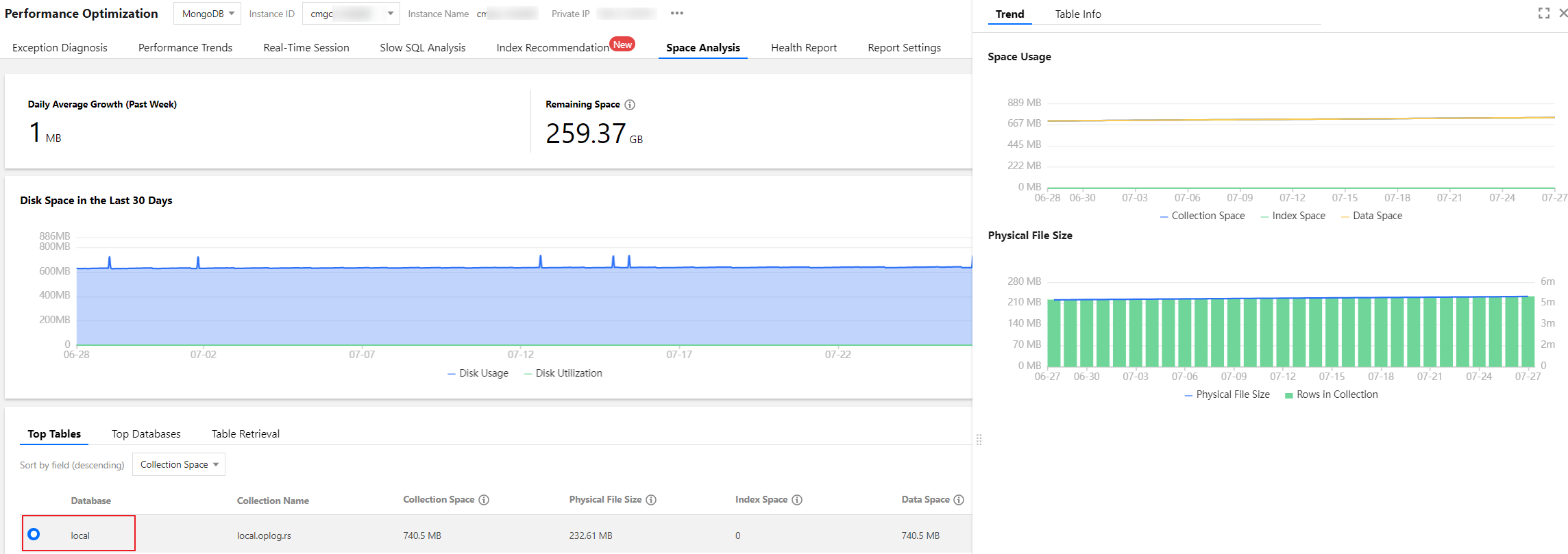
Sign in to the MongoDB console, select diagnostics optimization in the left navigation bar, then choose the Space Analysis tab. Through the Space Analysis feature of Database Intelligent Manager (TencentDB for DBbrain, DBbrain), you can further analyze the details of disk space usage for the database, including space for database collections, index space, size of physical files, as well as database size, data proportion, number of rows in collections, and other analytical data and views. For specific operations, please refer to Space Analysis.
Use MongoDB's own commands db.stats() and db.$collection_name.stats() to analyze disk space usage. For detailed information, please see the table below.
This command is used to access the statistical information of the current database. Executing the db.stats() command returns a document containing various information about the current database, such as: database name, data size, index size, number of collections, etc.
This command is used to access the statistical information of a specified collection. Executing the db.collection.stats() command returns a document containing various information about the specified collection, such as: collection name, number of documents, data size, number of indexes, etc.
This command is used to access the Storage space size occupied by a specified collection. Executing the db.collection.storageSize() command returns the Storage space size occupied by the specified collection, in bytes. The Storage space size returned by this command includes the space occupied by data and indexes in the collection, but does not include other overheads of the MongoDB instance, such as log files and temporary files.
This command is used to access the Storage space size occupied by all indexes of a specified collection. Executing the db.collection.totalIndexSize() command returns the Storage space size occupied by all indexes of the specified collection, in bytes. The Storage space size returned by this command does not include the space occupied by data in the collection, only the space occupied by all indexes of the collection.
This command is used to access the total Storage space size occupied by a specified collection. Executing the db.collection.totalSize() command returns the total Storage space size occupied by the specified collection, in bytes. The Storage space size returned by this command includes the space occupied by data and indexes in the collection, as well as other overheads of the MongoDB instance, such as log files and temporary files.
Analysis
TencentDB for MongoDB uses the WiredTiger engine by default. When documents are deleted, disk space is not directly reclaimed. When new data is inserted, MongoDB reuses the previously occupied space instead of continuing to occupy additional new disk space. As deletion operations increase, fragmentation also increases. The following code allows you to view the fragmentation rates of all collections in a specified database at once.
When the utilization rate of the instance disk space reaches 80% to 85% or higher, the risk of running out of space can be avoided by either reducing the actual space occupied by the database or expanding the Storage space.
## Function to generate peek fragmentation rate
function getCollectionDiskSpaceFragRatio(dbname, coll) {
var res = db.getSiblingDB(dbname).runCommand({
collStats: coll
});
var totalStorageUnusedSize = 0;
var totalStorageSize = res['storageSize'] + res['totalIndexSize'];
Object.keys(res.indexDetails).forEach(function(key) {
var size = res['indexDetails'][key]['block-manager']['file bytes available for reuse'];
print("index table " + key + " unused size: " + size);
totalStorageUnusedSize += size;
});
var size = res['wiredTiger']['block-manager']['file bytes available for reuse'];
print("collection table " + coll + " unused size: " + size);
totalStorageUnusedSize += size;
print("collection and index table total unused size: " + totalStorageUnusedSize);
print("collection and index table total file size: " + totalStorageSize);
print("Fragmentation ratio: " + ((totalStorageUnusedSize * 100.0) / totalStorageSize).toFixed(2) + "%");
}
## Specify a database to peek at the fragmentation rates of all collections
use xxxdb
db.getCollectionNames().forEach((c) => {print("\\n\\n" + c); getCollectionDiskSpaceFragRatio(db.getName(), c);});
Solutions
High disk utilization and fragmentation rates
TencentDB for MongoDB is for version 4.4 and above
If disk utilization is high (typically above 80%~85%) and fragmentation rates are high (usually beneficial to recycle if over 25%), for TencentDB for MongoDB versions 4.4 and above with a replica set architecture, use the command db.runCommand({compact:"collectionName"}) to compact specified collection documents and release disk space. Here, collectionName is the name of the collection, replace it according to the actual situation.
Note:
When MongoDB performs the Compact operation, it compresses the entire database. Thus, during this period, operations such as creation and deletion of collections, and creation and deletion of indexes will be blocked, while other operations (like inquiries) will not be affected. However, there will be a load impact with some latency in requests. It is advised to perform this operation during business off-peak periods.
TencentDB for MongoDB is for versions prior to 4.4
If the disk utilization is high (generally above 80%~85%) and the fragmentation rate is high (generally over 25%, which makes recycling beneficial), for TencentDB for MongoDB versions below 4.4, it is not recommended to perform compact as it will block all requests to the instance and may lead to issues where the Compact index is invalid. The solutions are as follows:
Upgrade the version. It is recommended to upgrade to the latest version for better performance and stability. For specific operations, please see Version Upgrade.
If you do not wish to upgrade, logical migration can be used to rebuild nodes and achieve space reduction effects, though multiple momentary disconnections may occur during the process. For specific operations, please contact support or Submit a Ticket.
High disk utilization but low fragmentation rate
If the disk utilization is high (generally above 80%~85%) and the fragmentation rate is not high (below 20%), performing the compact operation is not recommended, as MongoDB will reuse this space. In this case, please expand the disk space. For specific operations, please see Change Mongod node configuration specifications.