Adjusting Oplog Capacity
Baixar
Modo Foco
Tamanho da Fonte
Overview
The Oplog is used to record all data changes, and its capacity is only 10% of the instance by default. In write-intensive businesses, this default value may be insufficient. Once the Oplog is overwritten, data rollback to a specified point in time will not be possible. To ensure the availability of core features such as rollback in MongoDB, you must configure the Oplog (operation log) capacity properly. Scale up the Oplog in a timely manner based on your business load, with a maximum limit of 90% of the instance capacity.
Prerequisites
The instance is in the normal state (running), and no tasks are currently being executed.
Directions
1. Log in to the TencentDB for MongoDB console.
2. In the MongoDB drop-down list on the left sidebar, select Replica Set Instance or Shard Instance. The directions for the two types of instances are similar.
3. Select a region at the top of the instance list page on the right.
4. In the instance list, find the target instance.
5. In the Operation column, choose More > View/Adjust Oplog.

6. In the Adjust Oplog pop-up window, confirm the instance information and evaluate the target oplog capacity based on the current capacity.
Note:
The Oplog capacity should be at least 10% of the node capacity. When the size of the Oplog file reaches its maximum capacity, MongoDB starts overwriting previous operation records from the beginning of the file. If the Oplog is too small, it can lead to rapid data overwrite, posing Ops risks.
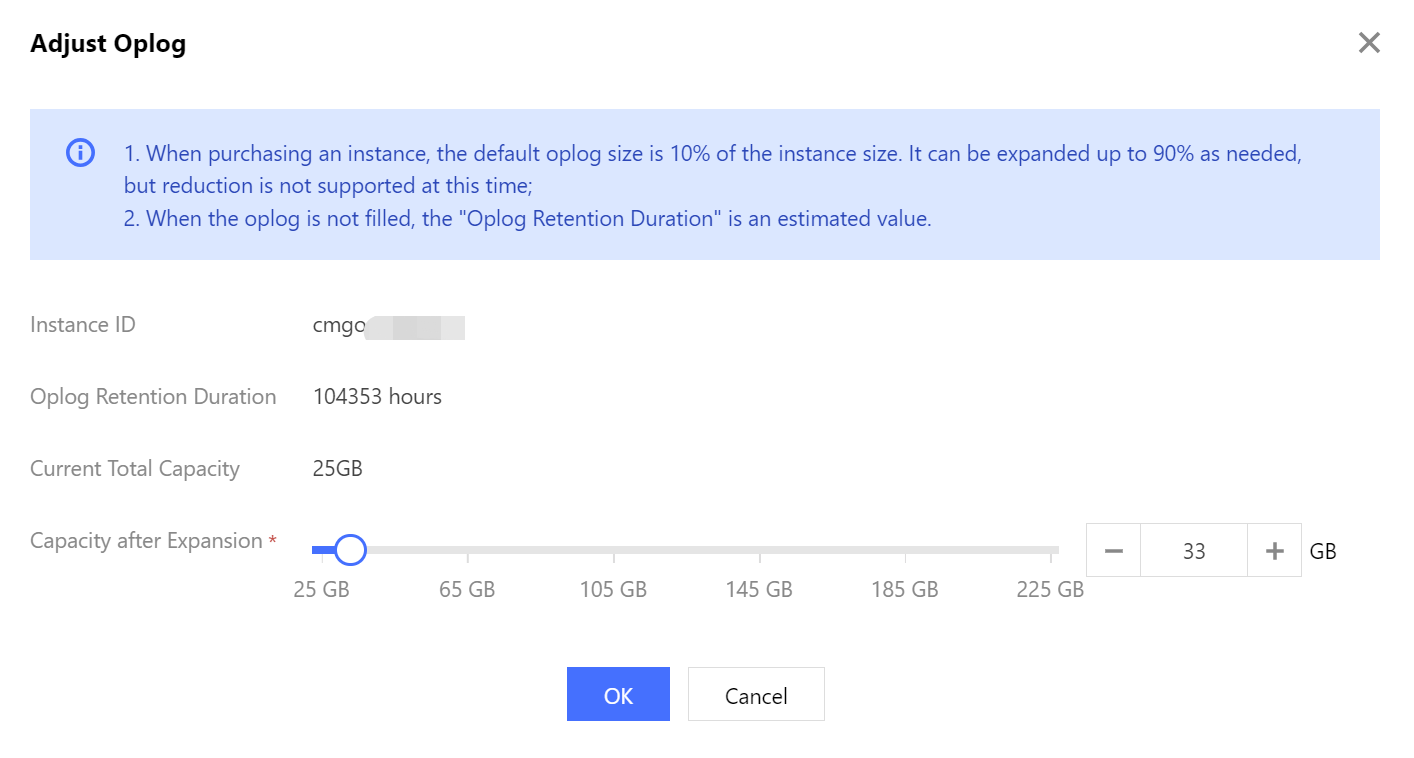
Interface Parameters | Description |
Oplog Retention Duration | The time it takes for the Oplog storage to be filled. If the Oplog is not full, the retention duration is an estimate. |
Current Total Capacity | Percentage of Oplog capacity to total disk capacity on each Mongod node. |
Capacity after Expansion | Use the slider to set the Oplog capacity after scale-out. |
7. Click OK, and then in the left sidebar, choose Task Management. Wait for the task to complete the scale-out.

Ajuda e Suporte
Esta página foi útil?
Você também pode entrar em contato com a Equipe de vendas ou Enviar um tíquete em caso de ajuda.
comentários