Adjusting Mongos Node Specification
Baixar
Modo Foco
Tamanho da Fonte
Overview
Mongos is the request entry point and query routing node of a MongoDB sharded cluster. When businesses face connection pressure or query performance bottlenecks, upgrading its compute specifications is a direct and effective solution.
Address connection bottlenecks
Applications frequently report errors such as "unable to establish a new connection" or "connection limit exceeded", and the maximum number of connections supported by the current Mongos node can no longer sustain the business's concurrent access volume. Upgrading the compute specifications of the Mongos node can directly increase its maximum connection limit, thereby resolving connection bottlenecks and ensuring business accessibility under high concurrency.
Relieve query routing performance pressure
Complex business queries or massive request volumes can cause sustained high CPU utilization on Mongos nodes, which in turn increases query response latency across the entire cluster. Upgrading to higher-specification Mongos nodes provides greater CPU processing power, enabling faster query routing, effectively reducing operational latency, and improving the overall response speed of the cluster.
Prepare for expected business peaks
When predictable traffic peaks such as new product launches or major promotions are approaching, capacity planning must be performed for the system in advance. Before the traffic surge arrives, proactively upgrade the Mongos specifications to provide it with greater processing power, ensuring smooth handling of sudden traffic surges and preventing the Mongos from becoming a performance bottleneck for the entire system.
Impact Description
Impact: Scaling up Mongos node specifications may involve cross-machine data migration, resulting in momentary disconnections lasting a few seconds. Before the operation, confirm that your business has an automatic reconnection mechanism, and we recommend completing the operation within the off-peak maintenance window.
Configuration coordination: When you scale out the entire sharded cluster (such as adding shards), you should also evaluate the load on Mongos and upgrade its specifications accordingly when necessary to maintain balanced performance across all cluster components.
Version requirements
MongoDB version 4.0 and later support adjusting Mongos specifications.
Prerequisites
Instance type: Sharded cluster instance.
Instance status: Running.
The CPU performance and memory capacity of the mongos nodes are insufficient and need to be upgraded.
Directions
1. Log in to the TencentDB for MongoDB console.
2. In the MongoDB drop-down list on the left sidebar, select Shard Instance.
3. Above the Instance List on the right, select the region.
4. In the instance list, locate the target instance whose nodes you want to view.
5. Click the Instance ID to enter the Instance Details page and click the Node Management tab.
6. On the Node Management tab, click the Mongos Node tab.
7. On the Mongos Node tab, click Modify Mongos Configuration. In the pop-up window, configure the new specification.
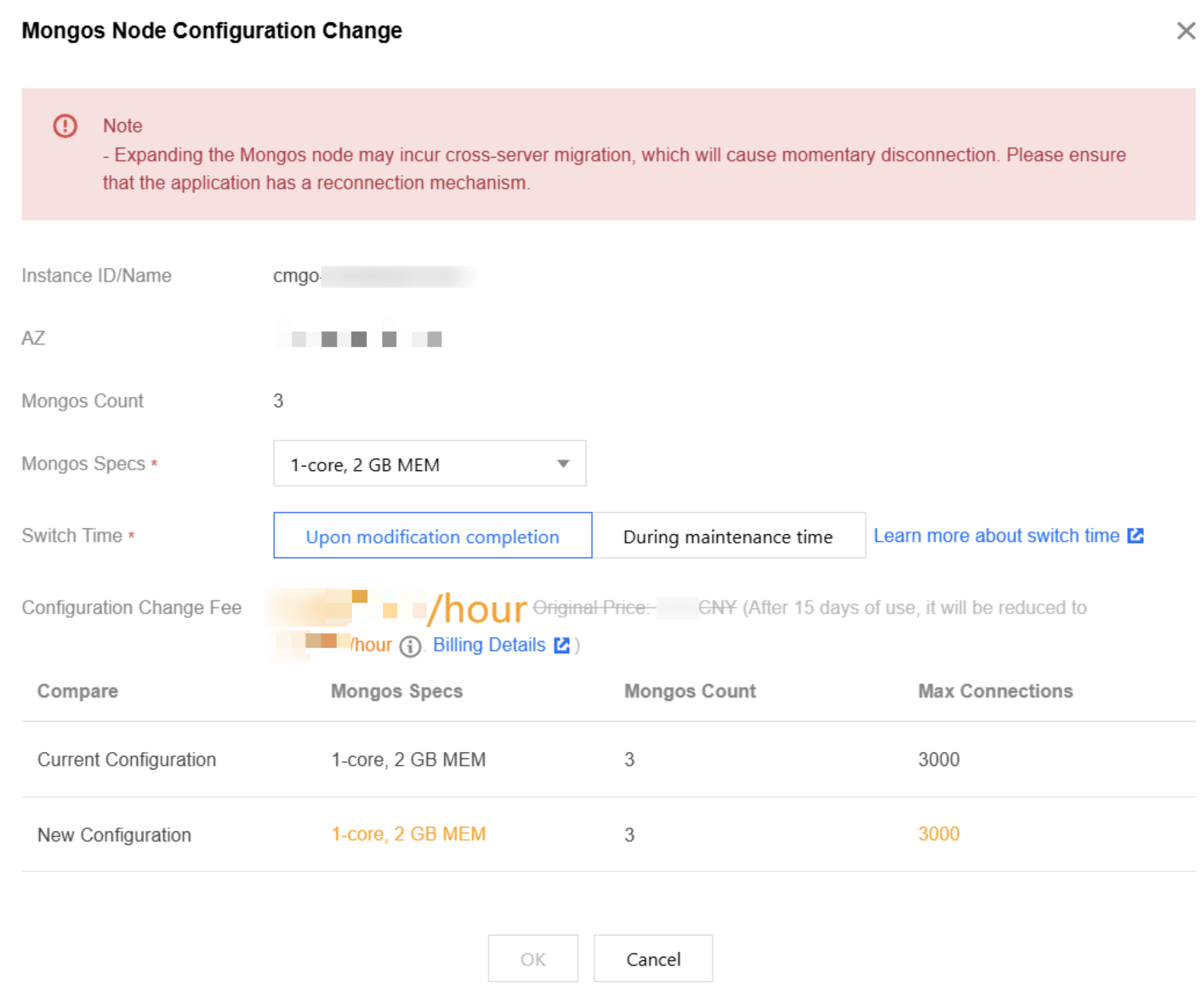
Parameter | Description |
Instance ID/Name | The unique ID and name of the instance. |
AZ | The AZ where the instance resides. |
Mongos Count | The current number of mongos nodes. |
Mongos Specs | Select the new mongos node specification in the drop-down list, which can be 1-core 2 GB MEM, 2-core 4 GB MEM, 4-core 8 GB MEM, 8-core 16 GB MEM, or 16-core 32 GB MEM. |
Switch Time | If you select Upon modification completion, the instance specification adjustment task will be executed immediately. Instance memory and capacity adjustment may involve node migration or primary-secondary switch. As the switch time point is uncontrollable, disconnection or restart may occur. If you select During maintenance period, the task will be executed during the maintenance period. For more information, see Setting Instance Maintenance Period. |
Specification Change Fee | Fee after the configuration adjustment. Pay-as-you-go: fee of the new specification per hour. Billing is divided into three tiers. Yearly/monthly subscription: total fee of the new specification for the remaining usable duration. |
Compare | You can compare the maximum number of connections before and after the mongos specification adjustment to evaluate whether the new specification meets your needs. |
8. Confirm the specification change and click OK.
Related APIs
API | Feature Description |
Adjusts the cloud database instance configurations | |
Queries the sales specifications of cloud databases |
Ajuda e Suporte
Esta página foi útil?
Você também pode entrar em contato com a Equipe de vendas ou Enviar um tíquete em caso de ajuda.
comentários